1
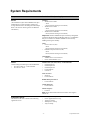
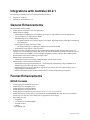
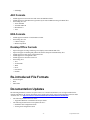
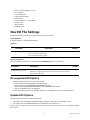
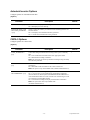
System Requirements
Component
Oracle-Certified Operating Systems and Software
Server
Windows
•
Windows Server 2003
- 32-bit
- 64-bit (AutoVue running in 32-bit mode)
•
Windows Server 2008
- 32-bit
- 64-bit (AutoVue running in 32-bit mode)
•
Windows Server 2008 R2
- 64-bit (AutoVue running in 32-bit mode)
Important: Windows 2008R2 has improved memory management
compared to Windows 2008 and Windows 2003. It is recommended
that you run AutoVue on Windows 2008R2 for better memory
handling and long-term stability.
(The installation requires about 400MB of free space.
Additional space will be required by AutoVue for
storing other data such as streaming files and markups.
Refer to the AutoVue Planning Guide for additional
information.)
Linux
•
Oracle Linux 5.8 (x86)
- 32-bit
- 64-bit (AutoVue running in 32-bit mode)
•
Red Hat Enterprise Linux 5.8 (x86)
- 32-bit
- 64-bit (AutoVue running in 32-bit mode)
Virtualization
•
VMWare Server version ESX 4.1
•
Oracle Virtual Machine 2.2.2
Client
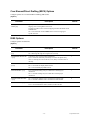
Clients running the following Java Virtual Machines:
•
Java SE 6 Update 31—32-bit and 64-bit
•
Java SE 7u5—32-bit
Windows OSes (XP, Vista, and 7)—32-bit and 64-bit
•
Internet Explorer 7
•
Internet Explorer 8
•
Internet Explorer 9
•
Firefox ESR 10
•
Chrome 19
MAC OS X 10.7
•
Safari 5.0
•
Firefox ESR 10
RedHat Enterprise Linux 5
•
Firefox ESR 10
Ubuntu 10.04 LTS
•
Firefox ESR 10
Solaris 10 (Sparc)
•
Firefox 9
Note: Ensure that the JRE used for the AutoVue client supports
SWING UI.
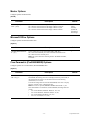
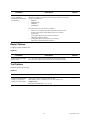
Application Server
The VueServlet has been certified on the following
application servers:
•
•
•
•
•
WebLogic 9.x and up
Oracle Application Server 10g
Tomcat 6.x and up
WebSphere 6.1 and up
Jetty 6.0 and up
-2 -
September 2012