1
74
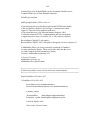
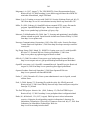
listing of the user allowed mounts; any user other than the root user cannot mount any
partition or block or character device not listed here. In most cases, users need access to
the most partitions listed, however restricting actions a user can perform in those
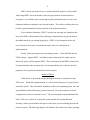
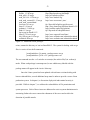
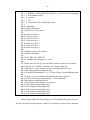
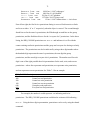
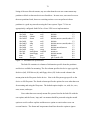
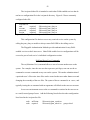
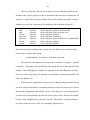
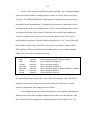
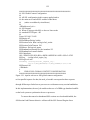
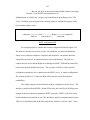
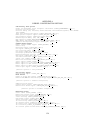
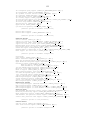
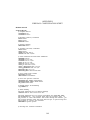
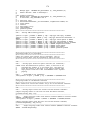
partitions is a good step toward securing the Linux system. Figure 7-1 lists an
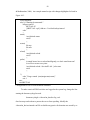
appropriately configured fstab file for a Linux VPN server implementation:
/dev/hda8
/
ext2
/dev/hda1
/boot
ext2
/dev/hda10
/chroot
ext2
/dev/hda12
/home
ext2
/dev/hda9
/opt
ext2
/dev/had11
/tmp
ext2
/dev/hda7
/usr
ext2
/dev/hda6
/var
ext2
/dev/hda5
swap
swap
/dev/hdc
/mnt/cdrom iso9660
/dev/fd0
/mnt/floppy ext2
none
/proc
proc
none
/dev/pts
devpts
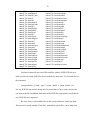
Figure 7-1. Mountable file system table
defaults
11
defaults
12
defaults
12
defaults,noexec,nosuid,nodev 1 2
defaults
12
defaults,noexec,nosuid,nodev 1 2
defaults
12
defaults,nosuid,noexec
12
defaults
00
noauto,ro
00
defaults,noauto
00
defaults
00
gid=5,mode=620
00
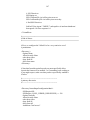
The fstab file contains six columns of information specific about the partitions
and devices available for mounting. The first column specifies the device type; typically
ide drives (hd), SCSI drives (sd), and floppy drives (fd). In the second column is the
mount point in the filesystem for the device. Next is the filesystem type specific to the
device or OS filesystem. The fourth column specifies the options for users other than root
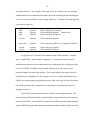
for mounting and using the filesystem. The defaults option implies: rw, suid, dev, exec,
auto, nouser, and async.
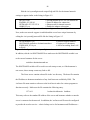
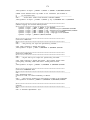
Users other than root can only mount file systems listed in the fstab file with the
user option, and the /home, /tmp, and /var mounts should be protected using the nosuid
option to avoid overflow exploits and the noexec option to restrict where users can
execute binaries. The /home and /tmp mounts should use the nodev option to ignore