1
IV.1.4. On a Workabout Pro G2 via 4-way cable
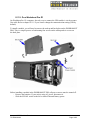
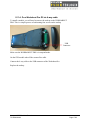
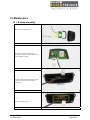
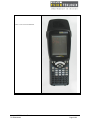
To install a module, you will need to remove the endcap on the WORKABOUT
PRO. This is a simple process of unfastening four screws on the endcap
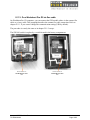
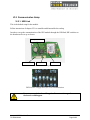
USB
Connector
Make sure the WORKABOUT PRO is in suspend mode.
On the GPS module take off the scanner flex cable.
Connect the 4-way cable to the USB connector of the Workabout Pro.
Replace the endcap.
Integrated GPS Module – Datasheet
TS-A00329-A02
Page 17/25