1
V.2. USB driver installation
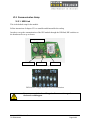
On the GPS board a block of 6 switches configure the communication mode. If your GPS
switches are set to USB, it is necessary to install the UBlox driver on the WORKABOUT PRO
else, it will display a message box “Unidentified USB Device”.
To install the driver you can launch “PsionTeklogix UBLOX_Setup.cab” available in the folder
“cab” of the “GPSModuleSetup v1.2” package or create your own setup file.
If you choose to do it yourself, you have to copy the driver UBXUSBSER.dll in the “\Windows”
folder and add the following registry keys:
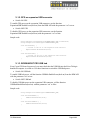
HKLM\Drivers\USB\LoadClients\5446_420_256\Default\Default\UBXUSBSER\FriendlyName, with the value
"Antaris(r)4 - GPS Receiver"
HKLM\Drivers\USB\LoadClients\5446_420_256\Default\Default\UBXUSBSER\DeviceType, with the value 1
HKLM\Drivers\USB\LoadClients\5446_420_256\Default\Default\UBXUSBSER\Tsp, with the value
"Unimodem.dll"
HKLM\Drivers\USB\LoadClients\5446_420_256\Default\Default\UBXUSBSER\Prefix, with the value "COM"
HKLM\Drivers\USB\LoadClients\5446_420_256\Default\Default\UBXUSBSER\Dll, with the value
"UBXUSBSER.dll"
V.3. Connection settings
The GPS device is accessible through a serial port even if the USB communication mode is used
(the UBlox USB driver emulates a serial port).
The baud rate is allways 9600bps.
V.3.1. GPS with serial communication mode
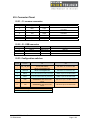
The port number is COM3 for serial communication mode on the scanner port.
V.3.2. GPS with USB communication mode
For USB communication mode, the port number is automatically assigned to the COM5. But
other port can be used by changing the registry key
HKLM\Drivers\USB\LoadClients\5446_420_256\Default\Default\UBXUSBSER \Index with the
value of the port number 1, 2, 4 or 5 (the COM3 is never available for USB device).
Keep in mind that some port number are already used by the system and could not be assigned
for the GPS.
Integrated GPS Module – Datasheet
TS-A00329-A02
Page 21/25