1
Orange Tree Technologies
4.1 Freescale Microcontroller FlexBus
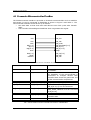
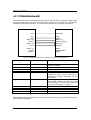
The FlexBus external interface is provided on Freescale microcontrollers such as ColdFire
and Kinetis. It can be connected to ZestETM1 as shown in Figure 2 and Table 1. The
microcontroller interface should be set up as follows:
• One wait state so that write and read data are two clock cycles after Transfer
Start.
• Auto Transfer Acknowledge as ZestETM1 does not generate this signal.
ZestETM1
FlexBus
CLK
FB_CLK
CSn
WEn
BEn[1:0]
A[9:1]
DQ[15:0]
INTn
FB_TSn
FB_R/Wn
FB_BEn/BWEn[1:0]
FB_A[9:1]
FB_D[15:0]
IRQn
EOF[1:0]
HEAD
LENGTH
FB_CS[5:0]
FB_OEn
FB_TAn
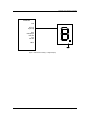
Figure 2. Freescale FlexBus Connections to ZestETM1 User Interface in 16-Bit SRAM Mode
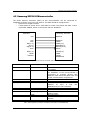
ZestETM1
FlexBus
CLK
FB_CLK
CSn
FB_TSn
WEn
BEn[1:0]
A[9:1]
FB_R/Wn
FB_BEn/BWEn[1:0]
FB_A[9:1]
DQ[15:0]
FB_D[15:0]
INTn
IRQn
FB_CS[5:0]
FB_OEn
FB_TAn
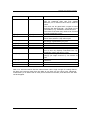
Comment
FB_CLK frequency should be from 5MHz
to 125MHz
Transfer Start is used as the Chip Select
for ZestETM1. If the microcontroller is
connected to multiple devices then
Transfer Start should be gated with one
of the microcontroller Chip Selects.
FB_BEn/BWEn [3:2] are not connected
Byte addresses so A[0] is tied low and
FB_A[23:10, 0] are not connected.
FB_D[31:16] are not connected.
EOF, HEAD, LENGTH could be connected
to D[19:16].
Not connected, but see comment for
Transfer Start
Not connected
Not connected
Table 1. Freescale FlexBus Connections to ZestETM1 User Interface in 16-Bit SRAM Mode
Page 6 of 18
CONFIDENTIAL