1
3. Products Name and Functions
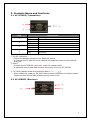
3.1 SC-IPT05P (Transmitter)
①
②
③
LED
Description
On
Off
Flash
Off
Flash
Off
On
Off
1
2
3
4
Power On
Power Off
Linked
Not Linked
Rx Data Active
No Active
TX Data Active
No Active
① RJ-45 Connector :
- Connect a Network camera or an Ethernet device
- It receives the IP data from the camera and supplies power to the camera
with PoE.
② BNC-F
- Connect the SC-IPR05P (receiver) using the coaxial cable
- It transmits the IP data and receives the power from the SC-IPR05P.
③ DC Jack (please note the polarity: Red = “+” ,
)
- When supplying power to the PoE camera which consumes the higher power,
Please connect the DC48V adaptor directly with RJ-45.
3.2 SC-IPR05P (Receiver)
③
②
①
4