1
TECHNICAL SPECIFICATIONS
SPECIFICHE TECNICHE
DIALOG PLUS
700-3000VA SINGLE-PHASE
On line double conversion (VFI) technology
SPEDLPX0205REN
DIALOG PLUS
Table of contents
..1.. OBJECTIVE
3
..2.. DESCRIPTION OF THE SYSTEM
3
..3.. APPLICATIONS
4
..4.. CHARACTERISTICS
4
..5.. NORMATIVE REFERENCES
7
> 5.1 Main reference standards
> 5.2 Standards relating to systems and installation
7
8
..6.. SUPPLIED EQUIPMENTS AND ACCESSORIES
9
> 6.1 Tower version
> 6.2 Rack version
9
10
..7.. BLOCK DIAGRAM
11
> 7.1 Block diagram of the UPS
> 7.2 Options
11
11
..8.. INTERFACING
15
> 8.1 Serial communication port
> 8.2 Communication software
> 8.3 Configuration software
15
16
18
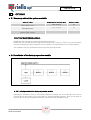
..9.. OPTIONS
19
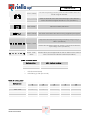
> 9.1 Summary table of the options available
> 9.2 Installation of the battery expansion module
> 9.2.1 Configuration of the battery expansion module
..10.. FRONT PANEL
20
> 10.1 Display panel
> 10.2 Description of the display panel icons
> 10.3 UPS front view
20
20
23
..11.. REAR PANEL
24
> 11.1 Rear panel 700 – 2000 VA Models
> 11.2 Rear panel 2000ER – 3000/3000ER VA Models
..12.. TECHNICAL DATA
24
25
26
> 12.1 Tower models
> 12.2 Back-up expansion modules for tower version
> 12.3 Summary data sheets
..13.. DIALOG PLUS RACK
26
26
27
31
> 13.1 Rack models
> 13.2 Back-up expansion modules for rack version
> 13.3 Rear panel view
31
32
32
2
SPEDLPX0205REN
19
19
19
DIALOG PLUS
1
- OBJECTIVE
This technical document has been produced to be used by UPS system designers and installers.
The objective of this document is to provide and illustrate:
. the technical information required to enable you to choose the correct UPS to suit your needs
. the information required to set up and configure the system
. the information concerning the installation and location of the UPS
. the information the UPS displays locally to the user or to the monitoring systems it is connected to
(e.g. control centres, etc.)
. a list of the possible options available to configure the UPS to the operators specific requirements
2
- DESCRIPTION OF THE SYSTEM
The new Dialog Plus range of UPS has been designed to offer a high level of versatility and reliability.
Utilising the latest ON LINE technology, meaning that the alternating current (AC) supplied to the load, is first
converted to direct current (DC) and then back to AC again to ensure a perfectly sinusoidal output, the frequency
and voltage are constantly monitored using microprocessor digital control, this control ensures true independence
of the input power supply. The Dialog Plus range of UPS is also supplied with an automatic by-pass system; the
bypass system can instantly switch the load on to the incoming power supply in the event of any unforeseen
overvoltages, overloads or any other power or load related problems, and therefore a continuous power supply
even during the most critical conditions is guaranteed.
The Dialog Plus range of UPS is available in two formats, tower or 19” rack mount, both of which are available as
either:
Standard: with batteries located inside of the UPS
ER: without any batteries located inside the UPS, but including a powerful battery charger (max
8A). This version can only be used in combination with an external battery box, for long
autonomy times.
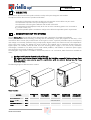
The following diagrams show the tower versions:
Tower version
MODEL
Nominal power
Nominal output
voltage
Dimensions HxWxD
Weight
[VA]
Dialog Plus
70
700
Dialog Plus
100/100ER
1000
[Vac]
[mm]
[Kg]
Dialog Plus
200/200ER
2000
Dialog Plus
300/300ER
3000
220/230/240
236x158x400
12
236x158x400
14/8
3
SPEDLPX0205REN
Dialog Plus
150
1500
236x158x500 348x192x460 348x192x460
19
34/14
35/14
DIALOG PLUS
Rack version
MODEL
Nominal power
Nominal output
voltage
[VA]
Dialog Plus
rack
100 / 100 ER
1000
[Vac]
Dimensions WxDxH (1)
[mm]
Weight
[Kg]
(1)
Dialog
Plus rack
70
700
Dialog Plus
rack
150
1500
Dialog Plus
Dialog Plus
rack
rack
220 / 220 ER 300 / 300 ER
2200
3000
220 / 230 / 240
483x390x88 483x390x88
13
483x480x88
16 / 9
21
483x480x176 483x480x176
/ 483x480x88 / 483x480x88
38 / 13
39 / 14
Note: 88mm = 2U; 176mm = 4U (2U + 2U); 483mm = 19”
3
- APPLICATIONS
=> Personal computers
=> Small IT networks
=> Local Area Networks (LAN)
=> Workstations
=> Servers
=> Point of sale (POS) systems
=> Data centres
=> Industrial PLC’s
=> Cash registers
=> Electrical medical equipment
=> Emergency devices (lights/alarms)
4
- CHARACTERISTICS
The system provides a stable and reliable voltage (On Line double conversion VFI technology in accordance with
European standard IEC62040-3) with filters for suppressing atmospheric and mains borne disturbances.
The On Line technology provides the maximum protection for the connected loads. The double conversion stage
filters and stabilises the input voltage, and then reproduces it free of any disturbances such as overvoltages,
variations in frequency and voltage, noise, etc.
The IEC62040-3 standard defines this technology as VFI (Voltage and Frequency Independent), meaning that the
output voltage and frequency are completely independent of any variations or disturbances caused to the incoming
mains supply.
High level of reliability, versatility and easy maintenance
− High level of reliability (total microprocessor control):
The digital control system dramatically improves the overall reliability and efficiency of the UPS; resulting in a
reduction in the number of electronic components required, the microprocessor controls and monitors all of
the functions of the UPS from one common control card. The control card can be used across a number of
various systems, even systems in different ranges, thereby increasing the productivity and reliability of the
range.
− High overload capacity:
The UPS can supply overloads up to 150% during mains supply or battery operation.
4
SPEDLPX0205REN
DIALOG PLUS
− Programmable timer:
This function enables the user to program the timer to automatically switch the system on or off at specific
times (configurable via the software).
− Stand by:
During Stand-by function the inverter is switched off and the batteries are charged. The stand-by function is
automatically activated when the UPS is switched off.
− Frequency auto selection:
The UPS can be configured to automatically select the output frequency (50 or 60Hz), by using the input
frequency as its reference (50 or 60Hz).
− Battery start-up (cold start):
The UPS can be switched on even when no incoming mains supply is available.
− Auto restart:
Following a mains supply failure, once the UPS has shutdown upon reaching the end of its designed battery
autonomy time, the system can be configured to automatically restart once the incoming mains supply
returns (configurable via the software).
− GS/TÜV certified:
The Dialog Plus range has been tested and approved by the official certification agency GS/TÜV which
guarantees the products performance and reliability.
− Network, phone and computer protection:
The UPS provides overvoltage protection via the RJ11 and RJ45 connectors.
− Re-settable input protection:
The UPS input is connected via a re-settable fuse to protect against overloads or short circuits.
Low consumption
− Low impact on the mains power supply (sinusoidal absorption):
The input current absorbed by the UPS from the mains supply is sinusoidal. This means that the system has a
very low impact on the incoming mains supply network, and as a consequence, on the other electrical
devices that are connected to it.
− Load power factor correction (UPS input power factor close to 1):
The UPS absorbs power from the incoming mains supply with a power factor close to 1, even if the systems
supplied by the UPS have a power factor inferior to this. For example, if the UPS supplies a piece of IT
equipment with an input power factor of 0.65, the UPS input power factor will still remain close to 1,
ensuring that any mains supply power factor correction banks are not overloaded.
5
SPEDLPX0205REN
DIALOG PLUS
Battery optimisation
− High level of battery reliability (automatic battery test):
The UPS carries out battery tests automatically; these tests enable the system to periodically check the
efficiency of the batteries in order to prevent any faults occurring to them. The test does not in any way
compromise the supply to the connected equipment, and given the short duration (seconds), it does not
affect the life or the back-up time of the batteries.
− Wide input voltage tolerances:
without any use of the batteries.
− Up to 120Ah back-up time expandability:
This is possible using additional external battery packs in combination with the ER version of UPS, which
includes an improved and upgraded battery charger.
Compact dimensions
− One of the smallest on the market:
Thanks to:
− microprocessor control
− IGBT technology
− internal batteries
− ventilation, front to rear which eliminates the need for any clearance down either side of the unit.
Reduced noise (<40db(A))
Due to:
− use of high frequency IGBT technology
− innovations in the design of the magnetic parts.
Advanced Communication
− Operational parameters selection via the software
Using the free software supplied with the system, it is possible to configure the UPS operating parameters to
suit the environment in which it is to be installed and operated (see page 18).
− Monitoring and shutdown software included
Powershield² provides an efficient and intuitive system for controlling and monitoring the UPS, displaying all
of the most important information, such as input voltage, applied load, battery capacity, etc. using a series
of bar charts.
The software is able to provide detailed information even if the UPS has malfunctioned, enabling the user
to find out why the fault has occurred and when.
Powershield² has been developed using a client/server architecture that renders it flexible and easy to use,
with multilingual support and on line help.
The Powershield² software is provided free of charge with an SNMP agent, this version will operate on
6
SPEDLPX0205REN
DIALOG PLUS
Windows 95, 98, 2000, Windows 2003 Server, Me, Xp, NT4.0, Novell, Mac OS, Mac Osx, Mac Os 9.x &
Linux operating systems.
The software enables the user to programme the automatic start-up and shutdown of the system on a
weekly basis.
The UPS also contains the following hardware interfaces:
− RS232 serial port
− signals interface
− slot for the installation of various adaptors
5
- NORMATIVE REFERENCES
> 5.1 Main reference standards
The company quality system has been certified as conforming to ISO 9001 (Certificate No. CERT-04674-99AQ-VEN-SINCERT). This covers all of the procedures, operating methods and controls from the design stage
to production, sales, through to the after sales service support.
This certification guarantees the following aspects to our customers:
− the use of quality materials
− rigorous standards in production and testing
− receptiveness and openness to our customers
− constant support of all our customers
As well as conforming to this certification, the company also produces “state of the art” products, as dictated
by the requirements of the standards quoted below.
The advances that have taken place in Information Technology systems, means that the power systems used to
power them must be able to provide an absolutely precise, and even more importantly, absolutely reliable
source of power. The standards produced by IEC/CENELEC in the IEC/EN62040 and EN50091 series, cover
all aspects of the product: safety, electromagnetic compatibility and performance. In more detail, this series is
divided into the following individual standards:
EN62040-1:
Uninterruptible power supply systems (UPS): general provisions and safety provisions
EN62040-1-1:
Uninterruptible power supply systems (UPS): general provisions and safety provisions used in areas
accessible to the operator
EN60950 (CEI74-2):
ITE (Information Technology Equipment) safety
EN50091-2:
Uninterruptible power supply systems (UPS): electromagnetic compatibility provisions.
EN50081-2:
Electromagnetic compatibility (immunity)
IEC1000-4-2:
Immunity: Electro Static Discharge (ESD)
IEC1000-4-3:
Immunity: electromagnetic fields
IEC1000-4-4:
Immunity: transient overvoltages (BURST)
IEC1000-4-5:
Immunity: current surges (Surge)
7
SPEDLPX0205REN
DIALOG PLUS
IEC61000-4-11:
EN50141:
EN55022:
Low frequency disturbances
Induced radio interference
Radio frequency disturbance
ENV62040-3
Uninterruptible power supply systems (UPS): performance provisions and test procedures.
IEC146 (CEI22):
Semiconductor electronic converters
IEC529 (CEI70-1):
Degree of protection of casings
European Directives
73/23
Low voltage directive enforcing the obligatory CE marking from 1/1/97. This directive concerns all safety
issues associated with the equipment.
89/336
Electromagnetic compatibility directive enforcing the obligatory CE marking from 1/1/96.This directive
concerns all issues of immunity and emissions relating to the UPS at its place of installation.
> 5.2 Standards relating to systems and installation
The above product regulations refer specifically to uninterruptible power supply systems. It is these
regulations that manufacturers of uninterruptible power supply systems are obliged to adhere to. However,
with regard to the electrical system, the installer must refer to other standards.
These standards are:
− HD384/IEC60364
for electrical systems in general
− Standard EN60439-1
concerning control equipment
− Standard EN50272-2
for battery installation
8
SPEDLPX0205REN
DIALOG PLUS
6
- SUPPLIED EQUIPMENT AND ACCESSORIES
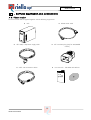
> 6.1 Tower version
The tower-version UPS is supplied together with the following equipments:
UPS
RS232 serial cable
IEC 10A(or 16A) Power supply cable
IEC 16A loose plug (only for 300/300ER
model )
2 IEC 10A connection cables
User manual + CD-ROM with software
User's
manual
Battery expansion connector
(only for ER models)
9
SPEDLPX0205REN
DIALOG PLUS
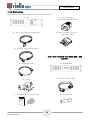
> 6.2 Rack version
The rack-version UPS is supplied together with the following equipments:
UPS
IEC 16A loose plug
(only for 300 / 300 ER models)
IEC 10A (or 16A) power supply cable
Battery expansion connector
(only for ER models)
2 IEC-IEC 10A connection cables
ONLY FOR DIALOG PLUS RACK 220 / 300
MODELS
RS232 serial cable
BATTERY BOX
handles
Battery expansion cable
CD-ROM software + User manual
Fuse (25A GL)
User's
manual
10
SPEDLPX0205REN
DIALOG PLUS
7
- BLOCK DIAGRAM
> 7.1 Block diagram of the UPS
> 7.2 Options
Isolating transformer
Battery back-up extension
Remote led mimic panel
Net Adapter
USB Converter
Multiplexer
LEGEND:
1) Re-settable input protection
2) Input EMI filter + back-feed protection:
Input filter for protecting the UPS and load against any electromagnetic disturbances.
Back-feed protection: intervenes when the mains power supply fails, therefore isolating the UPS from the
input socket to prevent any back feed to the mains power supply. This protection is required to prevent any
voltage from returning to the supply, which could put the operator at risk whilst carrying out maintenance
work.
3) Rectifier/booster block protection fuse:
This fuse is dependent on the status of the re-settable input fuse (1): a fault occurring to the rectifier/booster
will open this protection before the input fuse intervenes, ensuring that the power supply to the connected
load is not interrupted, as the by-pass line will remain powered.
11
SPEDLPX0205REN
DIALOG PLUS
4) Rectifier/Booster:
When the mains power supply is present, this converts the mains alternating current (AC) into a direct
current (DC) whilst controlling the power factor. If the mains power supply fails, it increases the voltage
from the battery to an appropriate voltage level to power the inverter stage.
5) Inverter:
Converts the direct current (DC) into alternating current (AC) to supply the load
6) Automatic by-pass:
Used for switching between the inverter output and the mains supply or vice versa without interrupting the
power supply to the load, this activates if any overloads or faults occur.
7) Output switch:
Used To isolate the UPS when carrying out maintenance work.
9) Output EMI filter:
Output filter for protecting the load against any electromagnetic disturbances.
10) Maintenance-free sealed lead acid batteries:
Supplies power to the inverter to support the load when the incoming mains power supply fails.
11) Battery expansion (from 1000 to 3000VA models):
Enables extended battery autonomy for prolonged power outages.
12) Battery charger:
A DC-DC module to recharge the batteries, it is deactivated when the mains power supply fails.
13) Battery protection:
Battery to UPS protection fuses
14) Intelligent slot:
To slot in any auxiliary communication card (accessory cards).
15) Net – Tel protection (on RJ11 and RJ45):
Protection for network or phone connection from any overvoltages.
16) RS232 interface:
Enables monitoring and shut down software connection.
17) Mimic panel:
The mimic panel provides the user with visual (LED) and acoustic (buzzer) signals relating to the status of
the UPS. The panel also enables the user to control and send basic commands to the UPS.
12
SPEDLPX0205REN
DIALOG PLUS
Operating modes
"NORMAL" mode
During NORMAL mode, the UPS power is taken from the incoming mains supply, whilst the UPS output
(load) is supplied by the inverter (refer to the block diagram), and the batteries are maintained at a fully
charged state.
Automatic "BY PASS" mode
The UPS will switch to BYPASS mode in the event of one of the following scenarios:
a) Immediately after the UPS is switched on if the mains power supply is present.
The UPS output is automatically switched onto the by-pass line; therefore the load is temporarily powered
by the incoming mains power supply.
This enables the user to exceed the applied load in-rush current without tripping the fuses to the inverter.
During the transition, the microprocessor ensures that the inverter output is synchronised in phase with the
incoming mains power supply, before the load is switched onto the inverter.
b) If the inverter is permanently overloaded.
The inverter will continue to supply power the load even when there is a temporary overload condition. If
this overload condition persists, the inverter protection is tripped and the UPS will switch the load onto the
by-pass line, therefore the load will be powered from the incoming mains supply.
c)
If the voltage produced by the inverter exceeds the allowable tolerance limits.
d) If the inverter or rectifier/booster malfunctions or fails completely.
"BATTERY" mode
The UPS operates in BATTERY mode when the mains power supply fails (short interruptions or total blackouts). During this mode, the buzzer sounds intermittently:
a) During battery back up (autonomy) mode
b) When the back-up time limit has been reached
Approximately 3 minutes from the end of the back-up time period (configurable via the software), the
yellow "battery discharged" LED will illuminate, and if the management software has been installed, the
programmed shutdown of the IT applications will begin (if configured to do so).
“Error conditions”
The UPS is designed to function reliably and to automatically guarantee the protection of the connected
load. However, particular operating conditions may exist which the operator should be aware of, to ensure
that the UPS continues to provide the highest level of protection and performance.
“Overload”
An overload occurs when the connected load requires a level of power higher than that for which the UPS
has been designed.
This condition is indicated by the red overload LED located on the load LED bar; also during this condition
the buzzer will sound.
To rectify this condition, the user must switch the UPS off (OFF button), reduce the applied load, and switch
the UPS back on again (ON button).
13
SPEDLPX0205REN
DIALOG PLUS
“Mains out of tolerance”
The UPS is designed to function with a wide range of input voltages. This ensures that the batteries do not
intervene unnecessarily, thus increasing the back-up time should an actual blackout occur.
The microprocessor continuously checks the input voltage and frequency to ensure a high standard of
operation and will switch the load onto the by-pass within a wide tolerance range.
“Overtemperature”
If the internal temperature exceeds the acceptable limits, the UPS will protect itself by shutting down. During
this situation the "Stop/Stand-by" LED will illuminate and the buzzer will sound continuously.
“Batteries depleted”
The microprocessor carries out a periodic battery efficiency test. If the batteries fail the test, the red "Battery
failure" (efficiency < 60%) LED will illuminate. In this condition, the UPS batteries should be replaced
accordingly.
14
SPEDLPX0205REN
DIALOG PLUS
8
- INTERFACING
> 8.1 Serial communication port
The UPS has the following communication ports (see UPS views):
-
RS232 serial port
-
COMMUNICATION SLOT: expansion slot for additional interface cards
RS232 serial port
The RS232 serial port enables the connection of a PC (COM port) by means of a pin-to-pin serial cable
(provided(1)).
RS232 CONNECTOR
6 7 8 9
1 2 3 4 5
PIN No.
1
2
3
4
5
6
7
8
9
(1)
(2)
(3)
SIGNAL
Contact closed: UPS failure/Bypass/Alarm (2)
TXD
RXD/SD (remote shutdown) (3)
GND
+12Vdc interface power input
PNP Signal
Contact closed: battery low pre-alarm (2)
Contact closed: on battery mode (2)
If a different cable is used, it should be a pin-to-pin type with a max length of 3 metres.
Opto-isolated contacts max. +35Vdc / 15mA.
SD: Whilst the UPS is in battery mode, the UPS will perform a complete shutdown when +515Vdc is applied between PIN 3 and PIN 5 for at least 20 seconds.
Communication Slot
All Dialog Plus come with an expansion slot for the fitting of optional communication cards so that the unit is
compatible with most communication options.
Some examples:
- Serial port duplexer
- Ethernet network agent with TCP/IP, HTTP and SNMP protocols
- RS232 + RS485 port with JBUS / MODBUS protocol
For more details on the options available, visit the manufacturer’s web site.
15
SPEDLPX0205REN
DIALOG PLUS
> 8.2 Communication software
MAIN CHARACTERISTICS
1) Sequential and prioritised shutdown:
PowerShield2 enables the user to shutdown the network without having to individually switch off each
PC or server, and before doing so, Powershield² will save the work that was being done regardless of
the application that was being used. The user may also define their own shutdown procedure and also
prioritise the shutdown of critical components within the system (such as vital and non vital servers).
2) Multiplatform compatibility:
PowerShield2 provides the user with a standard control and monitoring capability, using TCP/IP
communication protocol.
This enables the user to monitor computers that use different operating systems from a single console.
For example, not only could the user monitor a UNIX server from a PC with Windows 98, the user
could also connect to UPS systems situated in different locations by using either a dedicated network
(intranet) or the Internet.
3) Events scheduling:
PowerShield2 enables the user to define their own shutdown/switch off and on procedures, for the
systems that are connected to the UPS. Not only does this noticeably increase the degree of security of
the system, it also enables the user to make significant energy savings.
4) Message management:
PowerShield2 keeps the user constantly informed of the status of the UPS, whether locally or by sending
messages to users connected to the network. It is also possible to create a list of the people who will
receive messages by e-mail, fax and SMS should a fault or sudden blackout occur.
5) Integrated SNMP agent:
PowerShield2 contains an integrated SNMP agent for managing the UPS via SNMP. This agent is able
to send all of the information regarding the UPS and is capable of generating traps using the RFC
1628 MIB standard.
This enables the user to control the UPS using SNMP compatible workstations such as HP Open View,
Novell Managewise and IBM NetView.
OPERATING SYSTEMS SUPPPORTED (Powershield² FULL version )
-
Windows 95, 98, Me, NT 4.0, Win 2000, Win 2003 Server, XP.
Novell Netware 3.x, 4.x, 5.x, Intra NetWare
IBM OS/2 Warp and Server,
Mac OS, 9.X, OSX
The most commonly available UNIX systems such as:
IBM AIX, HP UNIX, SUN OS SPARC, SUN Solaris INTEL and SPARC, SCO Unix and UnixWare,
Siemens SINIX, Silicon Graphic IRIX, Compaq True64 UNIX and DEC UNIX, Linux, BSD UNIX and FreeBSD
UNIX
16
SPEDLPX0205REN
DIALOG PLUS
POWERSHIELD2 SOFTWARE FUNCTIONS
1) Graphical monitoring of the UPS status
PowerShield2 is the easy to use yet powerful program that enables the user to monitor and control the
UPS systems.
There are various graphical versions including Windows, Java, OS/2 and MacOS.
2) MACOS version
The PowerShield2 software is the only UPS control and shutdown software available for the Macintosh
that has a client-server architecture.
Enabling the user to access the Windows, Novell, IBM OS/2 and the most commonly available UNIX
operating systems, when using a TCP/IP network.
It also enables the user to support the NetMan series network agents to control the UPS via a network,
and furthermore, comes with multilingual support.
3) Detailed display of all the UPS data
PowerShield2 provides all the data required to make an accurate and swift assessment of the UPS
operation and status.
4) Block diagram and operational diagram of a UPS
PowerShield2 displays a block diagram of the UPS, thus providing the user with conceptual information
as to the status of the system.
5) Automatic saving of the events log and graphical display of the most important values
All of the events regarding the operation of the UPS are saved and recorded, thus allowing the user to
monitor such data as the input voltage, applied load or the remaining back-up time available from the
batteries.
6) Alarm notification via e-mail and SMS
It is possible to configure PowerShield2 to automatically notify of an alarm via an e-mail or SMS
message.
7) Programming the UPS commands
Enables the user to program all of the commands that would normally be carried out manually, to be
performed automatically, for example: shutting down or switching the servers back on, UPS battery test,
etc.
17
SPEDLPX0205REN
DIALOG PLUS
> 8.3 Configuration software
Configuration Software
UPSTools software enables the user to configure the UPS, and provides a full view of the system
parameters and status through the RS232 serial port.
Refer to the paragraph UPS Configuration for a list of the configurable values available.
UPS Configuration
The following table lists all of the possible configurable values available so as to best adapt the UPS to the
user requirements. The configuration can only be modified using the UPSTools software provided.
FUNCTION
DESCRIPTION
Automatic Restart
Automatic restart when
the mains power supply
returns
Battery low alarm
Remaining battery charge
level setting for the
battery low alarm
DEFAULT
POSSIBLE CONFIGURATIONS
Enabled.
•
•
Disabled
Enabled
3 min.
•
1 – 99 in steps of 1 minute
•
•
•
Output frequency
Enables the user to select
the output frequency.
50Hz
Output voltage
Enables the user to select
the output voltage
230 Vac
•
•
•
50Hz
60Hz
Auto(the UPS will set the output to
match the input frequency either 50 or
60 Hz)
220 Vac
230 Vac
240 Vac
Bypass voltage
threshold
Selects the voltage range
accepted for switching
over to the bypass
Low: 180V
High: 264V
•
•
Low: 180 – 200 in steps of 1V
High: 250 – 264 in steps of 1V
Battery capacity
Enables the user to set
the capacity of battery
Standard:
7.2Ah
ER: 65Ah
18
SPEDLPX0205REN
The user must set the capacity of the battery
if the actual capacity is different from the
default value.
DIALOG PLUS
9
- OPTIONS
> 9.1 Summary table of the options available
DESCRIPTION
Isolating transformer module for
DLP 100/DLP 150
Isolating transformer module for
DLP200/DLP300
PowerShield2 communication
software (“full” version)
Remote display panel with led
DIMENSIONS (HxWxD mm)
WEIGHT ( KG )
480x158x348
22
480x158x348
30
ISOLATING TRANSFORMER MODULE:
Enables the UPS output to be galvanically isolated from the input.
Enables the user to modify the neutral regime (for example, from TT to TN, or from TT to IT) to increase the
continuity of the power supply (IT systems) or to increase the level of protection to the users (TN systems).
The transformer may be connected to the input or to the output of the UPS.
> 9.2 Installation of the battery expansion module
> 9.2.1. Configuration of the battery expansion module
Following the installation of one or more battery expansion modules, the correct total Ah value must be
entered into the UPS memory. This may be done by using the UPSTools program, which can be found on
the same disc as the UPS management software, once this has been installed correctly.
19
SPEDLPX0205REN
DIALOG PLUS
10
- FRONT PANEL
> 10.1. Display panel
The LED display panel enables the user to check the UPS status and operating mode. It indicates in which mode the
UPS is working (on mains, on by-pass, on battery); it shows the load applied; the battery charge level and warns of
any error conditions occurring.
Display panel for the Tower and Rack versions
1
<= TOWER VERSION
2
!
7
100
6
75
RACK VERSION =>
5
50
4
25
3
5
4
6
LOAD
BAT
1
2
7
1
Load level indicator
5
Battery failure indicator
2
Battery level indicator
6
Load powered by bypass indicator
3
Mains mode indicator
7
“Fault/Stand-by” indicator
4
Battery mode indicator / Battery low indicator
> 10.2. Description of the display panel icons
Led indicator panel
This section provides a detailed description of all of the LED indicators on the display panel.
ICON
STATUS
DESCRIPTION
Red / Steady
The UPS has an error or fault
Red /
Flashing
The UPS is in stand-by mode
Green / Steady
The UPS is operating on mains power
Green / Flashing
The UPS is operating in bypass mode
The input voltage is out of the accepted tolerance
20
SPEDLPX0205REN
3
DIALOG PLUS
Green / Steady
The UPS is operating in battery mode and the audible alarm will
sound at regular intervals.
Green / Flashing
When operating from battery power, the UPS will signal that it is
about to switch off due to the end of discharge. In this state the
alarm will sound at regular intervals of 1 sec (see table 1)
Red / Steady
Indicates a battery test failure
Yellow / Steady
The loads connected to the UPS are being supplied by the bypass
Represents the estimated percentage of battery charge using 5
LED’s (see table 2)
Green / Active
Holding the ON button down for at least 10 seconds will show the
input voltage value (see table 3)
Green – Red /
Active
Indicates the % of load applied to the UPS in relation to the nominal
value. The last icon indicates overload (see table 4)
Table 1: battery status
*
**
Battery status
LED - battery working -
Normal
*
Low
**
LED illuminated steady
LED flashing (1 flash per second)
Table 2: battery level
Battery level
Battery LED bar
1
2
3
4
0%~20%
*
20%~40%
*
*
40%~60%
*
*
*
60%~80%
*
*
*
*
80%~100%
*
*
*
*
21
SPEDLPX0205REN
5
*
DIALOG PLUS
Table 3: input voltage
Input Voltage
190V~200V
200V~230V
230V~250V
250V~260V
>260V
1
*
*
*
*
*
2
Battery LED bar
3
4
5
*
*
*
*
*
*
*
*
*
*
100
!
Table 4: load level
Load level
Load LED bar
25
50
75
0~5%
*
5~25%
*
25%~50%
*
*
50%~75%
*
*
*
75%~102%
*
*
*
*
>102%
*
*
*
*
*
LED illuminated steady
Overloads on the UPS
The following table shows how the UPS reacts when overloads occur during mains or battery operation, and
indicates the time that the UPS will continue to supply power to the load.
OVERLOAD LEVEL
OVERLOAD TIMES
(from mains)
OVERLOAD TIMES
(from battery)
102% < Load ≤ 109%
Switches to bypass after 30 min
Shutdown after 30 min (if battery
back up time allows)
110% <= Load ≤ 130%
Switches to bypass after 30 sec
Shutdown after 30 sec
130% < Load ≤ 150%
Switches to bypass after 10 sec
Shutdown after 10 sec
Load > 150%
Switches to bypass after 0.5 sec
Shutdown after 0.5 sec
22
SPEDLPX0205REN
DIALOG PLUS
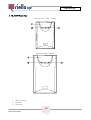
> 10.3 UPS front view
Dialog Plus 700 - 1000 - 1500VA
Dialog Plus 2000 - 3000VA
1. LED mimic panel
2. ON button
3. OFF button
23
SPEDLPX0205REN
DIALOG PLUS
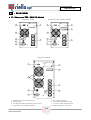
11 - REAR PANEL
> 11.1 Rear panel 700 – 2000 VA Models
Dialog Plus 700VA
1
Dialog Plus 1000-1000ER-1500VA
7
1
7
8
2
2
3
6
3
4
4
5
5
6
Dialog Plus 2000VA
1
7
8
2
6
4
3
5
1.
2.
3.
4.
RS232 serial communication port
Cooling fans
Telephone/modem protection/net or intranet
Input thermal re-settable protection
5.
6.
7.
8.
24
SPEDLPX0205REN
IEC mains input plug
IEC output sockets (max 10A)
Communication expansion slot
Battery expansion connector
DIALOG PLUS
> 11.2 Rear panel 2000ER – 3000/3000ER VA Models
Dialog Plus 2000 ER VA
1
Dialog Plus 3000 / 3000 ER VA
1
7
7
8
8
9
2
2
6
10
6
3
4
5
3
4
5
1.
2.
3.
4.
5.
RS232 serial communication port
Cooling fans
Telephone/modem protection/net or intranet
Input thermal re-settable protection
IEC mains input plug
6. IEC output sockets (max 10A)
7. Communication expansion slot
8. Battery expansion connector
9. IEC 16A output socket
10. Output socket fuse holders
25
SPEDLPX0205REN
DIALOG PLUS
12 TECHNICAL DATA
> 12.1 Tower models
MODEL
POWER
BACK-UP ( min )
Dialog Plus DLP 70
Dialog Plus DLP 100
Dialog Plus
DLP 100ER
Dialog Plus DLP 150
Dialog Plus DLP 200
Dialog Plus
DLP 200ER
Dialog Plus DLP 300
Dialog Plus
DLP 300ER
700VA/450W
1000VA/700W
8 (internal batteries)
8 (internal batteries)
DIMENSIONS
(HxWxD mm)
236x158x400
236x158x400
1000VA/700W
0 (external batteries)
236x158x400
8
1500VA/1050W
2000VA/1400W
8 (internal batteries)
13 (internal batteries)
236x158x500
348x192x460
19
34
2000VA/1400W
0 (external batteries)
348x192x460
14
3000VA/2100W
8 (internal batteries)
348x192x460
35
3000VA/2100W
0 (external batteries)
348x192x460
14
> 12.2 Back-up expansion modules for tower version
For types and back-up times of the Dialog Plus Tower models refer to the Riello Ups’s price list.
26
SPEDLPX0205REN
WEIGHT
(Kg)
12
14
DIALOG PLUS
> 12.3 Summary data sheets
MODEL
Input phases
Rated voltage
Maximum input voltage
before battery intervention
Minimum input voltage
before battery intervention
(applied load 100%)
Rated frequency
Input frequency tolerance
Maximum current
In-rush current
700VA
1000VA
1000VA ER
1500VA
INPUT
3000VA
3000VA ER
14.4 A
16 A
300 V single phase
(110 ± 5) V single phase (load 0% - 60%)
(160±5) V single phase (load 80% - 100 %)
3.8 A
Standard 50Hz (configurable via the software to 50Hz, 60Hz or auto select)
± 5 Hz
6.2 A
7.2 A
10 A
13.4 A
<In
5A
>0.97
<3%
Thermal switch 7 A
Thermal switch
10 A
“Hold up” time
(interruption to the mains
supply before battery
intervention)
Thermal switch
12 A
<40ms
BY-PASS
Maximum voltage
acceptable for switching
to the mains supply
264V single phase
Minimum voltage
acceptable for switching
to the mains supply
180V single phase
27
SPEDLPX0205REN
2000VA ER
1
220 / 230 / 240 V single phase
Power factor
Current distortion (THDi)
Input protection
2000VA
Thermal switch 16 A
DIALOG PLUS
MODEL
700VA
1000VA
Back-up in minutes
No. Batteries
Battery nominal voltage
Type of battery
Battery configuration
Type of recharge
Recharge current
Recharge time
Intervention time (loss of
the mains power supply)
Battery ripple current
Battery voltage stability
(batteries fully charged)
Battery protection
8
2
24 V
8
3
36 V
1000VA ER
1500VA
2000VA
2000VA ER
BATTERIES
External batteries
8
13
External batteries
External batteries
4
8
External batteries
External batteries
48 V
96 V
External batteries
7Ah Sealed lead maintenance-free,
In series
Two voltage levels
0.9 A
4hr (typical)
3000VA
3000VA ER
8
8
96 V
External batteries
External batteries
External batteries
3000 VA
2100 W
3000 VA
2100 W
Zero
< 0,01C
< 0.7 %
Fuse
OUTPUT
Rated voltage
Wave form
Frequency
Frequency converter
function
Current peak factor (from
EN62040-3 regulation)
Rated output (VA)
Rated output (W)
Static variation
Dynamic variation (with
load impact from 0 to
100%)
Output frequency
variation supply present
(supply lost)
220/230/240 V selectable
Sinewave
(50/60 ± 0.2) Hz selectable
Yes (with batteries)
3:1
700 VA
490 W
1000 VA
700 W
1500 VA
1050 W
2000 VA
1400 W
± 1.5 %
2000 VA
1400 W
≤ 5%
Same as the mains, for variations between ± 5 %
28
SPEDLPX0205REN
1000 VA
700 W
DIALOG PLUS
MODEL
Frequency variation
velocity (Hz/sec.)
Voltage reset after
dynamic variation
Voltage distortion
(linear load)
Voltage distortion
(non-linear load)
700VA
1000VA
1000VA ER
1500VA
2000VA
2000VA ER
3000VA
1 Hz/s
<20 ms
<2 %
<6 %
OVERLOAD TIMES
INVERTER OVERLOAD WITH MAINS SUPPLY AVAILABLE
30 ‘
30 ’’
10 ‘’
VARIOUS
100%<Load<110%
110%<Load<150%
Load > 150%
AC/AC efficiency (double
conversion operation)
Maximum permanent
operating temperature
Ambient operating
temperature
Recommended operating
temperature (for the
batteries)
90 %
40°C
40°C
20/25°C
Humidity
<95% without condensation
Protections
Compliance with safety
regulations
EMC compliance
Noise
Excessive battery discharge – overcurrent – short-circuit – overvoltage – undervoltage - over temperature
EN62040 -1-1
Directives 73/23/EEC and 93/68/EEC
EN50091 -2 cl. A, directive 89/336/EEC
<40 dB (A) at 1 metre
DIMENSIONS
236
236
236
348
348
348
158
158
158
192
192
192
Height (mm)
Width (mm)
236
158
29
SPEDLPX0205REN
3000VA ER
348
192
DIALOG PLUS
MODEL
Depth (mm)
Weight in Kg (with
standard back-up
integrated batteries)
Mechanical characteristics
Level of protection
Resistance to vibrations
(G)
Power dissipated with load
present (W)
Colour
700VA
400
1000VA
400
1000VA ER
400
1500VA
500
2000VA
460
2000VA ER
460
3000VA
460
3000VA ER
460
12
14
8
external batteries
19
34
14
external batteries
35
14
external batteries
210
210
Shielded metal cabinet with an applied plastic front panel display
IP215
<2G
49
77
77
115
1 mA
OUTPUT PROTECTION FIGURES (RECOMMENDED VALUES FOR DISCRIMINATION)
In (Rated current)/7
In (Rated current)/7
In (Rated current)/2
Rear
IEC socket
4 IEC sockets + 1 RS 232 + 1 Net Tel protection + slot
6 IEC sockets + 1 RS 232 + 1 Net Tel protection + slot
Forced ventilation
1000m
10% for every 1000m (above 1000m above sea level)
30
SPEDLPX0205REN
140
Metallic grey
Input differential current
Normal fuses (GI)
Normal circuit-breakers
(curve C)
Ultra-rapid fuses
(UR-URG)
Cable input
Input connections
Output connections
Cooling
Maximum installation
altitude
Altitude Power derating
140
DIALOG PLUS
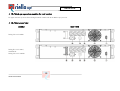
13 . DIALOG PLUS RACK
> 13.1 Rack models
MODELS
FRONT VIEWS
REAR VIEWS
Dialog Plus Rack DLPR 700 - 1500 VA
Dialog Plus Rack DLPR 2200 - 3000 VA
Battery box included for models
DLPR 2200 - 3000 VA
MODELS
Dialog Plus Rack DLPR 70
Dialog Plus Rack DLPR 100
Dialog Plus Rack DLPR 100 ER
Dialog Plus Rack DLPR 150
Dialog Plus Rack DLPR 220
Dialog Plus Rack DLPR 220 ER
Dialog Plus Rack DLPR 300
Dialog Plus Rack DLPR 300 ER
Note: 88mm = 2U;
POWER
AUTONOMY (min)
(*)DIMENSIONS (HWD mm)
WEIGHT (Kg)
700 VA/490 W
1000 VA/700 W
1000 VA/700 W
1500 VA/1050 W
2200 VA/1540 W
2200 VA/1540 W
3000 VA/2100 W
3000 VA/2100 W
8
8
External batteries
8
12
External batteries
8
External batteries
88x483x390
88x483x390
88x483x390
88x483x480
(88+88)x483x480
88x483x480
(88+88)x483x480
88x483x480
13
16
9
21
11 + 27
13
12 +27
14
176mm = 4U (2U + 2U); 483mm = 19”
31
SPEDLPX0205REN
DIALOG PLUS
> 13.2 Back-up expansion modules for rack version
For types and back-up times of the Dialog Plus Rack models refer to the Riello Ups’s price list.
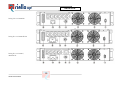
> 13.3 Rear panel view
MODELS
REAR VIEWS
Dialog Plus rack 700VA
Dialog Plus rack 1000 /
1000 ER VA
Dialog Plus rack 1500VA
32
SPEDLPX0205REN
DIALOG PLUS
Dialog Plus rack 2200VA
Dialog Plus rack 2200 ER VA
Dialog Plus rack 3000 /
3000 ER VA
33
SPEDLPX0205REN
DIALOG PLUS
Battery Box
1 - RS232 serial communication port
2 - Cooling fans
3 - IEC output sockets (max 10A)
4 - Input thermal re-settable protection
34
SPEDLPX0205REN
5 - IEC mains input plug
7 - IEC output socket 16A
6 - Battery expansion connector