1
Snare 2
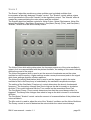
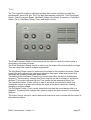
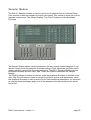
The Snare 2 algorithm combines a noise oscillator and a pitched oscillator that
incorporates a specially designed "Knarks" control. The "Knarks" control adds a unique
sound (reminiscent of the word "knarks") to the algorithm's output. The "Knarks" effect is
created by crossmodulating the noise source and the oscillator.
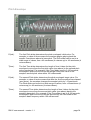
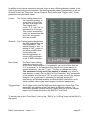
The Snare2 algorithm features controls for Noise Colour, Noise (Res)onance, Noise Env
(elope) Mod(ulation), Osc(illator) Freq(uency), Osc(illator) Decay (Time), and Osc(illator)
"Knarks", as well as a Mix and a Decay control.
The Noise Colour dial setting determines the frequency spectrum of the noise oscillator's
output. As it is crossmodulated with the pitched oscillator, the setting of this control directly
affects the sound of the output.
The Noise Res(onance) dial is used to set the amount of emphasis around the noise
oscillator's cutoff frequency. Higher settings create a more pronounced peak in the signal
while lower settings produce a flatter response.
The Noise Env(elope) Mod(ulation) dial is used to set the degree to which the noise
oscillator's filter cutoff frequency is modulated by the oscillator's amplitude envelope.
The setting of the Osc(illator) Freq(uency) control determines the drum's fundamental
frequency. The frequency changes from low to high as the dial is turned in a clockwise
direction. This control interacts with the Tune control on the associated Drum Pad.
The Osc(illator) Decay (Time) control determines how fast the sound decays after it is
triggered. The decay time changes from short to long as the dial is turned in a clockwise
direction.
The Osc(illator) "Knarks" control varies the amount of crossmodulation of the pitched and
noise oscillators.
The Mix control is used to adjust the mix of the "Knarks" oscillator and the Noise Oscillator.
The Decay control is used to determine the rate at which the mixed sound decays.
RM IV user manual : version 1.1
page 22