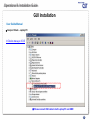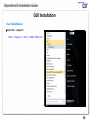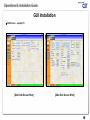
1
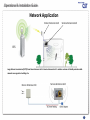
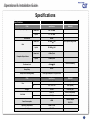
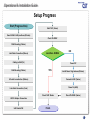
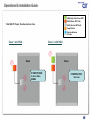
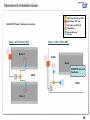
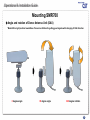
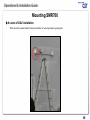
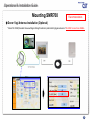
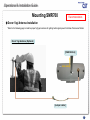
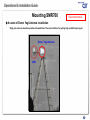
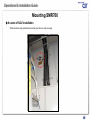
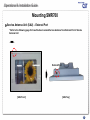
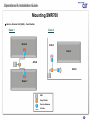
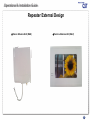
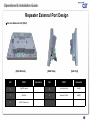
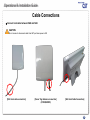
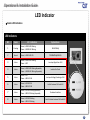
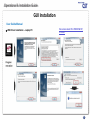
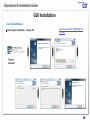
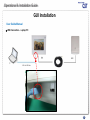
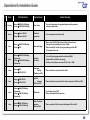
Operational & Installation Guide 1 © 2011, GS Teletech, Inc Operational & Installation Guide Verizon Wireless MPE 5K (Multi-Partitioned Enterprise Area of Less Than 5k sq. ft.) 2 © 2011, GS Teletech, Inc Operational & Installation Guide Contents of Box (1/2) Link Cable AC Cord Stand Bracket Jumper cable DAU DAU Bracket Set AC/DC Adaptor SAU SAU Bracket Set 3 © 2011, GS Teletech, Inc 3 Operational & Installation Guide Contents of Box (2/2) NO Items Q’ty 1 SMR (DAU) 1 2 SMR (SAU) 1 Picture NO 8 9 3 Link cable (1.5D) 60m Items Q’ty Jumper Cable 1 DAU BRACKET SET 1 • Tapping screw (PH(+) Φ5X25) • Anchor 4 4 SAU BRACKET SET 1 • FH(+)M3X6 for SAU • Tapping screw (PH(+) Φ5X25) • Anchor • Tapping screw for Stand Bracket (PH(+) Φ3X16) 4 4 Picture 1 4 AC/DC ADAPTOR 1 5 AC Power Cord 1 6 SAU Stand Bracket 1 7 CD 1 10 4 1 Technician's Operational & Installation, Quick Installation Guide, GUI Program, USB Driver, SMR700 User Manual, Registration Form 4 © 2011, GS Teletech, Inc 4 Operational & Installation Guide This publication provides instruction for installing Verizon Smart-700MHz SOHO LTE Repeater. The images for the User Interface in this publication may vary from the repeater’s depending on its S/W version. Copyright © 2011, GS Teletech, Inc. All Rights Reserved Printed in the Republic of Korea Version Revision History: Date Version 05/2011 Draft Changes Certification UL/FCC: This equipment complies with UL and FCC 5 © 2011, GS Teletech, Inc 5 Operational & Installation Guide Warnings and Hazards WARNING! ELECTRIC SHOCK Opening the BDA (bi-directional amplifier) could result in electric shock and may cause severe injury. WARNING! EXPOSURE TO RF Working with the repeater while in operation, may expose the technician to RF electromagnetic fields that exceed FCC rules for human exposure. Visit the FCC website at http://www.fcc.gov/oet/rfsafety to learn more about the effects of exposure to RF electromagnetic fields. WARNING! DAMAGE TO EQUIPMENT Operating the BDA with antennas in very close proximity facing each other could lead to severe damage to the repeater. RF EXPOSURE & ANTENNA PLACEMENT Actual separation distance is determined upon gain of antenna used. Please maintain a minimum safe distance of at least 8inch while operating near the donor and the server antennas. Also, the donor antenna needs to be mounted outdoors on a permanent structure. WARRANTY Opening or tampering the BDA will void all warranties. CAUTION: REPEATER SHOULD BE INSTALLED AS CLOSE AS POSSIBLE TO POWER SOURCE. CAUTION: THIS REPEATER IS FOR INDOOR USE ONLY AND SHOULD BE LOCATED INSIDE OF BUILDING. CAUTION: RISK OF EXPLOSION IF BATTERY ON CONTROLLER BOARD IS REPLACED WITH AN INCORRECT TYPE. CAUTION: DISPOSE OF USED BATTERIES ACCORDING TO THE INSTRUCTIONS 6 © 2011, GS Teletech, Inc 6 Operational & Installation Guide RF EXPOSURE & ANTENNA PLACEMENT Warning! For your safety, beware of power lines and ensure appropriate safety measures are maintained at all times during the installation of the SMR700 equipment. If equipment not shipped with the SMR700 system is to be used during installation or mounting, follow all equipment manufacturer’s instructions in proper use to ensure injury is avoided. The DAU and SAU of the SMR700 are low power transmitters. As with a cell phone antenna, avoid unnecessary contact with the front of the units when the units are operating. Mount the units in a location where people will not approach within 3.3 ft of the front of the DAU and 8 inches in front of the SAU. When deploying the extended coverage antenna, there must be a minimum separation of 4 inches between the main SAU and the extended coverage antenna with the antennas facing in opposite directions. The extended coverage antenna should be mounted in locations where people will not approach within 8 inches in front of the antenna. This manual outlines installation instructions and the appendix offers practical safety tips (see Appendix entitled ‘Safety Hints’). If you are not sure about a safe installation, do not attempt to install it yourself. Call a professional installer for help. 7 © 2011, GS Teletech, Inc 7 Operational & Installation Guide Network Application Donor Antenna Unit Service Antenna Unit BTS Long distance transmission (197ft) from Donor Antenna Unit to Service Antenna Unit. It enables customer to flexibly extend mobile network coverage into a building site. Service Antenna Unit Donor Antenna Unit 8 © 2011, GS Teletech, Inc 8 Operational & Installation Guide Specifications Specifications ITEM Specification Frequency Rang Down Link 746 – 756 MHz Up Link 777 – 787 MHz Brand Width REMARKS 10MHz Down Link 50~80dB ± 1dB Up Link 50~80dB ± 1dB Down Link +13dBm/Total Up Link +13dBm/Total AGC dynamic Range:30dB Gain Composite Output Power Over 5sec standing Shutdown Level +15dBm±2dB Group Delay <6usec EVM(Error Vector Magnitude) DL 8% @CPL15dB,UL:12.5% @CPL15dB ITEM Specification REMARKS DAU 6.22 x 5 x 1.96 H*W*D[Inch] SAU 5.7 x 7.67 x 1.65 H*W*D[Inch] 1.63 lbs Each DAU,SAD 196.85 ft RG174/1.5D(2.6mm) SMA(M) DAU to SAU direction Power Consumption ≤ 18W Extemal adaptor 12V/3.5A Operating Temperature +14° F~+122° F Humidity 0% ~ 95% Size Weight Link Cable 9 © 2011, GS Teletech, Inc 9 Operational & Installation Guide Setup Progress Start (Progress time) Start ‘GUI’ (3mins) Search DAU & SAU positions (20’mins) Check ‘DL RSSI’ DAU Mounting (10mins) Link Cable Connection (30secs) Less than -80dBm Cabling to SAU (1h) NO Power Off YES SAU Mounting (10mins) Install Donor Yagi Antenna (30mins) Connect to DAU (1mins) AC outlet construction (30mins) Power On (SAU) Link Cable Connection (1min) Check ‘LED’ Status Check ‘DL RSSI’ (3mins) AC/DC Adaptor Connection SAU Switch ON Finish 10 © 2011, GS Teletech, Inc 10 Operational & Installation Guide HGA (high Gain Donor ANT) DAU (Donor ANT Unit) Total 5000 ft² Project One Service Area Case SAU (Service ANT Unit) 2way Divider Service Antenna RF Cable Case 1 w/o HGA Case 2 with HGA Room Room If SMR700 RSSI is more than80dBm If SMR700 RSSI too Low 11 © 2011, GS Teletech, 11 Inc Operational & Installation Guide HGA (high Gain Donor ANT) DAU (Donor ANT Unit) Total 5000 ft² Project Two Service Area Case SAU (Service ANT Unit) 2way Divider Service Antenna RF Cable Case 1 with 2 Omni ANT Case 2 with 2 Omni ANT Room 2 AISLE Room If SMR700 Serviced Two Areas AISLE AISLE Room 1 12 © 2011, GS Teletech, 12 Inc Operational & Installation Guide Mounting SMR700 ◊ Donor Antenna Unit (DAU) 1. Find a place to have good LTE signals from Base Transceiver Station 2. Using a pencil, mark the location of each of the DAU Bracket’s four mounting holes on the wall 2. Drill holes in the wall at the locations marked in step 1 3. Set the anchors in the wall, and position the bracket and tighten tapping screws until secured 4. Put the DAU into mounting bracket 5. Tighten the mounting bracket with a wrench (32mm) 6. Connect the link cable to DAU 1 32mm 3 4 2 13 © 2011, GS Teletech, 13 Inc Operational & Installation Guide Mounting SMR700 ◊ Angle and rotation of Donor Antenna Unit (DAU) * Make DAU a right position toward Base Transceiver Station for getting good signals with changing of DAU direction 0 degree angle 90 degree angle 14 360 degree rotation © 2011, GS Teletech, 14 Inc Operational & Installation Guide Mounting SMR700 ◊ A scene of DAU installation * DAU should be toward to Base Transceiver Station for receiving stable & good signals 15 © 2011, GS Teletech, 15 Inc Operational & Installation Guide Mounting SMR700 Recommendation ◊ Donor Yagi Antenna Installation (Optional) * Check ‘DL RSSI’(Downlink Received Signal Strength Indicator) and Install high gain antenna if ‘DL RSSI’ is less than -80dBm. 16 © 2011, GS Teletech, 16 Inc Operational & Installation Guide Mounting SMR700 Recommendation ◊ Donor Yagi Antenna Installation * Refer to the following page to install a proper high gain antenna for getting better signal power from Base Transceiver Station Donor Yagi Antenna (Optional) [DAU Bottom] Link cable [Jumper cable] 17 © 2011, GS Teletech, 17 Inc Operational & Installation Guide Mounting SMR700 Recommendation ◊ A scene of Donor Yagi Antenna installation * High gain antenna should be positioned toward Base Transceiver Station for getting high qualified input signal Donor Yagi Antenna DAU 18 © 2011, GS Teletech, 18 Inc Operational & Installation Guide Mounting SMR700 ◊ Service Antenna Unit (SAU) – Stand Bracket 1. Put the Stand Bracket into SAU 2. Fix tightly Stand Bracket with a tapping screw 3. Connect the link cable to SAU 4. Connect the AC/DC Adaptor to SAU 1 3 Link 2 Cable STAN D 4 AC/DC adaptor 19 © 2011, GS Teletech, 19 Inc Operational & Installation Guide Mounting SMR700 ◊ A scene of SAU installation * SAU should be well positioned to provide good service and coverage. 20 © 2011, GS Teletech, 20 Inc Operational & Installation Guide Mounting SMR700 ◊ Service Antenna Unit (SAU) – Wall-Mounting 1. Using a pencil, mark the location of each of the SAU Bracket’s four mounting holes on the wall 2. Drill holes in the wall at the locations marked in step 1 3. Set the anchors in the wall, and position the bracket and tighten tapping screws until secured 4. Put the DAU into the mounting bracket 5. Tighten the mounting bracket with a cross screwdriver 6. Connect the link cable to SAU 1 2 3 SAU [Front] SAU [Back] 21 © 2011, GS Teletech, 21 Inc Operational & Installation Guide Mounting SMR700 ◊ A scene of SAU installation * SAU should be well positioned to provide good service and coverage. 22 © 2011, GS Teletech, 22 Inc Operational & Installation Guide Mounting SMR700 ◊ Service Antenna Unit (SAU) – External Port * Refer to the following page for Case Studies to extend Service Antenna from External Port of Service Antenna Unit External Port [SAU Front] [SAU Top] 23 © 2011, GS Teletech, 23 Inc Operational & Installation Guide Mounting SMR700 ◊ Service Antenna Unit (SAU) – Case Studies Case 1 Case 2 Room 2 AISLE Room AISLE AISLE Room 1 SAU 2way Divider Service Antenna RF Cable 24 © 2011, GS Teletech, 24 Inc Operational & Installation Guide Repeater External Design ◊ Donor Antenna Unit (DAU) ◊ Service Antenna Unit (SAU) 25 © 2011, GS Teletech, 25 Inc Operational & Installation Guide Repeater External Port Design ◊ Donor Antenna Unit (DAU) 1 2 [DAU Bottom Side] NO PORT Connector 1 Link Cable Port SMA (F) 2 High Gain Antenna Port SMA (M) 26 © 2011, GS Teletech, 26 Inc Operational & Installation Guide Repeater External Port Design ◊ Service Antenna Unit (SAU) 4 1 5 2 3 [SAU Bottom] NO PORT 1 [SAU Side] Connector [SAU Top] NO PORT Connector ON/OFF Switch 4 Link Cable Port SMA(F) 2 USB Port 5 External RF Port SMR(F) 3 AC/DC Power Port 27 © 2011, GS Teletech, 27 Inc Operational & Installation Guide Cable Connections ◊ Connect Link cable between DAU and SAU CAUTION Do not connect or disconnect cable from ANT port when power is ON [DAU Link cable connection] [Donor Yagi Antenna connection] (IF REQUIRED) 28 [SAU Link Cable Connection] © 2011, GS Teletech, 28 Inc Operational & Installation Guide LED Indicator ◊ Initial automatic setting LED Indicators NO Items LED Indications Explanations 1 Checking 2 Normal 3 Alarm Alarm → GREEN LED Blinking Power → OFF 4 Alarm Alarm → GREEN LED Blinking Repeatedly Power → GREEN LED Blinking Repeatedly 5 Alarm Alarm → OFF Power → RED LED ON Low Input Voltage (Freeding to DAU 6 Alarm Alarm → RED LED ON Power → RED LED ON Link Fail between DAU and SAU 7 Alarm Alarm → RED LED Blinking Repeatedly Power → RED LED Blinking Repeatedly 8 Alarm Alarm → RED LED Blinking Power → RED LED Blinking Alarm → GREEN LED Blinking Power → GREEN LED Blinking Auto Setup Standard operation Alarm → GREEN LED ON Low Input Signal from DAU Isolation Re-Check Shutdown Condition Lack of Isolation between DAU and SAU 29 © 2011, GS Teletech, 29 Inc Operational & Installation Guide LED Indicator ◊ Alarm LED Indication LED Indicators NO Items LED Indications Explanations 1 Checking 2 Normal 3 Alarm Alarm → GREEN LED Blinking Power → OFF 4 Alarm Alarm → GREEN LED Blinking Repeatedly Power → GREEN LED Blinking Repeatedly 5 Alarm Alarm → OFF Power → RED LED ON Low Input Voltage (Freeding to DAU 6 Alarm Alarm → RED LED ON Power → RED LED ON Link Fail between DAU and SAU 7 Alarm Alarm → RED LED Blinking Repeatedly Power → RED LED Blinking Repeatedly 8 Alarm Alarm → RED LED Blinking Power → RED LED Blinking Alarm → GREEN LED Blinking Power → GREEN LED Blinking Auto Setup Standard operation Alarm → GREEN LED ON Low Input Signal from DAU Isolation Re-Check Shutdown Condition Lack of Isolation between DAU and SAU 30 © 2011, GS Teletech, 30 Inc Operational & Installation Guide GUI Installation User Guide Manual Recommended OS: WINDOW XP, VISTAR ◊ USB Driver Installation – Laptop PC 31 © 2011, GS Teletech, 31 Inc Operational & Installation Guide GUI Installation User Guide Manual Recommended OS: WINDOW XP, VISTAR ◊ GUI program installation – Laptop PC 32 © 2011, GS Teletech, 32 Inc Operational & Installation Guide GUI Installation User Guide Manual ◊ USB Connection – Laptop PC 33 © 2011, GS Teletech, 33 Inc Operational & Installation Guide GUI Installation User Guide Manual ◊ Comport Check – Laptop PC In Device Manager of OS ※ Please connect USB cable to both Laptop PC and SMR 34 © 2011, GS Teletech, 34 Inc Operational & Installation Guide GUI Installation User Guide Manual ◊ Start ‘GUI’ – Laptop PC ‘Start’ => ‘Program’ => ‘GSI’ => ‘SMR’=>‘SMR_LTE’ 35 © 2011, GS Teletech, 35 Inc Operational & Installation Guide GUI Installation ◊ Start ‘GUI’ – Laptop PC ‘Select Com port’ => Click ‘Open’ 36 © 2011, GS Teletech, 36 Inc Operational & Installation Guide GUI Installation ◊ GUI Screen – Laptop PC [DAU GUI Screen Shot] [DAU GUI Screen Shot] 37 © 2011, GS Teletech, 37 Inc Operational & Installation Guide # Items 1 Checking 2 LED Indications Explanations Trouble Shooting Alarm GREEN LED Blinking Power GREEN LED Blinking Auto Setup * It is a self-optimization for good performance with parameter settings automatically Normal Alarm Green LED ON Power Green LED ON Standard operation * It is normal operation without fails Alarm Alarm GREEN LED Blinking Power OFF Low Input Signal * Please check ‘DL RSSI’ signal level of GUI at Donor Screen * The signal level should be more than -93dBm * Please move DAU to other site to get good signals from BTS if the signal level is low 4 Alarm Alarm GREEN LED Blinking Repeatedly Power GREEN LED Blinking Repeatedly Isolation Re-Check * It is a self-checking stage when the isolation (90dB) between DAU and SAU is not enough * Isolation value (at Service screen of GUI) = Gain + 15dB 5 Alarm Alarm OFF Power RED LED ON Low Input Voltage (Feeding to DAU) * Please check the connection of Link Cable 6 Alarm Alarm RED LED ON Power RED LED ON Link Fail between DAU and SAU * Please check the connection of Link cable at connector of DAU and SAU 7 Alarm Alarm Red LED Blinking Repeatedly Power Red LED Blinking Repeatedly Shutdown * It is hardware fail of SAU * Please exchange SAU with new one 8 Alarm Alarm RED LED Blinking Power RED LED Blinking Lack of Isolation between DAU and SAU * Please reposition DAU to be isolated between DAU and SAU 3 38 © 2011, GS Teletech, 38 Inc Operational & Installation Guide Appendix – Safety Hints Customer safety is a concern we would like to address in a sensible and proactive manner. To this end, the following notes have been provided as a reference to help installers remain safe and think about safety in all aspects of the installation. The following notes are to be considered as informational only, and not exhaustive or complete. 1. Lightning Never attempt to install the DAU outdoors while a lightning storm is in progress in your immediate or neighboring vicinity. The National Lightning Institute says for every five seconds between the flash of lightning and a thunderclap, the lightning is one mile away. If lightning is within 3 miles (15 second count between flash and thunder) of your location, do not attempt an installation. 2. Working Aloft When working aloft, it is best to work in pairs. Avoid attempting procedures alone that are best carried out with a spotter or by two people. 2.1 Power Tools Proper eye protection should be worn when using a drill or any other type of power tool. 2.2 Working with Ladders Properly secure your ladder and work in pairs. Make sure the ladder is properly tied off and use an insulated ladder when working around power lines. 2.3 Grounding Ensuring the DAU is properly grounded in external installations will help to prevent property damage and personal injury during lightening storms . 3. Overhead Power Lines While overhead power lines may appear to be insulated, they most likely are not insulated. Always thoroughly investigate your surroundings prior to installing masts or the DAU in an outdoor location. Never attempt installation without adequate lighting, as shadows and trees can obscure power lines. 39 © 2011, GS Teletech, 39 Inc Operational & Installation Guide GST Technical Support 24X7 Toll Free Technical Support 1-866-9-GST-USA Phone: Toll Free: 1-866-9 GST USA Phone: 913-469-6699 Write: GS Teletech Inc. 6900 College Boulevard, Suite 850, Overland Park, KS 66211, USA Product Information and Technical Assistance: www.gsteletechinc.com [email protected] Specifications and features of this installation guide are subject to change without notice or obligation. 40 © 2011, GS Teletech, 40 Inc