1
User Manual
CANopen / PROFIBUS Master
Document code: MN67426_ENG
Revision 1.000
Page 20 of 36
Industrial Electronic Devices
MODULE PARAMETERS:
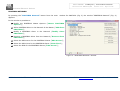
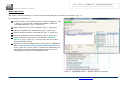
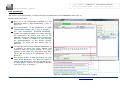
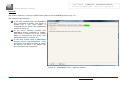
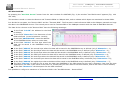
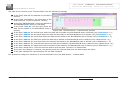
The section “Module Parameters” is used to modify the parameters of the Modules (Fig. 11).
In this section there are:
The List of all Module selected in the GSD file
(“Available modules”) (Fig. 11, point (1));
The List of all Parameters available for the Module
selected (“Parameters of module”) (Fig. 11, point
(2));
The Configuration of all parameters in RAW for the
Module selected (“Parameters in RAW (Hex)”) (Fig.
11, point(3));
The admited value for the selected parameter. It is
possible to select the value desired and confirm it
with the “Apply” button. If no value appears in
this table, the “Min Value” and “Max Value” are the
limit of the parameter. (Fig. 11, point(4));
The “Apply” button is used to confirm the new
value of the parameter, the “Default” button is
used to load the factory value for the parameter.
In “New Value” edit box it is possible to set the
new value. (Fig. 11, point(5));
Figure 11: “PROFIBUS Device – Module Parameters” window
ADFweb.com Srl – IT31010 – Mareno – Treviso
INFO: www.adfweb.com
Phone +39.0438.30.91.31