1
information on B-Core(UK) and B.
• The Tool Bar through which various tools can be invoked.
• The Environment Name which indicates the current environment (initially the Main
Environment).
• The Constructs Area which lists, down the right-hand side, all of the constructs
currently under configuration management. The term “construct” is used to refer to
the different types of Abstract Machine (machine, refinement or implementation) and
also to “system bases”, “set enumerations”, “interfaces”, “documents”, “proof files”
and so on. A number of different files may be associated with each construct. Down
the left-hand side are columns of buttons for the invocation of various commands
on the corresponding construct. These commands are indicated in the Command Bar
above the constructs area. Only those commands whose buttons are in full colour
can be invoked; this serves to indicate, also, the status of each construct.
• The Display Area which serves to display messages from the toolkit relating to its
current activity.
The Constructs Area and Display Area together form a paned window; their relative
sizes can be altered by vertically sliding the grip that appears on the right between them.
1.1.2
The Mouse
Only the left-hand mouse button is used in the B-Toolkit interface. It is used to select
menus, tools and commands by a single click. Clicking on many of the main panel entities
will also bring up on-line help information. Double-clicking on items in selection boxes is a
short-cut for a single click on that item, followed by clicking on the OK button to perform
the default action.
1.1.3
Subsidiary Panels
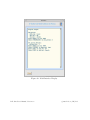
Some of the commands activated from the Main panel popup a subsidiary panel associated
with output from the B-Platform (see section 6). This panel displays information as the
tool is executed, after which it is popped down leaving a copy of the display in the Display
area in the Main panel.
Other panels are described under the appropriate tool descriptions.
1.1.4
The Top Bar
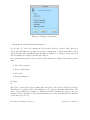
Except for Quit and Interrupt, each item on the Menu bar activates a pull-down menu.
They are selected either by clicking with the mouse, or from the keyboard by using the
B-Toolkit User’s Manual, Version 3.2
c
1996
B-Core (UK) Ltd.