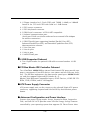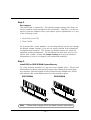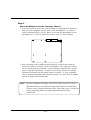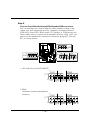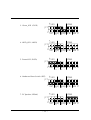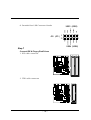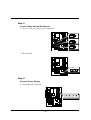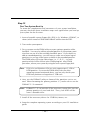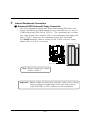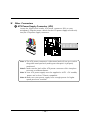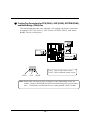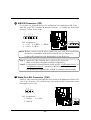
1
AK32 SocketA AMD Athlon/Duron Processor Based DDR/SDR Main Board User's Manual Shuttle® SpacewalkerTM AK32 SocketA AMD Athlon/Duron Processor based DDR/SDR Mainboard Manual Version 2.0 Copyright Copyright© 2002 by Shuttle ® Inc. All Rights Reserved. No part of this publication may be reproduced, transcribed, stored in a retrieval system, translated into any language, or transmitted in any form or by any means, electronic, mechanical, magnetic, optical, chemical, photocopying, manual, or otherwise, without prior written permission from Shuttle® Inc. Disclaimer Shuttle® Inc. shall not be liable for any incidental or consequential damages resulting from the performance or use of this product. This company makes no representations or warranties regarding the contents of this manual. Information in this manual has been carefully checked for reliability; however, no guarantee is given as to the correctness of the contents. In the interest of continued product improvement, this company reserves the right to revise the manual or include changes in the specifications of the product described within it at any time without notice and without obligation to notify any person of such revision or changes. The information contained in this manual is provided for general use by the customers. Trademarks Spacewalker is a registered trademark of Shuttle Inc. VIA is a registered trademark of VIA Corporation. AMD, Athlon/Duron is a registered trademarks of AMD Corporation. PS/2 is a registered trademark of IBM Corporation. AWARD is a registered trademark of Award Software Inc. Microsoft and Windows are registered trademarks of Microsoft Corporation. General Notice: Other brand and product names used herein are for identification purposes only and may be trademarks of their respective owners. M505 TABLE OF CONTENTS WHAT'S IN THE MANUAL ...................................................................... 5 Quick Reference ................................................................................................ 5 About This Manual ............................................................................................ 5 1 INTRODUCTION .................................................................................. 6 1.1 TO DIFFERENT USERS ............................................................................... 6 First-Time DIY System Builder ................................................................. 6 Experienced DIY User .............................................................................. 6 System Integrator .................................................................................... 6 1.2 ITEM CHECKLIST ........................................................................................ 7 2 FEATURES........................................................................................... 8 2.1 SPECIFICATIONS ......................................................................................... 8 3 HARDWARE INSTALLATION ............................................................ 11 3.1 STEP-BY-STEP INSTALLATION ................................................................ 11 STEP 1 Install the CPU .......................................................................... 12 STEP 2 Set Jumpers ............................................................................. 13 STEP 3 Install SDRAM System Memory ................................................ 13 STEP 4 Install Internal Peripherals in System Case ............................... 14 STEP 5 Mount the Mainboard on the Computer Chassis ....................... 15 STEP 6 Connect Front-panel Switches/LEDs/Speaker/USB .................. 16 STEP 7 Connect IDE & Floppy Disk Drives ............................................ 18 STEP 8 Connect Other Internal Peripherals ........................................... 19 STEP 9 Connect Power Supply.............................................................. 19 STEP 10 Install Add-on Cards in Expansion Slots .................................. 20 STEP 11 Connect External Peripherals to Back-panel ........................... 21 STEP 12 First Time System Boot Up ..................................................... 23 STEP 13 Install Driver & Software Components .................................... 24 -1- 3.2 JUMPER SETTINGS .................................................................................. 25 JUMPER & CONNECTOR GUIDE ......................................................... 26 Jumpers Clear CMOS (JP16) ............................................................................... 29 BIOS Write Protection (JP3) .................................................................. 30 Back-Panel Connectors PS/2 Keyboard & PS/2 Mouse Connectors ............................................ 31 USB1/USB2 Port Connectors ................................................................. 31 LAN Connector ....................................................................................... 31 COM1/2 Connector ................................................................................ 31 Parallel Port Connector .......................................................................... 32 Line-Out ................................................................................................. 32 Line-In .................................................................................................... 32 Mic-In ..................................................................................................... 32 MIDI/GAME Port.................................................................................... 32 Front-Panel Connectors ATX Power On/Off Switch Connector (PWR PT) ................................... 33 EPMI Connector (EPMI) ........................................................................ 33 Green LED Connector (GLED) .............................................................. 34 HDD LED Connector (HLED) ................................................................. 34 PWR LED Connector (PLED) ................................................................. 34 Hardware Reset Connector (RST) ......................................................... 35 Speaker Connector (SPEAK) ................................................................. 35 Extended four USB Connector Header (JP1/JP5) .................................. 36 Internal Peripherals Connectors Enhanced IDE Ports and Floppy Connectors ......................................... 37 -2- Other Connectors ATX Power Supply Connector (JP6) ...................................................... 38 Cooling FAN Connectors for CPU FANs (FAN1), AGP (FAN2), SYSTEM (FAN3), or North Bridge Fan (FAN4) ...................................................... 39 SIR/CIR Connector (JP2) ....................................................................... 40 Wake-On-LAN Connector (CN1) ............................................................ 40 Audio Connector CD_In (CN2) (Black) ................................................... 41 Audio Connector AUX_In (CN3) (White) ................................................. 41 Audio Connector TAD_In (CN4) (Green) ................................................ 41 3.3 SYSTEM MEMORY CONFIGURATION ...................................................... 42 Install Memory ....................................................................................... 42 Upgrade Memory ................................................................................... 42 4 SOFTWARE UTILITY ......................................................................... 43 4.1 Mainboard CD Overview .......................................................................... 43 4.2 Install VIA 4 in 1 Driver ............................................................................. 44 4.3 Install Audio Device Software .................................................................. 45 4.4 View the User's Manual ........................................................................... 46 5 BIOS SETUP ...................................................................................... 47 5.1 ENTER THE BIOS ...................................................................................... 47 5.2 THE MAIN MENU ....................................................................................... 48 STANDARD CMOS FEATURES ................................................................. 50 ADVANCED BIOS FEATURES ................................................................... 54 ADVANCED CHIPSET FEATURES ............................................................ 58 INTEGRATED PERIPHERALS ................................................................... 62 POWER MANAGEMENT SETUP ............................................................... 66 -3- PNP/PCI CONFIGURATION....................................................................... 70 PC HEALTH STATUS ................................................................................. 72 FREQUENCY/VOLTAGE CONTROL ......................................................... 74 LOAD FAIL-SAFE DEFAULTS.................................................................... 75 LOAD OPTIMIZED DEFAULTS .................................................................. 75 SET SUPERVISOR PASSWORD............................................................... 76 SET USER PASSWORD ............................................................................ 76 SAVE & EXIT SETUP ................................................................................. 77 EXIT WITHOUT SAVING ........................................................................... 77 -4- WHAT’S IN THE MANUAL Quick Reference Hardware Installation >> Step-by-Step ................................................ Page 11 Jumper Settings >> A Closer Look ...................................................... Page 25 Software Utility >> How to Install ......................................................... Page 43 BIOS Setup >> How to Configure ........................................................ Page 56 About This Manual For First-Time DIY System Builder......................................................... Page 6 For Experienced DIY User ...................................................................... Page 6 For System Integrator ............................................................................. Page 6 -5- 1 INTRODUCTION 1.1 To Different Users First-Time DIY System Builder Welcome to the DIY world! Building your own computer system is not as difficult as you may think. To make your first computer DIY experience successful, right from the start, we have designed the Chapter 3 Hardware Installation section in a step-by-step fashion for all the first-time DIY system builders. Prior to installation, we also suggest you to read the whole manual carefully to gain a complete understanding of your new Shuttle AK32 mainboard. Experienced DIY User Congratulate on your purchase of the Shuttle AK32 mainboard. You will find that installing your new Shuttle AK32 mainboard is just easy. Bundled with an array of onboard functions, the highly-integrated AK32 mainboard provides you with a total solution to build the most stable and reliable system. Refer to sections 3.2 Jumper Settings and Chapter 4 Software Utility to find out how to get the best out of your new mainboard. Chapter 5 BIOS Setup also contains the relevant information on how to tune up your system to achieve higher performance. System Integrator You have wisely chosen Shuttle AK32 to construct your system. Shuttle AK32 incorporates all the state-of-the-art technology of the KT266 chipset from VIA. It integrates the most advanced functions you can find to date in a compact ATX board. Refer to sections 3.2 Jumper Settings and Chapter 4 Software Utility for an in-depth view of system construction. -6- 1.2 Item Checklist Check all items with your AK32 mainboard to make sure nothing is missing. The complete package should include: K B One piece of Shuttle AK32 Mainboard U S B 1 S O A G 1P C K E T 4 6 2 1 P C I2 P C I1 P C I3 1 A U X T A D /I O 1 P C I4 P C I5 1 C D -IN C N C N C N F A N 2 VT802CD 36 01 12c 000600 CMTAI 1 0 J P 5 U S B 3 J P 6 1 F A N 4 1 1 0 F A N 1 1 C P 1 J P 2 W 1 IR OL C N VT839CD 23 00 13 C001005 CM TAI B 2 1 J P 3 ID E 2 ID E 1 F D D 1 One piece of Floppy Ribbon Cable One piece of twin ports USB Cable (optional) AK32 User's Manual One piece of Bundled CD-ROM with containing: Ø AK32 user's manual on PDF format Ø VIA 4-IN-1 driver Ø VIA Audio driver Ø Award Flashing Utility -7- ID E 1 ic 1 P T 1 E 2 o n 032 1 M _ F A F N A 3 1 S P E AK R 2 3 V ID S T E 1 J P 16 L E D S Y )9 )4, C 1 98 PCIP / NP 68 6 1 6 9 32966 1 R S T GL E D E MI P P WR + - + - + J P 7 P a n a s C J A P A N One piece of ATA100/66/33 Ribbon Cable U _ F A N 1 U S J P 4 i nb on P F D D 1 2 FEATURES AK32 mainboard is carefully designed for the demanding PC user who wants high performance and maximum intelligent features in a compact package. 2.1 Specifications CPU Support Support Socket462 package CPU with 200/266 MHz FSB. AMD Athlon XP Processor AMD Athlon Processor AMD Duron Processor Chipset Features VIA KT266, VT8366/VT8233 Chipset. VT8366, Integrated high performance SDRAM and DDR DRAM controller. Jumperless CPU Configuration Soft-configuration FSB (The FSB speed is software configurable from 100MHz to 166MHz by 1MHz step in the Frequency/Voltage Control of BIOS setup program.) AC'97 Link for Audio and Telephony CODEC AC'97 2.1 compliant Spread independent PCI functions for Audio and Modem Versatile Memory Support Two 184-pin DIMM slots to support up to 2GB of PC1600 or PC2100 compliant DDR SDRAM module. or two 168-pin DIMM slots to support up to 2GB of PC100 or PC133 compliant SDR SDRAM module. PCI Expansion Slots Provides five 32-bit PCI slots. AGP Expansion Slot Provides one 32-bit AGP slot which supports up to 4X AGP device. I/O Interface Provides a variety of I/O interfaces: -8- Ø 1*Floppy interface for 3.5-inch FDD with 720KB, 1.44MB, or 2.88MB format or for 5.25-inch FDD with 360K or 1.2MB format. Ø 1*PS/2 mouse connector. Ø 1*PS/2 Keyboard connector. Ø 2*DB9 Serial connectors 16550 UART compatible. Ø 1*Infrared communication port . (Serial port COM2 can also be redirected to an external IrDA Adapter for wireless connection.) Ø 1*DB25 Parallel port supporting Standard Parallel Port (SPP), Enhanced Parallel Port (EPP), and Extended Capabilities Port (ECP) data transmission schemes. Ø 1*Line-Out port. Ø 1*Line-In port. Ø 1*Mic-In port. Ø 1*MIDI/GAME port. 4 USB Supported Onboard Ø Two 10-pin header for optional USB cable to extend another 4 USB ports . PCI Bus Master IDE Controller Onboard Two UltraDMA 100/66/33 Bus Master Dual-channel IDE ports provide support to a maximum of four IDE devices (one Master and one Slave per channel). The IDE Bus implements the data transfer speed up to 100/66/33 MB/ sec and also supports Enhanced PIO Modes 0~4. 80-pin Cable Backward Compatible Legacy ATAPI Devices, ATAPI IDE CDROM, CD-R, CD-RW, and LS-120 Supports. ATX Power Supply Connector ATX power supply unit can be connect to the onboard 20-pin ATX power connector, supporting Suspend and Soft-On/Off by dual-function power button. Advanced Configuration and Power Interface Features four power saving modes: Snoop, Suspend to RAM, Suspend to Disk, and Soft-Off. ACPI provides more efficient Energy Savings Features controlled by your operating system that supports OS Direct Power Man- -9- agement (OSPM) functionality. System BIOS Provides licensed Award BIOS V6.0 PG on 2Mb Flash EEPROM and supports Green PC, Desktop Management Interface (DMI). ATX Form Factor System board conforms to the ATX specification. Board dimension: 305mm* 245mm. Advanced Features Ø Dual Function Power Button - The system can be in one of two states; one is Suspend mode and the other is Soft-Off mode. Pushing the power button for less than 4 seconds places the system into Suspend mode. When the power button is pressed for longer than 4 seconds, the system enters the Soft-Off mode. Ø Wake-on-LAN (WOL) - The onboard WOL connector can be attached to a network card that supports this function to wake up the system via LAN. Ø Modem Ring Power-On - The system can be powered on automatically by the activation of modem ring. Ø CPU Clock Setting- This item allows users to adjust CPU Host Clock in BIOS. Ø CPU Ratio Setting- This item allows users to adjust CPU Ratio in BIOS. Ø CPU Vcore Setting- This item allows users to adjust CPU Vcore in BIOS. Intelligent Features Ø Voltage Monitoring - Monitors various voltages of key elements, such as the CPU, and other critical system voltage levels to ensure stable current passing through mainboard components. System voltages include +3.3VIN, +5V, +12V, -12V, -5V on system etc. Ø Fan Status Monitoring - To prevent CPU from overheating, the CPU fan is monitored for RPM and failure. (CPU Cooling FAN with RPM sensor is required.) Ø Temperature Monitoring - This item allows users to make sure whether the CPU or system runs in a suitable temperature. - 10 - 3 HARDWARE INSTALLATION Before removing or installing any of these devices including CPU, DIMMs, Add-On Cards, Cables, please make sure to unplug the onboard power connector. This section outlines how to install and configure your AK32 mainboard. Refer to the following mainboard layout to help you identify various jumpers, connectors, slots, and ports. Then follow these steps to guide you through a quick and correct installation of your system. 3.1 Step-by-Step Installation Accessories Of AK32 ATX Power Connector Socket462 FAN1 PS/2 Keyboard/Mouse Connector D IM1 JP 6 D IM2 D IMM 1 Two 168-pin SDR D IMM Slo t Two 184-pin DDR DIMM S l o t KB D IMM 2 FAN1 1 CP U_ FAN S O C K ET 46 2 USB Connector US B1 Serial Port Connector (COM2) Parallel Connecto VIA VT8366 Chipset AU DIO 1 CO N 1 I FAN4 NB _FAN 1 FAN4 One 4 X AGP Slot AGP1 AG P_ FA N FAN2 ID E 1 ID E1 ID E 2 ID E2 1 FAN2 FDD P C I1 Onboard CODEC 1 CD- IN CN CD Audio Connectors CN P C I2 1 AUX FAN3 Two E-IDE Connectors VIA VT8233 Chipset Line-In/Line-Out /MicGame/MIDI Connectors Floppy Connecto Serial Port Connector (COM1) P C I3 1 1 1 1 FDD TAD/I CN 1 JP 1 6 in b o n d P C I5 JP 3 IR JP 2 1 )9 )4, C 1998 PCI/PNP68 6 169332966 1 WO L JP 5 US B3 10 1 1 10 US B2 JP 4 1 + CN P LE D 1 RST I/O Controller Extended four USB Connectors header - JP4/JP5 Wake-On-LAN Connector CN1 - - 11 - S PEAK JP 7 + - G L E D E P MI + - PW R PT Clear CM OS - JP16 P C I4 Five PCI Slots 1 P a n a s o n ic C R 2032 3V FAN3 JA P A N 1 SYS TEM_F Front Panel Connector JP7 Programmable 2Mb Flash EEPROM BIOS Write Protection JP3 IR Connector - JP2 Step 1 Install the CPU: 1. Locate the CPU ZIF (Zero Insertion Force) socket on the upper-right sector of your mainboard (between the back-panel connectors and the DIMM memory slots). 2. Pull the CPU ZIF socket lever slightly sideways away from the socket to unlock the lever, and then bring it to an upwardly vertical position. Blan S O S OCK ET4 C K E T AM D C PU 4 3. Place your AMD Athlon/Duron processor in the socket A. Note that the CPU's edges have been purposely designed non-symmetrically to prevent from inserting the processor in the wrong direction. The following diagram demonstrates the correct placement of the CPU in the ZIF socket. You can see that the two blunt-edged corners should face towards the socket-lever. ASSEM BL ED INMALAYSI Leve Blan N otch 4. Slightly push the AMD Athlon/Duron processor into the socket without applying excessive force while making sure there is no gap between CPU and socket. Then lower the socket-lever all the way down to its horizontal position and lock it to secure the CPU in place. 5. The AMD Athlon/Duron processor requires a set of heatsink/fan to ensure proper cooling of the processor. If heatsink/fan have not been already mounted on your CPU, you must purchase the heatsink/fan separately and have it installed. Plug the cable through the heatsink/fan in the CPU fan power connector located nearby. Note that there are several types of CPU fan connectors. Normally, if your mainboard supports the hard ware monitoring function, a 3-pin fan power connector should al low your system to detect the CPU fan's speed . The CPU fan can also run with a 2-pin fan power connector, however, detection of CPU fan's speed is not supported. Another type of CPU fan may feature a large 4-pin fan power connector, which does not support CPU fan's speed detection and must be directly connected to the system's power supply unit. Please refer to the following diagram. - 12 - Step 2. Set Jumpers This mainboard is jumperless! The default jumper settings have been set for the common usage standard of this mainboard. Therefore, you do not need to reset the jumpers unless you require special adjustments as in any of the following cases: 1. Over-clock your CPU 2. Clear CMOS For first-time DIY system builders, we recommend that you do not change the default jumper settings if you are not totally familiar with mainboard configuration procedures. The factory-set default settings are tuned for optimum system performance. For the advanced users who wish to customize their system, section 3.2 Jumper Settings will provide detailed information on how to configure your mainboard manually. Step 3. Install DDR or SDR SDRAM System Memory To insert memory module(s) in any one or two DIMM slot(s). Please note that modules are directional and will not go in the DIMM slots unless properly oriented. After the module is fully inserted into the DIMM slots, lift the clips of both sides of the DIMM slot to lock the module in place. SDR SDRAM Note: DDR SDRAM Please refer to page 42 for the detail memory information. - 13 - Step 4 Install Internal Peripherals in System Case Before you install and connect the mainboard into your system case, we recommend that you first assemble all the internal peripheral devices into the computer housing, including but not limited to the hard disk drive (IDE /HDD), floppy disk drive (FDD), CD-ROM drive, and ATX power supply unit. This will greatly facilitate in making the connections to the mainboard described below. To install IDE & FDD drives, follow this procedure: 1. Set the required jumpers on board each device according to the instructions provided by the manufacturer. (IDE devices, HDD, and CD-ROM have to set jumpers on Master or Slave mode depending on your willing to install more than one device for each kind.) 2. Connect IDE cable and FDD cable on the back-panel of the internal peripheral devices to the corresponding headers on board. Note that the cable should be oriented with its colored stripe (usually in red or magenta) connected to pin#1 both on the mainboard IDE or FDD connector and on the device as well. 3. Connect an available power cable through your system power supply unit to the back-panel of each peripheral device. Note that the power cable is directional and cannot fit in if it is not properly positioned. - 14 - Step 5 Mount the Mainboard on the Computer Chassis 1. You may find that there are a lot of different mounting hole positions both on your computer chassis and on the mainboard. To choose a correct mounting hole, the key point is to keep the back-panel of the mainboard in a close fit with your system case, as shown below. 2. After deciding on the proper mounting holes, position the studs be tween the frame of chassis and the mainboard. The studs are used to fix the mainboard and to keep a certain distance between the system chassis and the mainboard, in order to avoid any electrical shortage between the board and the metal frame of chassis. (If your computer case is already equipped with mounting studs, you will need to tighten screws to attach the mainboard.) Note: In most computer housings, you will be able to find 4 or more attachment points to install mounting studs and fix the mainboard. If there aren't enough matching holes, then make sure to install at least 4 mounting studs to ensure proper attachment of the mainboard. - 15 - Step 6 Connect Front-Panel Switches/LEDs/Speaker/USB connectors You can find there are several different cables already existing in the system case and originating from the computer's front-panel devices (HDD LED, Power LED, Reset Switch, PC Speaker, or USB devices etc.) These cables serve to connect the front-panel switches, LEDs, USB connectors to the mainboard's front-panel connectors group (JP7, JP4 and JP5), as shown below. 1 U SB 2 JP4 10 JP5 U SB 3 + P LED 1 SPEAK JP7 10 1 RST HL ED + - GLED EPMI PW R PT + - 1. ATX Soft Power On/Off (PWR PT) + P LED SPEAK JP7 1 RST HLED + - 2. EPMI (Hardware System Management + Interface) P LED GLED EPM I PW R PT + - SPEAK JP7 1 RST HLED + - 16 - GLED EPM I PW R PT + - 3. Green_LED (GLED) + P LED JP7 1 RST HLED + - 4. HDD_LED (HLED) SPEAK + P LED GLED EPM I PW R PT + - SPEAK JP7 1 RST HLED + + P LED 5. Power-LED (PLED) GLED EPM I PW R PT + - SPEAK JP7 1 RST HLED + - + P LED 6. Hardware Reset Switch (RST) GLED EPM I PW R PT + - SPEAK JP7 1 RST HLED + + P LED 7. PC Speaker (SPEAK) GLED EPM I PW R PT + - SPEAK JP7 1 RST HLED + - 17 - GLED EPM I PW R PT + - 8. Extended four USB Connector Header + 5V U S BD 3- U S BD 3+ GN D GN D U S BD 2+ 1 2 U S BD 2- 9 10 + 5V JP4 (JP5 ) GN D GN D US B3 (USB5) US B4 (USB6) Step 7 Connect IDE & Floppy Disk Drives 1. IDE cable connector IDE1 ID E1 ID E2 IDE2 1 1 FDD 1 2. FDD cable connector 1 FD D - 18 - Step 8 Connect Other Internal Peripherals 1. CD_IN, TAD_IN, and AUX_IN connectors 1 CD -IN C N2 C N3 1 AUX 1 TAD /I C N4 2. IR connector IR JP2 1 Step 9 Connect Power Supply 1. System power connector JP 6 - 19 - Step 10 Install Add-on Cards in Expansion Slots 1. Accelerated Graphics Port (AGP) Card 2. PCI Card - 20 - Step 11 Connect External Peripherals to Back-Panel You are now ready to put the computer case back together and get on to the external peripherals connections to your system's back-panel. KB USB1 AUDI O 1. PS/2 Mouse and Keyboard PS/2 Mouse PS/2 keyboard USB2 2. USB Port USB1 3. Parallel Port foxconn Parallel Port - 21 - CO N1 4. COM1/2 Port COM2 COM1 5. Audio Line_out / Line_in / Mic_in Purts Line-Out Line-In Mic_in 6. MIDI/Game Port MIDI/GAME Port - 22 - Step 12 First Time System Boot Up To assure the completeness and correctness of your system installation, you may check the above installation steps once again before you boot up your system for the first time. 1. Insert a bootable system floppy disk (DOS 6.2x, Windows 95/98/NT, or others) which contains FDISK and FORMAT utilities into the FDD. 2. Turn on the system power. 3. First, you must use the FDISK utility to create a primary partition of the hard disk. You can also add an extended partition if your primary partition does not use all of the available hard disk space. If you choose to add an extended partition, you will have to create one or more logical partition(s) to occupy all the space available in the extended partition. The FDISK utility will assign a drive letter (i.e., C:, D:, E:,...) to each partition which will be shown in the FDISK program. After FDISK procedure, reboot your system by using the same system floppy disk. Note: DOS 6.2x and Windows 95A can only support up to 2.1GB of HDD partition. If you use the FDISK utility with one of the operating systems mentioned above, you can only decide your HDD into partitions no larger than 2.1GB each. 4. Now, use the FORMAT utility to format all the partitions you've created. When formatting the primary partition (C:), make sure to use the FORMAT C: /S command. Note: FORMAT C: /S can transfer all the necessary system files into the primary partition of your hard disk. Then, your HDD will be come a bootable drive. 5. Install all the necessary drivers for CD-ROM, Mouse, etc. 6. Setup the complete operating system according to your OS installation guide. - 23 - Step 13 Install Driver & Software Components Please note that all the system utilities and drivers are designed for Win 9x operating systems only. Make sure your Windows 9x operating system is already installed before running the drivers installation CD-ROM programs. 1. Insert the AK32 bundled CD-ROM into your CD-ROM drive. The auto-run program will display the drivers main installation window on screen. 2. Select the Mainboard related program. 3. Install VIA 4-in-1drivers. 4. Return to the main installation window and select the Audio Device related program. 5. Install VIA Audio driver. - 24 - 3.2 Jumper Settings Several hardware settings are made through the use of jumper caps to connect jumper pins to the mainboard. Pin #1 could be located at any corner of each jumper; you just find a location marked with a while right angle, which stands for pin1#. There are several types of pin 1# shown as below: 3-pin and multi-pin (>3) jumpers show as follows: Pin #1 to the left: Pin #1 on the top: Pin #1 to the right: Pin #1 on the bottom: Jumpers with two pins are shown as for Close [On] or for Open [Off]. To Short jumper pins, simply place a plastic jumper cap over the desired pair of pins. Caution! 1. Do not remove the mainboard from its antistatic protective packaging until you are ready to install it. 2. Carefully hold the mainboard by its edges and avoid touching its components. When putting the mainboard down, place it on the top of its original packaging film and on an even surface, and components side up. 3. Wear an antistatic wrist strap or take other suitable measures to prevent electrostatic discharge (ESD) whenever handling this equipment. - 25 - Jumper & Connector Guide Use the mainboard layout on page 12 to locate CPU socket, memory slots, expansion slots, jumpers and connectors on the mainboard during installation. The following list will help you identify jumpers, slots, and connectors along with their assigned functions: E1 B1 E2 B2 B3~B4 B5~B8 E2 E2 E5 E6 D1 E7 E2 E3 A1 A2 C1~C7 C87 E4 CPU/Memory/Expansion Slots Socket 462 : CPU Socket for AMD Athlon and Duron processors. DIMM1/2 : Two DIMM Slots for 16, 32, 64, 128, 256, and 512 MB of 3.3V SDR SDRAM DIM1/2 : Two DIMM Slots for 64, 128, 256, 512 MB, and 1GB of 2.5V DDR SDRAM AGP : One AGP (Accelerated Graphics Port) Slot PCI : Five 32-bit PCI Expansion Slots - 26 - Jumpers A1 JP16 A2 JP3 : Clear CMOS : BIOS Write Protection Back-Panel Connectors B1 KB : PS/2 Keyboard B1 MS : PS/2 Mouse B2 USB : 2 USB (Universal Serial Bus) B3 COM1 : Serial Port 1 (DB9 male) : Serial Port 2 (DB9 male) B3 COM2 B4 PRINTER : Parallel Port (DB25 female) B5 LINE-OUT : Line-Out Port B6 LINE-IN : Line-In Port B7 MIC-IN : Mic-In Port B8 GAME/MIDI : MIDI/Game Port Front-Panel Connectors (JP7, JP4 and JP5) : ATX Power On/Off Momentary Type Switch C1 PWR PT : Hardware System Management Interface Momentary C2 EPMI Type switch : Green LED (ON when system stays in power saving mode) C3 GLED : IDE Drive Active LED C4 HLED : System Power LED C5 PLED : Hardware Reset Switch C6 RST : Housing Internal Speaker C7 SPEAK : Extended four USB Connector Header (USB3~USB6) C8 JP4/JP5 Internal Peripherals Connectors D1 FDD : Floppy Disk Drive Interface : IDE Primary Interface (Dual-channel) D1 IDE1 D1 IDE2 : IDE Secondary Interface (Dual-channel) Other Connectors: E1 JP6 : ATX Power (20-pin header) E2 FAN1 : CPU Fan Power E2 FAN2 : AGP Fan Power E2 FAN3 : System Fan Power E2 FAN4 : North Bridge Fan Power - 27 - E3 E4 E5 E6 E7 JP2 CN1 CN2 CN3 CN4 : : : : : IR Connector Wake-On-LAN Connector CD-in AUX-in TAD-in - 28 - F Jumpers A1 Clear CMOS (JP16) JP16 is used to clear CMOS data. Clearing CMOS will result in the permanent erasing of previous system configuration settings and the restoration of original (factory-default) system settings. Pin 1-2 (Default) 1 Pin 2-3 (Clear CMOS) 1 Step Step Step Step Step 1. 2. 3. 4. 5. Turn off the system power (PC-> Off). Remove jumper cap from JP16 pins 1-2. Place the jumper cap on JP16 pin 2-3 for a few seconds. Return the jumper cap to pin 1-2. Turn on the system power (PC-> On). - 29 - 1 JP16 A2 BIOS Write Protection (JP3) JP3 is used to protect BIOS from abnormal writing. You may choose to place jumper cap on pins 1-2 for BIOS write protection; however, please place jumper cap on pins 2-3 if you need to reflash BIOS. 1 To enable reflashing the BIOS Pin 2-3 (Default) JP3 1 BIOS write protection Pin 1-2 1 Reflash the BIOS, follow these steps: Step 1. Turn off the system power (PC-> Off). Step 2. Make sure of place jumper cap on JP3 pin 2-3. Step 3. Insert a bootable system floppy disk with AK32 BIOS and flashutility and then turn on your system to execute flash utility. - 30 - F Back-Panel Connectors B1 PS/2 Keyboard & PS/2 Mouse Connectors Two 6-pin female PS/2 keyboard & Mouse connectors are located at the rear panel of mainboard. Depending on the computer housing you use (desktop or tower), the PS/2 Mouse connector is situated at the top of the PS/2 Keyboard connector when the mainboard is laid into a desktop, as opposed to a tower where the PS/2 Mouse connector is located at the right of the PS/2 Keyboard. Plug the PS/2 keyboard and mouse jacks into their corresponding connectors. B2 USB1/USB2 Port Connectors PS/2 Mouse PS/2 keyboard USB2 This mainboard offers 2 USB ports on back-panel. Plug each USB device jack into an available USB1/USB2 connector. USB1 B3 COM1/COM2 Connector This mainboard can accommodate two serial device on COM1/COM2. Attach a serial device cable to the DB9 serial port COM1/COM2 at the backpanel of your computer. COM1 COM2 B4 Parallel Port Connector One DB25 female parallel connector is located at the rear panel of the mainboard. Plug the connection cable from your parallel device (printer, scanner, etc. ) into this connector. - 31 - foxconn Parallel Port B5 Line-Out Line-Out is a stereo output port through which the combined signal of all internal and external audio sources on the board is output. It can be connected to 1/8-inch TRS stereo headphones or to amplified speakers. B6 Line-In Line-In is a stereo line-level input port that accepts a 1/8-inch TRS stereo plug. It can be used as a source for digital sound recording, a source to be mixed with the output, or both. B7 Line-In Mic-In MIC-IN is a 1/8-inch jack that provides a mono input. It can use a dynamic mono or stereo microphone with a resistance of not more than 600 Ohms. B8 Line-Out Mic_in MIDI/GAME Port The MIDI/GAME port is a 15-pin female connector. This port can be connected to any IBM PC compatible game with a 15pin D-sub connector. MIDI/GAME Port MIDI Instrument Connection You will need a MIDI adapter to connect a MIDI compatible instrument to the sound card. The MIDI adapter can in turn be connected to the Joystick/MIDE port. You will also need the MIDI sequencing software to run MIDI instruments with your computer. - 32 - F Front-Panel Connectors C1 ATX Power On/Off Switch Connector (PWR PT) The Power On/Off Switch is a momentary- type switch used for turning on or off the system's ATX power supply. Attach the connector cable from the Power Switch to the 2-pin PWR PT header on the mainboard. + P LED SPEAK JP7 1 RST HLED GLED EPMI PW R PT + - + - Note : Please note the Speaker and all the LED connectors are directional. If your chassis's LED does not light up during running, please simply change to the opposite direction. C2 EPMI Connector (EPMI) Hardware System Management Interface (EPMI) header may attach to a 2pin momentary switch. Press the EPMI switch to force the system into power saving mode; press again to resume normal operation. + P LED SPEAK JP7 1 RST HL ED + - - 33 - GLED EPMI PW R PT + - C3 Green LED Connector (GLED) The Green LED (GLED) indicates that the system is currently in one of the power saving mode (Doze/Standby/Suspend). When the system resumes to normal operation mode, the Green LED will go off. Attach a 2-pin Green LED cable to GLED header. + P LED SPEAK JP7 1 RST HL ED + - C4 GLED EPMI PW R PT + - HDD LED Connector (HLED) Attach the connector cable from the IDE device LED to the 2-pin HLED header. The HDD LED lights up whenever an IDE device is active. + P LED SPEAK JP7 1 RST HL ED + - C5 GLED EPMI PW R PT + - PWR LED Connector (PLED) Attach the 3-pin Power-LED connector cable from the housing front-panel to the PLED header on the mainboard. The power LED stays light while the system is running. + P LED SPEAK JP7 1 RST HL ED + - - 34 - GLED EPMI PW R PT + - C6 Hardware Reset Connector (RST) Attach the 2-pin hardware reset switch cable to the RST header. Pressing the reset switch causes the system to restart. + P LED SPEAK JP7 1 RST HLED GLED EPMI PW R PT + - + - C7 Speaker Connector (SPEAK) Attach the PC speaker cable from the case to the 4-pin speaker connector (SPEAK). + P LED SPEAK JP7 1 RST HLED GLED EPMI PW R PT + - + - - 35 - C8 Extended four USB Connector Header (JP4/JP5) The headers are used to connect the cable attached to USB connectors which are mounted on front-panel or back-panel. But the USB cable is optional at the time of purchase. JP5 1 1 U SB 3 U SB 2 10 10 Port3 (Port5) 9 7 5 3 JP4 (J P5 10 8 6 4 Port 4 (Port 6) Pins Assignment: 1=+5V 5=USBD3+ 9=GROUND 2=GROUND 6=USBD2+ 10=+5V 3=USBD37=GROUND 4=GROUND 8=USBD2- - 36 - JP4 Internal Peripherals Connectors Enhanced IDE Ports and Floppy Connector The AK32 mainboard features two 40-pin dual-channel IDE device connectors (IDE1/IDE2) providing support to up to four IDE devices, such as CD-ROM and Hard Disk Drives (H.D.D.). This mainboard also includes one 34-pin floppy disk controller (FDC) to accommodate the Floppy Disk Drive (F.D.D.). Moreover, this mainboard comes with one 80pin ATA100/66/33 ribbon cable to connect to IDE H.D.D. and one 34-pin ribbon cable for F.D.D. connection. IDE2 IDE1 FDD 1 ID E1 D1 ID E2 F 1 1 1 FD D Note: Please connect you system H.D.D. to IDE 1 Important: Ribbon cables are directional, therefore, make sure to always connect with the red cable stripe on the same side as pin #1 of the IDE1/IDE2 or FDC connector on the mainboard. - 37 - F Other Connectors E1 ATX Power Supply Connector (JP6) Locate the 20-pin male header ATX power connector (JP6) on your mainboard. Plug the power cable from the ATX power supply unit directly into JP6 ATX power supply connector. JP 6 Note 1: The ATX power connector is directional and will not go in unless the guides match perfectly making sure that pin#1 is properly positioned. Note 2: Make sure the latch of the ATX power connector clicks into place to ensure a solid attachment. Note 3: Your ATX power supply must be supplied to ACPI +5V standby power and at least 720mA compatible. Note 4: Make sure your power supply have enough power for higher speed processor installed. - 38 - Cooling Fan Connectors for CPU (FAN1), AGP (FAN2), SYSTEM (FAN3), and North Bridge ( FAN4) Fan The mainboard provides four onboard 12V cooling fan power connectors to support CPU FAN (FAN1), AGP (FAN2), SYSTEM (FAN3), and North Bridge (FAN4) cooling fans. FAN 1 1 CPU_FAN NB_FAN 1 AGP_FAN FAN 4 FAN 2 E2 1 SYSTEM_FAN FAN 3 1 GND 1 FAN1, FAN3 with rotate sense. FAN2, FAN4 without rotate sense. +12V SENSE Note: Both cable wiring and type of plug may vary depending on the fan maker. Keep in mind that the red wire should always be connected to the +12V header, and the black wire, to the ground (GND) header. - 39 - E3 SIR/CIR Connector (JP2) If you have an Infrared device, this mainboard can implement SIR (Standard IR) and CIR (Cirsumer IR) transfer function. To enable the IR transfer function, follow these steps: 1 2 34 Pins Assignment: 1=+5V 2=CIRRX 4=GND 5=IRTX 3=IRRX IR JP2 1 Note: Before connect your IR device, please be sure each IR on board pin allocation is matchable with the pin of the IR device. Otherwise, incorrect IR connection may do damage to your IR device. Step 1. Attach the 5-pin infrared device cable to JP2 connector. (Refer to the above diagram for IR pin assignment.) Step 2. Configure the Infrared transfer mode in field "UART Mode Select" of "Integrated Peripheral" sub-menu in BIOS setup program. This mainboard supports IrDA, ASKIR, or Normal transfer modes. E4 Wake-On-LAN Connector (CN1) Attach a 3-pin connector through the LAN card which supports the Wake-OnLAN (CN1) function. This function lets users wake up the connected system through the LAN card. 1 2 Pins Assignment: 1=Power 2=GND 3=RING# WOL 1 C N1 - 40 - E5 Audio Connector CD _In (CN2) (Black) Port CN2 is used to attach an audio connector cable from the CD-ROM drive. 4 3 2 Pins Assignment: 1=CD_L 2=CD_GND 3=CD_GND 4=CD_R E6 1 CD -IN C N2 Audio Connector AUX _In (CN3) (White) Port CN3 can be used to connect a stereo audio input from CD-ROM, TVtuner, or MPEG card. 4 3 2 Pins Assignment: 1=AUX_L 2=AGND 3=AGND 4=AUX_R E7 C N3 1 A UX Audio Connector TAD _In (CN4) (Green) Port CN4 can be used to connect a modem audio line to AK32 mainboard. Typically, you would use this connector when running the voice mail software on your system for audio input and output. 4 3 2 Pins Assignment: 1=PHONE_IN 2=AGND 3=AGND 4=MONO_OUT 1 T AD /I C N4 - 41 - 3.3 System Memory Configuration The AK32 mainboard has two 184-pin and two 168-pin DIMM slots that allow you to install from 16MB up to 2GB of system memory. Each 184-pin DIMM (Dual In-line Memory Module) slot can accommodate 64MB, 128MB, 256MB, 512MB, and 1GB of PC1600/PC2100 compliant 2.5V single or double side 64-bit wide data path DDR SDRAM modules. Each 168-pin DIMM (Dual In-line Memory Module) Slot can accommodate 16MB, 32MB, 64MB, 128MB, 256MB, 512MB, and 1GB of PC100/PC133 compliant 3.3V single or double side 64-bit wide data path SDRAM modules. Install Memory: Install memory in any or all of the slots and in any combination shown as follows. Module SDR SDRAM DIMM Slot Memory Modules Quantity DDR SDRAM DIMM 1 16 MB , 32MB, 64MB, 128MB, 256M B, 51 2MB and 1GB 16 8-pin 3.3V SDR SDRAM DIMM x1 DIMM 2 16 MB , 32MB, 64MB, 128MB, 256M B, 51 2MB and 1GB 16 8-pin 3.3V SDR SDRAM DIMM x1 DIMM Slot Memory Modules Module Quantity DIM 1 6 4MB, 12 8MB, 25 6MB, 512 MB , and 1GB 18 4-pin 2.5V DDR SDRAM DIMM x1 DIM 2 6 4MB, 12 8MB, 25 6MB, 512 MB , and 1GB 18 4-pin 2.5V DDR SDRAM DIMM x1 Important:You can choose 168-pin SDR SDRAM or 184-pin DDR SDRAM to boot, but the system doesn't start if you use both of them at the same time! Note: You do not need to set any jumper to configure memory since the BIOS utility can detect the system memory automatically. You can check the total system memory value in the BIOS Standard CMOS Setup menu. Upgrade Memory: You can easily upgrade the system memory by inserting additional SDRAM modules in available DIMM slots. The total system memory is calculated by simply adding up the memory in all DIMM slots. After upgrade, the new system memory value will automatically be computed and displayed in the field " Standard CMOS Setup" of BIOS setup program. - 42 - 4 SOFTWARE UTILITY 4.1 Mainboard CD Overview Note: The CD contents attached in the AK32 mainboard are subject to change without notice. To start your mainboard CD disc, insert it into your CD-ROM drive, and the CD AutoRun screen should appear. If the AutoRun screen does not appear, double click or run D:\Autorun.exe (assuming that your CD-ROM drive is drive D:) Navigation Bar Description: F F F F F F Install Mainboard Software - Installing 4 in 1drivers. Install Audio Device Software - Installing Audio driver. Manual - AK32 series mainboard user's manual in PDF format. Link to Shuttle Homepage - Link to shuttle website homepage. Browse this CD - Allows you to see the contents of this CD. Quit - Close this CD. - 43 - 4.2 Install VIA 4 in 1 Driver Insert the attached CD into your CD-ROM drive, and the CD AutoRun screen should appear. If the AutoRun screen does not appear, double click on Autorun icon in My Computer to bring up Shuttle Mainboard Software Setup screen. Select the item using your pointing device (e.g. mouse) on the Install Mainboard Software" bar to install 4 in 1 driver. Once you make your selection, a Setup window will automatically runs the installation. When the files are done copying, make sure you reboot the system to insure that the files are installed correctly. - 44 - 4.3 Install Audio driver Insert the attached CD into your CD-ROM drive, and the CD AutoRun screen should appear. If the AutoRun screen does not appear, double click on Autorun icon in My Computer to bring up Shuttle Mainboard Software Setup screen. Select the item using your pointing device (e.g. mouse) on the Install Audio Device Software" bar to Install Audio driver. Once you make your selection, a Setup window will automatically runs the installation. When the files are done copying, make sure you reboot the system to insure that the files are installed correctly. - 45 - 4.4 View the User's Manual Insert the attached CD into your CD-ROM drive, and the CD AutoRun screen should appear. If the AutoRun screen does not appear, double click on Autorun icon in My Computer to bring up Shuttle Mainboard Software Setup screen. Select the item using your pointing device (e.g. mouse) on the Manual bar. Then Online Information windows will appear on the screen. Click on the Install Acrobat Reader" bar if you need to install acrobat reader. Then click on "AK32 Manual" bar to view AK32 user's manual. - 46 - 5 BIOS SETUP AK32 BIOS ROM has a built-in Setup program that allows users to modify the basic system configuration. This information is stored in battery-backed RAM so that it retains the Setup information even if the system power is turned off. The system BIOS is managing and executing a variety of hardware related functions in the system, including: System date and time Hardware execution sequence Power management functions Allocation of system resources 5.1 Enter the BIOS To enter the BIOS (Basic Input / Output System) utility, follow these steps: Step 1. Power on the computer, and the system will perform its POST (Power-On Self Test) routine checks. Step 2. Press <Del> key immediately, or at the following message: Press DEL to enter SETUP ,or simultaneously press <Ctrl>, <Alt>, <Esc> keys. Note 1. If you miss trains of words mentioned in step2 (the message disappears before you can respond) and you still wish to enter BIOS Setup, restart the system and try again by turning the computer OFF and ON again or by pressing the <RESET> switch located at the computers front-panel. You may also reboot by simultaneously pressing the <Ctrl>, <Alt>, <Del> keys simultaneously. Note 2. If you do not press the keys in time and system does not boot, the screen will prompt an error message, and you will be given the following options: Press F1 to Continue, DEL to Enter Setup Step 3. As you enter the BIOS program, the CMOS Setup Utility will prompt you the Main Menu, as shown in the next section. - 47 - 5.2 The Main Menu Once you enter the AwardBIOS(tm) CMOS Setup Utility, the Main Menu will appear on the screen. The Main Menu allows you to select from several setup functions and two exit choices. Use the arrow keys to select among the items and press <Enter> to accept and enter the sub-menu. Note that a brief description of each highlighted selection appears at the bottom of the screen. Setup Items The main menu includes the following main setup categories. Recall that some systems may not include all entries. Standard CMOS Features Use this menu for basic system configuration. Advanced BIOS Features Use this menu to set the Advanced Features available on your system. Advanced Chipset Features Use this menu to change the values in the chipset registers and optimize your system's performance. Integrated Peripherals Use this menu to specify your settings for integrated peripherals. - 48 - Power Management Setup Use this menu to specify your settings for power management. PnP / PCI Configuration This entry appears if your system supports PnP / PCI. PC Health Status This entry shows the current system temperature, Voltage, and FAN speed. Frequency/Voltage Control Use this menu to specify your settings for frequency/voltage control. Load Fail-Safe Defaults Use this menu to load the BIOS default values for the minimal/stable performance of your system to operate. Load Optimized Defaults Use this menu to load the BIOS default values that are factory-set for optimal performance system operation. While Award has designed the custom BIOS to maximize performance, the factory has the right to change these defaults to meet users' needs. Supervisor / User Password Use this menu to change, set, or disable supervisor/user password. It allows you to limit access to the system and Setup, or only to Setup. Save & Exit Setup Save CMOS value changes in CMOS and exit from setup. Exit Without Saving Abandon all CMOS value changes and exit from setup. - 49 - . Standard CMOS Features The items in Standard CMOS Setup Menu are divided into 10 categories. Each category includes no, one or more than one setup items. Use the arrow keys to highlight the item and then use the <PgUp> or <PgDn> keys to select the value you want in each item. Date <Month> <DD> <YYYY> Set the system date. Note that the 'Day' automatically changes when you set the date. Time <HH : MM : SS> The time is converted based on the 24-hour military-time clock. For example, 5 p.m. is 17:00:00. IDE Primary Master Options are in its sub-menu. Press <Enter> to enter the sub-menu of detailed options. IDE Primary Slave Options are in its sub-menu. Press <Enter> to enter the sub-menu of detailed options. - 50 - IDE Secondary Master Options are in its sub-menu. Press <Enter> to enter the sub-menu of detailed options. IDE Secondary Slave Options are in its sub menu. Press <Enter> to enter the sub-menu of detailed options. Drive A/Drive B Select the type of floppy disk drive installed in your system. Ø The choice: None, 360K, 5.25 in, 1.2M, 5.25 in, 720K, 3.5 in, 1.44M, 3.5 in, or 2.88M, 3.5 in Video Select the default video device. Ø The choice: EGA/VGA, CGA 40, CGA 80, or MONO Halt On Select the situation in which you want the BIOS to stop the POST process and notify you. Ø The choice: All Errors, No Errors, All, But Keyboard, All, But Diskette, or All, But Disk/Key Base Memory Displays the amount of conventional memory detected during boot up. Ø The choice: N/A Extended Memory Displays the amount of extended memory detected during boot up. Ø The choice: N/A Total Memory Displays the total memory available in the system. Ø The choice: N/A - 51 - ****************************************************** IDE Adapters The IDE adapters control the hard disk drive. Use a separate sub-menu to configure each hard disk drive. IDE HDD Auto-Detection Press <Enter> to auto-detect HDD on this channel. If detection is successful, it fills the remaining fields on this menu. Ø Press Enter IDE Primary Master Selecting 'manual' lets you set the remaining fields on this screen and select the type of fixed disk. "User Type" will let you select the number of cylinders, heads, etc., Note: PRECOMP=65535 means NONE ! Ø The choice: None, Auto, or Manual. Access Mode Choose the access mode for this hard disk. Ø The choice: CHS, LBA, Large, or Auto. Capacity Disk drive capacity (Approximated). Note that this size is usually slightly greater than the size of a formatted disk given by a disk checking program. Ø Auto-Display your disk drive size. The following options are selectable only if the 'IDE Primary Master' item is set to 'Manual' Cylinder Set the number of cylinders for this hard disk. Ø Min = 0, Max = 65535 Head Set the number of read/write heads. Ø Min = 0, Max = 255 - 52 - Precomp Warning: Setting a value of 65535 means no hard disk. Ø Min = 0, Max = 65535 Landing zone Set the Landing zone size. Ø Min = 0, Max = 65535 Sector Number of sector per track. Ø Min = 0, Max = 255 ****************************************************** - 53 - . Advanced BIOS Features This section allows you to configure your system for basic operation. You have the opportunity to select the system's default speed, boot-up sequence, keyboard operation, shadowing, and security. Virus Warning Allows you to choose the VIRUS Warning feature for IDE Hard Disk boot sector protection. If this function is enables and someone attempts to write data into this area, BIOS will show a warning message on screen, and an alarm beep. Enabled Activates automatically when the system boots up, causing a warning message to appear when anything attempts to access the boot sector or hard disk partition table. Disabled No warning message will appear when anything attempts to access the boot sector or hard disk partition table. Ø The choice: Enabled or Disabled. CPU L1 Cache This item enables CPU L1 internal cache to speed up memory access. Ø The choice: Enabled or Disabled. CPU L2 Cache This item enables CPU secondary cache to speed up memory access. Ø The choice: Enabled or Disabled. - 54 - CPU L2 Cache ECC Checking When you select Enabled, memory checking is enabled when the CPU internal L2 cache contains ECC SRAMs. Ø The choice: Enabled or Disabled. Quick Power On Self Test This item speeds up Power-On Self Test (POST) after you power on the computer. If it is set to enabled, BIOS will shorten or skip some check items during POST. Ø The choice: Enabled, or Disabled. First/Second/Third Boot Device The BIOS attempts to load the operating system from the devices in the sequence selected in these items. Ø The Choice: Floppy, LS120, HDD-0, SCSI, CDROM, HDD-1, HDD-2, HDD-3, ZIP100, LAN, or Disabled. Boot Other Device Select Your Boot Device Priority. Ø The choice: Enabled or Disabled. Swap Floppy Drive If the system has two floppy drives, you can swap the logical drive name assignment. Ø The choice: Enabled or Disabled. Boot Up Floppy Seek Seeks disk drives during boot-up. Disabling speed boots up. Ø The choice: Enabled or Disabled. Boot Up NumLock Status Selects power-on state for NumLock. Ø The choice: Off or On. Gate A20 Option This entry allows you to select how the gate A20 is handled. The gate A20 is a device used for above 1MByte of address memory. Initially, the gate A20 was handled via a pin on the keyboard. Today, while a keyboard still provides this support, it is more common and much faster in setting to Fast for the system chipset to provide support for gate A20. Ø The choice: Normal, or Fast. - 55 - Typematic Rate Setting Keystrokes repeat at a rate determined by the keyboard controller. When this controller enabled, the typematic rate and typematic delay can be selected. Ø The choice: Enabled or Disabled. Typematic Rate (Chars/Sec) This item sets how many times the keystroke will be repented in a second when you hold the key down. Ø The choice: 6, 8, 10, 12, 15, 20, 24, or 30. Typematic Delay (Msec) Sets the delay time after the key is held down before it begins to repeat the keystroke. Ø The choice: 250, 500, 750, or 1000. Security Option Select whether the password is required every time the system boots or only when you enter setup. System The system will not boot and access to Setup will be denied if the correct password is not entered promptly. Setup The system will boot, but access to Setup will be denied if the correct password is not entered promptly. Ø The choice: System or Setup. Note: To disabled security, select PASSWORD SETTING at Main Menu, and then you will be asked to enter password. Do not type anything and just press <Enter>; it will disable security. Once the security is disabled, the system will boot, and you can enter Setup freely. OS Select For DRAM > 64MB Selects the operating system that is running with greater than 64MB of RAM in the system. Ø The choice: Non-OS2 or OS2. - 56 - Video BIOS Shadow Determines whether video BIOS will be copied to RAM. However, it is optional depending on chipset design. Video Shadow will increase the video speed. Ø The choice: Enabled or Disabled. Small Logo(EPA) Show This item allows you to enable/disable the EPA Logo. Ø The choice: Enabled or Disabled. - 57 - . Advanced Chipset Features This section allows you to configure the system based on the specific features of the installed chipset. This chipset manages bus speeds and access to system memory resources, such as DRAM and the external cache. It also coordinates communications between the conventional ISA bus and the PCI bus. It states that these items should never need to be altered. The default settings have been chosen because they provide the best operating conditions for your system. If you discovered that data was being lost while using your system, you might consider making any changes. DRAM Clock/Drive Control Options are in its sub-menu. Press <Enter> to enter the sub-menu of detailed options. Current FSB Frequence This item show Current CPU Front Side Bus speed. Current DRAM Frequence This item show Current DRAM speed. DRAM Clock This item allows you to control the DRAM speed. Ø The Choice: 100MHz, 133MHz, or By SPD. When CPU speed set to 100MHz, DRAM speed can be set to 100MHz( by Host Clock) , or 133MHz (by Host Clock+33MHz). - 58 - When CPU speed set to 133MHz, DRAM speed only set to 133MHz (by Host Clock). DRAM Timing This item allows you to select the value in this field, depending on whether the board using which kind of DDR DRAM. Ø The Choice: Manual or By SPD. SDRAM Cycle Length When synchronous DRAM is installed, the number of clock cycles of CAS latency depends on the DRAM timing. Do not reset this field from the default value specified by the system designer. Ø The Choice: 2 or 2.5. (for DDR SDRAM) Ø The Choice: 2 or 3. (for SDR SDRAM) Bank Interleave The interleave number of internal banks, can be set to 2 way, 4 way interleave or disabled. For VCM and 16Mb type dram chips, the bank interleave is fixed at 2 way interleave. When the dram timing is selected by SPD, it will be set by the value on SPD of the RAM module(SDR). Ø The Choice: Disabled, 2 Bank, or 4 Bank. DRAM Command Rate (DDR only) This item allows you to select the DRAM executed rate. Ø The Choice: 2T Command or 1T Command. APG & P2P Bridge Control Options are in its sub-menu. Press <Enter> to enter the sub-menu of detailed options. AGP Aperture Size (MB) Select the size of Accelerated Graphics Port (AGP) aperture. The aperture is a portion of the PCI memory address range dedicated to graphics memory address space. Host cycles that hit the aperture range are forwarded to the AGP without any translation. Ø The Choice: 4M, 8M, 16M, 32M, 64M, 128M, or 256M. AGP Mode This item allows you to select the AGP Mode. Ø The Choice: 1x, 2x, or 4x. - 59 - AGP Driving Control This item enables the system to automatically select its output buffer drive strength or make it manually selectable by an end user. Ø The Choice: Auto or Manual. AGP Driving Value This item enables an end user to manually select the AGP output buffer drive strength. Ø Key in a HEX number: Min=0000, Max=00FF. AGP Fast Write This item enables an end user to manually select the AGP output buffer drive strength. Ø The Choice: Enabled or Disabled. AGP Master 1 WS Write When this item enabled, writing to the AGP(Accelerated Graphics Port) is executed with one wait state. Ø The Choice: Enabled or Disabled. AGP Master 1 WS Read When this item enabled, reading from the AGP (Accelerated Graphics Port) is executed with one wait state. Ø The Choice: Enabled or Disabled. CPU & PCI Bus Control Options are in its sub-menu. Press <Enter> to enter the sub-menu of detailed options. PCI1Master 0 WS Write When this item enabled, writing to the PCI bus is executed with zero wait state. Ø The Choice: Enabled or Disabled. PCI2 Master 0 WS Write When this item enabled, writing to the AGP bus is executed with zero wait state. Ø The Choice: Enabled or Disabled. - 60 - PCI1 Post Write This Item enable/disable AGP post write function, which means when cpu accessing the AGP data, the chipset can queue the instruction when the AGP bus is busy,then write the data when AGP bus is available . Ø The Choice: Enabled or Disabled. PCI2 Post Write This Item enable/disable PCI post write function, which means when cpu accessing the PCI data, the chipset can queue the instruction when the PCI bus is busy, then write the data when AGP bus is available. Ø The Choice: Enabled or Disabled. PCI Delay Transaction The chipset has an embedded 32-bit posted write buffer to support delay transactions cycles. Select Enabled to support compliance with PCI specification version 2.1. Ø The Choice: Enabled or Disabled. Memory Hole In order to improve performance, some space in memory can be reserved for ISA cards. Ø The Choice: Disabled or 15M-16M. System BIOS Cacheable Selecting Enabled allows caching of the system BIOS ROM at F0000hFFFFFh, resulting in better system performance. However, if any program is written to this memory area, a system error may result. Ø The choice: Enabled or Disabled. Video RAM Cacheable Selecting Enabled allows caching of the video RAM , resulting in better system performance. However, if any program is written to this memory area, a system error may result. Ø The Choice: Enabled or Disabled. - 61 - . Integrated Peripherals VIA OnChip IDE Device Options are in its sub-menu. Press <Enter> to enter the sub-menu of detailed options. OnChip IDE Channel0 The chipset contains a PCI IDE interface with support to two IDE channels. Select Enabled to activate the primary IDE interface; select Disabled to deactivate this interface Ø The choice: Enabled or Disabled. OnChip IDE Channel1 The chipset contains a PCI IDE interface with support to two IDE channels. Select Enabled to activate the secondary IDE interface; select Disabled to deactivate this interface Ø The choice: Enabled or Disabled. IDE Prefetch Mode The onboard IDE drive interfaces support IDE prefetching for faster drive access. If you install a primary and/or secondary add-on IDE interface, set this field to Disabled if the interface does not support prefetching. Ø The choice: Enabled or Disabled. - 62 - Primary/Secondary Master/Slave PIO The four IDE PIO (Programmed Input/Output) fields let you set a PIO mode (0-4) for each of the four IDE devices that the onboard IDE interface supports. Modes 0 through 4 provide successively increased performance. In Auto mode, the system automatically determines the best mode for each device. Ø The choice: Auto, Mode 0, Mode 1, Mode 2, Mode 3, or Mode 4. Primary/Secondary Master/Slave UDMA Ultra DMA/100 implementation is possible only if your IDE hard drive supports it and the operating environment includes a DMA driver (Windows 95 OSR2 or a third-party IDE bus master driver). If both of your hard drive and your system software support Ultra DMA/100, select Auto to enable BIOS support. Ø The choice: Auto or Disabled. VIA OnChip PCI Device Options are in its sub-menu. Press <Enter> to enter the sub-menu of detailed options. VIA-3058 AC97 Audio This item allows you to control the onboard AC 97 audio. Ø The Choice: Auto or Disabled. Super IO Device Options are in its sub-menu. Press <Enter> to enter the sub-menu of detailed options. Onboard FDC Controller Select Enabled if your system has a floppy disk controller (FDC) installed on the system board and you want to use it. If you install add-on FDC or the system has no floppy drive, select Disabled in this field. Ø The choice: Enabled or Disabled. Onboard Serial Port1/Port2 Select an address and corresponding interrupt for the first and second serial ports. Ø The choice: 3E8/IRQ4, 2E8/IRQ3, 3F8/IRQ4, 2F8/IRQ3,Auto, or Disabled. - 63 - UART Mode Select This item allows you to select which mode for the Onboard Serial Port 2. Ø The choice: IrDA, ASKIR, or Normal. RxD, TxD Active This item specifies the Active level for RxD & TxD signal. Ø The choice: Hi,Hi, Hi,Lo, Lo,Hi, or Lo,Lo. IR Transmission Delay This item enables/disables the delay of the IR state change from Rx to Tx mode or Tx to Rx mode. Ø The choice: Enabled or Disabled. UR2 Duplex Mode This item allows you to selects the IR half/full duplex function. Ø The choice: Full or Half. Use IR Pins This item allows you to select IR I/O Pins location. RxD2, TxD2 - Through SINB/SOUTB. IR-Rx2Tx2 - Through IRRX/IRTX. Ø The choice: RxD2, TxD2 or IR-Rx2Tx2. Onboard Parallel Port This item allows you to determine onboard parallel port controller I/ O address setting. Ø The choice:: 378/IRQ7, 278/IRQ5, 3BC/IRQ7, or Disabled. Parallel Port Mode Select an operating mode for the onboard parallel (printer) port. Select Normal, Compatible, or SPP unless you are certain your hardware and software both support one of the other available modes. Ø The choice: SPP, EPP, ECP, or ECP+EPP. EPP Mode Select This item selects the EPP Mode. Ø The choice: EPP1.7 or EPP1.9. - 64 - ECP Mode Use DMA Select a DMA channel for the parallel port for use during ECP mode. Ø The choice: 1 or 3. Game Port Address This item selects Game Port Address. Ø The choice: Disabled, 201, or 209. Midi Port Address This item selects Midi Port Address. Ø The choice: Disabled, 330, 300, or 290. Midi Port IRQ This item selects Midi Port IRQ. Ø The choice: 5 or 10. Init Display First This item allows you to decide to activate PCI Slot or on-chip VGA first. Ø The choice: PCI Slot or AGP. OnChip USB Controller This should be enabled if your system has a USB installed on the system board and you want to use it. Even when on chip USB so equipped, if you add a higher performance controller, you will need to disable this feature. Ø The Choice: All Disabled, All Enabled, 1&2 USB Port, 2&3 USB Port, 1&3 USB Port, 1 USB Port, 2 USB Port, or 3 USB Port. USB Keyboard Support Select Enabled if your system contains a Universal Serial Bus (USB) controller and you have a USB keyboard. Ø The Choice: Enabled or Disabled. IDE HDD Block Mode Block mode is also called block transfer, multiple commands, or multiple sector read/write. If your IDE hard drive supports block mode (most new drives do), select Enabled for automatic detection of the optimal number of block read/write per sector the drive can support. Ø The choice: Enabled or Disabled. - 65 - . Power Management Setup The Power Management Setup allows you to configure your system to most effectively saving energy while operating in a manner consistent with your own style of computer use. ACPI Function This item allows you to enable/disable the Advanced Configuration and Power Management (ACPI). Ø The choice: Enabled or Disabled. Power Management Option This category allows you to select the type (or degree) of power saving mode settings. Min Saving Minimum power management. HDD Power Down=Allows you to set each mode individually. Suspend Mode=1 hr. Max Saving Maximum power management. HDD Power Down=Allows you to set each mode individually. Suspend Mode=1 min. User Define Allows you to set each mode individually. HDD Power Down=Disabled or 1min.~15min. Suspend Mode= Disabled or 1 min ~1 hr. Ø The choice: User Define, Min Saving, or Max Saving. - 66 - HDD Power Down When this item enabled and after the set up time of system inactivity, the hard disk drive will be powered down while all other devices remain active. Ø The choice: Disabled or 1 Min~15 Min. Suspend Mode When this item enabled and after the set up time of system inactivity, all devices except the CPU will be shut off. Ø The choice: Disabled, 1 Min, 2 Min, 4 Min, 6 Min, 8 Min, 10 Min, 20 Min, 30 Min, 40 Min, or 1 Hour. Video Off Option When enabled, this feature allows the VGA adapter to operate in a power saving mode. Always On Monitor will remain on during power saving mode. Suspend --> Off Monitor is blanked when the system enters the Suspend mode. Ø The choice: Always On or Suspend ->off. Video Off Method This determines the manner in which the monitor is blanked. V/H SYNC+Blank This selection will cause the system to turn off the vertical and horizontal synchronization ports and write blanks to the video buffer. Blank Screen This option only writes blanks to the video buffer. DPMS Support Initial display power management signaling. Ø The choice: V/H SYNC+Blank, Blank Screen, or DPMS Support. MODEM Use IRQ This determines the IRQ which the MODEM can use. Ø The choice: 3, 4, 5, 7, 9, 10, 11, or N/A. Soft-Off by PWRBTN Pressing the power button for more than 4 seconds forces the system to enter the Soft-Off state when the system has "hung.". Ø The choice: Instant-Off or Delay 4 Sec. - 67 - State After Power Failure This allows you to set whether you want your system to reboot after power has been interrupted. Ø The choice: Auto or Off. IRQ/Event Activity Detect Options are in its sub-menu. Press <Enter> to enter the sub-menu of detailed options. VGA When this item enabled, you can set VGA to awaken the system. Ø The choice: OFF or ON. LPT & COM When LPT & COM stays On, any activity from one of the listed system peripheral devices or IRQs wakes up the system. Ø The choice: NONE, LPT, COM, or LPT/COM. HDD & FDD When HDD & FDD stays On, any activity from one of the listed system peripheral devices wakes up the system. Ø The choice: OFF or ON. PCI Master When PCI Master stays On, any activity from one of the listed system peripheral devices wakes up the system. Ø The choice: OFF, or ON Power-On by PCI Card This item enables/disables the power on function of PCI Card. Ø The choice: Disabled or Enabled. Modem Ring Resume When this item enabled, any event occurring Modem Ring/activity of LAN will awaken a system which has been powered down. Ø The choice: Disabled or Enabled. RTC Alarm Resume When this item enabled, your can set the date and time at which the RTC (real-time clock) alarm awakens the system from Suspend mode. Ø The choice: Disabled or Enabled. - 68 - Data (of Month) This item selects the alarm date. Ø Key in a DEC number:Min=0, Max=31. Resume Time (hh:mm:ss) This item selects the alarm Time. [hh] Ø Key in a DEC number:Min=0, Max=23. [mm/ss] Ø Key in a DEC number:Min=0, Max=59. IRQs Activity Monitoring Primary INTR Press Enter to on/off the wake up ability of a specified IRQ. Ø The choice: OFF, or ON. In the following is a list of IRQ's, Interrupt ReQuests, which can be exempted much as the COM ports and LPT ports above can. When an I/O device wants to gain the attention of the operating system, it signals this by causing an IRQ to occur. When the operating system is ready to respond to the request, it interrupts itself and performs the service. When On mode exist, activity will neither prevent the system from going into a power management mode nor awaken it. IRQ3 (COM 2 ) IRQ4 (COM 1) IRQ5 (LPT 2) IRQ6 (Floppy Disk) IRQ7 (LPT 1) IRQ8 (RTC Alarm) IRQ9 (IRQ2 Redir) IRQ10 (Reserved) IRQ11 (Reserved) IRQ12 ( PS / 2 Mouse ) IRQ13 (Coprocessor) IRQ14 (Hard Disk) IRQ15 (Reserved) Ø The choice: Disabled or Enabled. - 69 - . PnP/PCI Configuration This section describes the configuration of PCI bus system. PCI or Personal Computer Interconnection is a system which allows I/O devices to operate at the speed CPU itself keeps when CPU communicating with its own special components. This section covers some very technical items, and it is strongly recommended that only experienced users should make any changes to the default settings. PNP OS Installed This item allows you to determine PnP OS is installed or not. Ø The choice: Yes or No. Reset Configuration Data Normally, you leave this field Disabled. Select Enabled to reset Extended System Configuration Data (ESCD) when you exit from Setup if you have installed a new device or software and the system reconfiguration has caused such a serious conflict that the operating system can not boot. Ø The choice: Enabled or Disabled . Resource controlled By The Award Plug-and-Play BIOS has the capacity to automatically configure all of the boot and Plug-and-Play compatible devices. However, this capability means absolutely nothing unless you are using a Plug-and-Play operating system such as Windows 95. - 70 - If you set this field to "manual" , choose specific resources by going into each of the sub-menu that follows this field (a sub-menu is proceeded by a ">"). Ø The choice: Auto(ESCD) or Manual. IRQ Resources When resources are controlled manually, assign each system interrupt a type, depending on the type of device using the interrupt. IRQ3/4/5/7/9/10/11/12/14/15 assigned This item allows you to determine the IRQ assigned to the ISA bus and is not available to any PCI slot. Legacy ISA for devices is compliant with the original PC AT bus specification; PCI/ISA PnP for devices is compliant with the Plug-and-Play standard whether designed for PCI or ISA bus architecture. Ø The choice: PCI Device or Reserved. PCI/VGA Palette Snoop It determines whether the MPEG ISA/VESA VGA Cards can work with PCI/VGA or not. If you have MPEG ISA/VESA VGA Cards and PCI/ VGA Card worked, Enable this field. Otherwise, please Disable it. Ø The choice: Enabled or Disabled. Assign IRQ For VGA This item allows the user to set VGA IRQ Routing table Enabled or Disabled. Ø The choice: Enabled or Disabled. Assign IRQ For USB This item allows the user the option to assign an IRQ to on-board USB controller. Since the on-board controller is always enabled, if no IRQ is assigned to it, there will be a question mark report on the sytem device under Windows95/98. Ø The choice: Enabled or Disabled. INT Pin 1/2/3/4 Assignment This item defines each PCI slot IRQ assignment by manually, which can avoid the IRQ share problem for some PCI card cannot share IRQ. Ø The choice: Auto, 3, 4, 5, 7, 9, 10, 11, 12, 14, or 15. - 71 - . PC Health Status CPU Warning Temperature Since the mainboard support System and CPU temperature monitoring and overheat alert. This item allows the user to set the threshold of CPU warning temperature. When CPU temperature over the threshold, system will slow down clock to prevent CPU damage. Ø The choice: Disabled, 50¡ C C/122¡ C F, 53¡ C C/127¡ C F, 56¡ C C/133¡ CF, 60¡ CC/140¡ CF, 63¡ CC/145¡ CF, 66¡ C C/151¡ C F, 70¡ CC/158¡ C F. Current System Temperature Since the mainboard support System and CPU temperature monitoring and overheat alert. This item indicate the current main board temperature. Current CPU1 Temperature Since the mainboard support System and CPU temperature monitoring and overheat alert. This item indicate the current Processor temperature. Current CPUFAN1/2 Speed The mainboard can detect three fans rotation speed for CPU cooler, and AGP . - 72 - +3.3VIN, +5V, +12V, -12V, -5V The mainboard support CPU and mainboard voltages monitoring. The onboard hardware monitor is able to detect the voltages output of the voltage regulators and power supply. VBAT (V) Monitor the output voltage of the a backup battery. 5VSB (V) 5V standby voltage by ATX power. Shutdown Temperature Select the combination of lower and upper limits for the system shutdown temperature, if your computer contains an environmental monitoring system. If the temperature extends beyond either limit, the system shuts down. Ø The choice: Disabled, 60¡ CC/140¡ CF, 65¡C C/149¡ C F, 70¡ C C/158¡ CF, 75¡ CC/167¡ CF. - 73 - . Frequency/Voltage Control CPU Voltage This item show the voltage set after fine tuning. CPU Voltage default This item show CPU voltage is set by manufacturer prior to delivery. CPU Vcore Select This item allows you to select CPU Vcore. Ø The choice: Default, - 0.025V~- 0.100V, or +0.025V ~+0.275V. CPU Ratio Select This item allows the user to adjust CPU Ratio . Ø The choice: Default, x5.5, x6, x6.5, x7, x7.5, x8, x8.5, x9, x9.5, x10, x10.5, x11, x11.5, x12, x13, or x14. Auto Detect DIMM/PCI Clk This item allows you to enable/disable auto detection DIMM/PCI Clock. Ø The choice: Enabled or Disabled. Spread Spectrum This item allows you to enable/disable the spread spectrum. Ø The choice: Enabled or Disabled. CPU Clock This item allows the user to adjust CPU Host Clock from 100MHz to 166MHz by 1MHz step. Min=BIOS auto detection CPU Host Clock. Max=BIOS auto detection CPU Host Clock. Ø Key in a DEC number: (Between Min and Max.) - 74 - F Load Fail-Safe Defaults When you press <Enter> on this item, you will get a confirmation dialog box with a message similar to: Load Fail-Safe Defaults (Y/N) ? N Pressing 'Y' loads the BIOS default values for the most stable, minimal performance system operations. F Load Optimized Defaults When you press <Enter> on this item, you will get a confirmation dialog box with a message similar to: Load Optimized Defaults (Y/N) ? N Pressing 'Y' loads the default values that are factory-set for optimal performance system operation. - 75 - F Supervisor/User Password Setting You can set either supervisor or user password, or both of them. The differences between them are: Supervisor Password and User Password The options on the Password screen menu make it possible to restrict access to the Setup program by enabling you to set passwords for two different access modes: Supervisor mode and User mode. In general, Supervisor mode has full access to the Setup options, whereas User mode has restricted access to the options. By setting separate Supervisor and User password, a system supervisor can limit who can change critical Setup values. Enter Password Type the password up to eight characters, and press <Enter>. The password typed now will clear any previously entered password from CMOS memory. You will be asked to confirm the password. Type the password again and press <Enter>. You may also press <Esc> to abort the selection and not enter a password. To disable password, just press <Enter> when you are prompted to enter password. A message will confirm the password being disabled. Once the password is disabled, the system will boot and you can enter Setup freely. - 76 - Password Disable If you select System at Security Option of BIOS Features Setup Menu, you will be prompted in entering the password whenever the system is rebooted or you try to enter Setup. If you select Setup at Security Option of BIOS Features Setup Menu, you will be prompted only when you try to enter Setup. Warning : Retain a record of your password in a safe place. If you forget the password, the only way to access the system is to clear CMOS, please refer to "Clear CMOS" on page 29. F Save & Exit Setup Pressing <Enter> on this item asks for confirmation: Save to CMOS and EXIT (Y/N)? Y Pressing "Y" stores the selections made in the menus of CMOS - a special section of memory that stays on after you turn your system off. The next time you boot your computer, the BIOS configures your system according to the Setup selections stored in CMOS. After saving the values the system is restarted again. F Exit Without Saving Pressing <Enter> on this item asks for confirmation: Quit without saving (Y/N)? Y This allows you to exit from Setup without storing in CMOS any change. The previous selections remain in effect. This exits from the Setup utility and restarts your computer. - 77 -