1
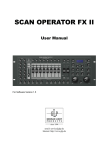
SCAN OPERATOR FX
Contents
1
2
3
View.......................................................................................................................... 7
1.1
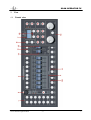
Frontal view....................................................................................................... 7
1.2
Back view........................................................................................................ 10
1.3
Install into a 19“ rack ........................................................................................ 10
DMX Basics ............................................................................................................ 11
2.1
Signal transmission........................................................................................... 11
2.2
The cabling ...................................................................................................... 11
2.3
The conversion to Light .................................................................................... 12
2.4
Adjusting how to address DMX ......................................................................... 13
Using the Scanoperator FX...................................................................................... 13
3.1
View ............................................................................................................... 13
3.2
Operation mode................................................................................................ 14
3.3
3.2.1 Play Mode............................................................................................. 14
3.2.2 Program mode....................................................................................... 14
3.2.3 Setup Mode ........................................................................................... 14
3.2.4 Easy mode............................................................................................. 14
Switching between Modes ................................................................................. 15
3.4
LCD Display informations................................................................................. 15
3.5
Activate programming ...................................................................................... 16
3.6
Programming scenes ......................................................................................... 16
3.7
3.6.1 Creating a new Scene ............................................................................. 16
3.6.2 Editing scenes........................................................................................ 18
3.6.3 Copying a scene..................................................................................... 18
3.6.4 Copying Fixture..................................................................................... 19
3.6.5 Copying complete Bank .......................................................................... 19
3.6.6 Deleting scenes...................................................................................... 20
3.6.7 Deleting banks....................................................................................... 20
Programming Chasers ....................................................................................... 20
3.7.2 Insert a bank into a chaser ..................................................................... 21
3.7.3 Change the editing position of a Chaser ................................................. 22
3.7.4 Delete a step in Chaser........................................................................... 23
3.7.5 Delete Chasers ...................................................................................... 24
2
(V1.3)
GLP German Light Products