1
Bulletin 3080IM9602R11/97
Periodically, you will need to compact the PLSystem.mdb database, especially after
having purged alarm and event logs. See Chapter 6 — Working with the SMS Database
for instructions on compacting the database.
Hardware Issues
When there are multiple PCs and devices, it’s best to plan the design of your system in
advance. In this way, you can avoid such confusion as trying to retrieve data, only to
find that the device names are duplicated or meaningless. These are some basic
hardware issues you should consider:
• Hardware Names: Because your system PCs will appear in lists throughout SMS, you
need to give them names that will be meaningful to system users. For example, it
would be more useful to name PCs by their locations (PC-Plant Mgr,
PC-Accounting) than by a number or type. The same is true of circuit monitors or
any other device that appears many times in your system.
• Logical Groups: Because you will be able to gather information by device groups,
names that tie that device to its group (for example, mains, feeders, paint line,
warehouse) will make displays and reports easier to follow.
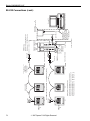
• System Schematic: To design the best system for your needs, a system schematic,
drawn in advance, will help you make the best choices and avoid later system
difficulties. For additional information about designing your system, refer to the
Power Monitoring and Control System Planning Guide (order no. 3000CT9601).
U.S. only: if you need help planning your installation, call the Engineering Services
Group at (615) 287-3400. This group provides technical help, from planning the
installation to providing a complete “turnkey” system.
Network Security Administrator Privileges
The installation program will write to the Windows NT registry provided the user who
installs the software has NT administrator rights. When the software is installed (and
if SY/LINK is installed), the SY/LINK driver becomes an automatic device driver in
the NT registry. After the program is installed, NT administrator privileges are no
longer required.
14
© 1997 Square D
All Rights Reserved