1
User manual - FLOW METER SPI-N118
i
Zeroing by [Σ ] button can be activated using „m CLr” option of “totAL” submenu.
Zeroing via total flow clearing input can be activated using „E CLr” option of “totAL”
submenu (see page 37).
Batching counter value is displayed in units defined by parameter “b unit” (L or m3), with
resolution defined by parameter “b PrEc” (max 3 digits after decimal point). If batcher counter
overflows, warning “bAt ov” is displayed alternatively with maximum counter value. Batching
counter can be zeroed using “CLrbAt” option of “bAtCH” submenu, using [Σ ] button (press
and hold by at least 2 sec.), electrically via batcher clearing input or via RS-485 interface by
writing of value 0000h to any of batcher counter result registers.
i
Zeroing by [Σ ] button can be activated using „m CLr” option of “bAtCH” submenu.
Zeroing via batcher clearing input can be activated using „E CLr” option of “bAtCH”
submenu (see page 35).
Switching between current flow rate, total flow counter and batcher counter can be
done by pressing [Σ ] button. Kind of displayed value is signalised by “Σ” LED. It lights,
while total flow is displayed. If batcher counter is displayed then “Σ” LED is pulsing.
i
Batching counter can be displayed while batcher mode only (set „SourCE”=”bAt” in
„rELAy1” submenu).
Functions of [^] and [v] buttons depend on kind of presently displayed value:
•
If instantaneous flow (flow rate) is displayed (LED marked “Σ” is off) or batcher counter
value (“Σ” LED is pulsing), user can check main threshold values and number of batches
counter (which indicates how many times batcher was started). After pressing [^] or [v]
buttons, name of the threshold (e.g. ”rELPr1”) and its value or ”bAtCnt” label and
number of batches counter will be displayed on the display in alternating mode.
If [^] or [v] will be pressed in 5 sec again, the next threshold will be displayed, else the
device comes back to the measurement mode. If a free access is enabled (see description
of ”SECu” menu), user can change the value of particular threshold pressing button
[ENTER] (see: PARAMETERS EDITION). Using [Σ ] button while number of batches
counter is displayed and confirm „CLEAr?” message by [ENTER] button causes zeroing
number of batches counter.
i
•
•
•
•
20
If particular parameter has been changed and confirmed in quick view mode, its
new value is displayed in alternating mode with parameter name by few seconds.
Confirmed changes may be checked or user can switch viewed parameter
pressing [^] or [v] button.
Number of batches counter is incremented after each start of batching process
(every first start after batcher counter zeroing).
If batcher counter value is displayed (“Σ” LED is pulsing) and counter value
exceeds 6 digits, then decimal point of the most left digit is pulsing. To view most
significant digits, it is required to decrease resolution or/and change unit to m 3.
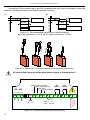
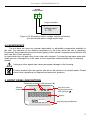
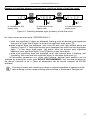
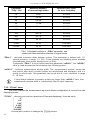
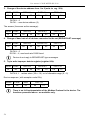
If total flow counter value is displayed ( LED marked “S” is on), and its length exceeds 6
digits, buttons [^] and [v] enable switching between more and less significant digits.
Positions of currently displayed digits are signalized by flashing decimal points (see
example below).