1
User manual - FLOW METER SPI-N118
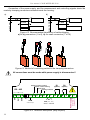
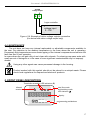
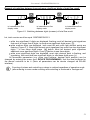
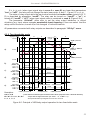
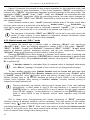
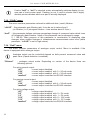
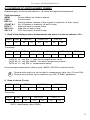
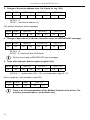
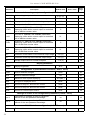
Example of switching between less and more significant digits of total flow result .
[Σ ]
to instantaneous flow
display mode
[Σ ]
to instantaneous flow
display mode
[Σ ]
to instantaneous flow
display mode
Figure 6.1. Switching between digits (screens) of total flow result.
Let, total counter result be equal 1236789876543.21:
– while less significant 6 digits are displayed, flashing most left decimal point signalizes
that result is longer than 6 digits, to show more significant digits press [^],
– while medium digits are displayed both most left and most right decimal points are
flashing (Figure 6.1). Most right decimal point signalizes than result has less significant
digits – to see these digits press [v] button. Most left decimal point signalizes
additional more significant digits. Press [^] button to see these digits.
– while most significant digits are displayed, most right decimal point is flashing, and
signalising that result has less significant digits, to see these digits press [v].
All accessible parameters (e.g. pulse input settings, decimal point position) can be
changed by entering the menu (see: DEVICE PROGRAMMING). Use the local keyboard or
the remote controller to do it. (Note: all parameters can be remote changed via RS-485
interface).
i
Counting of pulses and controlling or relays is realised regardless of operation mode
(after entering to menu mode counting and controlling is continued in “background”.
21