1
1. Introduction
This Instruction Book explains how to monitor and operate the units connected to the AE-200A/AE-50A and
AE-200E/AE-50E using a Web browser.
1-1. Terms Used in This Manual
--“Centralized Controller AE-200A/AE-200E” is referred to as “AE-200.”
--“Centralized Controller AE-50A/AE-50E” is referred to as “AE-50.”
--“Booster unit” and “Water HEX unit” are referred to as “Air To Water (PWFY) unit.”
--“Hot Water Heat Pump unit” is referred to as “HWHP (CAHV) unit.”
--Screen images used in this manual are from Windows 7 ® and Internet Explorer 9.0.
Note: Windows is a registered trademark or trademark of Microsoft Corporation in the United States and other countries.
1-2. PC Requirements
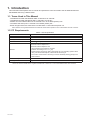
Table1-1 PC Requirements
Item
Requirement
CPU
1 GHz or faster
Memory
512 MB or more
Screen resolution
1024 x 768 or higher recommended
Browser
Microsoft ® Internet Explorer 8.0
Microsoft ® Internet Explorer 9.0
Microsoft ® Internet Explorer 10.0
**Java execution environment is required.
(Oracle ® Java Plug-in Ver. 1.7.0_51)
**Install Oracle ® Java Plug-in that is appropriate for your operating system. When
using a 64-bit Internet Explorer, install a 64-bit Java Plug-in.
**The version of the Oracle ® Java Plug-in can be verified by clicking [Java] in the
Control Panel.
On-board LAN port or LAN card
100 BASE-TX
Pointing device
e.g., mouse
Note: Microsoft is a registered trademark or trademark of Microsoft Corporation in the United States and/or other countries.
Oracle and Java are trademarks or registered trademarks of Oracle Inc. in the United States and/or other countries.
WT07140X01
2