1
3. Logging in to the Web Browser for User
(1) Enter the web page address in the address field of the Web browser as follows:
http://[IP address of each AE-200/AE-50]/index.html
Press the [Enter] key. A login screen will appear.
Note: If the IP address of the AE-200/AE-50 is [192.168.1.1], the web
page address is [http://192.168.1.1/index.html].
Note: Default IP address of AE-200 and AE-50 is [192.168.1.1].
When one or more AE-50 controllers are connected, none of
their IP addresses should overlap. The recommended IP address
ranges are as follows.
AE-200: Between [192.168.1.1] and [192.168.1.40]
AE-50: Between [192.168.1.211] and [192.168.1.249]
Note: Log in to the AE-200 or AE-50 Web browser respectively to
monitor or operate the units that are under the control of AE-200
or AE-50. The Web browser cannot be switched between the
AE-200 and the AE-50.
Note: If the login screen does not appear then take the steps below to
delete the temporary files.
<Internet Explorer>
1.Click [Tools] in the menu bar, then click [Internet options].
2.On the [General] tab, click [Delete] in the middle of the window.
3.In the [Delete Browsing History] window, click [Delete].
<Java>
1.Click [Control Panel] from the Start menu.
2.Click the [Java] icon to launch the Java Control Panel.
3.On the [General] tab, click [Settings] in the [Temporary Internet
Files] section.
4.Click [Delete Files].
5.In the [Delete Files and Applications] window, click [OK].
Note: The web page will be displayed in the same language as the operating system on the PC.
The web page can be displayed in other languages by entering the web page address as follows:
Chinese
English
French
German
Italian
Japanese
Portuguese
Russian
Spanish
http://[IP address of each AE-200/AE-50]/zh/index.html
http://[IP address of each AE-200/AE-50]/en/index.html
http://[IP address of each AE-200/AE-50]/fr/index.html
http://[IP address of each AE-200/AE-50]/de/index.html
http://[IP address of each AE-200/AE-50]/it/index.html
http://[IP address of each AE-200/AE-50]/ja/index.html
http://[IP address of each AE-200/AE-50]/pt/index.html
http://[IP address of each AE-200/AE-50]/ru/index.html
http://[IP address of each AE-200/AE-50]/es/index.html
Note: You can add the web page address to your Favorites on the login screen for easy access in the future.
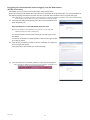
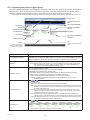
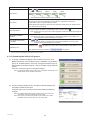
(2) Enter the user name and the password in the login screen, and click [Login]. A Condition List screen will
appear, which shows the operation conditions of groups.
WT07140X01
Note: Consult the building manager for your user name and password.
8