1
2. Setting the Operating Environment
This chapter explains how to make PC settings and Web browser settings to monitor and operate the air
conditioning units.
2-1. Setting the IP Address of the PC
Follow the instructions below to set the PC’s IP address for the Web browser to recognize the AE-200 unit.
The PC’s IP address must have the same network address as the AE-200/AE-50’s IP address.
(i.e., AE-200’s IP address: [192.168.1.1], PC’s IP address: [192.168.1.101])
When connecting an AE-200/AE-50 to an existing LAN, consult the system administrator to decide the IP
addresses.
Note: When using an AE-200/AE-50-dedicated LAN, it is recommended that the AE-200 unit be assigned an IP address
between the range [192.168.1.1] and [192.168.1.40], the AE-50 unit be assigned an IP address between the range
[192.168.1.211] and [192.168.1.249], and that the PC connected to the AE-200/AE-50 be assigned an IP address
between the range [192.168.1.101] and [192.168.1.150].
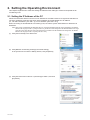
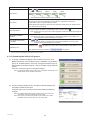
(1) Click [Control Panel] in the Start menu.
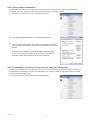
(2) Click [Network and Sharing Center]>[Local Area Setting].
In the [Local Area Connection Status] window, click [Properties].
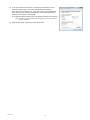
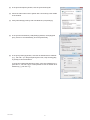
(3) Click [Internet Protocol Version 4 (TCP/IPv4)] to select it, and click
[Properties].
WT07140X01
3