1
B Using
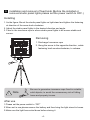
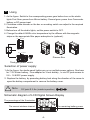
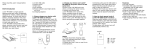
1. As the figure: Switch to the corresponding power gear before turn on the studio
lights.First Gear :power from lithium battery. Second gear: power from Camcorder
battery or DC power input
2. Clockwise rotate dimmer on the box or encoding switch can adjust to the required
illumination.
3. Before turn off the studio lights, set the power switch to OFF.
4. Change the default 5600k color temperature by the diffuser with the magnetic
stripe on the appropriate filter paper adsorption to (optional).
DC
5.8~8.4V
OFF
DC
10~16.8V
Dimmer Box
Third gear power switch
Selection of power supply
1.As the figure, the studio panel lights can run on multiple power options: One barn
for 7.2V lithium battery, One adapter for V-lock battery , or via DC jack access to
5.8 ~ 16.8VDC power supply.
2. Replace the battery by promoting battery lock along the direction of the arrow to
open the battery compartment to remove the battery cover.
Note
DC jack Φ 2.5m (inside is positive)
Schematic diagram of LCD Digital Screen Display
The percentage of the Illumination
The remaining battery power
The current wireless channel
-5-