1
1
Introduction
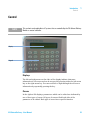
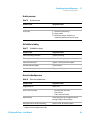
Control
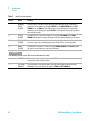
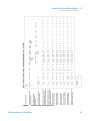
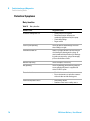
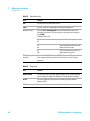
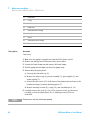
Table 1
Specific cursor functions
Cursor
Name
Function
--
NUMERIC
ENTRY
CURSOR
Used for numeric entry only. Values entered or edited while the cursor is flashing are
temporary until accepted by pressing the ENTER key, the RIGHT ARROW key, the LEFT
ARROW key, or the RUN key. If the edited value is not accepted by pressing one of the
above keys, or cancelled by pressing the CLEAR key, the parameter reverts to its previous
value after 60 seconds.
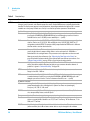
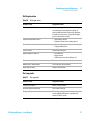
↓↑
SCROLL
CURSOR
Used when there is a preset list of choices. Pressing the UP ARROW or the DOWN
ARROW with this type of cursor is displayed scrolls up or down through the preset choices.
??
DUAL-MODE
CURSOR
Used when there is a preset list and numeric entry. Used when the value can be set either
by numeric entry or by scrolling through a preset list of choices, as described above.
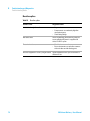
||
MENU
CURSOR
Used when the selection is a menu. Pressing the DOWN ARROW or the ENTER key with
this type of cursor displays the next level of the menu.
NOTE
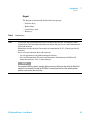
The following are not cursors, but are described here for clarity.
*
ASTERISK
Used to show cursor position (for accessing HELP) when the parameter in question is a
status indicator and cannot be edited.
←→
LEFT-RIGHT
ARROWS
These indicators are used at the right or left edge of the display to indicate that more
information can be seen by pressing either the RIGHT or LEFT ARROW key.
24
218 Solvent Delivery - User Manual