1
VIVITECH Ltd.
Corner House, Top Street, North Wheatley
Nottinghamshire, England DN22 9DB
Tel: +44 (0)1427 881277 Fax: +44 (0)1427 883018
E-mail: [email protected]
www.vivitech.co.uk
User Instruction Manual
and Tips
Version 2.15
01 November 2004
Table of Contents
1.
REVISION HISTORY .................................................................................................3
2.
INTRODUCTION ........................................................................................................3
3.
DISPENS-IT IN EVERYDAY USE..............................................................................4
3.1
An initial run-through..................................................................................................................................... 4
3.2
Dispensing an Item .......................................................................................................................................... 5
3.2.1
Scanning a barcode ....................................................................................................................................... 5
3.3
Item not found: Adding items to the database ............................................................................................. 6
3.3.1
Teaching a new barcode ............................................................................................................................... 8
3.4
Barcode Incorrect .......................................................................................................................................... 10
3.5
Updating records with extra barcodes......................................................................................................... 11
3.6
Missing or Illegible Barcodes........................................................................................................................ 11
3.7
Item not found: Name changes.................................................................................................................... 12
4.
HISTORY SEARCH .................................................................................................15
5.
NON-POPUP MODE: SHOW ITEM QUEUE............................................................18
6.
MANUFACTURERS DATABASE............................................................................19
7.
BACKING UP YOUR DATABASE...........................................................................21
VIVITECH
DISPENS-IT
Page 2 of 23
1. Revision History
Version 1.00
Version 2.00
Version 2.01
Version 2.04
Version 2.05
Version 2.06
Version 2.15
Nov 2003
Jan 2004
Feb 2004
May 2004
June 2004
July 2004
Nov 2004
Initial release
Label capturing for alternative GP systems
Batch ID entry options
Improved label capturing capabilities
Improved Edit Item facility
Manufacturers database and Backing Up
Multi-user and faster access to capture list
2. Introduction
Vivitech’s Dispens-IT software is designed to help eliminate human error in the dispensary by
making use of the barcodes that now appear on almost every item.
Quite simply, Dispens-IT intercepts and stores the details of each prescribed item as it is output
from the surgery’s prescribing software and withholds the printing of the item label until
dispensary staff have scanned the barcode of the item. If the barcode matches the item’s
description, the label is printed normally. If it does not, a warning message prompts the user to
investigate.
Introducing this simple extra step in the dispensing process typically takes only a second or two
per item, yet can save hours of time in manual cross checking. In addition, a complete historical
log of all dispensed items is maintained, including the scanned barcodes, and this history may be
easily queried and printed using familiar PC-based tools.
By interfacing only at the labels level, Dispens-IT can be used with all the popular GP clinical
data systems.
The barcode database is populated during the initial period of use within each individual surgery
and maintained as part of normal operation. There are no expensive subscriptions to database
providers and no lengthy update procedures to endure.
VIVITECH
DISPENS-IT
Page 3 of 23
3. Dispens-IT in everyday Use
3.1
An initial run-through
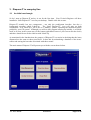
So let’s start up Dispens-IT and try it out for the first time. Your Vivitech Engineer will have
installed a “Start Dispens-IT” icon on your desktop. Double click this to start.
Dispens-IT actually has two components – not only the push-button interface, but also a
background program called LabelCap. The “Start Dispens-IT” icon will start up both
components. It is LabelCap’s job to act as a “dummy” printer, capturing the medication labels
printed by your GP system. Although you will see this program starting up initially, it will hide
itself as an icon in the system tray (at the bottom right hand corner of your screen near the clock)
and there should be no need to interact with LabelCap.
As mentioned in the Introduction, the purpose of Dispens-IT is to assist in checking that the items
dispensed are the same as those prescribed. It does this by maintaining a database of the items’
names and storing the barcodes associated with those names.
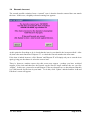
The main menu of Dispens-IT will present you with the screen shown below.
VIVITECH
DISPENS-IT
Page 4 of 23
3.2
Dispensing an Item
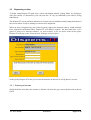
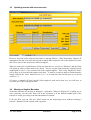
To begin using Dispens-IT right away, choose the button marked ‘Popup Mode’ by clicking it
with your mouse, or alternatively you can press the “P” key (as indicated by the letter P being
underlined).
The Dispens-IT screen will then minimize to a button on your taskbar (usually along the bottom of
the screen) where it will sit waiting for an item to be dispensed.
When an item is dispensed by your clinical system, right at the moment when it would normally
have printed the medication label, Dispens-IT will instead “capture” the label and store it in a
queue of items to be barcode scanned. As soon as there is one (or more) items in the queue,
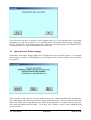
Dispens-IT will pop-up the “Process Item” dialogue screen (below).
At this point, Dispens-IT wants you to scan the barcode on the item to verify that it is correct.
3.2.1 Scanning a barcode
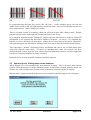
Simply hold the item under the scanner so that the red laser line goes across the barcode as shown
below.
VIVITECH
DISPENS-IT
Page 5 of 23
OK
OK
NOT OK
It is important that the bean goes across ALL the lines – in the examples above, the left and
middle scans would be OK, the right hand one would not work. Also, do not hold the barcode too
close to the scanner – about 100mm (4”) is ideal.
There is a certain “knack” to scanning, which you will soon acquire after a little practice. Simply
pass the barcode on the item under the scanner and wait for the “beep”.
In its simplest installation form, Dispens-IT requires only the barcode to be scanned. Batch ID
information is not required (but this can be enabled if required – see later!). So, assuming the
barcode is correct, the label will be printed. If there are no more items in the queue, Dispens-IT
will again disappear into the taskbar, waiting for the next item to be sent from the clinical system.
This represents a “normal” dispensing action, and should take only a few seconds longer than
using your clinical system alone. Of course, in spending those extra few seconds, you have
checked that the correct item has been selected from the dispensary shelves, and also logged the
barcode to a historical database for future reference.
Naturally, there are some possible variations from this sequence.
3.3 Item not found: Adding items to the database
When Dispens-IT is first installed, the item database is empty. This is because most clinical
systems allow the practise to define different formats of item name, strength, quantity and so on,
so there is a wide variation in the formats of the item names used from surgery to surgery.
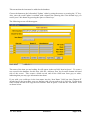
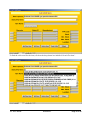
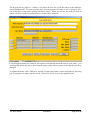
When a label is captured, and the item name is not recognised, the following screen will appear:
VIVITECH
DISPENS-IT
Page 6 of 23
This means that the item must be added to the database.
Choose the button on the left marked ‘Update’ either by using the mouse or pressing the “U” key.
Also, since the word Update is outlined with a dotted line (showing this is the default key) you
could “press” this button by pressing the Space or Enter keys.
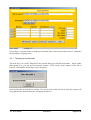
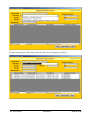
The following screen will then appear:
The name of the item you are looking for will appear in the top field ‘Item in Queue’. To create a
new record in the database for this item, click the ‘Add new item’ key from the bottom left hand
side of the screen. This creates a blank record, and all the fields turn from grey to white,
indicating that you may type information into them.
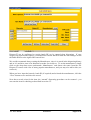
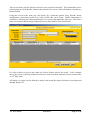
If you wish, you could type in the item name into the ‘Item Name’ field, but since Dispens-IT
already knows the item name your are dealing with, all you need to do is click the ‘Update item
name’ button and this will copy the text from the ‘Item in Queue’ field into the ‘Item name’ field
as shown below.
VIVITECH
DISPENS-IT
Page 7 of 23
Unless there is a good reason to hand-type the name, this is the best procedure since it eliminates
the possibility of typing errors.
3.3.1 Teaching a new barcode
The next step is to “teach” Dispens-IT the barcode that goes with this item name. Again, rather
than typing it in, you can use the barcode scanner. Click on the ‘Scan’ button to the left of
barcode 1 box and the following screen will appear:
Scan the barcode as described in section 3.2.1 and as soon as the barcode is read, the scanner will
beep and the data from the barcode will appear in the box:
VIVITECH
DISPENS-IT
Page 8 of 23
Dispens-IT can be configured to require batch ID’s to be entered when dispensing. If your
surgery has requested this option, you should also read the batch ID from the item and type it into
the Batch ID box to the right of the barcode box.
We would recommend always setting the Manufacturer, since it is stored in the dispensing history
and so it is useful to enter it for historical searches for recalls etc. To set the manufacturer, simply
click on the drop-down arrow underneath ‘Manufacturer’ and choose the name from the list.
Dispens-IT comes with a list of many popular manufacturers, and you may also add to this (see
section 6).
When you have input the barcode, batch ID (if required) and selected the manufacturer, click the
‘Close’ button to save and close the record.
Now that a record exists for the item, the “normal” dispensing procedure can be resumed – you
can scan the item for checking as described in section 3.2.
VIVITECH
DISPENS-IT
Page 9 of 23
3.4
Barcode Incorrect
The second possible variation from a “normal” scan is that the barcode scanned does not match
the item. In this case, a brightly coloured warning box appears:
At this point the first thing to do is check that the item in your hand is the item prescribed! After
all, that is the main function of Dispens-IT – to check the barcode matches the item name.
If the item is indeed incorrect, click ‘Rescan’ and Dispens-IT will simply ask you to scan the item
again, giving you the chance to select the correct item.
There is, however, another reason why this screen may appear – perhaps you have switched
supplier of the item and therefore the barcode on the item no longer matches the one you first
“taught”. In this case, you need to teach Dispens-IT the new barcode too, so that it knows that this
is a valid barcode for the item in your hand. To do this, click ‘Update’ and the familiar ‘Add and
Edit Item’ screen will appear:
VIVITECH
DISPENS-IT
Page 10 of 23
3.5
Updating records with extra barcodes
However, this time notice that the Item Name is already filled in. Why? Remember, Dispens-IT
managed to find the record, but the barcode scanned didn’t match the one in the database because
this is new stock of the item from a different supplier.
What we need to do is teach Dispens-IT the new barcode too, so click on ‘Edit Item’ and the fields
will again go white to allow them to be edited. There is a good chance that the original barcode
might again be used – if you switch back to the original supplier. This is why Dispens-IT allows
you to store up to four barcodes against each item. To teach a second (or third or fourth) barcode,
simply click on the ‘Scan’ button next to 2 (or 3 or 4) and teach the barcode just as you did in
section 3.3.1.
Of course, eventually all four barcode fields might be used and in that case you will have to
overwrite one of the existing barcodes.
3.6 Missing or Illegible Barcodes
Sometimes barcodes are missing or damaged – what then? Wherever Dispens-IT is asking you to
scan a barcode, you may also enter text at the keyboard, so if the human-readable part of the
barcode is visible you can type the barcode number in instead.
If all else fails, you can click the ‘Print’ button on the dispensing screen without scanning a
barcode. Dispens-IT will respond with a question:
VIVITECH
DISPENS-IT
Page 11 of 23
If the item does not have a barcode (a few products don’t!) or if the barcode label is too badly
damaged to be read, you can answer ‘No’ and Dispens-IT will print the label anyway, logging the
item as ‘No Barcode’ in the dispensing history. Obviously, the checking aspect of Dispens-IT has
been bypassed here, so this facility must be used with care.
3.7
Item not found: Name changes
Sometimes, item names change subtly due to modifications in the clinical system – for example
when drugs are renamed. If this happens, you will again see the ‘Item not found’ screen as shown
in section 3.3.
Notice that the word “Special” has been added to this item. When something like this happens,
you could simply add a new item as before, and re-teach the barcode. However, this will leave the
old record for the item in the database too, which is not desirable. It would be better to find the
old record and update the item name. To do this, click ‘Update’ to arrive at the Add/Edit Item
screen as before:
VIVITECH
DISPENS-IT
Page 12 of 23
To find the old record for the item, click on the drop-down box labelled ‘Search For item’:
VIVITECH
DISPENS-IT
Page 13 of 23
The drop-down list (called a “Combo”) will show the first few of all the names in the database,
sorted alphabetically. To zoom in on the item, you can type the first letter or two – typing in “SO”
will zoom down to the items starting with those letters. When you can see the item you wish to
update, click on it in the list and that item’s record will be selected:
Even though the name has changed, the barcode field should match the item in your hand – you
could quickly check this just to prove that the name on the clinical system is the only thing to have
changed!
To update the name, click ‘Edit Item’ and the ‘Update Item Name’ button will light up, allowing
you to bring the new name into the record. Then click ‘Close’ to save the updated name.
VIVITECH
DISPENS-IT
Page 14 of 23
4. History Search
As it performs its main function of item checking, Dispens-IT creates a comprehensive log of
items dispensed, which may be queried and filtered in a multitude of ways: for example, by
patient, manufacturer, period of time, item name etc. in any combination. A report can be created
and printed with a few clicks of the mouse to assist with product re-calls, complaints and
computer downtime periods.
To access the history, click ‘Dispensing History’ on the main menu:
Dispens-IT will start by listing the historical information of all the items dispensed. Each field
can be selected for filtering for specific information. For instance, if it is necessary to find out
which patients have been given a certain drug, check the tick-box marked ‘Drug Name’ to the top
left of the screen, this will then open this field for search. Click on the drop down arrow to the
right of this field and a list of the drugs in the history will appear as shown below.
VIVITECH
DISPENS-IT
Page 15 of 23
By then choosing one of the drugs on the list, the screen will appear as follows:
VIVITECH
DISPENS-IT
Page 16 of 23
This screen shows only the patients who have been prescribed Atenolol. This information can be
printed using the ‘Print Results’ button at the bottom of the screen if the information is needed in a
printed format.
Using this screen in the same way, the history for a particular patient, drug, barcode, batch,
manufacturer (particularly useful for a recall) or PIP code can be listed. Further information is
available by choosing the ‘Dispensed Between’ box on the right hand side at the top. This allows
dates to be entered and the drugs dispensed between those dates will be listed below.
It is also possible to specify more than one field to further narrow the search. In the example
above, the screen is showing all patients who have been prescribed Atenolol between certain times
on 19th May 2004.
All manner of reports can be defined to analyse and search the drugs which have been dispensed
through Dispens-IT.
VIVITECH
DISPENS-IT
Page 17 of 23
5. Non-popup mode: Show Item Queue
Some clinical systems do not have their own queue of items to be dispensed. Instead they would
normally print the labels as soon as items are issued in the consulting room. In this case the queue
of captured labels builds up within Dispens-IT. To show this queue, click ‘Show Item Queue’ and
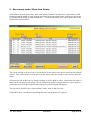
all the items will be shown:
The ‘Items waiting to be processed’ screen shows all the items in the queue sent from the clinical
system. The items can be viewed, put on hold, selected for processing or even deleted from the
queue.
By placing a tick in the box (by simply clicking on it) for hold or select, a particular selection of
items can be chosen for processing. This is particularly useful if certain items are out of stock or a
patient has arrived for prescription collection before processing has taken place.
The list can be sorted by any of the columns - name, item or date received.
Each label can be viewed prior to printing and items can be deleted if required.
VIVITECH
DISPENS-IT
Page 18 of 23
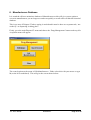
6. Manufacturers Database
It is worth the effort to maintain a database of Manufacturers as this will give you an option to
overwrite manufacturers you no longer use and react quickly to recall notices within the historical
database.
This is one area of Dispens-IT where typing is needed and it must be done as a separate task, ‘not
on the fly’ as dispensing is taking place.
Firstly, go to the main Dispens-IT menu and choose the ‘Drug Management’ button at the top left.
A separate menu will appear:
The central option on the menu is Edit Manufacturers. Either select this with your mouse or type
M (as the M is underlined). This will give the screen shown below:
VIVITECH
DISPENS-IT
Page 19 of 23
This screen is fairly self explanatory (as Dispens-IT is generally we hope). Manufacturers can be
added, deleted or changed as appropriate. When adding a new record, firstly check the
Manufacturer is not already listed. This is important for historical searches as if one manufacturer
is listed under two similar names, it could be confusing or misleading when searching for drugs
supplied by that manufacturer at a later date.
VIVITECH
DISPENS-IT
Page 20 of 23
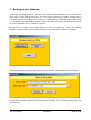
7. Backing up your database
To back up your database safely, it should really be done to an external device such as a network
drive, CD or even a USB memory stick. However if none of these are available, backing up to a
local folder is better than no back up at all. The purpose of backing up data is to ensure that if
something happens to the Dispens-IT computer, a recent back up is available and lost data is kept
to a minimum. The drug database will have taken some time to build up, and the historical data is
even more important, since it cannot be replaced.
Dispens-IT has a simple to use facility built in to assist in backing up. Choose the ‘Backup
Database’ option from the left hand side of the main menu and the screen below will appear.
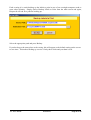
Choose Backup Item & History Data from this screen and the options shown below will appear.
Specify where the back up should be placed and press Backup. This will place the drug data in the
specified area.
VIVITECH
DISPENS-IT
Page 21 of 23
Each evening it is worth backing up the labels to print in case of an overnight computer crash or
some other calamity. Simply choose Backup Labels to Print from the main screen and again,
Dispens-It will ask for a path for backing up.
Select the appropriate path and press Backup.
If you back up to the same place each evening, this will appear as the default setting on the screen
to save time. This makes backing up a series of only three clicks and your data is safe.
VIVITECH
DISPENS-IT
Page 22 of 23
This manual has been presented to you in loose format so that future additions can be incorporated
easily.
If you would like more information about a specific feature of Dispens-IT please contact Vivitech
either by telephone 01427 881277, fax 01427 883018 or e-mail [email protected].
Each suggestion will be taken seriously and when covered will be despatched to all Dispens-IT
users.
VIVITECH
DISPENS-IT
Page 23 of 23