1
What You Can Do Using the Wireless LAN Functions
This camera’s wireless LAN functions let you perform a range of tasks
wirelessly, from sending images to Web services and other cameras to
controlling the camera remotely, simply by connecting to a Wi-Fi®
network or other device supporting this camera’s wireless LAN functions.
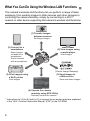
(1) Transfer images
between cameras
Exchange images
(2) Connect to a
smartphone
(6) View images using
a media player
Make images
viewable on a
smartphone
Shoot remotely
with a smartphone
View images
(Canon Image Gateway)
(5) Send images to
a Web service
(3) Print images using
a Wi-Fi printer
Save and share images
Print images
(4) Operate the camera
remotely using EOS Utility
Remotely control the camera
* Instructions for (3) to (6) and for (2) to connect via an access point are explained
in the “Wi-Fi Function Instruction Manual” (PDF) in the CD-ROM.
2