1
DIGITAL B-RAD USER MANUAL
Level
Functions
Locked
Basic
Intermediate
Advanced
Selecting a Preset
YES
YES
YES
YES
Hard Joint Mode
YES
YES
YES
YES
View Tool Information
YES
YES
YES
YES
View Last Result
YES
YES
YES
YES
View Life Cycles
YES
YES
YES
YES
View Maintenance Cycles
YES
YES
YES
YES
Change Target Torque
NO
YES
YES
YES
Save a Preset
NO
YES
YES
YES
Change Torque Units
NO
YES
YES
YES
Set the Clock
NO
NO
NO
YES
Clear Maintenance Cycles
NO
NO
NO
YES
Tool Calibration
NO
NO
NO
YES
Default Calibration
NO
NO
NO
YES
Table 3.2-1: User Access Levels and Functions
Note: The Digital B-RAD Tool System is shipped from factory in the Basic Level. After configuration, it
is recommended that the tool be locked for normal bolting operations to avoid inadvertent changes to
tool settings and calibration.
3.2.1 Unlocking Access Levels
To unlock an Access Level:
1. Press the “Centre” button.
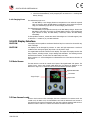
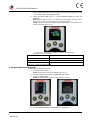
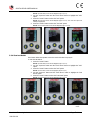
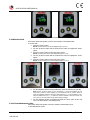
Result: The Main Menu screen will be displayed (Figure 3.2.1-1).
2.
3.
Press the “Down Arrow” button to highlight the “Unlock” option.
Press the “Centre” button.
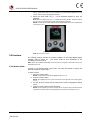
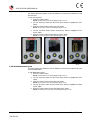
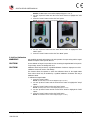
Result: The Password Input screen will be displayed (Figure 3.2.1-2).
Figure 3.2.1-1: Main Menu Screen
4.
New World Technologies Inc.
V2015.01.28
Figure 3.2.1-2: Password Input Screen
Use the navigation keypad to enter the desired password.
Page • 10