1
DIGITAL B-RAD USER MANUAL
Table 1.2.2: Battery Specifications
1.2.3 Environmental Specifications
CAUTION!
Only operate the Digital B-RAD Tool System if the following environmental storage and
operation specifications have been met.
Temperature Ranges
Operating Temperature
Charging Temperature
Storage Temperature
Humidity
Shock
Vibration
Required Operating Conditions
̊C
̊F
0 – 35
32 – 95
0 – 50
32 – 122
-25 – 70
-13 – 158
10% to 90% non-condensing
10G according to DIN IEC 68-2-6/29
1G, 10-150Hz according to DIN IEC 68-2-6/29
Non explosive atmosphere
Dry location
Table 1.2.3: Environmental Specifications
2.0 Tool System
2.1 Tool Handle
The following sections give a visual and functional description of the Tool Handle,
Navigation Keypad, RAD Li-Ion Battery Pack and RAD Battery Charger.
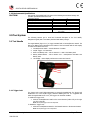
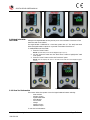
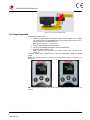
The Digital B-RAD (Figure 2.1-1) is trigger activated with a Forward/Reverse Switch. The
RAD Li-Ion Battery Pack is attached to the bottom of the Tool Handle and the LCD Display
is located on the back of the Tool.
1.
2.
3.
4.
5.
Forward/Reverse Switch – controls direction of rotation
On/Off Trigger – tool activation
RAD Li-Ion Battery Pack – refer to Section 2.3 – RAD Li-Ion Battery Pack
Battery Release Button – refer to Section 2.3.1 – Insert/Remove the RAD Li-Ion
Battery Pack
LCD Display – status display with access to menus and controls
5
1
2
4
3
Figure 2.1-1: Digital B-RAD
2.1.1 Trigger Lock
The Trigger Lock is useful while transporting or storing the Digital B-RAD. The Trigger Lock
disables the use of the On/Off Trigger, therefore disabling the tool. It is suggested that
while the Digital B-RAD is not in use, the Trigger Lock should be enabled.
To enable the Trigger Lock:
1. Slide the Forward/Reverse Switch to the Centre Position (neither fully to the right
nor fully to the left).
Note: The On/Off Trigger cannot be depressed.
To disable the Trigger Lock:
1. Slide the Forward/Reverse Switch to the Forward Position or the Reverse Position.
Note: The On/Off Trigger can be depressed.
New World Technologies Inc.
V2015.01.28
Page • 6