1
THE ELECTRIC PENCIL
OPERATOR'S MANUAL
Page 11
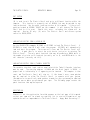
STRING SEARCH
The search function is used to Locate any string of characters that may exist in
the file from the current cursor position to the end of the file. (V) clears the
video display screen and then displays:
SEARCH STRING?
The character string desired followed by a RETURN is then typed in by the user.
The maximum string Length is 40 characters. The first occurence of the string from
the cursor position forward will appear as the top Line on the video display
screen.
The search may be continued by typing control character (C).
Each
subsequent "find" will also appear as the top line on the screen. When the end of
the file is reached or the string no longer exists in the file,
CAN NOT LOCATE "String"
will appear on the video display screen.
selected areas within a file.
This function is used to quickly locate
SEARCH and REPLACE
This function is used to locate a string and replace it with another string. The
old and new strings may be of different lengths. The way this is handled is as
follows:
SEARCH STRING? Old string/New string/12
followed by a RETURN. 12 represents the number of times that the replacement is to
occur and may be any decimal number. In the event that "Old string" only appears 8
times in the text (from the current cursor position), the screen will clear and
display:
LOCATED "Old string" 8 TIMES
The actual replacement will have been made 8 times. If "Old string" occurs 12 or
more times in the text, 12 replacements will be made and the cursor will return to
the file.
All occurences of "Old string" can be replaced by typing a number
greater than the possible occurences of "Old string" at the end of the reply to the
SEARCH STRING? question. For example:
SEARCH STRING? Mr. Jones/Mr. Smith/9999
The system will respond with:
LOCATED "Mr. Jones" 14 TIMES
Assuming "Mr. Jones" appears only 14 times in the text.