1
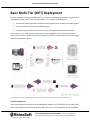
Serv-U Distributed Architecture Guide to allow outbound connections for support FTP/S active mode data connections, or may be “FTP aware” enough to open FTP data channels dynamically. The firewall between the DMZ segment and the internal network only needs to allow outbound connections from Serv-U to Serv-U Gateway over TCP port 1180. Variations: If Serv-U accesses remote storage (e.g., NAS or file shares), then Serv-U must be able to make a CIFS (Windows networking) connection to those resources. If Serv-U accesses an ODBC-compliant database for remote authentication, then Serv-U must be able to make a database-appropriate connection to that database. For example, SQL Server connections are often made over TCP port 1433. If Serv-U accesses Active Directory (“AD”) for remote authentication, then your Serv-U server must be part of the AD domain and on the same network segment. The two firewalls represented in the diagram are really often “two legs” of a single firewall controlling access between multiple segments. Serv-U Gateway and Serv-U may be deployed on different operating systems. (e.g., your Internet-facing Serv-U Gateway can be deployed on Linux even if you have deployed your Serv-U server on Windows.) Advantages: Still easy to set up. (Install Serv-U Gateway, define Serv-U Gateway, define Serv-U listeners, test, and go.) Completely satisfies MFT requirement that no data at rest exists in the DMZ. Satisfies most security policy requirements by ensuring direct connections to internal storage, internal databases, or Active Directory domain controllers are only made between computers on your trusted internal network. No CIFS, AD, or DB connections are ever made across a firewall. Disadvantages: No active redundancy means the Serv-U server and Serv-U Gateway are single points of failure. Serv-U Distributed Architecture Guide – v12.0.0.0 – Page 7 of 15 Copyright 2012 Rhino Software, Inc. (RhinoSoft.com) – All Rights Reserved