1
Chapter 4
Data Export
The automatic export of information in GeneValorization is done through the menus File, Edit
and Chart’s options.
4.1
Saving in XML
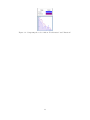
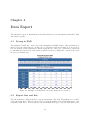
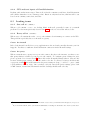
The submenu "Menu File - Save" saves the information in XML format. This information is
then read by the menu "Open". In the case of "All those fields and results" it is proposed to
save the matrix of GeneValorization. When saving the file, a file gene_valorization_v2.xsl will
be automatically saved in the same folder, it allows a browser to display the content of the saved
file in a user friendly way.
Figure 4.1: Example of an XML file saved and displayed in a browser.
4.2
Export lists and hits
The sub-menu File - Export allows to export information. The item "Everything in a csv file"
of the sub-menu "File - Export" allows you to export the matrix of GeneValorization into a file
compatible with Excel. You can also use the sub-menu Edit-Copy to copy the main filter, genes
14