1
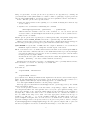
noweb file. Multiple code chunks can have the same name, the corresponding code chunks are
the concatenated when the source code is extracted. noweb has some additional mechanisms
to cross-reference code chunks (the [[...]] operator, etc.), Sweave does currently not use nor
support these features, so they are not described here.
3
Sweave files
3.1
A simple example
Sweave source files are noweb files with some additional syntax that allows some additional
control over the final output. Traditional noweb files have the extension ‘.nw’, which is also
fine for Sweave files (and fully supported by the software). Additionally, Sweave currently
recognizes files with extensions ‘.rnw’, ‘.Rnw’, ‘.snw’ and ‘.Snw’ to directly indicate a noweb file
with Sweave extensions. We will use ‘.Rnw’ throughout this document.
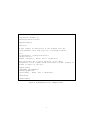
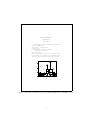
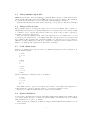
A minimal Sweave file is shown in Figure 1, which contains two code chunks embedded in a
simple LATEX document. Running
> rnwfile <- system.file("Sweave", "example-1.Rnw", package = "utils")
> Sweave(rnwfile)
Writing to file example-1.tex
Processing code chunks with options ...
1 : echo keep.source term verbatim (example-1.Rnw:13)
2 : keep.source term verbatim pdf (example-1.Rnw:23)
You can now run (pdf)latex on 'example-1.tex'
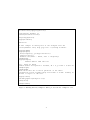
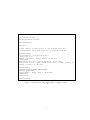
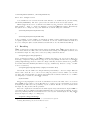
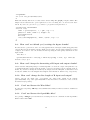
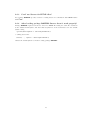
translates this into the LATEX document shown in Figures 2 and 3. The latter can also be created
directly from within R using
> tools::texi2pdf("example-1.tex")
The first difference between ‘example-1.Rnw’ and ‘example-1.tex’ is that the LATEX style
file ‘Sweave.sty’ is automatically loaded, which provides environments for typesetting R input
and output (the LATEX environments Sinput and Soutput). Otherwise, the documentation
chunks are copied without any modification from ‘example-1.Rnw’ to ‘example-1.tex’.
The real work of Sweave is done on the code chunks: The first code chunk has no name, hence
the default behavior of Sweave is used, which transfers both the R commands and their respective
output to the LATEX file, embedded in Sinput and Soutput environments, respectively.
The second code chunk shows one of the Sweave extension to the noweb syntax: Code chunk
names can be used to pass options to Sweave which control the final output.
• The chunk is marked as a figure chunk (fig=TRUE) such that Sweave creates (by default) a PDF file of the plot created by the commands in the chunk. Furthermore, a
\includegraphics{example-1-002} statement is inserted into the LATEX file (details on
the choice of file names for figures follow later in this manual).
• Option echo=FALSE indicates that the R input should not be included in the final document
(no Sinput environment).
3.2
Sweave options
Options control how code chunks and their output (text, figures) are transferred from the ‘.Rnw’
file to the ‘.tex’ file. All options have the form key=value, where value can be a number,
2