1
1.3 Software
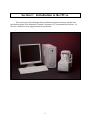
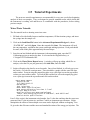
In order for the system to initialize properly, all components must be powered up in the
correct order. First, boot up the computer and log in to Windows. Once Windows has started,
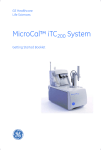
power the iTC200 by operating the switch at the rear of the unit. After several seconds, open the
iTC200 software. If the option is selected, a real-time copy of Origin will open automatically, as
well as the iTC200 control software.
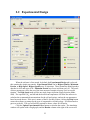
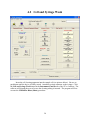
When the instrument first boots up, the line just below the menus reads “System
Initialization – Please Wait”, which is the current status of the instrument. After a few seconds,
the system will begin heating or cooling to the preset temperature. If the instrument is not
attached or not turned on, the program will open into Demo Mode, in which the user can see and
manipulate the program, but it will not attempt to control the iTC200. To the right of the status
bar, the Time Left box, during a run, will show the time left until the end of the run.
14