1
SolidFX User Manual
Version 2.1
July 2009
Copyright © 2007-2009 SolidSource BV – All rights reserved
No part of this document may be reproduced or distributed in printed or electronic form without the
explicit written permission of SolidSource.
SolidSource reserves the right to modify and update the information contained in this document at any
time without prior notification.
©SolidSource 2007-2009 www.SolidSourceIT.com
3
SolidFX User Manual
Contents
1. Structure of this Document..................................................................................................................... 10
Chapter 2: Architecture of the SolidFX Framework ................................................................................ 10
Chapter 3: Installation............................................................................................................................. 10
Chapter 4: Fact Extraction....................................................................................................................... 11
Chapter 5: Basic Analysis Tools ............................................................................................................... 11
Chapter 6: XML-based Query API ........................................................................................................... 11
Chapter 7: C++ Fact Database API........................................................................................................... 11
Chapter 8: Software Metrics ................................................................................................................... 11
Chapter 9: Data Exporters....................................................................................................................... 11
Chapter 10: Visualization Tools............................................................................................................... 12
Glossary ................................................................................................................................................... 12
Appendix A: Framework Directories ....................................................................................................... 12
Appendix B: SolidFX Performance .......................................................................................................... 12
2. Architecture of the SolidFX Framework .................................................................................................. 13
2.1. Fact extraction and the fact database ............................................................................................. 13
2.2. Using the Extracted Facts................................................................................................................. 14
2.3. Predefined analyses ......................................................................................................................... 15
Module dependency analyzer............................................................................................................. 15
Function-level analyzer ....................................................................................................................... 15
Call graph analyzer .............................................................................................................................. 15
Class inheritance analyzer................................................................................................................... 15
2.4. Visual exploration ............................................................................................................................ 16
2.5. Programmatic APIs ........................................................................................................................... 16
3. Installation .............................................................................................................................................. 17
3.1. Prerequisites .................................................................................................................................... 17
3.2. System requirements ....................................................................................................................... 17
Operating system ................................................................................................................................ 17
Processor............................................................................................................................................. 17
Memory............................................................................................................................................... 17
Disk space............................................................................................................................................ 18
Graphics card ...................................................................................................................................... 18
Development....................................................................................................................................... 18
©SolidSource 2007-2009 www.SolidSourceIT.com
4
SolidFX User Manual
3.3. Directory Structure and File Extensions........................................................................................... 18
bin directory ........................................................................................................................................ 18
profiles directory ................................................................................................................................. 18
Queries and QueryLibs directories...................................................................................................... 19
Metrics and MetricLibs directory ........................................................................................................ 19
File Extensions..................................................................................................................................... 19
Platform portability of output ............................................................................................................ 19
4. Fact Extraction ........................................................................................................................................ 20
4.1. The extractor driver ......................................................................................................................... 20
Examples: using the extractor driver .................................................................................................. 21
Using the extractor driver in makefiles............................................................................................... 21
4.2. Example code ................................................................................................................................... 22
File example.cpp ................................................................................................................................. 22
File example.h ..................................................................................................................................... 22
4.3. Using the extractor driver ................................................................................................................ 23
4.4. Quick inspection of the extraction unit ........................................................................................... 24
4.5. Using the standalone fact extractor ................................................................................................ 25
Recursive header searching (-tr I option) ........................................................................................... 28
4.6. Analyzing the code using the fact extractor .................................................................................... 28
4.7. Passing extraction parameters to the driver ................................................................................... 31
4.8. Using profiles to control the analysis............................................................................................... 31
Compiler profiles ................................................................................................................................. 32
User (project) profiles ......................................................................................................................... 32
Example compiler profile: ................................................................................................................... 33
Example user profile ........................................................................................................................... 33
Using profiles ...................................................................................................................................... 34
4.9. Using the fact linker ......................................................................................................................... 34
Linker modes ....................................................................................................................................... 35
4.10. Extraction projects ......................................................................................................................... 36
4.11. Extraction targets ........................................................................................................................... 38
Example ............................................................................................................................................... 38
4.12. Managing the size of large fact databases..................................................................................... 41
A simple example ................................................................................................................................ 41
Database compression ........................................................................................................................ 42
©SolidSource 2007-2009 www.SolidSourceIT.com
5
SolidFX User Manual
4.13. Filtering the extraction output....................................................................................................... 43
Filtering the output ............................................................................................................................. 44
Filtering unused code.......................................................................................................................... 44
Filtering unused code – details ........................................................................................................... 46
4.14. Converting a build system to an extraction system....................................................................... 47
4.15. Integrating SolidFX with a native compiler .................................................................................... 47
Microsoft Visual C++ ........................................................................................................................... 48
gcc ....................................................................................................................................................... 48
5. Basic Analysis Tools ................................................................................................................................. 49
5.1. Introduction ..................................................................................................................................... 49
Before you start .................................................................................................................................. 49
5.2. FXLog: Inspection of a fact database ............................................................................................... 50
Invocation ........................................................................................................................................... 50
Purpose ............................................................................................................................................... 50
Example ............................................................................................................................................... 50
Where to use....................................................................................................................................... 50
Options ................................................................................................................................................ 50
Remarks .............................................................................................................................................. 51
5.3. FXUses: Analysis of file dependencies ............................................................................................. 52
Invocation ........................................................................................................................................... 52
Purpose ............................................................................................................................................... 52
Example ............................................................................................................................................... 52
Where to use....................................................................................................................................... 53
Options ................................................................................................................................................ 54
Remarks .............................................................................................................................................. 54
5.4. FXMetrics: Function-level analysis ................................................................................................... 55
Invocation ........................................................................................................................................... 55
Purpose ............................................................................................................................................... 55
Example ............................................................................................................................................... 55
Where to use....................................................................................................................................... 57
Options ................................................................................................................................................ 57
Remarks .............................................................................................................................................. 57
5.5. FXCalls: Call graph analysis............................................................................................................... 58
Invocation ........................................................................................................................................... 58
©SolidSource 2007-2009 www.SolidSourceIT.com
6
SolidFX User Manual
Purpose ............................................................................................................................................... 58
5.6. FXCCheck: Analysis of C++ class declarations .................................................................................. 60
5.7. FXCalls: Extraction of function call dependencies ........................................................................... 61
6. XML API ................................................................................................................................................... 63
6.1. Introduction ..................................................................................................................................... 63
6.2. Query basics ..................................................................................................................................... 63
6.3. Applying queries – the simple way .................................................................................................. 64
6.4. Designing custom queries ................................................................................................................ 65
Query trees ......................................................................................................................................... 65
Query nodes ........................................................................................................................................ 66
Accumulators ...................................................................................................................................... 66
Selectors .............................................................................................................................................. 67
6.5. Atomic queries ................................................................................................................................. 68
Selectable query.................................................................................................................................. 69
Syntax queries ..................................................................................................................................... 69
Semantic queries................................................................................................................................. 70
Preprocessor queries .......................................................................................................................... 70
Simple queries..................................................................................................................................... 70
Name queries ...................................................................................................................................... 71
Flag queries ......................................................................................................................................... 72
Location queries .................................................................................................................................. 72
Scope query......................................................................................................................................... 72
List query ............................................................................................................................................. 72
Visitor query ........................................................................................................................................ 72
File queries .......................................................................................................................................... 73
Closure query ...................................................................................................................................... 73
6.6. Aggregate queries ............................................................................................................................ 73
6.7. Link map integration ........................................................................................................................ 74
6.8. Writing queries ................................................................................................................................ 74
6.9. Properties......................................................................................................................................... 75
Basic idea ............................................................................................................................................ 75
XML Specification ................................................................................................................................ 75
6.10. Query library .................................................................................................................................. 77
6.11. Query performance........................................................................................................................ 78
©SolidSource 2007-2009 www.SolidSourceIT.com
7
SolidFX User Manual
6.12. Query examples ............................................................................................................................. 78
Query 1: Select all syntax nodes ......................................................................................................... 79
Query 2: Select all nodes with type T ................................................................................................. 79
Query 3: Select all AST nodes whose name matches regular expression x ........................................ 79
Query 4: Select all AST nodes of type T whose name matches regular expression x ......................... 80
Query 5: Selectall functions named f with more than n parameters of type T .................................. 80
Query 6: Select all function calls ......................................................................................................... 81
Query 7: Select all direct subclasses of a given class .......................................................................... 82
Query 8: Select all classes derived from a given class ........................................................................ 82
Query 9: Select all reachable functions from a given set of functions ............................................... 83
Query 10: Select all recursive functions called from a given set of functions .................................... 83
7. Software Metrics ..................................................................................................................................... 84
7.1. Computing metrics – the simple way............................................................................................... 84
7.2. An overview of basic metrics ........................................................................................................... 84
Lines of code (LOC).............................................................................................................................. 85
Lines of comments (COM)................................................................................................................... 85
Number of statements (STAT) ............................................................................................................ 85
Number of external symbols (EXT) ..................................................................................................... 86
Number of called functions (CALL) ..................................................................................................... 86
Number of clients (NOC) ..................................................................................................................... 87
Number of interfaces (NOI) ................................................................................................................ 87
Number of members (NOM) ............................................................................................................... 87
8. Data exporters ........................................................................................................................................ 88
9. C++ API .................................................................................................................................................... 89
9.1. Introduction ..................................................................................................................................... 89
9.2. Structure of a fact database............................................................................................................. 89
Global Identifiers................................................................................................................................. 89
Selections ............................................................................................................................................ 90
9.3. Loading fact databases..................................................................................................................... 90
9.4. Visiting a fact database on disk........................................................................................................ 91
9.5. Visiting a fact dababase in memory ................................................................................................. 92
9.6. Error handling .................................................................................................................................. 93
9.7. Query interfaces............................................................................................................................... 93
9.8. Example application ......................................................................................................................... 94
©SolidSource 2007-2009 www.SolidSourceIT.com
8
SolidFX User Manual
10. Visualization Tools ................................................................................................................................ 97
10.1. Introduction ................................................................................................................................... 97
10.2. The added value of visualization.................................................................................................... 97
10.3. Visualization of structure and dependencies................................................................................. 98
Tree-based visualization ..................................................................................................................... 98
Visualization based on bundled edges layout................................................................................... 100
10.4. FX IDE: The Integrated Reverse-engineering Environment ......................................................... 101
Project view....................................................................................................................................... 102
Output view ...................................................................................................................................... 102
Selection view ................................................................................................................................... 102
Query library ..................................................................................................................................... 102
Metrics library ................................................................................................................................... 103
Selection monitor.............................................................................................................................. 103
Code view .......................................................................................................................................... 103
UML view .......................................................................................................................................... 104
Includes view..................................................................................................................................... 104
Extraction report view ...................................................................................................................... 104
Exporters library................................................................................................................................ 105
Correlated views ............................................................................................................................... 105
Glossary ..................................................................................................................................................... 106
Appendix A. Framework Directories ......................................................................................................... 118
a. Top-level structure ............................................................................................................................ 118
b. bin directory ...................................................................................................................................... 118
c. profiles directory ............................................................................................................................... 118
d. Queries directory .............................................................................................................................. 118
e. Metrics directory............................................................................................................................... 118
f. C++ API directories ............................................................................................................................. 118
Appendix B. SolidFX Performance ............................................................................................................ 119
a. Set-up ................................................................................................................................................ 119
b. Results ............................................................................................................................................... 119
wxWidgets:........................................................................................................................................ 120
Boost: ................................................................................................................................................ 120
VTK: ................................................................................................................................................... 120
c. Observations ..................................................................................................................................... 121
©SolidSource 2007-2009 www.SolidSourceIT.com
9
SolidFX User Manual
Overall speed .................................................................................................................................... 121
Methods to enhance the extraction speed....................................................................................... 121
Appendix C. Analysis Pipeline ................................................................................................................... 123
a. General structure of the pipeline...................................................................................................... 123
Step 1: Preprocessing........................................................................................................................ 124
Step 2: Parsing................................................................................................................................... 124
Step 3: Type checking ....................................................................................................................... 125
Step 4: Elaboration............................................................................................................................ 126
Step 5: Filtering ................................................................................................................................. 126
Step 6: Output generation ................................................................................................................ 127
©SolidSource 2007-2009 www.SolidSourceIT.com
10
SolidFX User Manual
1. Structure of this Document
This document describes SolidFX, a framework for fact extraction, analysis, and visualization for code
written in the C and C++ programming languages. SolidFX supports a variety of tasks in the development
and maintenance of large software systems, ranging from the actual software development to
refactoring, reverse-engineering, documentation, quality assessment and assurance, safety analysis and
standards checking. SolidFX distinguishes itself from other similar static analysis tools by a number of
features:
•
efficiently parses huge projects of millions of lines of code;
•
handles incorrect and incomplete source code;
•
handles correctly a large number of modern C/C++ dialects;
•
extracts and saves virtually all information from the source code;
•
offers several visualization tools to interactively explore the extracted information;
•
offers several interfaces to access the extracted information programmatically;
This document provides information for several types of users. First and foremost, it is a manual that
describes how end users can employ SolidFX to perform a variety of software analysis tasks by running
the different tools provided in the framework. However, SolidFX is an open framework that allows the
extension and customization of the analysis tasks via several open Application Programming Interfaces
(APIs). These range from simple and compact APIs that provide ease-of-use with a minimum of learning
and coding, to detailed APIs that provide fine-grained information to virtually every bit of the analyzed
source code. The second role of this document is to provide a detailed description of these APIs and
assist users in creating customized analyses for their specific purposes.
The structure of this document is described below. During the reading of this document, we recommend
consulting 0 for a description of the terms and definitions used throughout the presentation.
Chapter 2: Architecture of the SolidFX Framework
This chapter briefly describes the high-level architecture of the SolidFX framework. The purpose and
functions of the different components of the framework are outlined, as well as the functional
interactions between these components. This quick overview is intended to serve as a guide for users to
locate the desired functionality within the SolidFX framework, and determine which components are
suitable for their desired tasks, and what to read further.
Chapter 3: Installation
This chapter describes the installation of the SolidFX framework. The information provided here should
be sufficient for end users of the framework to get started using the SolidFX tools to perform typical
analysis tasks. However, the framework components provide fine-grained configuration options that is
useful when customizing them for specific tasks. Detailed information on the fine-grained configuration
of the framework components is provided in further chapters of this document.
©SolidSource 2007-2009 www.SolidSourceIT.com
11
SolidFX User Manual
Chapter 4: Fact Extraction
This chapter describes the first step in static analysis: extracting the information, or facts, from the
source code. This chapter describes all that users need to set up and run SolidFX to extract facts from
their source code. Several extraction scenarios are detailed, ranging from fully automated to fully
customizable. This chapter discusses the choices that users can make when opting for one scenario in
favor of another one. After reading this chapter, users should be able to run the extraction and create a
so-called fact database, the central component of all static analyses in the SolidFX framework.
Chapter 5: Basic Analysis Tools
After the fact extraction is performed and a fact database is created, several analyses can be run using
the SolidFX tools. This chapter describes a number of basic analysis tools. These tools are simple to use
and need virtually no configuration. The analyses covered by these tools include dependency analyses,
function call analyses, structural metric analyses, and C++ class information analyses. Besides these
simple tools, SolidFX also offers two APIs that allow users to fully customize their analysis and create
their own analysis tools. These APIs are described in the next two chapters.
Chapter 6: XML-based Query API
All information extracted by the SolidFX framework from the source code, or produced by further
analyses, is stored in a fact database. The various framework tools access this database automatically to
read, or update, this information. However, SolidFX also provides several programmatic APIs that enable
users to access every information element in the fact database. These APIs are useful for users who
intend to design their own customized analyses. In this chapter, the simpler query API, based on a query
language written in XML, is presented.
Chapter 7: C++ Fact Database API
Besides the XML-based query API mentioned above, the SolidFX framework also provides a finer-grained
API written in C++ for accessing the fact database. The C++ API offers full control over the querying
process, and access to all types of information stored in the fact database, including syntax, semantic
(type-related), preprocessor directives, code formatting, and code metrics. While more complex than
the XML-based query API, the C++ API allows full freedom to users to design their own custom analyses.
Such analyses based on the C++ API can be embedded into standalone tools of the user’s choice, such as
command-line, GUI-based, or web-based. This effectively extends the range of applications of SolidFX to
any usage scenario where static C/C++ analysis is of interest.
Chapter 8: Software Metrics
SolidFX is able to compute a number of well-known structural metrics used in static C/C++ analysis, such
as: lines of code, lines of comment code, fan-in and fan-out, cohesion, coupling, and complexity. Besides
these, SolidFX can also compute any metric of the form “number of X”, where X is any structure in the C
and C++ languages, as well as some more advanced safety and portability metrics. This chapter gives an
overview of how to use the SolidFX framework to compute such metrics and how to define custom
metrics.
Chapter 9: Data Exporters
SolidFX can export various parts of its fact database to files in various data interchange formats, such as
XMI, GraphViz, SQL, Tulip, and plain text. These files can then be used by compatible third-party
software applications, thereby making the integration of SolidFX in existing analysis pipelines easy. This
chapter describes how to use SolidFX to export data to files in third-party formats, and explains how to
develop custom exporters.
©SolidSource 2007-2009 www.SolidSourceIT.com
12
SolidFX User Manual
Chapter 10: Visualization Tools
Besides the actual fact extraction and analysis, SolidFX comes with several visualization tools. These
tools enable users to interactively browse, inspect, and query their fact dabatases in various ways.
Sample tools include visualizations of software structure and dependencies, and visualization of
software metrics. Apart from these standalone tools, SolidFX provides the FX IRE, an integrated reverseengineering environment that offers to end-users in reverse engineering and static analysis the same
look-and-feel and ease-of-use that traditional IDEs offer for software development.
Glossary
This appendix describes the most frequently used terms throughout this manual.
Appendix A: Framework Directories
This appendix describes the directory structure of the SolidFX framework and explains the functionality
located in the main framework directories.
Appendix B: SolidFX Performance
This appendix presents several recommendations for optimizing the performance, and minimizing the
memory and disk space requirements of SolidFX. Additionally, performance figures are presented for the
analysis of a number of large open-source C and C++ projects.
©SolidSource 2007-2009 www.SolidSourceIT.com
13
SolidFX User Manual
2. Architecture of the SolidFX Framework
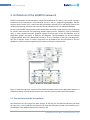
SolidFX is a framework for fact extraction, analysis and visualization of C and C++ source code. The main
component of this framework is a fact extractor for the C and C++ programming languages. The fact
extractor parses several C/C++ source code files (collectively referred to as a code base), performs the
needed preprocessing, and saves raw static source code information into a so-called fact database.
All tools in the SolidFX framework access this fact database to provide custom analyses, such as querying
for specific code constructs and computing software quality metrics. Moreover, several visualization
tools, or views, provide interactive graphical displays of various parts of the fact database, such as
dependency graphs, call graphs, or UML-like class diagrams. The fact database can also be accessed
programmatically, either via a XML-based interface or via a C++ interface, so that users can design their
own set of analyses. Finally, a number of exporters are provided to save the information in the fact
database in various formats compatible with a number of third-party software tools.
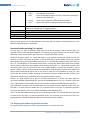
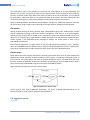
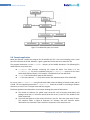
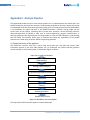
Figure 1: Architecture of the SolidFX framework
Figure 1 shows the high-level structure of the SolidFX framework and how the data flows between its
components during a typical analysis session. Such a session typically contains the following steps.
2.1. Fact extraction and the fact database
Fact extraction is the first step of any static analysis. In this step, the so-called fact extractor tool reads
the input C/C++ source code files and extracts and saves raw information parsed from these files into a
fact database. Fact database files have the extension .db.
©SolidSource 2007-2009 www.SolidSourceIT.com
14
SolidFX User Manual
A fact database contains the following types of information
•
several extraction units that contain the extracted facts from each translation unit (source file)
of the input code. Extraction units have the extension .fxc.
•
a link map, that describes relations between extern-linkage declarations and definitions, much
like a real linker.
•
statistics and warning and error messages from the extraction process
•
selections that store the results of queries on the database facts
The SolidFX extractor can be used directly from the command line, embedded in scripts or makefiles, or
via a graphical user interface. Also, the several elements of a fact database can be generated or updated
separately. This offers the flexibility to the user of performing a complex analysis scenario in several
steps, if so desired.
Most analysis operations such as searching for code patterns and metrics computation are available
both on individual extraction units or an entire fact database. Hence, in the following, we shall use the
term ‘fact database’ to refer interchangeably to both types of data. When needed to refer to one of the
two types of data (fact database or extraction unit) specifically, the extension name for that file will be
used, that is .db for fact databases and .fxc for extraction units.
2.2. Using the Extracted Facts
After the fact extraction is completed for a translation unit (source file), an extraction unit is available.
This file contains so-called raw information, or the basic facts that can be directly extracted from the
source code. These facts include
•
syntax information, such as the structuring of the code into classes, functions, statements, and
identifiers;
•
semantic information, that describes the types of code structures such as variables, and links
the used variables to their actual definitions in the code;
•
preprocessor information, that describes all the preprocessor directives present in the input
code, such as #define, #include, #ifdef, and #line statements (among others).
•
location information, that describes the position in the source code (file, line, column) of each
construct. Most syntax and preprocessor facts have location information. As a rule, semantic
information lacks locations, since a semantic construct is not linked to a unique location in the
source code.
The fact database can be accessed by a query engine and metric engine to select, or query, specific code
constructs, or compute source-code quality metrics. The query and metric engine is accessible either via
a high-level interface written in XML, or via a detailed, fine-grained interface written in C++. The fact
database is also directly accessed by several tools provided with the SolidFX framework, such as a
number of software visualization tools. These tools provide both an interactive display and exploration
of the information stored in the fact database, but also allow users to save additional information in the
database, such as the results of specific analyses they wish to perform.
©SolidSource 2007-2009 www.SolidSourceIT.com
15
SolidFX User Manual
2.3. Predefined analyses
SolidFX packages a number of predefined static analyses as standalone, easy-to-use tools. These tools
can be directly used to ask specific questions on the fact database. Since their usage is highly
automated, these tools can also be embedded in automated code analysis scripts which are executed
periodically on a given code base. The tools output their results either as plain text, HTML, XML, or other
types of highly structured output.
Examples of SolidFX tools that provide predefined analyses include the following:
Module dependency analyzer
This tool outputs all dependencies of each source file in a code base on other files. The dependencies
reported include: implemented interfaces (functions) and used interfaces (functions, types, enums,
preprocessor symbols, constants, and external variables). For each interface, detailed information on
the actual object implemented or used is provided, as well as the location the object is declared or
defined. The module dependency analyzer is an effective tool to extract all inter-file dependencies,
useful in the refactoring and architecture recovery phases of large software projects.
The module dependency analyzer is described in Section 5.2.
Function-level analyzer
This tool reports several useful types of information for each defined function in each source file. The
reported information includes a number of structural software metrics (lines of code, complexity, lines
of comments, fan-in, fan-out, coupling, number of local variables, parameters, used global variables, and
function calls). The function-level analyzer can also report the exact signatures and locations of all the
symbols used by a function. This tool is useful when one wants to determine all code dependencies at
function level for finer-grained refactoring and documentation purposes.
The function-level analyzer is described in Section 0.
Call graph analyzer
The call graph analyzer extracts a static call graph from a given set of source code files. The nodes of the
graph are function definitions, and the edges indicate call relations. Several options control the level of
detail and type of calls extracted, such as: weigh each edge with the number of call locations to the
same function; extract call attributes (virtual call, call via pointer, static call, call to another file, inline
call, call to a standard library function, and more); extract implicit calls added by the compiler such as
baseclass, default and copy constructor calls, conversion operator calls, and destructor calls. Several
options are also offered to resolve virtual and call-by-pointer calls to the actual function definitions.
The extracted interprocedural call graph can be saved in various output formats. The resulting data can
be visualized with SolidFX tools or third-party visualization tools.
The call graph analyzer is described in Section 5.5.
Class inheritance analyzer
The class inheritance analyzer extracts a class inheritance graph from a given set of source code files.
The nodes of the graph are class declarations, the edges indicate inheritance. Several options control the
level of detail and type of inheritance relations extracted, such as: consider inheritance from standard
library and/or template classes; and save inheritance attributes (public, private, protected, virtual).
©SolidSource 2007-2009 www.SolidSourceIT.com
16
SolidFX User Manual
The extracted class inheritance graph can be saved in various output formats. The resulting data can be
visualized with SolidFX tools or third-party visualization tools.
The class analyzer is described in Section 5.6.
2.4. Visual exploration
The various visualization tools provided in the SolidFX framework can be used to explore the fact
database produced by the extractor from a given source code base. These visualizations show various
aspects of the code, such as structure (call and dependency graphs, UML-like class diagrams), metric
tables computed on various levels-of-detail (from whole files, classes, functions, up to individual code
statements), and the actual code text.
Some visualizations combine several of these aspects together using multiple correlated views, for
example showing code quality metrics atop of the source code text, or showing the results of queries
atop of the code text. This usage is typical in situations where one wants to examine smaller parts of a
fact database in detail and/or when the questions of interest are not all known in advance, but are
determined during the exploration itself.
2.5. Programmatic APIs
The SolidFX framework provides also several programmatic APIs that allow full access to all facts stored
in a fact database. These APIs provide different flavors of querying a fact database. For example, one can
iterate over all code constructs of a given kind, such as all function declarations, global variables, types,
or #define directives; or visit a given syntactic structure (such as a function body or class declaration)
and perform visiting actions depending on the specific type of visited construct. Simple queries can also
be combined into more complex queries, such as “find all virtual functions having three parameters and
returning a type derived from a given type T”.
The programmatic fact database API is mainly useful for developers who wish to extend the SolidFX
framework by designing their own custom analyses. The programmatic API comes in two flavors: a XMLbased query API, which allows specifying code queries in a simple XML-based language; and a C++ API,
which allows full access to all information in the fact database. The C++ API can be called from user
code, which effectively allows one to build any type of custom analysis tool and/or integrate the SolidFX
functionality with third-party tools.
©SolidSource 2007-2009 www.SolidSourceIT.com
17
SolidFX User Manual
3. Installation
This chapter describes the installation process of the SolidFX framework on a client machine. The
requirements of the client machine are detailed, as well as all configuration steps needed to get the
various components of the SolidFX framework operational.
3.1. Prerequisites
We assume that the user has the binary redistributable of SolidFX. Depending on the actual version
shipped, this can be either an archive (zip file) or an executable installer. If an executable installer is
provided, follow the on-screen guidelines proposed by the installer. If an archive file is provided, unzip
this archive at the desired location on the client machine.
The location for installation can be, in principle, any valid location in the local file system where the
installing user has write rights for. However, it is recommended to install SolidFX on a path that does not
contain spaces, e.g. C:\SolidFX on Windows-based systems.
The system components (extractor, visualization and analysis tools, etc) should be available right away
after the installation completes. All the executable tools are located in the bin/ directory within the
installation path.
Note: As the SolidFX framework evolves, new tools are added to it. Also, the SolidFX framework is
shipped with custom-made tools following the needs of specific customers. This chapter describes the
installation of the main tools, or components, of the framework. If the installation information of a
particular tool present in your distribution of SolidFX is not present here, please examine the specific
documentation provided separately with your distribution.
3.2. System requirements
Several requirements are placed on the client machine where SolidFX is to be installed, as follows.
Operating system
SolidFX is currently supported on several operating systems: Windows 2000, XP, and Vista (32-bit); Linux
(several versions); Cygwin; Solaris; and Mac OS X 10.4 or higher. If you require a distribution of SolidFX
for a different platform, please contact SolidSource for details.
Processor
SolidFX requires a 32-bit processor architecture. For optimal performance, we recommend a recent
high-performance processor of 2GHz or more. The additional parallelization possibilities offered by
multiple core machines are not yet used, but will be considered in the near future.
Memory
Approximately 1 GB of RAM is needed for smooth operation. 2 GB or more are recommended for
optimal performance. Higher amounts of memory are likely to improve performance in the analysis
phase for large code bases. The performance in the fact extraction phase is not influenced by the
availability of additional memory atop of the 1 GB recommended.
©SolidSource 2007-2009 www.SolidSourceIT.com
18
SolidFX User Manual
Disk space
SolidFX requires approximately 100 MB of free disk space to be installed and run in a typical
configuration. Note that significant additional free disk space is needed when analyzing large projects,
due to the need of saving the fact database. For example, analyzing the Mozilla code base requires
approximately 5 GB of free space to save the entire fact database. Note that, depending on the actual
configuration of the extraction process, smaller amounts of required disk space may be achieved.
Graphics card
Except for the visualization tools, the SolidFX framework runs in command-line mode, which does not
require the presence of a high-end graphics card. However, the visualization tools included in the
framework use a number of advanced graphics features for displaying and browsing the extracted facts.
For this, a graphics card is required that supports OpenGL in true-color (32-bit color) mode and supports
alpha blending.
Development
As already noted, SolidFX offers a C++ API to enable developers to construct their own custom analyses.
For this, developers should have access to a C++ compiler that supports both the SolidFX C++ API and
the precompiled binary libraries that implement this API.
The SolidFX C++ API is provided for several compilers: Visual C++ 8.0 (2005 edition), gcc 3.4.4 or higher
(Linux, Cygwin, and Mac OS X 10.4 or higher - Intel architecture), and Solaris, all for the 32-bit variants.
Apart from the SolidFX libraries and the required compiler, several third-party libraries are also needed.
Precompiled versions of these libraries can be provided by SolidSource on demand for all the abovementioned platforms.
3.3. Directory Structure and File Extensions
The following briefly describes the directory structure of the SolidFX framework installation. Although
understanding this structure is not mandatory for the typical usage of the SolidFX tools, this information
can be useful in several situations, such as stripping down the installation or tracking down installation
problems. Moreover, understanding the SolidFX directory structure is needed when developing new
tools for the framework, for example using the XML API (Chapter 6) or C++ API (Chapter 7).
bin directory
The bin/ directory contains all the tool executables of the SolidFX framework. These tools can be called
from any location. It is however important that the relative position of the bin/ and profiles/ directory to
stay the same as in the installation, since the tools require to access configuration data in the profiles/
directory.
profiles directory
The profiles/ directory, located within the bin/ directory, contains the so-called extraction profiles.
These are predefined settings that the extractor can use to analyze code bases create for specific
compilers, such as Visual C++ or gcc. The profiles/ directory is needed only when one wishes to used the
©SolidSource 2007-2009 www.SolidSourceIT.com
19
SolidFX User Manual
predefined profiles. This is mainly the case when the analysis is done on a platform where the target
compiler used to build the analyzed code base is missing.
Queries and QueryLibs directories
The Queries and QueryLibs directories, located within the bin/ directory, contain the XML-based queries
and query libraries provided by default with the framework. These directories are accessed by most
analysis and some of the visualization tools, but are not needed by the fact extractor.
Metrics and MetricLibs directory
The Metrics and MetricLibs directories, located within the bin/ directory, contain the XML-based metrics
and metric libraries provided by default with the framework. These directories are accessed by most
analysis tools, but are not needed by the fact extractor.
File Extensions
The SolidFX framework uses and recognizes several file extensions as having particular meaning for the
file type. These extensions are as follows:
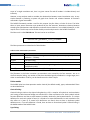
C, cxx, cpp, cc C++ source code file (usual extensions recognized by C++ compilers)
c
C source code file (usual extension recognized by C compilers)
h, hpp
C, respectively C++ headers (usual extensions recognized by C/C++ compilers)
fxc
binary extraction unit containing extracted facts from a unit (C/C++ source file)
query
query specification (XML-based)
metric
metric specification (XML-based)
linkmap
binary link map file
db
fact database file containing information for an entire software analysis project
exe
executable tool (this extension is used in SolidFX for all OS versions, not just Windows)
Platform portability of output
The various types of output files generated by the SolidFX framework, such as extraction units, link
maps, fact databases, and the various XML-based listed above, are all platform-independent. Hence, it is
possible for example to create a fact database on the Mac OS X platform and analyze it further on a
Windows platform. The only current limitation is that portability is only available within the same
architecture (endianness).
For a more detailed description of the actual files located in the SolidFX framework directories, including
the C++ API, see Appendix A.
©SolidSource 2007-2009 www.SolidSourceIT.com
20
SolidFX User Manual
4. Fact Extraction
Fact extraction is the process that converts raw source code to a fact database. This is the first, and most
important, operation that needs to be performed to obtain the facts that will be used later on by any
static analysis. Performing a well-configured extraction ensures the availability of high-quality, complete
data that are required for a good, detailed static analysis.
There are two main strategies to perform a fact extraction: using the extractor driver or using the fact
extractor itself. If your SolidFX distribution comes with an extractor driver, this is most likely the fastest,
easiest, and simplest way to do the fact extraction, if the target code is compilable for a gcc or gcc-like
system. Using the extractor driver is described next in Section4.1. In contrast, using the fact extractor
offers full flexibility to configure the extraction process, but requires more work. Using the fact extractor
is described in Section 4.5.
In many cases, code bases are built using sophisticated build systems, such as makefiles or Visual Studio
projects. Performing the fact extraction for such an entire project can be a challenging task. Section 4.9
discusses several tools offered by the SolidFX framework to assist with this process.
4.1. The extractor driver
The extractor driver is a tool that highly automates the fact extraction process. The basic idea is simple:
the extractor driver emulates the behavior and command-line options of a native compiler, but
produces extraction units instead of executable code. Hence, users can follow precisely the same build
process to create a fact database as they do to build their executable.
Since there exist different C/C++ compilers, each with their own options and slightly different behavior,
there should exist different extractor drivers. So far, the SolidFX framework contains one extractor
driver, fxgcc. This driver emulates the gcc/g++ compiler system. fxgcc will be described next in this
section and referred to briefly as the ‘driver’, while the gcc/g++ compiler system will be referred to as
the ‘target compiler’. For users whose code bases are typically built with a different compiler, see
Section 4.94.10 on how to convert a build process to a fact extraction process.
The driver accepts most of the command-line options of the target compiler. The simplest way to find
out the supported options is to run fxgcc –help, just as for the target compiler. A sample output of this
command is displayed below
Usage: fxgcc [options] file...
Options:
-fxc <option>
Pass <option> to extractor
-fxl <option>
Pass <option> to linker
--help
Display this information
-std=<standard>
Assume that the input sources are for <standard>
-c
Extract facts, but do not link
-o <file>
Place the output into <file>
-x <language>
Specify the language of the following input files
Permissible languages include: c c++ none
'none' guesses language from file's extension
-I<path>
Pass include search <path> to preprocessor
©SolidSource 2007-2009 www.SolidSourceIT.com
21
SolidFX User Manual
-D<define>
-U<undef>
-include<file>
Pass symbol definition <define> to preprocessor
Pass symbol undefinition <undef> to preprocessor
Force-include <file> before processing the input
For all options except those prefixed by -fxc and -fxl, see gcc and cpp
As shown above, the driver supports the well-known –D, -I, -U, -std, -o –x, and –include of the target
compiler (gcc). These options have precisely the same meaning, for which we refer to the gcc
documentation.
All additional options added to the driver, as compared to the target compiler, are prefixed by –fxc or
–fxl. These prefixes indicate that a SolidFX specific option follows. Options prefixed by –fxc are passed to
the fact extractor itself, which described further in Section 4.5). Options prefixed by –fxl are passed to
the fact linker, which is described further in Section 4.9.
Examples: using the extractor driver
The following shows some examples of using the extractor driver. Since the purpose of this section is to
illustrate the driver rather than the fact extractor, we use in all examples here a single extractor option,
-fxc alldata, which instructs the extractor to save all the extracted data. For a detailed explanation of all
the extractor options, see Section 4.5.
fxgcc –c input.cc –Iincludes –DNDEBUG –fxc alldata
Runs the fact extraction on the input file input.cc, adding includes/ to the header search path, and
defining the macro NDEBUG. The output will be put by default into the fact database file input.cc.fxc.
fxgcc –o output.fxc input.cc –Iincludes –DNDEBUG
Runs the fact extraction on the same input file and with the same flags, but saves the output in the file
output.fxc.
fxgcc –o output.linkmap input1.cc input2.cc input3.cc
Runs the fact extraction on all the input files input1.cc… input3.cc. Next, runs the link map construction
on the resulting fact database files and saves the resulting link map as output.linkmap
Using the extractor driver in makefiles
Many real-world code bases have complex build procedures. Frequently, these procedures are
expressed via makefiles. Some makefiles contain much more than the invocation of the compiler, for
example file tests, moves, renames, running conditional scripts, and so on. When we are interested to
perform a fact extraction process in such cases, it is desirable to replicate the makefile operation, but
substitute the fact extractor for the compiler and/or linker call.
This can be achieved very easily for systems which use a compiler for which there is an equivalent
SolidFX driver (such as gcc). To replace the build process by a fact extraction process, simply run the
makefile substituting the compiler for the extractor driver. For example
©SolidSource 2007-2009 www.SolidSourceIT.com
22
SolidFX User Manual
make –f my_makefile “CC=fxgcc”
will run my_makefile using fxgcc, the extractor driver, instead of whatever compiler was used by default.
Of course, use this construct with care. Makefiles may rely upon running other tools on the executable
output (object files) of compilers, such as archivers, symbol loaders, or even run the generated
executables themselves as part of the make process. Such makefiles may need manual editing to
customize them for fact extraction. Alternatively, other techniques can be used such as creating an
independent extraction project, as described in the next section.
4.2. Example code
We now give a complete example of how to use the extractor driver. Consider the following simple
source code example, stored in a file called example.cpp, which includes a user header example.h and
some system headers. The example is kept very simple on purpose for the sake of illustration, and
includes various constructs such as system and user headers, function calls, local and global variables.
File example.cpp
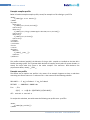
#include
#include
#include
#include
<stdio.h>
<stdlib.h>
“example.h”
“missing.h”
int num_args;
int main(int argc, char** argv)
{
num_args = argc-1;
if (!num_args) exit(1);
printf(“Sum: %d\n”,add(argv+1));
return 0;
}
int add(char** argv)
{
int sum = 0;
for(int i=0;i<num_args;i++)
sum += ATOI(argv[i]) + undefined;
return sum;
}
File example.h
#ifndef EXAMPLE_H
#define EXAMPLE_H
int add(char** arguments);
#endif
The above program computes the sum of the numbers passed as command-line arguments, displays the
sum, and returns it. It uses two system headers: stdio.h and stdlib.h for importing the definitions
©SolidSource 2007-2009 www.SolidSourceIT.com
23
SolidFX User Manual
of the C standard library functions printf, atoi, and exit. It also declares one of its functions, add,
and one macro, ATOI, in the user header example.h. Finally, the code contains a reference to a
variable undefined, which is actually not defined in the code, and attempts to include a
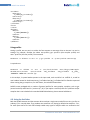
In all the analysis examples below, we assume that the SolidFX tools are on the operating system’s
search path. Also, we shall use forward slash path separators (‘/’). Depending on your actual operating
system conventions (e.g. Windows), backward slashes (‘\’) may need to be used.
4.3. Using the extractor driver
Running the extractor driver on the above example is very simple:
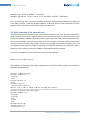
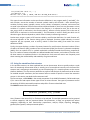
fxgcc.exe –c example.cpp –fxc alldata
This instructs the extractor driver to analyze the file example.cpp and save all data (preprocessor,
syntax, semantic) in a extraction unit called example.cpp.fxc. Since the extractor driver is configured
to use the underlying native compiler on the target platform, in this case gcc, it will correctly find the
system includes referenced in the code, stdio.h and stdlib.h. The extractor produces the following
report (the exact messages may slightly differ depending on your actual SolidFX framework version):
Processing file: example.cpp
preprocessed input size:
filtered lines:
parse errors:
Type check errors:
Type check warnings:
Total type check errors:
Total type check warnings:
Type resolution errors:
Missing includes:
17403 bytes
0 of 0
0
1 (spanning 0 lines, so 100% parsed correctly)
0
1
0
0 of 240
1 of 29 includes (3%)
This report gives a quick overview of what happened during the analysis: The total size of the
preprocessed input, including system headers, is 17403 bytes. There are no parse errors, meaning that
the input code is syntactically correct C/C++, so all syntax information saved in the fact database is
correct and complete, usable for further analyses. In total, there are 29 header files included directly or
indirectly by the code. Most of these headers come actually from the headers indirectly included by the
system headers stdio.h and stdlib.h. There is, however, one type check error, and one missing
include.
If we are interested to get more detail in the errors, we can run the extractor driver with the –fxc verr
option, which will output these errors:
fxgcc.exe –c example.cpp –fxc alldata –fxc verr
We now see two additional messages displayed:
©SolidSource 2007-2009 www.SolidSourceIT.com
24
SolidFX User Manual
example.cpp: Missing header: missing.h
example.cpp:20:29: error: there is no variable called `undefined'
This is not surprising: there is one missing header missing.h and the variable undefined, referenced
in the add() function, is nowhere declared. However, as we shall see next, such situations do not pose
problems for the analyses that the SolidFX framework is able to do.
4.4. Quick inspection of the extraction unit
To inspect the generated extraction unit, several tools and APIs can be used. These are described in
detail in further sections of this manual. However, for illustration purposes, we shall use here one such
simple tool: FXMetrics. FXMetrics generates another simple report that shows several simple metrics for
each function defined in the user source code, such as the number of external symbols that function
uses, the number of function calls it makes, its size (in lines of code), the number of comment lines, and
its complexity. These values are useful for assessing the complexity and quality of a code base, and are
frequently met in refactoring scenarios. FXMetrics is described in detail in Section 0.
Let us now run FXMetrics to show information on the function definitions:
FXMetrics.exe example.cpp.fxc
This produces the following report (again, depending on your actual SolidFX version, the information
displayed may slightly vary):
Function add(char**argv)
External symbols (2)
num_args
atoi
External macros (1)
ATOI
Function calls (1)
int atoi(char const *v)
Metrics: LOC 7, MVC 2, COM 0, FAN-IN 2 PP-FAN_IN 1 CALLS 1
============================================================================
Function main(int argc,char**argv)
External symbols (5)
num_args
num_args
exit
printf
add
External macros (0)
Function calls (3)
void exit(int v)
©SolidSource 2007-2009 www.SolidSourceIT.com
25
SolidFX User Manual
int printf(char const *v, ...)
int add(char **v)
Metrics: LOC 7, MVC 3, COM 0, FAN-IN 5 PP-FAN_IN 0 CALLS 3
============================================================================
This report shows information on the two function definitions in our program, main() and add(). For
each function, we see the number of external symbols used by that function – these include types,
variables, function names, typedefs, enums, structs, classes, namespaces, constants, and macros that
are used in the definition of that function and are declared outside it, that is are not parameters or local
variables. If a symbol is used several times in the function, it is reported as such, like in the case of
num_args, which is used twice in the function main(). Macros are also reported, like in the case of
ATOI which is used once in the function add(). This information is useful in finding out which are all
data that a given function depends on, which comes in handy in refactoring scenarios.
Furthermore, we get a report of all functions called by each function definition. For each function call,
the actual signature of the function being called is displayed. Functions called indirectly via macro
expansion are also reported, such as atoi() which is called from add() from within the macro
definition of ATOI.
Finally, the report displays a number of structural metrics for each function: the actual number of lines
of code in the function (LOC), number of lines of comments (COM), the function’s cyclomatic complexity
(MVG), fan-in or number of C/C++ symbols used which are defined outside that function, preprocessor
fan-in or number of macros used which are defined outside that function, and number of function calls.
All these metrics are explained further in this document. Such structural metrics are frequently used
when assessing the maintainability and testability of a given code base.
4.5. Using the standalone fact extractor
In the previous sections, we have explained how to use the extractor driver to quickly analyze a code
base. As mentioned, the extractor driver is actually just a front-end that internally runs the actual fact
extractor tool, configuring it automatically to use the underlying C/C++ compiler present on the current
platform. However, in many cases we would like to perform code analysis on platforms that do not have
an installed compiler. Moreover, the fact extractor offers a wealth of options to control the extraction
process. In this section, we detail the fact extractor itself.
The fact extractor, called FXCXX, is the central component of the SolidFX framework. FXCXX reads input
C/C++ source files and output various types of facts in various formats. Two types of parameters control
the working of FXCXX: command-line options and profiles. These are described next.
The FXCXX command line has the format:
FXCXX.exe [parameter_list] filename
Here, filename is the name of C/C++ file that is to be analyzed. The available parameters can be grouped
in several categories, and are presented below. The parameters, or flags, are grouped into several
categories, depending on their functionality: preprocessor, analysis, output, reporting, debugging,
general (other) options, and experimental options.
©SolidSource 2007-2009 www.SolidSourceIT.com
26
SolidFX User Manual
For most users, only the preprocessor, analysis, output, and reporting options are of interest.
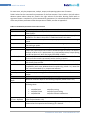
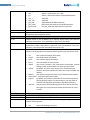
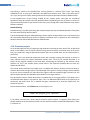
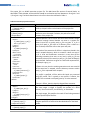
Table 1 below lists the command line parameters for the fact extractor. Text in italics in the left column
denotes options whose values are listed in the right column of the table. Running FXCXX with no
arguments shows a complete list of the command line parameters. For a detailed technical explanation
of the way all these parameters affect the operation of FXCXX, we refer to Appendix C.
Table 1: Command line parameters for the fact extractor
Preprocessor
P path
p profile
-Ipath
-Dkey=value
-Uname
-E
-include file
-tr nocpp
-tr bkinc
-tr Ipath
-tr stop-afterpp
Analysis
-template-depth
depth
-tr phase
Control the preprocessing of the input source code
Specify the path on which profiles are searched. See Section 4.7 for a discussion
about profiles.
Use profile for the extraction. Multiple profiles can be specified as –p profile1 –p
profile2 etc. The data in the profiles is loaded and used in that order.
Add path to the search paths used by the preprocessor. See the similar gcc
option
Add macro definition key with value value. If value not given, 1 is assumed. See
the similar gcc option.
Undefines macro definition with key name. See the similar gcc option.
Output the preprocessed source code to standard output and stop. The output is
identical to what a C/C++ preprocessor (e.g. cpp) would produce, except spacing
and #line directives, which are largely eliminated in FXCXX.
Add header file to the so-called forced headers. These are all loaded before the
first line of source code is processed. See the similar gcc option.
Skips the preprocessing phase. Useful to slightly increase speed if the input code
was already preprocessed.
Interprets backslashes as forward slashes in #include directives. Useful for
compatibility with some Windows-based compilers (e.g. Visual C++). Note that
this is not the standard C/C++ preprocessor behavior.
Search headers recursively on path (see discussion below this table)
Stops after preprocessing and emits the preprocessed code on the standard
output.
Control the analysis phases (parsing, type checking, elaboration)
Maximum recursion depth for instantiating templates (default value: 512)
Stop extraction after analysis phase phase is done. This option can have the
following values
•
•
•
-tr
filter-implems
-tr dialect
stopAfterParse
stopAfterTCheck
stopAfterElab
stop after parsing
stop after type checking
stop after semantic elaboration
Replace function definitions by declarations in all files (headers) except the main
input file (see Section 4.13)
Chooses the C/C++ dialect to be used during the analysis (C++ by default). The
dialect values correspond to the following C/C++ dialects.
©SolidSource 2007-2009 www.SolidSourceIT.com
27
SolidFX User Manual
•
•
•
•
•
•
•
•
-xc
-tr msvcBugs
Output
-o file
-tr compression
-tr saving-option
GNU C (also known as GNU C99)
ANSI C++ (also known as C++ 98)
ANSI C++ with GNU extensions (the default dialect)
ANSI C89
ANSI C99
ANSI C89 with the GNU extensions
K&R C with GNU extensions and C99 extensions
Like gnu_kandr but without built-in type bool
Synonim for –tr c_lang
Allows some of the deviations supported by Visual C++, such as implicit-int types
for operators and anonymous structs.
Control the type of information output by the fact extractor
Outputs results to file. By default, file is input.fxc where input is the input file
passed to the extractor. fxc is appended to input, like in foo.cpp.fxc
Controls whether compression of the output is done or not. By default,
compression is done using a built-in compressor tool. If compression is set to nocompress, then compression is disabled (see Section 4.12)
Choose which data to save in the fact database and other output-related
options. The saving-option may take the following values (see also Section 4.13):
•
•
•
•
•
•
•
•
•
•
Reporting
-tr nowarnings
-w
-tr verbosity
c_lang
ansi
g++
ansi_c
ansi_c99
gnu_c89
gnu_kandr
gnu2_kandr
ast
prepro
types
binary
alldata
save syntax information (AST nodes)
save preprocessor information
save semantic (type) information
save information in binary format
save syntax, semantic, and preprocessor information, without
filtering. Useful shortcut when one wants to save all facts.
nofilter
By default, only facts in the source C/C++ file passed to the
extractor are saved. nofilter also saves facts in the included user
headers.
NOfilter
Like nofilter but also saves facts in the included system headers.
xmlPrintAST Save syntax (AST) data in XML.
origlocs
by default, only location information for the facts that pass the
filtering phase is output. For some analyses, one may need all
locations. This flag saves all locations, regardless of filtering.
obuf size control the size of the buffering used to write data to files. Fine
tuning this size may improve the output performance on some
systems.
Control the verbosity and type of messages output during the analysis
Disables all warnings produced during the analysis
Synonim for –tr nowarnings
Sets the verbosity level of the messages produced during reporting. verbosity can
take the following values
•
vall
reports all warnings and errors
©SolidSource 2007-2009 www.SolidSourceIT.com
28
SolidFX User Manual
-tr cerr file
General
Debugging
•
•
•
verr
vnone
brief
•
•
timing
sizes
reports only analysis errors
no warning or error reports
limits all messages to exactly one line. Useful when invoking the
extractor from a batch job
reports times spent in the different analysis phases
reports the amount of data generated by the analysis
Redirects all errors messages to the file file. Useful for separating error output
from other messages e.g. for logging purposes
Various options that do not fit in the above categories
To be done
Various options that are using to control the debugging of the extractor
To be done
Most extractor options are already explained in the above table. A number of advanced options in this
table are explained below in more detail.
Recursive header searching (-tr I option)
In many cases, we want to analyze a code base but we do not exactly know all include paths. For
example, we may know that all used headers are somewhere in a given directory, but not exactly where,
and which are the precise include paths (extractor –I option) that need to be set.
FXCXX has a special option –tr Ipath that helps in such situation. Setting this option instructs the
extractor to search recursively for headers in the directory path if these headers cannot be resolved
during preprocessing using the standard mechanisms, i.e. the explicitly specified search paths given by
the –I or –include options, or the include search paths in a profile file. When FXCXX encounters a header
which it cannot resolve via these standard search mechanisms, and the –tr Ipath option is given, it will
recursively search path for the occurrence of the needed header. If exactly one instance of such a
header is found, it will be used to resolve the required #include directive. If several such headers are
found, FXCXX cannot decide which one to use (since it simply has no information for that), so it will
report that the recursive header searching for automatic resolution yielded multiple solutions (and
which these solutions are), and behave like in the case the header is missing.
Several –tr Ipath options can be given to a FXCXX command line. In such a case, these paths are
recursively searched as described above, just like the standard behavior of a C/C++ compiler in the case
of its –Ipath option. The first path on which such a header is uniquely found will then be used, if any.
This mechanism correctly treats #include directives that specify partially qualified header files, like
foo/bar.h. In such a case, the header bar.h is resolved if there is a file bar.h located directly within
a directory foo which is, in its turn, located somewhere within the given path.
Note: The recursive header searching may incur a performance cost in the cases the directory path given
to search into is very large, e.g. contains thousands of files. This is normal, as the search for a file in very
large directories is inherently expensive due to the many disk accesses needed.
4.6. Analyzing the code using the fact extractor
The simplest way to analyze the source code listed above is to run the command
©SolidSource 2007-2009 www.SolidSourceIT.com
29
SolidFX User Manual
FXCXX.exe -tr alldata –tr verr example.cpp
This command will analyze the code in example.cpp and the included headers and save all extracted
data (syntax, semantic, and preprocessor) in a fact database file called example.cpp.fxc. The flag –tr
verr says that we are interesting to see error messages generated during the analysis. Notice the
similarity of this command line with the invocation of the extractor driver, described in Section 4.1.
Besides the extraction unit, the analysis writes some results on the standard output (the actual format
of the output may slightly differ depending on your actual SolidFX version):
Processing file: example.cpp
example.cpp: Missing header: stdio.h
example.cpp: Missing header: stdlib.h
example.cpp: Missing header: missing.h
example.cpp:11:18: error: there is no function called `exit'
example.cpp:12:3: error: there is no function called `printf'
example.h:3:17: error: there is no function called `atoi'
example.cpp:20:29: error: there is no variable called `undefined'
preprocessed input size:
filtered lines:
parse errors:
Type check errors:
Type check warnings:
Total type check errors:
Total type check warnings:
Type resolution errors:
Missing includes:
237 bytes
0 of 0
0
4 (spanning 0 lines, so 100% parsed correctly)
0
4
0
0 of 0
3 of 4 includes (0%)
Let us compare this report with the one produced by the extractor driver (see Section 4.1). The main
difference is that we see now three missing header errors (instead of just one when running the
extractor driver) and four type check errors (instead of one when running the extractor driver).
Where do these errors come from?
The two additional missing headers are the standard library headers stdlib.h and stdio.h. Indeed,
the fact extractor is totally agnostic of any installed compiler, so it cannot know that there are such
standard headers, or where to look for them. This will, in turn, generate three additional type checking
errors: the functions exit, printf, and atoi are now undeclared, since the system headers are
missing.
Why should we care about missing headers and type check errors?
The short answer is: the SolidFX framework is designed to robustly perform analyses of incomplete
and/or incorrect code, so missing headers and/or missing declarations do not prevent its ability to
analyze such code and produce useful, detailed reports. However, it is clear that not all facts can be
extracted from such code, for the simple reason that some information is missing.
©SolidSource 2007-2009 www.SolidSourceIT.com
30
SolidFX User Manual
To illustrate this, let us run again the FXMetrics analysis tool on the created extraction unit to show
information on the function definitions:
FXMetrics.exe example.cpp.fxc
This produces the following report (again, depending on your actual SolidFX version, the information
displayed may slightly vary):
Function add(char**argv)
External symbols (1)
num_args
External macros (1)
ATOI
Function calls (1)
atoi(*(argv+1))
Metrics: LOC 7, MVC 2, COM 0, FAN-IN 1 PP-FAN_IN 1 CALLS 1
============================================================================
Function main(int argc,char**argv)
External symbols (3)
num_args
num_args
add
External macros (0)
Function calls (3)
exit(1)
printf("Sum: %d\n",add(argv+1))
int add(char **v)
Metrics: LOC 7, MVC 3, COM 0, FAN-IN 3 PP-FAN_IN 0 CALLS 3
============================================================================
Let us compare this report with the one generated when running the extractor driver (see Section 4.1) –
remember, the driver was able to find all system includes, while running the fact extractor without any
additional configuration would not find the system headers.
First, we see that both definitions of add() and main() are found in both cases. This is not surprising,
since these exist in the user code example.cpp and not the missing headers stdlib.h and stdio.h.
However, the fact extractor run does not find atoi as an external symbol used by add(), since its
actual definition (located in stdlib.h) is unavailable, so it cannot infer that this is an external symbol.
The function call to atoi() is correctly found, even though its definition is missing. This function calls is
reported using the information from the call point, atoi(*(argv+1)), and not the actual signature of
the called function int atoi(const char*), since the latter is missing. Also, we see that the use of
the ATOI macro is correctly found, as this macro is defined in the existing header example.h. A similar
process happens for the second function definition, main(). Finally, we see that the values of the
structural metrics computed by FXMetrics also change accordingly to the defined symbols. For the
©SolidSource 2007-2009 www.SolidSourceIT.com
31
SolidFX User Manual
main() function, for example, the LOC, MVC, COM, and PP-FAN-IN metrics stay the same as when
computed using the extractor driver, but the FAN-IN metric is now 3 instead of 5, since the exit and
printf symbols have missing definitions, so we cannot infer whether they are locals, parameters, or
external symbols.
To conclude: the SolidFX fact extractor can robustly analyze incomplete and/or incorrect code having
missing definitions and/or missing headers. The analysis results will reflect the completeness and
correctness of the input code. For a large class of analyses and applications, this does not pose major
problems. Incompleteness due to missing system headers is tolerable since one is typically not
interested to analyze system header information. Incompleteness due to undefined symbols in the user
source code itself, on the other hand, are unavoidable, and in such cases the extractor will deliver as
much information as available in the provided code.
4.7. Passing extraction parameters to the driver
The extractor driver is the easiest, simplest option to use for extraction when a native compiler is
installed on the target system. On the other hand, the fact extractor itself offers fine-grained control
over many analysis options, as described in Section 0. Using the extractor driver does not mean that this
level of control is not available. All extractor-specific options, that is the options prefixed with –tr listed
in Table 1, are understood by the extractor driver when prefixed with –fxc instead of –tr, and they
will be passed further to the extractor.
For example, the line
fxgcc.exe –c example.cpp –fxc alldata –fxc verr
will pass the options alldata and verr to the fact extractor, as if the extractor were invoked with the
options –tr alldata –tr verr.
4.8. Using profiles to control the analysis
In many cases, code bases contain hundreds or even thousands of source files. Often, many files share
several properties, such as include paths and preprocessor defines. Specifying such properties on the
command line of either the driver or the fact extractor for each individual file is a tedious process. In
such cases, it is convenient to group extraction options shared by a subset of files and manage them
accordingly.
The SolidFX fact extractor offers a convenient mechanism to do this in the form of profiles. A profile is an
XML-based specification file which contains four types of options: include paths, preprocessor defines,
preprocessor undefs, and forced includes (further globally referred to as options). By specifying a profile
as argument to the fact extractor, all these options are loaded before the extraction analyzes the input
source code.
There exist two types of profiles:
©SolidSource 2007-2009 www.SolidSourceIT.com
32
SolidFX User Manual
Compiler profiles
These profiles describe the options used by a specific compiler. Although users can freely edit and create
compiler profiles, this practice is not recommended. If a given compiler, including its standard libraries,
is already present on a given machine, it is simpler to use the extractor driver. The driver will then
automatically interact with the installed compiler to use the right options for that compiler.
User (project) profiles
These profiles describe options that are specific for a given project, or code base. Such options are
typically passed to the build process via makefiles or other compiler-specific build mechanisms, such as
Visual C++ project files. The simplest way to interpret these options is to run the native build process, for
example the makefile, by substituting the native compiler with the SolidFX extractor driver. This process
is described in Section 4.1. However, in the case when you cannot do this, for example when there is no
executable makefile or similar available, the solution is to create a user profile containing the desired
options and run the fact extractor with this profile.
The structure of a profile file consists of several fields, as described in Table 2 below. The fields can
come in any order within a profile file.
Table 2: Extractor profile structure
Field name
Description
<Name>
<![CDATA[name]]>
</Name>
<System>
<Directory>
<![CDATA[path]]>
</Directory>
</System>
Indicates the profile’s name. For user profiles, any string can be used
here. For compiler profiles, unique names are recommended.
<Includes>
<Directory>
<![CDATA[path]]>
</Directory>
</Includes>
<Force>
<Directory>
<![CDATA[forced_header]]>
</Directory>
</Force>
<Defines>
<Define>
<![CDATA[define]]>
</Define>
<Undef>
<![CDATA[undef]]>
</Undef>
</Defines>
Same as the <System> tag, but specifies search paths for the user
headers.
Specifies search paths for the system headers. If several
<Directory>…</Directory> blocks are specified, their search paths
are considered in the order of specification. Roughly equivalent to
the –I option of gcc.
Specifies one or more forced headers. Forced headers behave as
though they were included before the first line of the actual input
code. Similar to the –include option of gcc.
Specifies one or more preprocessor defines and/or undefines. The
defines are of the form name=value. The undefines are of the form
name. Similar to the –Dname=value and –Uname options of gcc. The
defines and undefines get passed to the extractor in the order that
they appear declared within the <Defines>…</Defines> block.
Defines and undefines declaration can come in any order within this
block.
©SolidSource 2007-2009 www.SolidSourceIT.com
33
SolidFX User Manual
Example compiler profile:
Below is listed an example compiler profile, stored, for example in a file called gcc.profile
<Name>
<![CDATA[gcc 4.0.1 Darwin]]>
</Name>
<System>
<Directory>
<![CDATA[/usr/local/include]]>
</Directory>
<Directory>
<![CDATA[/usr/lib/gcc/i686-apple-darwin9/4.0.1/include]]>
</Directory>
<Directory>
<![CDATA[/usr/include]]>
</Directory>
</System>
<Includes>
</Includes>
<Force>
</Force>
<Defines>
<Define>
<![CDATA[__STDC__]]>
</Define>
</Defines>
This profile simulates (partially) the behavior of the gcc 4.0.1 compiler as installed on the Mac OS X
Darwin operating system. The <System> block declares all compiler search paths for system headers, in
exactly the same order they come in the native compiler. The <Defines> block declares one
preprocessor define, namely __STDC__.
Example user profile
The easiest way to explain user profiles is by means of an example. Suppose we have a code base
containing two sources source1.c and source2.c that comes with the following makefile:
INCLUDES = -I my_includes1 –I my_includes2
DEFINES
= -DNODEBUG –DNAME=abc
%.o: ../%.c
$(CC) -c -o $@ $< $(DEFINES) $(INCLUDES)
all: source1.o source2.o
To analyze this code base, we could create the following user profile user.profile
<Name>
<![CDATA[My profile]]>
</Name>
©SolidSource 2007-2009 www.SolidSourceIT.com
34
SolidFX User Manual
<Includes>
<Directory>
<![CDATA[my_includes1]]>
</Directory>
<Directory>
<![CDATA[my_includes2]]>
</Directory>
</Includes>
<Force>
</Force>
<Defines>
<Define>
<![CDATA[NODEBUG]]>
</Define>
<Define>
<![CDATA[NAME=abc]]>
</Define>
</Defines>
Using profiles
Having a profile, we can pass it to either the fact extractor or extractor driver to instruct it to use its
settings. For example, consider the above two profiles, gcc.profile (the compiler profile) and
user.profile (the user profile). The command
FXCXX.exe -tr alldata –tr verr –tr –p gcc.profile –tr –p user.profile source1.cpp
is equivalent to
FXCXX.exe -tr alldata –tr verr –I
darwin9/4.0.1/include
–I/usr/include
-DNODEBUG –DNAME=abc source1.cpp
/usr/local/include –Iusr/lib/gcc/i686-apple–Imy_includes1
–Imy_includes2
–D__STDC__
In this analysis, C system headers present in the input code, such as stdio.h or stdlib.h, as well as
user headers located in the directories my_includes1 and my_includes2 will be found as expected
when running the gcc compiler or, for that matter, the makefile shown above.
SolidFX comes packaged with a number of general profiles for many popular compilers, such as gcc
(several versions) and Visual C++ (versions 6, 7, 8). If you require a custom profile for a platform and/or
compiler that is not included in the standard SolidFX distribution, please contact SolidSource.
4.9. Using the fact linker
Both the SolidFX extractor and the extractor driver analyze a single source code file at a time, just like an
ordinary C/C++ compiler does. They produce one extraction unit, having by default the extension .fxc,
for each input source file. Such files already enable many types of analyses which are confined to the
©SolidSource 2007-2009 www.SolidSourceIT.com
35
SolidFX User Manual
scope of a single translation unit, that is a given source file and all headers it includes directly and
indirectly.
However, many analyses need to consider the relationships between several translation units. A very
simple example is producing a system call graph that contains call relations between all functions
contained in a given executable.
The SolidFX framework provides a tool for this purpose: the fact linker, or linker for short. The linker
takes as input several extraction units produced by the fact extractor, determines relations between
several types of declarations and definitions, and saves these relations in a so-called link map file, or link
map for short. The link map can be further used by several analysis tools in the SolidFX framework.
The linker tool is called FXCLink.exe. This tool can be run as follows
FXCLink.exe [parameter_list] filenames
The linker parameters are described in Table 3 below.
Table 3: Linker command line parameters
Parameter
-o file
-types
-extended
-errors
-verify
Description
Outputs the result of linking to the link map file file. Link maps typically have the
extension .linkmap.
Use type linking
Use extended linking
Display errors encountered during linking, such as double definitions and
undefined symbols.
Verify the created link map (for debugging purposes only)
The filenames in the linker invocation are extraction units created by the fact extractor. Just as in
classical compiler linking, any number of files that should be logically combined in a single target, be it
either an executable or a library, can be listed here on the linker’s input.
Linker modes
The SolidFX linker has three operation modes: classical (the default mode), types, and extended. These
are described below.
Classical linking:
Classical linking is similar to the object linking done by a C/C++ compiler. All symbols in each translation
unit having so-called external linkage are searched for in other translation units. Such symbols include
function definitions and the so-called external variables, declared by the keyword extern. If a unique
definition for each such symbol is found, it is linked to its external declarations in each translation unit
that refers to it (uses it). If several such definitions are found, then we have a duplicate symbol
definition error. If no such definition is found, then we have an unresolved symbol. Classical linking is
the default mode of the SolidFX linker.
Type linking:
©SolidSource 2007-2009 www.SolidSourceIT.com
36
SolidFX User Manual
Type linking is specific to the SolidFX linker, and not present in a classical C/C++ linker. Type linking
establishes if two or more types, declared in two different translation units, refer to the same type or
not. If yes, the types are linked, meaning that the link map stores equivalence relations between them.
In the standard form of type linking, invoked by the –types option, two types are considered
equivalent if they do have the same fully qualified name. Compound types such as classes or structs are
still considered equivalent if they have the same name, even though their actual definitions may contain
different members.
Extended linking:
Extended linking is just like type linking, but compound types are only considered equivalent if they have
the same name and the same members.
Type and extended linking are advanced options used in specific analyses where one is interested to find
out relationships between types located in different translation units, as opposed to just relationships
between function and variable declarations and definitions.
4.10. Extraction projects
Let is consider again the task of analyzing a large code base consisting of many source files. As described
earlier in this chapter, such an analysis implies running the fact extractor or extractor driver on all source
files in the code base, using the appropriate options that can be passed either via the command line or
profile files.
Obviously, such a task should be automated rather than manually invoking the extractor or driver on
every separate source file. Several automation options exist. The first one, already described, is to
simply run the original makefile of that code base, substituting the compiler by the extractor driver
(Section 4.1). This is the simplest option, which works if the respective makefile does not have any
undesired side effects.
The second option would be to manually write a makefile that explicitly invokes the fact extractor or
extractor driver with the right options. The advantage of this option is that by writing a custom makefile
we can be sure to eliminate any side effects the original code base makefile might have had. Still, this
option requires that we have the make tool available on the target platform.
The third option comes in handy when there is no make tool on the target platform. This option uses a
so-called extraction project, or project for short. This is an XML-based description of the analysis to be
performed, and works much like a makefile that gets interpreted by a particular SolidFX tool: the
extraction executor.
The extraction executor, called FXRun.exe, is very simple to run:
FXRun.exe project_file <options>
In the above command line, options denote extractor-specific options. If supplied, these options are
passed verbatim to the fact extractor FXCXX. The fact extractor options are described separately in Table
1 in Section 4.5.
©SolidSource 2007-2009 www.SolidSourceIT.com
37
SolidFX User Manual
The project_file is a SolidFX extraction project file. This XML-based file consists of several blocks, as
described in Table 4 below. All these blocks should be enclosed at top level between a <Project> and
</Project> tag. The blocks should come in the file in the order indicated in Table 4.
Table 4: Extraction project file structure
Field name
<InputRoot>
<![CDATA[path]]>
</InputRoot>
<OutputRoot>
<![CDATA[path]]>
</OutputRoot>
<Batch>
<Input>
<![CDATA[path_or_file]]>
<Dir>is_dir</Dir>
</Input>
<Output>
<![CDATA[outpath]]>
</Output>
<Recursive>
is_recursive
</Recursive>
<Flatten>
flatten
</Flatten>
<Active>
active
</Active>
<Extensions>
<![CDATA[extensions]]>
</Extensions>
<Profile>
<![CDATA[profile]]>
</Profile>
</Batch>
<Target>
<Input>
<![CDATA[fact_file]]>
</Input>
<Output>
<![CDATA[target_file]]>
</Output>
</Target>
<CompilerProfile>
<![CDATA[profile]]>
</CompilerProfile>
<Profile>
<![CDATA[profile]]>
Description
The path on which all source files to be extracted are found. If
relative, this path refers to the location of the project file.
The path where all the extraction units to be created during
extraction are to be saved. If relative, this path refers to the
location of the project file.
A batch specifies a set of source files that share locations and/or
extraction settings. Several batches can exist in a project file.
Several input files or paths path_or_file are given. If is_dir is
true, then path_or_file refers to a directory, else it refers to a
file. If relative, these files refer to the input root path.
The results of the extraction of all files in a batch are placed in the
batch’s outpath directory, which is created if it does not exist. If
is_dir is true and furthermore recursive is true, then all files
matching extensions that exist at any level in path_or_file are
processed, else only files exactly in path_or_file (and not deeper)
are processed. Extensions are given as a semicolon separated list,
for example cpp;c;cc
If flatten is true, then the resulting extraction units are saved all
at the same level in outpath, else the directory structure within
path_or_file is replicated within outpath.
If a profile is specified, all files within this batch are processed
using this profile. This is typically a user profile. If relative, the
profile file is searched on the path given by –P to the extractor.
If active is false, then this batch is skipped from extraction.
Specifies a set of fact (.fxc) files fact_file that logically belong to
the same target. A target is typically the product of a build
process, like an archive file, shared library, or executable.
The single target_file specifies the result of fact linking executed
on the specified input fact files.
Specifies the compiler profile to use for this entire project. The
compiler profile file is searched as described above for the batch
profile.
Specifies the project profile to be used for this entire project.
©SolidSource 2007-2009 www.SolidSourceIT.com
38
SolidFX User Manual
</Profile>
Project profiles behave much like compiler profiles, but contain
typically project-specific options, while compiler profiles contain
compiler-specific options. Several user profiles can be specified. In
that case, their settings will be applied as if they appeared one
after the other in the same profile file.
Profiles allow a flexible organization of the extraction process for a large code base, with minimal effort.
Moreover, the results of the extraction can be saved in a separate directory hierarchy that automatically
mirrors the hierarchy of the code base (if desired). This is useful when we do not want the extraction
results to pollute the actual code base or when the code base directories are not writable.
FXRun creates an entire fact database (.db), in contrast to the extractor FXCXX or extractor driver fxgcc,
which only create individual extraction units (.fxc). This database stores information concerning all the
extraction units processed from the input project. Moreover, results created during subsequent analyses
of the facts in the database can be stored in the same database. Hence, the database provides a
convenient way to manage all information related to one given static analysis project.
4.11. Extraction targets
The fact extractor FXCXX and extraction driver fxgcc described so far in this chapter work much like
traditional compilers such as gcc or Visual C++. They produce fact files that contain the information
extracted from individual source files just as compilers create object files from sources. However, in reallife projects, individual object files are linked into larger units, such as libraries or executables. Linking is
performed by the FXCLink tool described in Section 4.9.
The SolidFX projects, introduced in the previous section, allow one to specify which fact files are to be
linked together to produce a target. The extraction target contains fact files that are automatically
linked into a link map file (see Section 4.9). This enables doing cross-file analyses within a target, for
example resolving declarations to definitions, finding a global call graph, finding dead code, or finding
the required and provided interfaces of a library.
A project can contain several targets, and multiple targets can share the same fact files.
Example
Let us illustrate the working of FXRun using a simple example: a project consisting of three source files,
a.cpp, b.cpp and c.cpp. When built, the project should create one library lib.a, containing the code in
a.cpp, and an executable prog.exe, containing the code in b.cpp and c.cpp.
For clarity, a typical makefile for this project would look like the following (we suppose we use gcc as a
build system):
lib.a:
a.o
ar lib.a a.o
a.o:
a.cpp
gcc –o a.o a.cpp
prog.exe: b.o c.o
©SolidSource 2007-2009 www.SolidSourceIT.com
39
SolidFX User Manual
gcc –o prog.exe b.o c.o
b.o:
b.cpp
gcc –o b.o b.cpp
c.o:
c.cpp
gcc –o c.o c.cpp
The complete SolidFX project for this system would look as follows:
<Project>
<InputRoot> <![CDATA[.]]> </InputRoot>
<OutputRoot> <![CDATA[.]]> </OutputRoot>
<Batch>
<Input> <![CDATA[a.cpp]]> <Dir>false</Dir> </Input>
<Output> <![CDATA[.]]> </Output>
<Recursive>false </Recursive>
<Flatten> false </Flatten>
<Active> true </Active>
</Batch>
<Batch>
<Input> <![CDATA[b.cpp]]> <Dir>false</Dir> </Input>
<Output> <![CDATA[.]]> </Output>
<Recursive>false </Recursive>
<Flatten> false </Flatten>
<Active> true </Active>
</Batch>
<Batch>
<Input> <![CDATA[c.cpp]]> <Dir>false</Dir> </Input>
<Output> <![CDATA[.]]> </Output>
<Recursive>false </Recursive>
<Flatten> false </Flatten>
<Active> true </Active>
</Batch>
<Target>
<Input> <![CDATA[a.cpp.fxc]]> </Input>
<Output> <![CDATA[lib.linkmap]]> </Output>
</Target>
<Target>
<Input> <![CDATA[b.cpp.fxc]]>
</Input>
<Input> <![CDATA[c.cpp.fxc]]>
</Input>
<Output> <![CDATA[prog.linkmap]]> </Output>
</Target>
<CompilerProfile> <![CDATA[gcc.profile]]> </CompilerProfile>
</Project>
Let us explain the above listing. Although the listing is quite verbose, we shall see that many of the
settings can be eliminated using their default values.
©SolidSource 2007-2009 www.SolidSourceIT.com
40
SolidFX User Manual
First, the input and output root of the project, i.e. the locations of the source files and the resulting fact
and link map files, are set to the current directory, by the InputRoot and OutputRoot blocks. Note
that the current directory is the default value for these settings, so these two blocks can be omitted
from the project in this case.
Second, a Batch is declared that specifies how to extract the first source file, a.cpp. This file is marked
as not being a directory – which is needed, seen that the Input tag of a Batch can be either a file or
directory, see Table 4. The created fact file, a.cpp.fxc, will be placed in the same directory. There is no
recursion and flattening of the extracted files, since a.cpp is not a directory (see again Table 4). Finally,
this target is marked as active, i.e. not skipped in the extraction process. Similar batches occur for the
b.cpp and c.cpp sources.
Third, a target is declared for the library lib.a, namely a.linkmap. This contains a link map file that
gathers the symbols from the fact file a.cpp.fxc, just as lib.a gathers the code from a.o. A second target
called prog.linkmap is declared for the target prog.exe, which gathers the symbols from b.cpp.fxc and
c.cpp.fxc, just as c.o and c.o get linked into prog.exe
Finally, a compiler profile is declared – this is gcc.profile, which should contain the default settings
emulating the behavior of the gcc compiler. The actual name of this file will, in reality, depend on the
available compiler profiles for a given SolidFX installation.
As already mentioned, the above compiler project looks excessively complicated when compared to the
much simpler makefile listed earlier. Fortunately, many of the settings specified in the above profile can
be eliminated, since we often can use their default values, as explained above. When eliminating the
settings whose default values are suitable for the current project, we obtain the following, much
simpler, profile:
<Project>
<Batch><Input> <![CDATA[a.cpp]]> </Input></Batch>
<Batch><Input> <![CDATA[b.cpp]]> </Input></Batch>
<Batch><Input> <![CDATA[c.cpp]]> </Input></Batch>
<Target>
<Input> <![CDATA[a.cpp.fxc]]> </Input>
<Output> <![CDATA[lib.linkmap]]> </Output>
</Target>
<Target>
<Input> <![CDATA[b.cpp.fxc]]>
</Input>
<Input> <![CDATA[c.cpp.fxc]]>
</Input>
<Output> <![CDATA[prog.linkmap]]> </Output>
</Target>
<CompilerProfile> <![CDATA[gcc.profile]]> </CompilerProfile>
</Project>
This profile is more concise than the formerly listed one, but still more verbose than the original
makefile. However, note that a large amount of this additional verbosity is due to the usual overhead of
the XML markup.
Executing this extraction project, which is saved in a file, say myfile.project, is immediate:
FXRun myfile.project
©SolidSource 2007-2009 www.SolidSourceIT.com
41
SolidFX User Manual
This will create three fact files a.fxc.cpp, b.fxc.cpp and c.fxc.cpp, and two link maps, lib.linkmap and
prog.linkmap. These fact files can be further explored with the several tools available in the SolidFX
framework, such as FXLog, FXMetrics, FXQuery, and FX_IDE.
4.12. Managing the size of large fact databases
The fact extractor FXCXX can generate very large amounts of data when analyzing large projects. The
consequence of this is that fact databases can take very large amounts of disk space, up to several
gigabytes. Although this is not a problem from the perspective of executing queries on the stored facts
(due to the high speed of the query engine described further in Chapter 6, large fact databases can
create unnecessary storage problems, and are comparatively slower to save than smaller databases.
In the following, we detail the factors that influence the size of fact databases created during analysis
and explain what can be done to reduce their size.
A simple example
Consider a file foo.cpp containing the following simple example:
#include <stdlib.h>
int main(int,char**)
{
printf("Hello world\n");
return 0;
}
To analyze this file, we run the command
fxgcc.exe -fxc ast -fxc binary -fxc types -c foo.cpp
If database compression is disabled1, the above analysis will create a extraction unit foo.cpp.fxc of
approximately 3200 bytes (the actual sizes may slightly vary as a function of the platform). This file
contains the syntax, type, and preprocessor information of all code located in the file foo.cpp.
From the facts located in the system header stdlib.h included by the file foo.cpp, only those which
are referred by the code in foo.cpp are saved, by default, in the extraction unit, as described earlier in
this section (Table 1). In our case, this means the declaration of the function printf. This is the desired
behavior in most usage scenarios, as one is not interested to analyze system headers.
However, in some cases, this strategy of filtering unused facts from the system headers will still create
relatively large outputs. Consider, for example, the code
1
Database compression is described later in this section. For the moment, assume this feature is
disabled, e.g. by adding the switch –fxc no-compression to the fxgcc command line
©SolidSource 2007-2009 www.SolidSourceIT.com
42
SolidFX User Manual
#include <iostream>
using namespace std;
int main(int,char**)
{
cout<<"Hello world"<<endl;
return 0;
}
The analysis of this file, done by running the same command as before, will create a extraction unit
foo.cpp.fxc of about 14600 bytes, hence roughly five times larger than in the first case. The reason
for this increase in output size is simple: C++ headers, such as iostream, contain mainly class
declarations. When a client, such as our file foo.cpp, uses a method of one of these classes, like the <<
operator of cout, the fact extractor has to output the entire class used, and all its base classes and
internally used types, even though the client code does not refer to those directly2. For headers
containing large classes and deep class hierarchies, like the STL or Boost3 headers, this amount of
information can be quite large.
However, there are cases when we simply need to save the full information generated by the parser,
that is all facts residing in both user code, user headers, and system headers. This is the standard
behavior of the extractor when run as follows
fxgcc.exe -fxc alldata -c foo.cpp
In the case of the first, stdio-based, code example shown above, this will generate an extraction unit of
about 372 Kbytes, as compared to the 3200 bytes generated when unused system header facts were
filtered. In the case of the second, iostream-based, code example, the generated extraction unit has 7.8
Mbytes, which is a dramatic increase as compared to the 14600 bytes generated when filtering was
used. The explanation of this large number lies in the large size, and intricate structure, of the C++ STL
headers.
Database compression
For the cases when filtering is not desired, the SolidFX framework tackles the problem of large
extraction units by automatically compressing the files generated by the fact extractor or similar tools
upon writing, and decompressing them upon reading. The compression and decompression strategies
are built in the framework and completely transparent for the end user or application programmer.
Compression is by default enabled. There is a small speed penalty to be paid when using compression –
this amounts, for example, to about 3..4 seconds for the last example discussed in the previous section
that generated a 7.8 Mbyte output. However, there is virtually no time penalty at decompression, so
queries and other fact database analyses run with practically the same speed when using compression
as compared to not using compression.
2
Precisely speaking, in the case described here the extractor outputs the transitive closure of all syntax
and type information residing in system headers which is referred to from the client source code
3
Boost is a template-based set of C++ libraries widely used in the industry (www.boost.org)
©SolidSource 2007-2009 www.SolidSourceIT.com
43
SolidFX User Manual
If no compression is desired, for whatever reasons (e.g. the user is interested to maximize speed at the
expense of storage space), it can be disabled during the fact extraction by adding the option nocompression to the command line (see also Table 1). This option is valid for the fact extractor (FXCXX),
linker (FXCLink), and extractor driver (fxgcc).
Compression is highly effective for large databases. Table 5 shows the sizes of the extraction unit
created for the previous examples and the considerable size decrease due to compression. For the
larger files, compression reduces the size of the generated files by roughly 4..5 times.
Table 5: Extraction unit size as a function of the filtering and compression methods used
Input code
Filtering performed
Result size
Result size
(no compression)
(with compression)
stdio-based example
unused sys. header data
(-tr nofilter option)
3.2 Kbytes
1.2 KBytes
stdio-based example
no filtering
(-tr NOfilter option)
372 Kbytes
68 Kbytes
Iostream-based example
unused sys. header data
(-tr nofilter option)
14.6 Kbytes
4.2 Kbytes
Iostream-based example
no filtering
(-tr NOfilter option)
7.8 Mbytes
1.6 MBytes
Note: The availability of compression in the SolidFX framework may be platform-dependent. The
compressor used, a variant of the well-known p7zip algorithm, may not be provided with all SolidFX
packages. If you need compression but this function is unavailable, contact SolidSource for an upgrade.
Note 2: Compression or decompression may fail in certain situations, e.g. due to the unavailability of the
compressor or due to insufficient read or write permissions or file corruption. If compression fails,
SolidFX will behave as if no compression was actually requested, so this is fully transparent to the user. If
decompression fails, SolidFX will display an error message and the subsequent operations will be
stopped. This only affects the analysis tools that read compressed files.
4.13. Filtering the extraction output
Fact extraction can create very large databases, up to several megabytes per extraction unit. This is not
surprising if we consider that source files may include large system headers that contain thousands of
classes and functions, such as the Standard C++ system headers. However, in many analysis scenarios,
these facts are not used, as we want to limit ourselves to the information contained in the actual user
code.
SolidFX provides several mechanisms to filter information during the parsing or output generation.
These mechanisms can considerably reduce the size of the output fact database. They are described
next.
©SolidSource 2007-2009 www.SolidSourceIT.com
44
SolidFX User Manual
Filtering the output
The fact extractor, FXCXX.exe, provides a filter option (-tr filter, see Table 1) that specifies which facts
are to be saved in the output. Two values are possible for the filter option:
• nofilter: Saves information from the main source file passed to the extractor, all user headers
that this file includes directly or indirectly, as well as all referenced information from the system
headers. To explain the last point, consider a source file that uses the cout symbol defined in
iostream, like in cout<<”Hello world”. The nofilter option will save all information from
iostream and other system headers that is needed for the definition of cout. Note that this is
not just the definition of the cout symbol itself, but also the definition of its enclosing class (if
any) and all other symbols (classes, functions, templates, typedefs, etc) that are referred by this
class directly or not. Depending on the structure of the system headers, the –tr nofilter option
can be sometimes less effective, for example when one uses symbols that are defined in large
classes with many base classes.
• NOfilter: Saves all information seen by the parser, that is, all facts from the user and system
headers. This is the most verbose output mode, which generates quite large fact databases.
However, in this mode, we are sure to have in the output database all information present in
the input files and their headers. If space is not at a prime, this is the simplest and most hasslefree mode to use the fact extractor.
If no filtering option is given, the fact extractor will only save facts declared in the main source file. This
will create very small fact databases, but no information on the symbols defined in headers included by
this source file will be available for further analyses.
Filtering unused code
In most cases, fact databases saved with the –tr nofilter or –tr NOfilter options will contain a lot of facts
originating from system or library headers. As explained above, this can bloat the size of such fact
databases. Moreover, there are analysis scenarios in which we actually want to keep all interface
symbols declared by such headers.
To further reduce the size of fact databases in this case, SolidFX offers a second filtering option: filtering
unused code. This option is enabled by the –tr fimp family of command-line flags of the fact
extractor. To explain this filtering mode, let us classify code in two groups:
•
filter target: the code on which filtering is applied
•
extraction target: the code on which the filter is not being applied
Filtering unused code is not simple to explain: This means removing code from the filter target that is
not used by, or referred to, the extraction target.
There are three flags in the –tr fimp family that set up different filter targets and extraction targets,
as follows:
Flag value
Filter target
Extraction
target
Description
fimp-system-code
system
headers
user code
Remove code from system headers that is not
used by user code (headers and sources)
©SolidSource 2007-2009 www.SolidSourceIT.com
45
SolidFX User Manual
Fimp-system-funcs
system
headers
user code
Like fimp-system-code, but only affects the
code in the bodies of the system functions
fimp-all-headers
all headers
user sources
Remove code from all headers that is not used by
user sources
Fimp-all
all code
-
Remove code from all input that is not used
For an example, consider the following code fragment:
system.h:
class S
{
void f() { g(); }
void g();
};
client.cpp:
#include <system.h>
void main() { S s; s.f(); }
In this program, the client code includes the system header system.h which contains the interface of
the class S, but uses only one method thereof, the method f().
Let us now explain the different ways to filter the extraction output:
•
-tr nofilter would remove the entire declaration of S, since in a system header. This generates
a small but incomplete output. Using this output in further analyses may create problems, since the
declaration of S (and its contained methods, of which f() is referred in the main source) is missing.
•
-tr NOfilter would not remove anything. This generates a complete but potentially very large
output. If S would be a huge interface, containing hundreds of methods and types, it is clear that
saving all this information from the extraction would create very large amounts of data.
•
The -tr fimp family of flags achieves a good balance between completeness and compactness.
The first effect of using this filter type is that all function bodies from the filter target are removed.
This is done since, in most cases, we do not care about definitions of functions from headers, but
only about their declarations. The second effect of this filter is that all remaining function
declarations from the filter target are removed if they are not referred to from code in the
extraction target. In other words, if we were to apply –tr fimp-system-code or –tr fimpsystem-cfuncs or –tr fimp-all-headers to the sample code discussed above, the output
would look as if the following code was given at the input:
system.h:
class S
{
void f();
};
client.cpp:
©SolidSource 2007-2009 www.SolidSourceIT.com
46
SolidFX User Manual
#include <system.h>
void main() { S s; s.f(); }
We see that the filtering has removed the implementation of S::f(), since this method is declared in a
header, and has also completely removed S::g(), since this function is not used in the extraction
target, i.e. in the main source file. Note that, since the body of S::f() was removed, the internal
reference to S::g() contained in this body also disappeared, so it is now safe indeed to completely
remove S::g().
Unused code filtering option is highly effective, especially for C++ system headers containing many inline
functions or function templates, like the Standard C++ headers or headers from template libraries such
as Boost.
For example, consider the following file foo.cpp
#include <iostream>
void foo() { std::cout<<”Hello world”<<std::endl; }
Let us say that we want to extract the syntax and type information from this file, and we will use no
filtering of the system headers:
fxgcc.exe –fxc ast –fxc binary –fxc NOfilter –fxc no-compress –c foo.cpp
On a platform that uses the gcc 4.0.1 compiler suite, we will obtain a fact file of approximately 4.1 MB.
Now we run the same extraction, but we filter out unused code from the system headers
fxgcc.exe –fxc ast –fxc types –fxc binary –fxc fimp-system-code –fxc nocompress –c foo.cpp
The resulting fact database file will now have only 216 KB. That is, we saved 20 times of the used disk
space by removing unused function bodies from the system headers. If we also use the database
compression option (described in Section 4.12), i.e. remove the flag –fxc no-compress, the size of
the resulting fact file decreases further to 56 KB.
Filtering unused code – details
Below are given some additional details on the working of the flags controlling the filtering of unused
code. Understanding these helps in choosing the right combination that benefits extraction speed,
compactness of the created fact database, and completeness of the facts available in this database.
1. Using any of the –tr fimp-*** flags automatically sets the –tr NOfilter option in the
extractor. Indeed, it does not make much sense to check for unused code in headers if that code
©SolidSource 2007-2009 www.SolidSourceIT.com
47
SolidFX User Manual
was already removed. Hence, the NOfilter option can be omitted on the command-line, once any
of the fimp-*** options are used.
2. The difference between –tr fimp-system-funcs and –tr fimp-system-code is that the former only
removes code from within the bodies of the functions defined in system headers, like inline
functions and template functions, whereas the latter performs a more sophisticated removal of
additional constructs which are not referred to by user code, such as class declarations, extern
variables, typedefs, enums, and more. At the present moment, however, the implementation of
fimp-system-code is experimental. For maximum completeness of the created fact databases, we
recomment using fimp-system-funcs.
3. The unused code filtering in the current version of SolidFX does not only work on function
definitions. That is, other types of facts, such as entire type declarations or extern declarations, for
example, are also filtered out if the extractor is sure that they are not used by code in the extraction
target.
4. The function definition removal mechanism removes the function bodies, optional try/throw
clauses, and optional base class and member initializers from constructors. It only leaves the
function signature. This process affects all function kinds, including free functions, methods, and
function templates.
4.14. Converting a build system to an extraction system
In the previous section, we have described the SolidFX profiles that allow a flexible and compact
specification of an extraction job for an entire code base. As mentioned, profiles are useful when we
cannot run, or we do not have, a makefile for that code base. If we avail of such a makefile, a simpler
option than profiles is to use the extractor driver, as explained in Section 4.1.
However, the process of manually writing an extraction project can be quite elaborate for some large,
complex codebases. To simplify this process, the SolidFX framework offers a tool that can convert a large
variety of makefiles and Visual Studio project files (.vcproj files) to extraction projects.
For further information on the makefile and Visual Studio converter, please contact SolidSource.
4.15. Integrating SolidFX with a native compiler
As explained previously in this chapter, there are two main modes of integrating SolidFX with a native
compiler present on a given platform:
•
using the extractor driver (Section 4.3)
•
using compiler profiles (Section 4.8)
The extractor driver method is fully automatic, but will not work in case one has a compiler for which
SolidFX does not provide such an extractor driver. Also, in some cases, users would like to have finegrained control over the exact way in which system headers and built-in defines of the native compiler
are interpreted by the extractor. In this case, the solution is to write a custom compiler profile.
In the following, we detail this process further for a number of well-known compilers.
Note: the following examples assume that the discussed compilers are not run with additional options
which change the set of standard include paths or built-in defines. Of course, if such options exist and
©SolidSource 2007-2009 www.SolidSourceIT.com
48
SolidFX User Manual
are important in the analysis, they should be considered when extracting the include paths and defines
from the respective compilers. For this, consult the specific documentation of each compiler.
Microsoft Visual C++
Integrating the SolidFX extractor with the various compilers in the Visual C++ suite (version 6, 7 (2003), 9
(2005) and 9 (2008)) can be done as follows.
The first step is to find the system include paths that are used by the compiler. These paths are set by a
batch file called vcvars32.bat, which is located in the Visual C++ installation directory4. One can run
this file from a DOS command prompt and then examine the value of the %INCLUDE% environment
variable, e.g. using echo %INCLUDE%. This will list the system include paths, separated by semicolons.
These paths should be added in the <Include> section of the compiler profile.
The second step is to find the built-in defines that are used by the compiler cl.exe. Unfortunately,
there is no automatic way to do this with all the Visual C++ compilers. The best way is to examine the
reference documentation provided by Microsoft, which lists all these includes for the various versions of
their compilers5. Once these defines (and their values) are found, they should be listed in the <Define>
section of the compiler profile.
gcc
Integrating the SolidFX extractor with any version of the GNU gcc compiler can be done as follows6.
The first step is to find the system include paths. These paths can be found by running
gcc -Wp,-v -x c++ -E - < /dev/null
for the C++ and C search paths, or alternatively
gcc -Wp,-v -E - < /dev/null
for the C search paths only. This will list the respective search paths on the standard output. These paths
should be added in the <Include> section of the compiler profile.
The second step is to find the built-in defines that are used by the compiler. This can be done by running
gcc -dM -E - < /dev/null
This will list the built-in defines, with their values, on the standard output. These defines (and their
values) should be next added to the <Define> section of the compiler profile.
4
The exact location of this batch file and its name may vary slightly between different versions of Visual C++.
5
See, for example, http://msdn.microsoft.com/en-us/library/b0084kay(VS.80).aspx, or alternatively search for
“Predefined Macros” in the “C/C++ Preprocessor Reference” section of the MSDN knowledge base at
http://msdn.microsoft.com.
6
Manual integration is typically not needed, as this is done automatically by the fxgcc driver.
©SolidSource 2007-2009 www.SolidSourceIT.com
49
SolidFX User Manual
5. Basic Analysis Tools
5.1. Introduction
The extraction of facts from C/C++ source code, detailed in Chapter 4, is just the first step of completing
a useful analysis for a given code base. Once we have created the fact database, several analyses can be
performed on it. These analyses can answer a wide variety of questions and support tasks such as code
refactoring, program understanding, architecture recovery, and safety, testability, quality, and
maintainability analyses.
The SolidFX framework offers several tools that perform a wide range of analysis, from simple to
advanced, as well as an API with which users can develop their own analyses. In this chapter, the basic
analysis tools are described. In contrast to the XML and C++ APIs of SolidFX, which are further discussed
in Chapters 6 and 8, the basic analysis tools offer less fine-grained control over the analysis. However,
these tools are very easy to use and require no programming or scripting skills – they can all be invoked
from the command-line and have only a few parameters.
Before you start
Before you start using any of the basic analysis tools described in this section, be sure you study the
process of creating a fact database. The basic analysis tools need to have such a fact database created
on disk. They do not directly analyze the source code, but retrieve all the necessary information from
the database. The process of creating a fact database is described in Chapter 4.
©SolidSource 2007-2009 www.SolidSourceIT.com
50
SolidFX User Manual
5.2. FXLog: Inspection of a fact database
FXLog generates a text report that shows a quick overview of an entire fact database. Running FXLog on
a fact database is a quick and easy manner to verify the consistency of the database, as well as to quickly
get an idea about the contents of the database.
Invocation
The command-line of FXLog is as follows:
FXLog.exe database_file
Here, database_file is a fact database file (.db file) produced by the project tool FXRun (Section 4.10). Do
not confuse this with a fact extraction file (.fxc file), which is produced by the extractor tool FXCXX from
a single source code file. A fact database contains several fact extraction files, an optional link map,
information from the extraction (such as statistics and extraction warning and error messages), and
optional selections which store already executed query operations on the fact database. In contrast, a
fact extraction file stores just the raw facts (syntax, type, preprocessor, location) corresponding to a
single translation unit.
Purpose
FXLog is a simple reporting tool that produces a textual overview of the types of information stored at
the top level in a fact database. It can be used either for quick inspection or correctness validation of a
fact database.
Example
Consider the fact database database.db created by running the project extractor FXRun as described in
Section 4.10. Running
FXLog.exe database.db
Will produce the following text output (slight variations may appear depending on your toolset version)
TO BE DONE
Where to use
FXLog is probably most useful during daily working with the SolidFX framework, when one wants to
quickly check the integrity and contents of a fact database, before using the database for actual work.
Options
FXLog has no additional command-line options except the database file.
©SolidSource 2007-2009 www.SolidSourceIT.com
51
SolidFX User Manual
Remarks
FXLog does not perform an in-depth analysis of a fact database, but only a shallow one. Currently, only
the actual database (.db) file and referred link map files (.linkmap) are read. The extraction units (.fxc)
referred to by the database are not opened. For examination of the extraction units, consider using
FXDump.
©SolidSource 2007-2009 www.SolidSourceIT.com
52
SolidFX User Manual
5.3. FXUses: Analysis of file dependencies
FXUses generates a text report that shows, for each user source code and user include file, the symbols
used by that file which are declared in another file. This simple analysis is useful when one is interested
to find the interdependencies between the files of a large code base, for refactoring and/or
documentation purposes.
Invocation
The command-line of FXUses is as follows:
FXUses.exe fact_file options
Here, fact_file is a fact database file (.fxc file), produced by the fact extractor.
The options are described in Table 6 further in this section.
Purpose
FXUses lists the interface-implementation relationships between a source file and all headers that it
includes, directly or indirectly.
Consider an extraction unit foo.cpp.fxc for a given source file foo.cpp. In most cases, a source file like
foo.cpp will have the following roles:
•
implement several interfaces which are declared in included header files, like foo.h
•
use some other interfaces which are declared in included header files, like foo.h or bar.h
Example
To illustrate this, take the following example consisting of two header files foo.h and bar.h and one
source file foo.cpp.
File foo.h
#include “bar.h”
int func(char*);
#define RETURN_TYPE int
File bar.h
extern int variable;
void func3();
File foo.cpp
#include “bar.h”
int variable;
©SolidSource 2007-2009 www.SolidSourceIT.com
53
SolidFX User Manual
RETURN_TYPE func(char* s)
{ int length=0; for(;*s;++s,++length); return length; }
void func2()
{ }
In this code, we have three so-called interfaces: the integer variable, the macro RETURN_TYPE, and
the function func. We call these symbols interfaces because they are declared in a header file, so
clients can use them by including that header file.
Note: Interfaces are all symbols (macros, types, typedefs, constants, enumerations, extern variable
declarations, and function declarations) that are declared in a header file. For macros, types, typedefs,
constants, and enumerations, the declaration and definition are identical. For functions and extern
variables, there is a distinction between declarations and definitions. Typically, a declaration (interface)
is located in a header file, while the definition is located in a source file.
If we run
FXUses.exe foo.cpp.fxc
we obtain the following result printed on the standard output:
Interface int variable from
bar.h
- implemented in bar.cpp
Interface int func(char*) from
foo.h
- implemented in foo.cpp
Macro RETURN_TYPE in foo.cpp - defined in foo.h
The above describes the relations between the interfaces declared by the two headers used by foo.cpp,
that is foo.h and bar.h with the source file foo.cpp. We find that the extern integer variable and the
function func, declared in bar.h and foo.h respectively, are both implemented by foo.cpp. In contrast,
we do not find the interface func3, declared in bar.h, since this function is not implemented by foo.cpp.
Finally, we see that the interface macro RETURN_TYPE is used by foo.cpp.
Where to use
The information produced by FXUses can be used in refactoring or analysis, for example when we are
interested to find out how a given source code file depends on, or implements, interfaces declared by its
headers. This can be used for splitting interfaces in a given set of large headers in smaller, finer-grained,
headers or splitting large implementation (source) files.
If an interface is declared in several headers and implemented in the source file, all headers that declare
that interface will be listed. This is useful in identifying multiple declarations of the same interface that
©SolidSource 2007-2009 www.SolidSourceIT.com
54
SolidFX User Manual
are present in several headers. Such situations are typical indicators for refactoring – in a given project,
any interface should be, normally, declared only once in a single header.
Options
The command-line options of FXUses are described in Table 6 below.
Table 6: FXUses command-line options
Option
Description
-m
Do not show the usage of macros (default is true)
-l verbosity
Use verbosity as level-of-detail when printing the names of symbols. There are
three levels of verbosity. To explain these, consider the example code listed
earlier in this section.
•
min: print only the names of symbols, like variable and func
•
brief: print the signatures of symbols, like int variable and int
func (char*). This is the default setting.
•
full: print the entire source code of symbols. For function definitions
and class declarations, this will print the entire definition, respectively
declaration. Can generate quite large amounts of output.
Remarks
FXUses handles only interfaces declared in the global scope. This is the desired behavior, as local-scope
symbols, like function local variables or class members, cannot have different locations of declaration
and definition.
FXUses handles symbols in all directly or indirectly included headers from the source file. Both user and
system headers are handled. Of course, this implies that the fact extraction was run with the
appropriate options to save facts from these headers. For details on saving facts during the extraction
process, see Chapter 4.
©SolidSource 2007-2009 www.SolidSourceIT.com
55
SolidFX User Manual
5.4. FXMetrics: Function-level analysis
FXMetrics generates a text report that shows, for each function definition on the input source code, a
number of fundamental structural dependencies: the symbols that the function depends on, and the
function calls it makes. Secondly, FXMetrics computes a number of structural function-level metrics: the
lines-of-code, lines-of-comment-code, number of external dependencies or fan-in, number of function
calls, and cyclomatic complexity.
Invocation
The command-line of FXMetrics is as follows:
FXMetrics.exe fact_file options
Here, fact_file is a fact database file (.fxc file), produced by the fact extractor.
The options are described in Table 6 further in this section.
Purpose
FXMetrics generates a simple function-level analysis of a given translation unit. For each function
definition in that unit, the list (and count) of external symbols and function calls are computed. External
symbols are preprocessor macros or C/C++ types, typedefs, enums, data objects, or other symbols that a
function uses, but does not declare or get via its parameter list. Function calls are all C/C++ function calls
(including constructors, destructors, and operators) that are made within a given function. The above
information elements are useful in determining the dependencies of a given set of functions from their
context, that is, the external symbols they use.
Besides function-level dependencies, FXMetrics also computes a number of simple structural metrics:
•
LOC: the number of lines-of-code
•
COM: the number of lines of comments (C and C++ style)
•
MVC: the McCabe cyclomatic complexity of the function
•
FAN-IN: the number of C/C++ external symbols used by the function (multiple occurrences of
the same symbol are counted)
•
PP-FAN-IN: the number of macros used by the function, which are not defined in the function
(multiple occurrences of the same macro are counted)
•
CALLS: the number of C/C++ function calls made in the function (multiple calls of the same
function are counted)
Example
To illustrate the above, consider a simple translation unit foo.cpp, as follows:
#include <stdio.h>
©SolidSource 2007-2009 www.SolidSourceIT.com
56
SolidFX User Manual
class A {...};
int
x;
enum { E1, E2} E;
void func(char* name,A*)
{
FILE* fp = fopen(name,"r");
if (fp==NULL) return;
x = E1;
//First comment
x = E2;
/*Second comment*/
}
In this code, we have a function declaration that uses symbols declared in the same file, and also in the
standard C header stdio.h
If we run
FXMetrics.exe foo.cpp.fxc
we obtain the following result printed on the standard output:
Function func(char*name,A*)
External symbols (7)
A
FILE
fopen
x
E1
x
E2
External macros (1)
NULL
Function calls (1)
struct __sFILE *fopen(char const *v, char const *v)
Metrics: LOC 7, MVC 3, COM 2, FAN-IN 7 PP-FAN_IN 1 CALLS 1
The function func uses seven external symbols: the type A (from the same file), the typedef FILE (from
stdio.h or some header included by this one), the global variable x (twice), the enumeration values E1
and E2, and the macro NULL. Also, func calls the function fopen, which has the indicated signature.
The computed metrics are as follows: the function func has seven lines-of-code (counting the body and
declaration together), and it contains two lines of comments. Note that a line need not contain only
comment text to be labeled as such. The cyclomatic complexity of the function is 3, it has a fan-in of 7
external symbols, a preprocessor-fan-in of one macro (the NULL macro), and it contains one function
call (fopen).
©SolidSource 2007-2009 www.SolidSourceIT.com
57
SolidFX User Manual
Where to use
The information produced by FXMetrics can be used in refactoring or analysis, for example when we are
interested to find out how modular (or not modular) a given set of functions is. A function is more
modular when it uses less external symbols, and conversely. Although the information in FXMetrics
could be relatively easily computed by hand for one or a few functions, the added value of FXMetrics is
that it can produce such statistics quickly and reliably on huge code bases. The usage of FXMetrics can
thus be the first step in a more involved software analysis pipeline, where metrics or dependencies are
used to select a small set of functions of interest from a large project, on which subsequent analysis is
done.
Options
The command-line options of FXMetrics are described in Table 6 below.
Table 7: FXMetrics command-line options
Option
Description
-l verbosity
Use verbosity as level-of-detail when printing the names of symbols. There are
three levels of verbosity. To explain these, consider the example code listed
earlier in this section.
•
min: print only the names of symbols, like variable and func
•
brief: print the signatures of symbols, like int variable and int
func (char*). This is the default setting.
•
full: print the entire source code of symbols. For function definitions
and class declarations, this will print the entire definition, respectively
declaration. Can generate quite large amounts of output.
Remarks
FXMetrics works, so far, function-centric. That is, all symbols used by a function which are declared
outside it are considered external. This may not be the desired behavior in case we have methods that
use data members declared in their own class. If desired, a more refined analysis can be quite easily
constructed – have a look at the source code of FXMetrics.
FXMetrics handles symbols in all directly or indirectly included headers from the source file. Both user
and system headers are handled. Of course, this implies that the fact extraction was run with the
appropriate options to save facts from these headers. For details on saving facts during the extraction
process, see Chapter 4.
©SolidSource 2007-2009 www.SolidSourceIT.com
58
SolidFX User Manual
5.5. FXCalls: Call graph analysis
FXCalls generates a text report that describes the call relationships present in one or several translation
units. The tool is able to extract all types of function calls – for example classical C calls, C++ static and
virtual function calls, constructors, destructors, conversion and new operator calls, and so on. Calls are
gathered in call graphs. In such a graph, nodes represent function definitions or declarations, whereas
edges represent actual function calls. Call graphs can be constructed for a single translation unit, or
more translation units that are part of a given target. Several static analyses such as detection of
possible function definitions called via a virtual call or pointer-to-function call are provided.
Invocation
The command-line of FXCalls is as follows:
FXCalls.exe f1 f2 fn f.linkmap
Here, f1, f2, … fn are several fact database files (.fxc files), produced by the fact extractor. If only one
such file is given, then FXCalls will generate the call graph of functions defined and/or declared in the
translation unit corresponding to that file only. If several fact files are given as well as a link map file,
such as f.linkmap on the command line in the above example, then the complete call graph of all
functions defined and/or declared in all the translation units of all given fact files is generated. Also, if a
link map is given, calls from one unit fi to functions defined in another unit fj are resolved, much as a
traditional C or C++ linker would do.
Purpose
FXCalls is useful in producing call graphs containing dependencies (calls) between callers and callees.
Callers are always function definitions, since these are the only C/C++ constructs from which a function
can be called. Callees can be either function definitions or declarations. In all cases, FXCalls will try to
find out which actual function definition is called from a given point in the code (the call site). If this is
found in an unambiguous manner, then the callee will be the function definition of the called function.
For example, consider the following code fragment:
void foo()
{
}
void bar()
{ foo();
}
The call graph of this simple program can be depicted as illustrated below:
bar()
foo()
©SolidSource 2007-2009 www.SolidSourceIT.com
59
SolidFX User Manual
In this example, we can determine the callee unambiguously: there is one possibility for the callee
foo(). Moreover, we can also locate the definition of this function, which is in the same file as its caller,
bar().
However, there are cases when it takes more work to determine the definition of the callee. For
example, consider a program consisting of two files:
foo.cpp
bar.cpp
void foo() { }
extern void foo();
void bar() { foo(); }
If we analyze the two translation units foo.cpp and bar.cpp separately, we can only find out that bar()
calls a function foo() having the declaration void foo(), but not the actual definition of foo(). This is
the reason that FXCalls accepts a link map argument. If such a link map is given, it is assumed to contain
linking information related to the fact files passed to FXCalls on its command line. Using this
information, it is possible to determine the location of the definition of foo(), which is in the file
foo.cpp.
There are, however, cases when having a link map is not sufficient for determining which function
definitions are actually called from a given program. Consider the following example:
class A { public: virtual void foo() { } };
class B : public A { public: virtual void foo() { } };
void bar(A* ptr) { ptr->foo(); }
In this case, we have two classes, A and B, related by inheritance. The function bar() will call one of the
two methods, A::foo or B::foo. The definitions of both methods are present in the program, and we
do not have any issues with linking, since there is only one single source file. However, due to C++’s
virtual dispatch mechanism, it is not possible in most cases to determine statically which of the two
functions is actually called. Indeed, if this were possible, this would defeat the very purpose of having
virtual functions in an object-oriented language.
In such situations, FXCalls will determine statically which is the complete set of functions that could be
called at the call site. In our example, FXCalls will report that either A::foo or B::foo are possible
function definitions that can be called by the function bar().
©SolidSource 2007-2009 www.SolidSourceIT.com
60
SolidFX User Manual
5.6. FXCCheck: Analysis of C++ class declarations
FXCCheck (a shortcut for FX Class Check) generates a text report that performs a number of ‘good style’
checks on the class declarations present in an extraction unit. Along with these checks, it also performs
checks that can discover subtle potential errors in the design of class interfaces in a class hierarchy.
©SolidSource 2007-2009 www.SolidSourceIT.com
61
SolidFX User Manual
5.7. FXCalls: Extraction of function call dependencies
©SolidSource 2007-2009 www.SolidSourceIT.com
62
SolidFX User Manual
FXQuery: Executing user-defined queries
FXQueries reads an XML-based query file and a fact database file, executes the given query on the fact
database and displays the results as a text report. The given query can be either one of the queries
provided with the standard SolidFX distribution or alternatively an user-written custom query.
©SolidSource 2007-2009 www.SolidSourceIT.com
63
SolidFX User Manual
6. XML API
6.1. Introduction
SolidFX generates very large databases containing a wealth of syntax, semantic, and preprocessor
information about all levels of the source code, from functions and classes up to statements and
identifiers.
In contrast to other static analyzers, the SolidFX framework has a clear separation between the fact
extraction phase and the analysis phase. First, all so-called raw facts are extracted by parsing the code
and saved in an on-disk fact database. Next, different types of analyses can query different aspects from
this fact database and also save derived facts into it.
The SolidFX framework offers three ways to access the information stored in a fact database:
•
using one of the standard analysis or visualization tools
•
using an XML-based query API
•
using a C++ query API
Standard analysis and visualization tools are detailed separately in Chapters 5 and 10. In this chapter, we
describe the XML-based query API. The XML query API requires practically no programming, as queries
are expressed as XML-based scripts which can be interpreted by a tool provided by default with the
framework: FXQuery. In contrast, the C++ API offers a much finer control to the types of data accessed
during a query and the query algorithm itself, at the price of a steeper learning curve. The C++ API is
described separately in Chapter 7.
6.2. Query basics
We first describe the principle of querying. Simply put, a query Q is a function that, given a set of facts
Sinput produces another set of facts Soutput. This can be denoted as follows
Soutput = Q(Sinput , parameters)
The input and output fact sets Sinput and Soutput are called the query’s input and output selections. The
notion of selection is fundamental to all tools and APIs of the SolidFX framework. Simply put, a selection
is a set of facts from a fact database. All kinds of facts, whether syntax, semantic, or preprocessor, can
be selected, and the same fact can appear in several selections at the same time. The elements of a
selection are called selectables. Hence, syntax, semantic, and preprocessor facts are all selectables.
Selections offer a simple but effective mechanism to pass around sets of facts between the different
tools and components of the SolidFX framework.
In the above expression, parameters denote the parameters of the query. Different queries can have
different parameters depending on their purpose. Parameters have names and values, just as
parameters of ordinary functions in a programming language.
An example follows. The query “Select all functions from a file whose name matches the expression
func* can be expressed as
©SolidSource 2007-2009 www.SolidSourceIT.com
64
SolidFX User Manual
Soutput = Functions(Sinput , name=”func*”)
where
•
Functions denotes the query name. Queries have unique names by which they can be referred
to by users.
•
Soutput denotes the query’s result – that is, all functions whose name matches the given pattern.
•
Sinput denotes the input data we query, that is, a file in our current example
•
name=”func*” denotes that the query is run with one parameter name whose value is “func*”
6.3. Applying queries – the simple way
SolidFX comes with an extensive library of queries, ranging from simple ones, like the query just
described above, up to complex queries, like “Select all symbols used in a function but declared outside
the translation unit that contains that function, and referred to via an extern declaration” or “Select all
public methods of a class that override a pure virtual method declared in one of its ancestor classes”.
Besides the provided queries, users can write their own queries using a simple XML-based language.
Applying an existing query is quite simple. SolidFX provides a tool called FXQuery that allows users to
apply any query to any given fact database file. This tool can be invoked as
FXQuery.exe extraction_unit [parameter_list] query_name
Here, extraction_unit refers to a fact database file created by an earlier fact extraction job. query_name
refers to the name of the query we want to apply. parameter_list specifies the parameters of the query
as well as parameters that allow to control how reporting of the query’s results is done. For a complete
description of FXQuery, see Section 0.
To illustrate the FXQuery tool, consider the simple C example from Section 4.2, which we have already
run through the fact extractor to obtain the fact database file example.cpp.fxc. Assume that we are
interested to find all function definitions in this code. We can use a query called “Function definitions”
which does the desired job. This query is included in the standard distribution of SolidFX. To perform this
query, we can run the following
FXQuery.exe example.cpp.fxc “Function definitions”
The result of this query, printed on the standard output, is
Function definitions: 2
int add{ 3 statements }
©SolidSource 2007-2009 www.SolidSourceIT.com
65
SolidFX User Manual
int main{ 4 statements }
This tells us that there are two function definitions in the input code, and also prints a brief description
of these function definitions. FXQuery offers various options to control the way the output is displayed.
For a complete description of FXQuery, see Section 0.
Now let us say that we are interested in only finding those functions whose name matches a given
pattern, such as “m*”. The query “Function definitions” has a parameter that does just that. To execute
this query, we can run the following
FXQuery.exe example.cpp.fxc –p “name” “m*” “Function definitions”
This instructs FXQuery to run the same query called “Function definitions”, but this time with the
parameter name set to the value “m*”. The result of this query is
Function definitions: 1
int main{ 4 statements }
as expected, since only the function main() does match the name pattern “m*”.
The above is just a very simple example of how to use the FXQuery tool. FXQuery offers additional
functions that allow selecting the input code to be queried, saving the query results in the fact database,
cascading queries, and more. For a full description of the capabilities of FXQuery, see Section 0.
6.4. Designing custom queries
We have described in the previous section how to use the FXQuery tool to apply an existing query to a
given fact database. However, the real power of the SolidFX query engine resides in the ability of users
to define their own queries, either from scratch, or by composing existing queries.
To understand how to create custom queries, we first must explain how the query engine works. This is
the subject of the current and following sections up to Section 6.12. The XML-based syntax of the query
language is described in Section 6.9.
Query trees
In SolidFX, queries are implemented by so-called query tree. The purpose of the query tree is simple: it
allows designing complex queries from simpler ones. We explain next the structure of the query tree
and how this tree is used when performing a query. Understanding the query tree structure is important
for designing custom queries. Understanding how the tree is used by the query engine is important for
designing efficient queries that execute quickly on very large fact databases.
Recall the definition of a query as a function
Soutput = Q(Sinput , parameters)
The SolidFX query engine works by searching for patterns in the input selection Sinput that match the
pattern described by the query tree of the query Q. At a high level, the query engine uses the query tree
much like a regular expression engine matches a regular expression in a sequence of text. However, as
©SolidSource 2007-2009 www.SolidSourceIT.com
66
SolidFX User Manual
we shall see next, the SolidFX query engine allows one to specify much more complex patterns than a
classical regular expression engine.
Of course, to construct such a tree we need some basic queries to start with. These queries, also called
atomic queries, are built in the SolidFX query engine. The several types of atomic queries available in
SolidFX are described further in Section 6.5.
Query nodes
Query nodes are the atomic building blocks of a query tree. Query nodes are always part of exactly one
query tree. Nodes cannot be shared between different query trees, because they have context
dependent state. Each query node ν in a query tree defines a selection predicate Pv. The predicate takes
a selectable s from the input selection as argument and returns a boolean value: true if Pv is true on s
and false otherwise.
For each element s of the input selection Sinput , the query system applies the query tree by traversing it
in depth first order from the root downwards and checking on s the predicates Pv of each query node ν
in the tree. Each query node can decide, internally, how it implements its own query predicate. In this
process, query nodes can use their children query nodes. For example, a query node that searches for
‘if’ statements will check that s is indeed an ‘if’ statement, run its children queries on the ‘then’
and ‘else’ branches of the ‘if’ statement (if it has such children queries in the query tree), and finally
combine the answers of these children to deliver its own answer.
If a query node admits children, then the user can provide zero or more such query children, as desired.
Two questions are yet to be answered:
•
how should a query predicate combine the results yielded by the predicates of its sub-queries?
•
what should be selected if a query predicate returns true?
The answers to these questions are given by two additional mechanisms of the query engine:
accumulators and selectors. These are described next.
Accumulators
As explained above, each query node ν implements a predicate Pν which returns true or false depending
on the decision of that query node and its children queries (if any).
Consider, for example, the query “select all functions with the name foo and the return type bar”. In the
C/C++ AST, a function node has a function name and a return type child, among other children. Hence, to
design this query, we could
•
query all nodes of type function
•
for each such node
o
query its function name child using a name query, with a parameter name=foo
o
query the return type child using a type query, with a parameter name=bar
o
return true if and only if both children sub-queries return true
The above essentially performs a logical AND between the results of the two children sub-queries.
©SolidSource 2007-2009 www.SolidSourceIT.com
67
SolidFX User Manual
In some other cases, however, we may need to combine children sub-query results differently. For
example, consider the query “select all functions with the name foo or the return type bar. In this case,
we need to perform a logical OR between the results of the children sub-queries.
Accumulators are a mechanism provided in the query system to let users specify how to combine the
results of children queries to yield the result of a parent query. There exist several predefined
accumulator types in the SolidFX query system, as described in Table 8 below.
Table 8: Types of accumulators in the query system
Accumulator type
Purpose
AND
Returns true if all its inputs are true
OR
Returns true if at least one input is true
AT_LEAST
Returns true if at least n inputs are true, where n is user specified
AT_MOST
Returns true if at most n inputs are true, where n is user specified
LESS_THAN
Returns true if less than n inputs are true, where n is user specified
BIGGER_THAN
Returns true if more than n inputs are true, where n is user specified
EQUALS
Returns true if exactly n inputs are true, where n is user specified
DIFFERS
Returns true if either more or less than n inputs are true, where n is user
specified
The AT_LEAST, AT_MOST, LESS_THAN, BIGGER_THAN, EQUALS and DIFFERS accumulators test the
number of times that a sub-query yields true. This is useful for designing queries such as “find all
functions having more than three parameters”.
Each query node in a query tree can have a different accumulator. If no accumulator is specified, the
default assumed is the AND accumulator, which essentially means that all children sub-queries should
return true for the parent to return true.
Selectors
When a query predicate returns true, the query has the opportunity to decide which selectable to add
to the output selection Soutput. In many cases, the selectable we are actually after is not the input of a
query, but some other node. Selectables are a mechanism in the SolidFX query engine that allow users
to specify what to select, that is add to the query’s output selection, when the query yields true.
Consider, for example, the query “select all functions having parameters of type int”. Clearly, the test is
done on the function parameters, but what we actually want to select is the function, not its
parameters.
Selectors provide the needed mechanism to specify what to select when a query predicate yields true. A
selector is a function
Sel(n) = n’
©SolidSource 2007-2009 www.SolidSourceIT.com
68
SolidFX User Manual
Each query node in the query tree has two lists of selectors: the so-called true selectors and the false
selectors. Each list may contain zero or more selectors. Whenever a query predicate returns true on
some input selectable n, all its true-selectors are called with n as argument, and the returned selectables
n’ are added to the query’s output selection Soutput. When the predicate returns false, the false-selectors
are called and their input gets added to the output selection. In this way, a query that yields true (or
false) can specify whether it wants to select anything, and what to select. Multiple selectors allow
selecting more than just one element for each successful query. The false-selector list is provided to
easily design negations of query conditions – that is, finding all elements for which a given test fails.
So far, there is just one type of selector in the standard SolidFX distribution: the default selector, which
simply returns the input node.
In our previous example, the query “select all functions having parameters of type int” can be designed
as follows
•
query all nodes of type function using a default selector
•
for each such node
o
query its parameters children using a type query, with a parameter name=int
In this example, the type query run on the parameters will return true if it finds a child of type int.
However, the node that actually gets selected and output by the query is the function, since it is that
node that has a selector added.
6.5. Atomic queries
This section describes the several types of atomic queries that are built in the SolidFX framework. These
atomic queries are used to construct more complex query trees, as described in Section 6.4.
Inheritance: In SolidFX, atomic queries share data attributes very much like classes share data members
via inheritance. To keep this analogy, we will say that a query A inherits from a query B if A contains the
same data attributes as query B, to which it possibly adds additional ones. We will see that queries do
not inherit only data, but also functionality related to this data.
Understanding query inheritance is very important when we want to design new queries by assembling
existing ones. It is also important when using queries, as inheritance tells us which are all the attributes
provided by a query.
Similar to classic object-oriented inheritances, some query types defined below are abstract. That is,
they are simply used as convenient base-class-like containers of attributes when designing derived
queries, but do not implement the actual query operation. All abstract queries are marked “(abstract)”
in the text below. If not marked, they are concrete, instantiable queries.
Table 9 shows a quick overview of the several types of atomic queries:
Table 9: Types of atomic queries
Query type
Purpose
Selectable queries
Query any selectable – AST, preprocessor, or semantic information
using a list of child queries and another list of name queries
©SolidSource 2007-2009 www.SolidSourceIT.com
69
SolidFX User Manual
Syntax queries
Query syntactic (AST) information
Semantic queries
Query semantic (type) information
Preprocessor queries
Query preprocessor directive information
Location queries
Query the location (file, row, column) information
Simple queries
Query the values of AST, type, and preprocessor data attributes
Flag queries
Query the value of bit-wise flags in data attributes (convenience)
Scope query
Query whether a fact is within a given scope (directly or nested)
List query
Apply a given item query on all elements (facts) of a list
Visitor query
Apply a given visit query on all children of a fact node
Closure query
Recursively apply a query on its own output until closure achieved
All these query types are detailed next. For a detailed description of all the attributes of a query node, as
well as the XML syntax used to specify such a node, consult Section 6.9.
Selectable query
The selectable query is the ‘base query’ of all queries that work on selectables. There are three major
derived queries of the selectable query: Syntax, semantic, and preprocessor queries – just as selectables
are specialized in syntax, semantic, and preprocessor nodes.
A selectable query – and thus, any query derived from it – has two lists of sub-queries: child queries and
name queries. A selectable query will actually accumulate the results of all its child queries and name
queries on its input.
Child queries: A selectable query has a list of other selectable queries, called child queries.
Name queries: Besides child queries, a selectable query also has a list of name queries. A name query
checks the textual name of its input selectable. All selectables implement the name interface – that is,
they have a name. For leaf syntax nodes, such as identifiers, literals, and similar, the name is simply the
text of that element, and always exists. For higher-level nodes, such as statements or expressions for
example, the name is null.
Usage: By providing the name and child queries, the selectable query acts basically like a ‘query
container’ that tests any selectable by a list of specialized queries (the child queries) and also tests the
selectable’s name (by the name queries).
Syntax queries
Syntax queries inspect the syntax (AST) information present in a fact database. For each of the over 150
types of syntax nodes of the C and C++ languages, such as functions, classes, statements, exceptions,
templates, and so on, there exists a built-in atomic query that selects only elements of that type.
Children: Syntax queries have children sub-queries that reflect the C/C++ language definition of their
respective AST node types. For example, a Function definition query has children for attaching subqueries on the function’s return type, name, parameter list, and body. The same principle applies to all
AST nodes.
Parameters: Besides children, syntax queries also have specific parameters that allow one to refine the
querying by specifying values for the particular attributes of each syntax node. For example, a Function
©SolidSource 2007-2009 www.SolidSourceIT.com
70
SolidFX User Manual
definition query has parameters allowing users to specify the kind of function declaration they are
interested in (virtual, static, extern, inline, const and so on).
Inheritance: Syntax queries also reflect the inheritance structure of the C/C++ syntax nodes. That is, if a
syntax node A inherits from a syntax node B, then the query QA corresponding to A will contain all
attributes and children declared by the query QB corresponding to B.
Appendix I provides a detailed description of the AST node queries and their children and parameters.
Semantic queries
Semantic queries inspect the semantic (type) information present in a fact database. Semantic queries
are designed along the same lines as syntax queries, as follows. For each of the over 20 types of
semantic nodes of the C and C++ languages, there exists a built-in semantic query that selects only
elements of that type.
Children: Semantic queries allow children queries that specify sub-queries for the children of each
semantic node. For example, the Scope query, which selects scopes, or regions in the program which
delimit the lifetime of symbols such as types and variables, has a child query that allows querying the
scope’s parent, that is, the scope within which the current scope is nested. The same principle applies to
all semantic nodes.
Parameters: Semantic queries also have specific parameters that allow refining the query by specifying
values for the particular attributes of each semantic node. For example, a Scope query has parameters
allowing users to specify the kind of scope they are interested in (local, global, function, class, and so
on).
Appendix I provides a detailed description of the scope queries and their parameters.
Preprocessor queries
Preprocessor queries inspect the preprocessor information present in a fact database. For each of the
approximately 10 types of preprocessor nodes of the C and C++ languages, there exists a built-in query
that selects only elements of that type.
Parameters: Preprocessor queries have specific parameters that allow one to refine the querying by
specifying values for the particular attributes of each preprocessor node. For example, a Include query,
which selects #include directives, has parameters allowing users to specify the kind of include they are
interested in (delimited by quotes or angular brackets) and the name of the included header.
Preprocessor queries do not have children queries, as the preprocessor nodes in the C/C++ grammar do
not have children nodes.
Appendix I provides a detailed description of the preprocessor queries and their parameters.
Simple queries
Simple queries test the value of data attributes contained in syntax, semantic, or preprocessor facts in a
fact database. As explained earlier, fact nodes have data attributes, such as the text of string constants,
values of numerical constants, text of preprocessor include or comment directives, and various flags like
whether a function is virtual or inline.
Simple queries query the data attributes. There is just one simple query in the SolidFX query engine,
which compares a given data attribute of its input selectable with a user-supplied reference value. The
comparison is done using a comparator. The comparator types implemented are listed in Table 10.
©SolidSource 2007-2009 www.SolidSourceIT.com
71
SolidFX User Manual
Table 10: Comparator types for the simple queries
Comparator type
Description
LESS
Tests if the attribute is strictly less than the reference value (<)
ATMOST
Tests if the attribute is at most equal to the reference value (<=)
EQUAL
Tests if the attribute is equal to the reference value (=)
DIFFER
Tests if the attribute differs from the reference value (!=)
Simple queries may have no children, so are used as leaf queries in the query tree. The queries in the
examples shown earlier in this section, that test the name or name of the return type of a function, are
simple queries.
Value types: The attributes and reference values supported by simple queries include strings, numerical
values, boolean values, and enumeration values. Note that these are not all the so-called C/C++ built-in
types. Indeed, we do not need such a rich set of value types. We only need to provide those value types
of which we have attributes in the fact nodes (AST, types, preprocessor).
Data passing: Simple queries can receive the reference values to test for from clients of the query
system, via the so-called property mechanism. This mechanism is described further in this section.
Name queries
Name queries test the name of a selectable against a given criterion. As explained before, name queries
are used by selectable queries. There are several derived queries from name queries that test a
selectable’s name against a string reference value in several ways. The derives name queries are given in
Table 11 below.
Table 11: Types of name queries
Derived name query
Description
StringQuery
Tests if the name equals the reference value
StringLengthQuery
Tests if the name has as many characters as the reference value
SubStringQuery
Tests if the name contains the reference value as substring
RegExQuery
Tests if the name matches the regular expression given by the reference
value
Name queries vs simple queries: Name queries look very much like simple queries that use a string
reference value. Name queries can also be linked to properties (see Section 6.9).
©SolidSource 2007-2009 www.SolidSourceIT.com
72
SolidFX User Manual
Flag queries
Within the fact database, some enumeration types used as attribute values are defined in such a way
that their constant values can be used as flags. Hence, the presence of several attributes turned on is
stored in a compact manner as a logical OR between their corresponding constant values, interpreted as
bit patterns. For example, the DeclSpec attribute used by declaration syntax nodes in the AST, is an
enumeration that has the values virtual, member, register, and inline. Function declaration nodes have
an attribute flags which can contain any OR combination of the above DeclSpec values. This can
describe, for example, functions that are virtual and inline.
The query engine offers flag queries for conveniently querying such flag-type attributes. Flag queries can
conveniently test whether individual flag values are turned on or off. Flag queries exist purely for
convenience, since they are essentially simple queries using a “bitwise AND” compare function.
Location queries
Location queries inspect the location information present in a fact database. As described in Section 2.2,
most syntax and preprocessor nodes have location information. Location information can be queried
independently, such as in the case we want to find all code constructs situated on a given line (or line
range) of code in a given file, or all functions having more than 10 lines of code. Location queries do not
have children, since locations are standalone nodes.
Appendix I provides a detailed description of the location queries and their parameters.
Scope query
A scope query enables users to easily test the scope within which a given construct is declared. For
example, consider the query “select all functions declared in the std namespace”. The test we actually
want to do is whether the std scope is located somewhere on the path from the element undergoing
testing to the root (the translation unit containing that element). The scope query allows this to be done
easily.
List query
Some selectable nodes contain lists of children. For example, a function has a list of parameters. List
queries are a convenient mechanism for executing a given child query on all the elements of a given list.
In the query “select all functions having a parameter of type int” described earlier in this section, we
would actually use a list query to apply the type-is-int query to all parameters of a function.
List queries also allow the specification of a range of list elements to iterate on. The range is specified as
an interval [first..last) of element indexes. If such a range is provided, only the list elements within that
range are queried. This is useful when we want to query based on the actual position of elements in a
list, such as “select all functions whose second parameter is of type int”.
Visitor query
Sometimes it is impractical or simply impossible to specify the pattern we are looking for using a strict
structure. For example, consider the query “select all functions having at least three goto statements”.
We cannot use a list query here, since the goto statements we are looking for may be anywhere within
the AST of the function, for example at different levels. Visitor queries are very useful when the patterns
we are looking for are ‘somewhere inside’ the queried input, but we cannot exactly specify where.
©SolidSource 2007-2009 www.SolidSourceIT.com
73
SolidFX User Manual
The visitor query helps in such situations. It traverses the entire subtree of its input selectable, and
executes one or more visit queries on each of the traversed nodes. These visit queries are provided by
the user as children of the visitor query. Each such visit query has its own accumulator, so it can decide
by itself when it yields true. After all visit queries are done on all nodes in the input subtree, the final
result of the visitor query is set by accumulating the results of all visit query accumulators.
Note: by allowing different accumulators for the different visit queries, SolidFX can implement internally
the visitor query using a single traversal (visiting) of the input subtree, thereby maximizing speed.
File queries
Writing complex queries can easily generate large, unmanageable query trees. SolidFX offers a simple
way to modularize the design of queries in terms of file queries. A file query is, as its name suggests,
nothing else but a query that is loaded from a separate file rather than being provided in-line in the
query tree. A file query has a single attribute, namely the name of the file where the referenced query
resides, written in the XML-based query language of SolidFX. The actual syntax of such a file is
overviewed in Section 6.8.
The file query mechanism is roughly similar to the #include mechanism provided in C/C++. However,
there are some differences. File queries have to refer to self-contained queries stored in separate files,
whereas the C preprocessor include mechanism simply inserts text at the #include location.
Closure query
Some queries are most naturally expressed by iterating a given base query until no more elements are
added to the output selection. A simple example of such a query is computing a call graph: given an
input function and a base query that finds all function definitions which are called from the input
function, we want to determine all functions reachable, via call relations, from the input function. Such a
query can be easily implemented using the closure query provided by SolidFX.
Figure 2 shows the internal structure of a closure query.
Figure 2: Structure of a closure query
Closure queries have several additional applications. For access to detailed documentation on all
features offered by closure queries, please contact SolidSource.
6.6. Aggregate queries
[Removed]
©SolidSource 2007-2009 www.SolidSourceIT.com
74
SolidFX User Manual
6.7. Link map integration
The link map links similar occurrences of the same symbol in multiple translation units to a single
definition. This essentially generates cross-links between different translation units.
The query system can handle link maps. The link map is a requisite for queries spanning multiple
translation units. Examples of such queries are 'select all calls to functions with more than 10 lines of
code', or 'select all assignments to global variables defined in file console.cpp'. Queries nodes for the
type system can optionally perform a link map lookup for a type node. Its query predicate is then
evaluated on the result of the lookup, instead of the type node that was provided as input to the query.
There is no global option for using the link map, instead it must be specified per query node whether or
not it should perform a link map lookup. Link map lookups are relatively expensive and not always
necessary. Therefore, they should be used with care.
6.8. Writing queries
Users can develop custom queries by assembling the atomic query types described in Section 6.5 in an
XML-based language specific to SolidFX, called SolidML. Once such a query is developed, it can be saved
into a file, typically with the extension .query. The query saved in such a file can be loaded later on and
applied on some fact database using the FXQuery tool (Section 6.3). The exact syntax of each query type,
including its name, attributes, and children, is described in detail in Appendix I.
To give a better feeling of how a query written in SolidML looks like, we show below the full
specification of a query that searches for all C-style cast expressions in a given input selection.
<QueryTree>
<Root Type="ASTNodeQuery">
<NodeQueries>
<ASTNodeQuery Type="ASTQueryVisitor">
<VisitQueries>
<VisitQuery>
<Query Type="E_keywordCast">
<TrueSelectors>
<Selector Type="NodeSelector"/>
</TrueSelectors>
</Query>
</VisitQuery>
</VisitQueries>
</ASTNodeQuery>
</NodeQueries>
</Root>
</QueryTree>
Let us describe the structure of this query. First, the entire query tree is contained within QueryTree tag.
This is mandatory for any query saved to file in the SolidML language. Next, the root of this query tree is
declared to be of type ASTNodeQuery. This is a query that selects all syntax (AST) nodes. The
ASTNodeQuery admits several children, declared within the NodeQueries tag. Here, we have a single
such child, of type ASTQueryVisitor. This is the visitor query, discussed earlier in Section 6.8. The visitor
query contains a single visit query, which will be applied when visiting (traversing) the input code. This
visit query is of type E_keywordCast. This is an AST node query that selects all nodes that are C-cast
©SolidSource 2007-2009 www.SolidSourceIT.com
75
SolidFX User Manual
expressions. Finally, this query contains a true-selector of the default type, that will simply add the Ccast found to the query’s output.
6.9. Properties
Creating a query from scratch is a time consuming and difficult process. But once a useful query is
constructed, it can be reused many times over. As explained earlier, queries may have one or more
parameters – more precisely, queries can contain simple queries, each testing the value of one
parameter, and also name queries, that test the value of the input’s name. These parameters can be
given values when executing a query, thereby parameterizing the query’s operation.
Parameter values can be directly edited in the XML query specification. However, this is not useful, since
it implies re-editing the XML specification each time the user wishes to change such values.
Basic idea
The SolidFX query engine offers a generic mechanism, called query properties, by which clients of
queries can specify the values of the parameters when calling a query Q (see Section 6.2). More exactly,
a property passes reference values to simple queries and name queries, since these are the only queries
that do check data attributes (see the sections on simple queries and name queries earlier in this
chapter). Hence, there are as many property types as simple query types: boolean properties,
enumeration properties, integer properties, string properties, and one additional property, the name
property.
Sub-query property: One additional special kind of boolean property is the sub-query property. Subquery properties can be used to disable parts of a query tree. This eliminates the need to write separate
query trees for combinations of sub-queries. Instead, the query caller can disable the parts of the query
that he does not wish to use. For example, consider a function-call query that selects constructor calls,
member initializations, and so on, besides normal function calls. Now imagine that one wants once to
query for all function types, next time only for constructors, next time for initializers, and so on. We can
implement this by a query tree that contains all separate cases as sub-trees, each annotated with a subquery property which will be set at run-time to indicate the activation or deactivation of that case.
Usage: Properties can be used by command-line clients to pass query parameters as text strings to the
query engine, like in the case of the FXQuery tool (Section 0). Properties can also be used to construct
graphical user interfaces automatically in GUI-based tools that allow users to interactively apply queries,
like in the case of the FX IRE tool (Section 10.4).
XML Specification
Properties are specified in XML as children tags of a query-tree scope. Each property in a query-tree
should be given a unique integer identifier. After that, we can bind a property to a given simple query
which is a child of that query-tree, and the property will set the reference-value of that simple query.
Binding: We do the binding using the special Id field of a simple query. Consider the following SolidML
example that specifies a query tree and its properties:
<QueryTree>
<Root Type=”...”>
...
<fooQuery Type=”RegExQuery” Id=”1”>
©SolidSource 2007-2009 www.SolidSourceIT.com
76
SolidFX User Manual
...
<barQuery
...
<aQuery
...
<bQuery
...
<cQuery
</Root>
<Properties>
<Property
<Property
<Property
<Property
<Property
</Properties>
</QueryTree>
Type=”StringQuery” Id=”2”>
Type=”StringQuery” Id=”3”>
Type=”StringQuery” Id=”4”>
Type=”StringQuery” Id=”5”>
Type=”String”
Type=”Enum”
Type=”Int”
Type=”Bool”
Type=”String”
Name=”Function name” QueryId=”1”/>
Name=”Access modifiers” QueryId=”2”/>
Name=”# parameters” QueryId=”3”/>
Name=”Query parameter type” QueryId=”4”/>
Name=”Parameter type” QueryId=”5”/>
The ellipses in the above code indicate that this example highlighted only a portion of a query tree – the
remainder is not interesting for this example.
Let us think that this query tree is part of the query-tree that finds function definitions. The five simple
queries, called fooQuery, barQuery, aQuery, bQuery, and cQuery in the example above, could look at
various attributes of a function, such as name, access modifiers, number of parameters, parameter
types, and so on.
If we want to specify reference values for these simple queries, that is, values that we search for in the
actual input data, we can use properties. The second part of the example in the above code declares five
properties, corresponding to the five simple query id’s used in the first part of the code. These
properties have the types string, enumeration, integer, boolean, and string respectively, and different
names, as shown in the code.
How it works: When reading the above code, the SolidFX query engine will associate the five properties
specified to the five simple queries indicated by the ids. All in all, this allows clients to do things such as
“execute the query with the Function name equal to func* and the # parameters equal to 5”, without
modifying a single line of the SolidML code.
Some tools in the SolidFX framework, like the FX IRE tool, can also use properties to automatically create
GUIs that allow users to specify query parameters. Figure 3 shows the GUI created by FX IRE for the
above query. Using such a GUI, one can pass the desired parameters to the query and then execute it, all
with just a few mouse and key clicks.
©SolidSource 2007-2009 www.SolidSourceIT.com
77
SolidFX User Manual
Figure 3: Graphical user interface constructed from a query specification
6.10. Query library
Existing queries, saved separately as query files (Section 6.8), can be grouped into so-called query
libraries. Query libraries typically have the extension .querylib. These are nothing but subsets of
existing query files, and are provided for convenience reasons, as described next.
A query library stores a collection of queries. For each query, three elements are specified:
•
The query name: this is a string that should uniquely identify the query. In the current version of
SolidFX, this identifier should be unique over all existing libraries. A more modular mechanism,
where identical query names can coexist if present in different libraries, is under development
•
The query description: this is a string that gives a short textual description of what the query
does. This is used by some of the SolidFX tools purely to inform the user about the query’s
purpose.
•
The query file: this is a file, typically having the extension .query that contains the actual query
tree for the current query. See Section 6.8 for an overview of how to write query files.
Besides the actual description of the individual queries, a query library should also specify
•
The library name: this is a string that uniquely identifies the query library in a given SolidFX
installation
•
The library description: this is a string that gives a short textual description of what the library
contains. This is used by some of the SolidFX tools purely to inform the user about the query’s
purpose.
Query libraries can contain any number of queries, and the same query may be part of different
libraries. The actual organization of queries into libraries can differ for different installations of the
SolidFX frameworks, as it reflects the way in which users manipulate queries. Plainly put, queries that
are frequently used together for a given task should be put in the same library. In practice, most users
will decide themselves which queries they most frequently use, and create a custom query library
containing those.
The following code fragment shows the XML specification for a query library named 'My queries'. It
contains two queries, one called “Select functions” and the other one called “Select casts”. The
©SolidSource 2007-2009 www.SolidSourceIT.com
78
SolidFX User Manual
implementations of these two queries reside in two files, Functions.query and Casts.query
respectively.
<QueryLibrary Name="Error queries" Description="Queries to finderrors">
<QueryItem
Name="Select functions"
Description="Select function definitions"
QueryFile="Functions.query"
/>
<QueryItem
Name="Select casts"
Description="Select C-style cast expressions"
QueryFile="Casts.query"
/>
</QueryLibrary>
SolidFX comes by default with several query libraries that contain a wide set of frequently used queries
in static analyses. Simple examples of the included queries are: finding all classes, function definitions,
function declarations, dangerous code constructs (C-casts, goto’s, switches containing cases without
breaks, functions that should return a value but have no return statements), finding all global, local, or
static variables.
6.11. Query performance
Queries can be executed on very large databases at nearly interactive rates.
The SolidFX query engine is able to traverse hundreds of thousands of in-memory nodes in sub-second
time. This is much more efficient than loading an extraction unit from disk. Queries accessing nodes that
are not in memory typically take longer to execute, depending on the speed of the storage device and
the size of the extraction units. However, the performance is adequate for most queries and fact
databases.
Testing the predicate of a node is extremely efficient. The query system is fully type-safe, which implies
that relatively expensive string comparisons or conversions unnecessary for testing a query predicate.
Moreover, a predicate is built from several very simple sub predicates. Many predicate evaluations are
avoided by shortcutting predicate evaluation if the final result stays invariant.
The number of nodes that are actually selected is often relatively low compared to the tested nodes.
Hence, most predicates fail after a small number of sub predicates is evaluated. Evaluating query
predicates does not hamper performance. Adding nodes to the result selection, however, does have
impact on performance. Insertion takes O(lg n) time.
6.12. Query examples
In this section, we discuss ten examples of queries constructed using the SolidFX XML API. These queries
are similar to the ones users would use in actual software analysis applications, so they should illustrate
well the effort and manner of using the XML API. By studying these examples, the reader should be
convinced by the power and flexibility of the XML API.
©SolidSource 2007-2009 www.SolidSourceIT.com
79
SolidFX User Manual
The queries discussed here are ordered in increasing complexity of their implementation. Some of the
more complex queries can be implemented using more basic queries in this set.
Note: As a rule, the input of a query is a selection containing any C/C++ grammar nodes (syntax,
semantic, or preprocessor). Clearly, to design such queries, one should have an understanding of the
C/C++ grammar used by SolidFX. We shall not explain here this grammar, as this would be a very
complex task. We refer the user for details on the C/C++ grammar to the SolidFX Language Reference
document. Where necessary to help the exposition, we shall give minimal information about those parts
of the grammar that we use in a given query.
For every query, we provide a motivation, that is what the query can be used for, and an
implementation, that is how we implement that query.
Query 1: Select all syntax nodes
Motivation: Given a selection of nodes which represent top-level language constructs, such as functions,
classes, or namespaces, it is often interesting to select all their child nodes. One can use this query to
find out how many, and what kinds of, constructs are in a given code fragment, indicated by the input
‘root’ constructs.
Implementation: To do this, we design a query that selects all syntax nodes contained directly or
indirectly in a number of given code constructs. Our query system contains a special visitor query for
precisely this purpose (see Section 6.5). This visitor query can serve as the root for our query tree. The
visitor query takes a visit-query parameter that is executed on each visited node. We can implement
Query 1 by adding an AST node query as visit query. The AST node query tests if the visited node is an
AST (syntax) node, which is precisely what we want. We finalize the query by adding a node selector to
the visit query. This will select the AST nodes.
Query 2: Select all nodes with type T
Motivation: Sometimes, one wants to know how often a C/C++ construct occurs in a given code
fragment. This query can be used, for example, to find all uses of the infamous goto statement, or all
exception handlers, or all return statements. The main condition of this query is that we look for
constructs which are represented by precisely the same node type in the C/C++ grammar.
Implementation: This query can be implemented in different ways, depending on the moment when we
define the type T.
The simplest situation is when T is fixed – for example, in the case we want a query that looks for all
goto statements (hence, T=goto statement). To implement this, qe can use the same visitor query
principle as in Query 1, but add a specific query that looks for AST nodes of type T as visit query. Luckily,
for each construct type in the C/C++ grammar, SolidFX provides a builtin query that will only select
nodes of that type. Hence, in our example, we just need to add a S_gotoQuery as visit query – here, we
know that the AST node for a goto statement is called S_goto.
Query 3: Select all AST nodes whose name matches regular expression x
Motivation: In virtually any code analysis session, we search the code for constructs, like identifiers
called x or classes called MyClass. Of course, we only want to search in actual code; that is, we should
skip comments, C/C++ identifiers, and other constructs which are not actual code. This query
implements precisely this functionality.
©SolidSource 2007-2009 www.SolidSourceIT.com
80
SolidFX User Manual
Implementation: Like query 2, this query is based on the first query, to select all AST nodes. However,
we must add a supplementary query that will check the name matching. We can query the name of an
AST node by adding a query to the list of name queries of the AST node query (that is, the visit query).
This works because the AST node query is a selectable query (see Selectable queries in Section 6.5).
If we want the name to match a regular expression, for example, we will add a regular-expression query.
Finally, the actual value x of the regular expression that we want to match against, can be added via a
property linked to the name query.
As a variant, we can use other simple queries on the name than a regular expression.
Query 4: Select all AST nodes of type T whose name matches regular expression x
Motivation: Often, we do not want to look for symbols called x or having type T, but a combination of
both things. Many interesting queries such as “all classes starting with ABC” and “all variables named
var” can be performed using this query.
Implementation: This query can be constructed by combining Query 2 with Query 3. This can be
achieved by adding the name query of query 3 to the visit query of query2. The default AND
accumulator makes sure to select elements that match both conditions.
1Figure 1 shows the logical structure of this query.
Figure 4: Structure of query 4
Query 5: Selectall functions named f with more than n parameters of type T
Motivation: This query selects functions satisfying the condition that their name matches f and that they
have more than n parameters of type T. This is useful to find functions applied to n objects of type T.
Implementation: We can select all functions by creating a visitor query that uses a function-definition
query (that is, an AST query that selects function definitions). Of course, we add a selector to the
function-definition query, since what we want to select are those function definitions.
To test the function’s parameters and name, we must dig deeper in the AST of the function-definition.
Both data elements are contained in the so-called declarator child of a function-definition node. We can
get this node by adding a declaratory query to the function-definition node. Once we have the
declarator, we can get the function’s name by adding a variable query to the declarator. Finally, we add
a name query (like a string query or a regular expression query) to this variable query.
©SolidSource 2007-2009 www.SolidSourceIT.com
81
SolidFX User Manual
Thus far, we have constructed a query that selects all functions whose name matches f. We must add
now the criterion “and has at least n parameters of type T”. A function declaration node has a list of
parameters, which we can query using a list query. To find out if more than n parameters satisfy our
type condition, we use a counter accumulator and a less-than comparison function for the list query.
Finally, for each parameter we have to query if its type is T. Function parameter nodes store a type
identifier child. This type identifier is a declarator node, which in turn has a type node child. We can thus
get this type node by adding a type identifier query and next a declaratory query to the list query.
Finally, we add a name query to check if the type’s name matches T.
Figure 5 depicts the complete query tree.
Figure 5: Query tree for query 5
Query 6: Select all function calls
Motivation: This query is a fundamental ingredient for many analyses, such as call graphs,
dependencies, fan-in metrics, finding recursive functions and dead code, and so on.
Implementation: This is a relatively complicated query to implement, at least in the case of C++ code.
Finding all function calls is non-trivial because function call expressions do not directly refer to functions.
©SolidSource 2007-2009 www.SolidSourceIT.com
82
SolidFX User Manual
Instead, function call nodes are the roots of arbitrarily large expression trees containing a variable
expression leaf node, which in turn refers to the called function. Directly searching for variable
expressions yields an incorrect result, because such expressions also occur in different contexts such as
variable assignments in a function call. Another complexity in finding function calls is that many C++
constructs, such as new expressions and constructor calls, to name just two, possibly result in a function
call. We want a query that reports all function calls, no matter how the call is performed.
We can find all classical function-call expressions (that is, things like func() but not constructor,
destructor, new-operator and similar calls) by using a function-call-expression query assigned, as visit
query, to a visitor query. The variable expression in the expression subtree can be found by adding a
visitor query with a variable-expression query. From a variable expression we can arrive, via its variable
child node, at the called function. We select this function by adding a selection path consisting of a
variable expression selector, a variable selector, and a function selector.
Next, we extend our query such that it selects all called functions, that is constructors, destructors, new
operators and the like. We do this by adding, as visit query, one separate query for each C++ grammar
construct that can be a function call. There are six such constructs. All these nodes refer directly to the
function variable, so we can now simply add a selector path for selecting the called function.
Note: in this query, we use a variable query to go from the call of a function to the actual definition of
the function. This information is a typical example of semantic information – that is, it is present in the
fact database if and only if the semantic (type checking) analysis has correctly completed. This is not
surprising: if we have a call foo() to some function named foo, but there is no declaration of foo in the
code, then the type checking will fail here, so the variable associated to the function call location will be
null. In such a case, the query will silently skip the call of foo, because it cannot tell where foo is
defined. This is arguably the optimal way to proceed in such situations, since we simply cannot do
anything better.
Query 7: Select all direct subclasses of a given class
Motivation: This query is the basic ingredient to many analyses, such as extracting class hierarchies.
Implementation: We can select all classes by adding a class query with a node selector to the list of visit
queries of a visitor query. The bases of a class are stored in a list of base classes in the class-declaration
node. We can query this list using a list query. If at least one of the elements in the list occurs in the
input selection, that base class should be selected. Hence, we attach an OR accumulator to the list
query. We use a selection query as element query, to test if the base class occurs in the input selection.
This step is needed since the input selection here is supposed to contain the ‘root’ class whose bases we
query for, and not the entire code that also contains the base classes of this root.
Query 8: Select all classes derived from a given class
Motivation: This query is one step further from query 7 in the direction of extracting a class hierarchy.
Implementation: This query not only selects all classes directly derived from a class in the input
selection, but also all classes indirectly inheriting from the input class. This corresponds to the transitive
closure of the base-class relation in the AST. We can implement query 8 as a closure-query of query 7.
The stop condition for the closure query is that the empty set is found – that is, we do not find any more
derived classes.
©SolidSource 2007-2009 www.SolidSourceIT.com
83
SolidFX User Manual
Query 9: Select all reachable functions from a given set of functions
Motivation: This query is useful to extract a call sub-graph, that is all functions called directly or
indirectly by a given set of functions.
Implementation: This query selects all functions reachable from a selection of given functions. It is
clearly an undecidable problem to find all functions that are actually called using static analysis, but we
can produce a superset by assuming that all the calls in the code are actually executed. We can find all
functions called by a given function by applying query 6 on the function body. By applying this step
repeatedly using a closure query, we can find all reachable functions. The stop condition for the closure
query is that the function call query produces no new results.
Query 10: Select all recursive functions called from a given set of functions
Motivation: Finding recursive functions is useful, as recursive calls may not be desired in some
situations. Also, this can be a step in a more complex optimization analysis.
Implementation: A recursive function calls itself either directly or indirectly via one or more other
function calls. We can find a superset of the recursive functions by running query 7 on the function
bodies of all functions in the input. If the original function occurs in the list of reachable functions, then
we found a potentially recursive function. Of course, this is extremely inefficient and certainly not
suitable for pro jects with millions of function calls.
If we change the query slightly to ’select all functions that may recursively call themselves in at most n
steps’, then we can limit the number of iterations for the closure query to n. This query can be executed
efficiently, taking less than a second on pro jects with more than a hundred thousand function calls. In
practice it still finds almost all recursive functions, even for small values of n.
©SolidSource 2007-2009 www.SolidSourceIT.com
84
SolidFX User Manual
7. Software Metrics
Software metrics are an essential component of activities such as reverse engineering and software
maintenance in general. In static analysis, metrics are used to quantify various aspects of the source
code to support assessments such as maintainability, portability, and testability; identify the hot-spots
of a given system and support refactoring; test the degree of standard conformance; and get a better
understanding of a system in general.
The SolidFX framework supports users in computing a wide range of static analysis metrics. These cover
both simple size metrics such as lines of code and number of methods of a class; structural metrics, such
as complexity, cohesion, and coupling; and a number of more advanced metrics such as tainted analysis
values (used in safety analysis) and clone detection values (used in refactoring and maintainability
analyses).
This chapter describes the way in which metrics can be computed from source code using the SolidFX
framework. Briefly put, SolidFX provides two mechanisms for this:
•
several simple to use, zero-configuration tools that compute a number of predefined metrics
•
an open API that supports users in designing their own custom metrics
7.1. Computing metrics – the simple way
The simplest and quickest way to compute software metrics is to use one of the metric tools already
provided with the SolidFX distribution. One such tool is FXMetrics, which is included in all standard
distributions of SolidFX. Depending on your actual distribution, more metric tools may be available. For a
complete reference to all basic analysis tools in the SolidFX standard distribution, see Chapter 5.
7.2. An overview of basic metrics
Before we actually detail how custom metrics can be computed, we provide an introduction to a
number of basic metrics used in static analysis. Besides SolidFX, such metrics are implemented by many
analysis tools. SolidFX also provides these metrics as they are widely applicable, easy to interpret, and
useful in many scenarios. However, the real power of SolidFX comes when complex, custom-designed
metrics must be quickly developed. This can be done either by designing new metrics from scratch using
the SolidFX APIs or by adapting or combining one or several of the existing metrics which are provided in
the SolidFX distribution.
Note: Before we proceed, let us mention that SolidFX is able to compute virtually any of its metrics on
any construct of the C and C++ languages – on which that metric makes sense, of course. For example,
the lines of code metric (described next) can be evaluated on a function, but also on a class, statement,
declaration, or expression. Once a metric is added to the framework, it is by default available to be
evaluated on any type of construct. This means that users can develop a metric once, and then use it in
many different situations.
Warning: the list below is currently under heavy update, as many metrics get added to the SolidFX
distribution. Please contact SolidSource for the most actual distribution.
Each metric in the list below is further referred to by an acronym (like LOC for “lines of code”) in the
remainder of this chapter.
©SolidSource 2007-2009 www.SolidSourceIT.com
85
SolidFX User Manual
Lines of code (LOC)
The lines of code metric is arguably the simplest, most used metric in static analysis. Briefly put, this
metric computes the number of lines of source code that a given construct has. The LOC metric gives the
size of a construct, as perceived by the programmer that has to maintain it. Clearly, large constructs are
harder to understand and maintain than smaller constructs.
SolidFX can compute various flavors of the LOC metric:
•
lines of code including whitespace lines and comments
•
lines of code without whitespace lines and/or comments
The distinction is useful. Comments may not be considered as code proper, that is they do not require
the same maintenance effort that code does. Whitespace lines, such as blank lines separating
statements, are often not interesting when interpreting the size of a construct as an indication of its
maintenance or understanding effort, so users may desire to skip them from computation.
Macro expansions are not considered when computing this metric. That is, the LOC metric counts the
number of lines in the original source code, before preprocessing. This is logical, as this is the code that
the user has to maintain. In this context, macros can be simply regarded as function calls.
Related metrics: lines of comments, number of statements
Lines of comments (COM)
The lines of comments metric is also one of the most frequently used metrics in basic static analyses.
This metric computes the number of lines of a construct that include comments, be it C style or C++ style
ones. The COM metric is important mainly in correlation with other metrics such as the LOC metric.
Large constructs with little comments are arguably hard to understand and maintain. As an example, in
many cases a ratio of 1 comment line to 5 code lines is recommended as a good indicator for
maintainable code.
SolidFX can compute the COM metric for both C and C++ style comments. This metric is computed
before macro expansion, just like the LOC metric.
Related metrics: lines of code, number of statements
Number of statements (STAT)
The number of statements metric counts the statements that are included in a construct. There are
several types of statements in C/C++: expressions, labels, case, case default, compound (block), if,
switch, while, do-while, for, break, continue, return, goto, declaration, try, catch, asm, and function
definition statements (there are some other statements that have been omitted here for brevity but are
considered when computing this metric).
The STAT metric considers all statements contained directly, or indirectly, in the AST of the construct of
interest. This metric can be evaluated either before or after macro expansions.
This metric is useful in assessing the size of a code fragment from a different perspective than the bare
number of lines, in contexts similar to the ones where the LOC metric is used. Different code formatting
options can largely change the LOC metric for the same fragment of code, whereas the STAT metric
gives the same value.
Related metrics: lines of code, lines of comments
©SolidSource 2007-2009 www.SolidSourceIT.com
86
SolidFX User Manual
Number of external symbols (EXT)
The number of external symbols counts the number of times that a given code construct uses symbols
that are not declared within that construct, but outside of it. There can be many types of such symbols.
Consider, for example, a function definition. This function can use external symbols such as
•
global variables
•
other functions (by definition, these are external, since C/C++ does not admit nested function
definitions)
•
macros which are declared outside the function
•
typedefs, constants, enumerations, and any other types declared outside the function
Symbols that are not external to a function would include local variables and the function parameters.
The EXT metric is very useful in assessing how strongly coupled a function is to its context. A low EXT
value means that we have a function which weakly depends on anything else except its parameters. This
makes it an easy to maintain function, that can be moved from its definition context to another context,
in case this is needed. High EXT values indicate functions that strongly depend on their definition
context, and thus are hard to refactor.
SolidFX implements several flavors of the EXT metric. For classical C functions, the definition explained
above is used. For methods, variables that are data members of the class where the function is declared
are not considered external, since a class is supposed to share all its variables to its methods. For data
members inherited from base classes and used within the function, we have the option of considering
them as external (since they do ‘bind’ the method to a given class hierarchy context, which may not be
desirable) or internal (in case we assume that the respective method is intrinsically bound to its class
hierarchy).
A second variation implies the number of times an external symbol is counted. SolidFX can count each
symbol every times it appears in the target code, or only count the number of different symbols.
Related metrics: number of dependencies, fan-in, number of called functions
Number of called functions (CALL)
The number of called functions counts how many function calls we have in a given construct. SolidFX can
consider all, or only a specified subset of the following types of function calls:
•
static calls (C functions and C++ non-method functions)
•
method calls
•
virtual calls
•
implicit calls – these are calls that the compiler would insert in the code, but are not written as
such by the programmer. Such calls include constructors, destructors (of static objects, member
objects, and base class objects), conversion operators, user-defined casts, and operators
The CALL metric can be seen as a refinement of the EXT metric, focusing specifically on function calls.
Measuring the number of function calls is useful when one is interesting in assessing the control
complexity of a code fragment. This metric is also of a higher level than the EXT metric, as it essentially
reduces dependencies to functions.
Related metrics: number of dependencies, fan-in, number of external symbols
©SolidSource 2007-2009 www.SolidSourceIT.com
87
SolidFX User Manual
Number of clients (NOC)
The number of clients metric counts how many code constructs in a given code base use a given target
construct. This metric has different instantiations depending on the actual constructs we are interested
in. Several examples follow in the table below.
Target construct T
Used constructs
Function definition
Functions calling T
Type declaration
Declarations using T in their definition (directly or indirectly)
Type declaration
Functions using variables of type T
Variable
Functions reading or writing T in their body
Macro declaration
Code fragments using T
The NOC metric is one of the most used structural metrics in static analysis. It essentially tells how many
clients in a code base need a given construct. This indirectly measures the cost that refactoring would
incur if we had to remove or modify that construct.
Related metrics: number of dependencies, fan-in, number of called functions
Number of interfaces (NOI)
The number of interfaces measures how many interfaces a given code construct offers to its clients. Of
course, the notion of interface is quite wide, so this metric comes in different flavors depending on the
actual type of construct we are examining.
Target construct T
Definition of an interface
Class declaration
Public methods and data members (protected ones can be considered too)
Header file
Global symbols declared inside (functions, types, external variables, macros)
Class hierarchy
Sum of NOI metric on all classes in the hierarchy
The NOI metric is useful in connection with the NOM or LOC metrics to assess the ratio between how
much functionality a construct offers (NOM) as a proportion to its size (LOC). Low NOM values
correlated with high LOC values denote a high degree of encapsulation.
Related metrics: number of members, number of base classes
Number of members (NOM)
The number of members (NOM) counts how many data members and/or methods a class has. The
metric can be applied to public, private, or protected members, or the union thereof. Just as the NOI
metric, the NOM metric can be applied on entire class hierarchies.
©SolidSource 2007-2009 www.SolidSourceIT.com
88
SolidFX User Manual
8. Data exporters
[removed]
©SolidSource 2007-2009 www.SolidSourceIT.com
89
SolidFX User Manual
9. C++ API
9.1. Introduction
This chapter describes the C++ API of the SolidFX framework. This API is the most flexible and detailed
mechanism offered to query, or analyze, a fact database created by the fact extraction process
described in Chapter 4. The C++ API offers full access to a wealth of information stored in the fact
database, ranging from a full Abstract Syntax Tree (AST) of the source code to semantic (type)
information that links syntax to types, and from preprocessor information to the actual location in the
source code of all constructs. All this information is available for all the analyzed source code, whether
user source code, user headers, or system headers, and ranging from top-level constructs such as classes
and functions up to individual statements and identifiers. Also, this information covers the entire C and
C++ language constructs, including operators, exceptions, and templates, and handles incorrect and/or
incomplete code parsed by the fact extractor.
Given the complexity and size of the information stored in a fact database, the SolidFX C++ API offers
several mechanisms to inspect this information: reading the fact database from file, visiting the
database to find specific facts, and detailed type-specific interfaces for each construct (class, function,
statement, identifier, and so on). Learning how to use this C++ API can be challenging. However, once
mastered, this API offers to developers an efficient and effective tool to develop a wide range of indepth static analyses covering the whole complexity of C and C++.
9.2. Structure of a fact database
Before detailing the actual C++ API, the structure of the fact database should be explained.
Global Identifiers
The class GlobalId stores a global node identifier. A global identifier is used to uniquely identify an AST
node in a list of extraction units. Global identifiers are a combination of an extraction unit identifier and
a node identifier in an extraction unit. Global identifiers are required because pointers are not
persistent. The SolidFX API offers the function GetSelectable for obtaining a pointer to the identified
node. The function loads the extraction unit containing the AST node into memory if needed.
Given a pointer to an extraction unit, and a pointer to an AST node, it is possible to construct a GlobalId
in constant-time using the id functions.
Constructing a Global Identifier:
GlobalId CreateId(ExtractionUnit *unit, ASTNode *node)
{
return GlobalId(unit->id(), node->id());
}
The id functions never throw exceptions.
©SolidSource 2007-2009 www.SolidSourceIT.com
90
SolidFX User Manual
Selections
A SolidFX fact database contains a variety of objects which a user should be able to select. This includes
the fact database itself, extraction units, files, ASG nodes, type nodes, data nodes, and preprocessor
nodes. Figure 6 shows the class hierarchy for selectable nodes.
Figure 6: Selectable node class hierarchy
All selectable nodes have a node identifier that is unique across a single extraction unit. The node
identifier of a selectable object can be queried in constant-time. By combining the node identifier with
an extraction unit identifier, or simply unit identifier, it forms a global identifier.
Global identifiers uniquely identify a node in the fact database for an entire project. A set of global
identifiers is called a selection.
Queries accept a selection as input and produce a result selection as output. The query system uses a
selection object for storing input and output selections. The presence of a node in a selection object can
be queried using the “contains” function, which accepts a global identifier as argument. It is also
possible to iterate through all the nodes stored in the object. The begin and end functions of a selection
object return iterators to its sequence of global identifiers.
A selection can be written to a file. This way the result of a query can be stored on disk. The selection
can later be recovered by loading the file.
9.3. Loading fact databases
The entire interface of the SolidFX C++ API resides in the SolidFX namespace. This way potential name
clashes with client code are easily avoided, making it easier to integrate in client specific applications. In
the remainder of this section, symbol names will be referred to without explicitly qualifying them with
the SolidFX namespace.
The most important class in the API is the ExtractionUnit. An extraction unit is an output file produced
by SolidFX. It stores all information about a single translation unit (thus, a C or C++ file together with its
includes). The file name of the extraction unit is usually the name of the original source file with the
“.fxc” extension as suffix. An ExtractionUnit object can be used for loading, saving, and accessing the
information of an extraction unit.
SolidFX can produce a fact database file (*.db) when it finishes extracting a project. This is a SQL file
storing all extraction units that were produced by SolidFX as well as some additional information about
©SolidSource 2007-2009 www.SolidSourceIT.com
91
SolidFX User Manual
the project configuration and extraction statistics. The API contains a FactDB singleton class for
accessing and manipulating fact databases. You can obtain a reference to the singleton instance by
calling the GetFactDB function. The function FactDB::load loads a fact database file. The function throws
a FileOpenError exception if the file cannot be opened for reading. If the file is corrupt the API throws a
ParseError exception.
Loading a fact database:
SOLIDFX::GetFactDB().load("test.factdb");
Each extraction unit has a unique identifier in the fact database. Identifiers are numbered consecutively
starting from zero. The FactDB class has a member function size, returning the total number of
extraction units in the list.
The function FactDB::get accepts an extraction unit identifier as parameter and returns a reference
counted extraction unit, if the file exists. Reference counting is automated using the boost::shared_ptr
class. If the reference counted object expires, all data stored in the extraction unit, e.g. AST and type
information, is automatically freed from memory. The get function throws a FileOpenError exception if
the file cannot be opened for reading.
Obtaining extraction unit objects:
for (int i=0; i!=SOLIDFX::GetFactDB().size(); ++i)
boost::shared_ptr<SOLIDFX::ExtractionUnit> file = SOLIDFX::GetFactDB().get(i);
Besides loading fact databases from files previously extracted by SolidFX, you can also procedurally
compile a fact database in code. Manually created ExtractionUnit objects can be added to the database
using the ExtractionUnit::addUnit function. Using ExtractionUnit::save, the current fact database can be
written to a file.
Once an ExtractionUnit object is obtained, the contents of the extraction unit can be read into memory.
There are two overloaded read functions for this.
Overloads of the read function:
void ExtractionUnit::read(bool readAST, bool readTypes, bool readPrepro);
void ExtractionUnit::read(BinReadVisitor &visitor, bool readASTStrings, bool readTypes, bool readPrepro);
Thye API distinguishes three kinds of data in an extraction unit: the abstract syntax tree (AST), type
information, and the preprocessor information. Both read functions allow you to specify which parts of
the extraction unit you want to read. The second overload also accepts a visitor object, which allows you
to selectively read the AST. We recommend using the first overload if you want to read the entire AST,
because it is slightly more efficient.
It is easy to create your own visitor object by creating a new class derived from BinReadVisitor. By
default, this visitor reads all nodes of the AST.
The BinReadVisitor object contains a visit method for all types of AST nodes. If a visit method returns
false, all AST nodes of that type, and all their children, are skipped. You can override the visit methods to
return false to skip reading various subtrees of the AST.
For example, the following visitor skips compound statements and expression statements and their
children, and reads all other nodes.
9.4. Visiting a fact database on disk
©SolidSource 2007-2009 www.SolidSourceIT.com
92
SolidFX User Manual
Creating a custom visitor by deriving from BinReadVisitor:
class LinkVisitor : public SOLIDFX::BinReadVisitor {
bool visitS_expr() {return false;}
bool visitS_compound() {return false;}
};
Often, however, one cannot decide on a per-type basis what one wants to read. For this, BinReadVisitor
offers the visitChildren and postVisit sets of functions.
The visitChildren methods are called before the children of a node are read. Partial information about
the node, such as its location, is passed as arguments to the function. By default, these functions return
true. By returning false, all children of the node are skipped.
The postVisit functions, as the name suggests, are called when a node, and all its children, are stored in
memory. The function allows one to decide, based on the complete information about the node and its
children, whether one really wants to keep them in memory. If false is returned, all information about
the node and its children will be efficiently discarded.
9.5. Visiting a fact dababase in memory
Once an extraction unit is loaded into memory, the SolidFX API offers two ways to traverse the data.
One can iterate through all nodes of a specific type, for example through all functions. This is the most
efficient way to traverse data, making optimal use of processor caches.
Iterating through all declaration TopForms:
TF_declIterator declEnd = file.astIterators()->TF_declEnd();
for (TF_declIterator iter=file.astIterators()->TF_declBegin(); iter!=declEnd; ++iter)
defineVariable((*iter)->decl);
Secondly, one can traverse the in-memory AST using a visitor. It is easy to construct a custom visitor by
deriving from the ASTVisitor interface and overriding the visitASTNode function.
Writing a custom visitor:
class MyVisitor : public ASTVisitor {
Visit MyVisitor::visitASTNode(ASTNode &node) {return VISIT_CHILDREN;}
};
The visitASTNode method must return a value of enumeration type Visit. Possible return codes are:
•
VISIT_CHILDREN_AND_POST
Visit the node, all its children, and also do a postVisit
•
VISIT_CHILDREN
Visit the node, and all its children
•
VISIT_SIBLING
Directly move to node sibling, ignoring node children
•
VISIT_POSTPARENT
Directly move to the sibling of the parent, ignoring node children and all node siblings
•
VISIT_STOP
Stop the visit process. No further nodes are visited.
©SolidSource 2007-2009 www.SolidSourceIT.com
93
SolidFX User Manual
The class ExtractionUnit has a member function ast for obtaining the root of the AST. It returns a pointer
to a TranslationUnit object which supports the ASTNode interface. The root node can be used as a
starting point for an AST traversal.
Starting a traversal at the root of the AST:
ASTNode *root = extractionUnit->ast();
MyVisitor visitor;
visitor.traverse(root);
9.6. Error handling
The SolidFX API uses C++ exceptions for handling exceptional conditions. All API exceptions are derived
from class Exception. The API may also throw STL exceptions, usually to indicate more critical errors. The
client application is responsible for handling these errors.
The Exception class has an abstract virtual what method, returning a string containing an intuitive
description of the error that occurred.
The SolidFX API defines several classes derived from the Exception base class. FileOpenException is used
for indicating errors when trying to open a file format. The exception may be thrown by
ExtractionUnit::openFile. ParseError is used to indicate parse errors when trying to read input files. This
may indicate file corruption, for example due to a version conflict. This exception is potentially thrown
by the FactDB::load and ExtractionUnit::read. Most SOLIDFXAPI functions may throw other exceptions
derived from Exception, e.g. NullPointerException, OutOfBoundsException, or GeneralException. These
exceptions should be rare, and probably indicate version conflicts.
9.7. Query interfaces
TO BE DONE
For example, to look for all classes whose name begins with "Foo" and have a base called "Bar", one
should set the class node's name attribute to "Foo*" and the name attribute of the 'parent' child node
to "Bar". The query nodes are C++ classes generated from the C++ grammar. The query API consists of
all these classes plus a single query function that applies a given query tree to a given set of 'input' ASG
nodes, yielding an 'output' subset of the input nodes which match the query. The carefully optimized
implementation of this function enables users to execute complex queries on databases containing
millions of ASG nodes in less than one second.
…
Once a query tree is constructed, it often necessary to traverse the nodes of the query tree.
For example, this is needed to alter the parameters of query nodes. The query system uses the visitor
design pattern for this purpose. It offers a query visitor class that can serve as the base class for custom
visitors.
…
Figure Figure 7 shows the class diagram for the fundamental query tree classes. Analogous to how
©SolidSource 2007-2009 www.SolidSourceIT.com
94
SolidFX User Manual
Figure 7: Fundamental query tree classes
9.8. Example application
Below we describe a simple test program for the SolidFX API. This is far from illustrating even a small
part of the features of the API. However, it gives a good idea of what the API is and works like.
The program distribution is in the SOLIDFXAPI directory of the SolidFX distribution. The following files
and directories are present here:
•
•
•
SolidFXTest: The directory containing the
SolidFXTest.cpp file and is compilable using
simple API demo. The demo is in the
the SolidFXTest.sln project file for Visual
Studio 2005 (Express Edition). This compiler is available for free from Microsoft.
include: The includes which make the API interface.
lib: The static libraries (.lib files) which contain the implementation of the SolidFX API.
For a start, open SolidFXTest.sln using Visual Studio 2005, select the Debug or Release mode, and do
a Build. The corresponding executable SolidFXTest.exe should be created in the Debug or Release
directories, as usual. This is a simple command-line program.
The demo application should produce a text output showing two pieces of information:
•
•
The number of topforms (i.e. global scope constructs such as function declarations) and
garbage constructs (i.e. constructs which parse with errors) in the file. This should be 505
and 0 respectively.
The name and signature of the various functions in the file. There are quite many of them.
The snapshot shown in Figure 8 illustrates, for example, that also functions whose
declarations are contained in the include files are present in the extraction unit.
©SolidSource 2007-2009 www.SolidSourceIT.com
95
SolidFX User Manual
Figure 8: Function names and signatures in the extraction unit
Now let us have a look at the program SolidFXTest.cpp which produces this output. The program
begins by including various files which make the API interface. Next, the program declares a class called
BinReadTopformCountVisitor as shown below:
class BinReadTopformCountVisitor: public BinReadVisitor
//This is a simple visitor that counts the top forms and garbage statements in an extraction unit
{
public:
BinReadTopformCountVisitor():tfcount(0),gbcount(0) {}
virtual bool postVisitTF_decl(TF_decl &obj) { ++tfcount; return false; }
virtual bool postVisitTF_func(TF_func &obj) { ++tfcount; return false; }
virtual bool postVisitTF_template(TF_template &obj) { ++tfcount; return false; }
virtual bool postVisitTF_explicitInst(TF_explicitInst &obj) { ++tfcount; return false;}
virtual bool postVisitTF_linkage(TF_linkage &obj) { ++tfcount; return false; }
virtual bool postVisitTF_one_linkage(TF_one_linkage &obj) { ++tfcount; return false; }
virtual bool postVisitTF_asm(TF_asm &obj) { ++tfcount; return false; }
virtual bool postVisitTF_namespaceDefn(TF_namespaceDefn &obj){++tfcount;return false; }
virtual bool postVisitTF_namespaceDecl(TF_namespaceDecl &obj){++tfcount;return false; }
virtual bool postVisitTF_masm(TF_masm &obj) { ++tfcount; return false; }
virtual bool postVisitTF_garbage(TF_garbage &obj) { ++gbcount; return false; }
int tfcount, gbcount;
};
This class is used in the main() function to count the topforms and garbage constructs. First, the
desired extraction unit is opened and read into memory:
SOLIDFX::ExtractionUnit file(0,fname.c_str()); //Open the extraction unit 'fname'
file.read(true, true, true);
//Read it in the memory
Next, the BinReadTopformCountVisitor visitor is used to visit the complete syntax tree of the parsed
file. This applies, on every node in the syntax tree, a corresponding visit method from the
BinReadVisitor class. In the presented example, the methods corresponding to the topform nodes have
been overridden to count the topforms and garbage constructs respectively, so the visitor computes
these statistics. The visitor invocation is as follows:
BinReadTopformCountVisitor binReadTopformCountVisitor;
©SolidSource 2007-2009 www.SolidSourceIT.com
96
SolidFX User Manual
delete file.visit(binReadTopformCountVisitor, false);
This code is responsible for the first part of the output.
Next, the example application iterates over all (topform) function declarations and display their name
and signature. A visitor could be used here as well. However, this would (unnecessarily) visit all nodes in
the syntax tree, whereas only certain type of nodes is interesting in this case, i.e. function declarations.
The SolidFX API offers several iterators which can efficiently enumerate all nodes of a give type, skipping
the others. One such iterator is the TF_funcIterator which enumerates the (topform) function
declarations:
TF_funcIterator end = file.astIterators()->TF_funcEnd();
for (TF_funcIterator iter=file.astIterators()->TF_funcBegin();iter!=end;++iter)
{
const Function*
ff = (*iter)->f;
//Get current function
const Declarator* dc = ff->nameAndParams; //Get function's declarator
const Variable* var = dc->var;
//Get function's name
const Type*
type = dc->type;
//Get function's type
const char*
name = var->name.str;
//Get function's textual name
cout<<"Name: "<<name<<" Type: "<<type->toString()<<endl;
}
This iterator could be used to access all desired function declarations. For every such declaration, the
example application digs deeper in the actual syntax tree, and gets to its declarator, variable, and type
subnodes. Ultimately, as shown by the code above, these nodes provide the desired information:
function name and signature.
The SolidFX API contains an wide set of iterators and other accessors that expose the comprehensive set
of facts saved in the extraction unit. To this end, the API contains a few tens of classes which map on
various types of facts. For concrete information, consult the SolidFX Language Reference and further in
this document.
©SolidSource 2007-2009 www.SolidSourceIT.com
97
SolidFX User Manual
10. Visualization Tools
10.1. Introduction
The SolidFX framework provides a number of advanced visualization tools. These tools allow users to
interactively examine and navigate the facts extracted during the code parsing (Chapter 4) as well as the
derived facts created by several of the additional analysis tools of the framework (Chapter 5). Several
visualization tools support also interactive analysis, by allowing users to query the source code by simple
point-and-click operations, with the entire range of queries supported by the framework (Chapter 6).
Note: This chapter presents several visualization tools in the SolidFX framework. Depending on your
actual SolidFX distribution, some or none of these visualization tools may be available. Please contact
SolidSource in case your required visualization tool is not contained in your distribution.
10.2. The added value of visualization
The SolidFX fact extractor and query system produce a huge amount of information. Users can absorb
this information in various ways: by browsing it as text reports, HTML reports, or by examining it
interactively using visualization tools.
Visualization tools have several advantages as compared to the classical text-based inspection of static
analysis information. First and foremost, several types of software-related data, such as different types
of relationships between source code elements, are best understood when presented visually, using one
of the available many graph drawing metaphors. SolidFX offers different graph-like visualizations for
exploring the various relations of a code base, such as function calls, data dependencies, symbol-file
dependencies, and class hierarchies.
Secondly, visualization is useful when the targeted questions are not easily quantifiable in numerical
results. A well-known such case is the analysis of modularity of large software systems. A visual
representation of the interdependencies between the involved software modules can help users see
whether (and where) there is a lack of modularity, whereas measuring modularity analytically can be
very difficult.
Third, visualization is useful when one wants to take decisions based on correlating several aspects of
the software, such as different metrics, the software structure, and the source code itself. Showing a
combination of all these information sources in a single image directly helps users in uncovering existing
correlations. The SolidFX visualizations combine several attributes in one or more views, such as metrics,
structure, and text code, and let users explicitly discover correlations based of the displayed data.
Fourth, visualization is the investigation method of choice for large, unknown code bases. Visual
representations can help showing simplified views of such systems, a better alternative to the classical
browsing of large amounts of source code using an editor. The FX IDE, one of the SolidFX visualization
tools, offers an integrated reverse-engineering environment that combines code browsing, querying,
software metrics, and relationship visualizations, all with the ease and look-and-feel of a classical IDE.
Finally, visualization is the method of choice for presentation and communication of results in large
software projects and development teams. SolidFX offers several tools that can export selected data
from its fact database to various representations, such as UML diagrams, which can be visualized by the
SolidFX tools or compatible third-party tools.
©SolidSource 2007-2009 www.SolidSourceIT.com
98
SolidFX User Manual
In this chapter, we describe various visualization tools that can be used to present and explore the
information produced by the SolidFX static analysis framework. Given that the focus of this document is
on static analysis rather than software visualization, we only present a few of the visualization tools
available at SolidSource. For more details on the software visualization tools offered by SolidSource, visit
http://www.solidsource.nl
10.3. Visualization of structure and dependencies
A common task in software engineering is the analysis of dependencies between the components of
large software systems. Several such dependencies exist: function calls, header include relations, data
reading and writing, and use of variables and types.
The SolidFX tools offers can extract all these dependencies using its query system. For example, the
FXUses, FXCalls, FXMetrics and FXClasses described in Chapter 5, are simple, ready-to-use tools that
produce such dependencies from source code.
Besides dependencies, a second important type of relations captures the system’s structure. A given
software system admits several types of structural relations, such as class hierarchies and containment
hierarchies (directory-file-function or namespace-class-method). In most cases, dependency and
structural relations must be visualized together, since the interpretation of one type of relation is
heavily influenced by the other. For example, in modularity analysis the dependency relations refer to
the module structure depicted by the structural relations.
The dependency and structure relations that can be extracted using the SolidFX can be visualized in
different ways. Three such visualizations are briefly presented next.
Tree-based visualization
The first visualization (Figure 9 bottom) uses a classical tree view to depict the system structure. Nodes
represent different types of software elements, ranging from the entire system under study at the root,
systems, subsystems, components, files, and classes, and methods, the latter being the leafs.
A typical question that arises when analyzing such systems is finding out whether there exist undesirable
dependencies between the different parts of the system. These could show up as dependencies
between sub-hierarchies that should not interact with each other. Alternatively, in many software
architectures, dependencies are only allowed between one hierarchy level and the immediately superior
and inferior levels, so dependencies should not cross multiple levels in the software hierarchy.
The visualization shown in Figure 9 supports these kinds of analyses. Users can interactively select
different parts of the displayed hierarchy, marking the subsystems of interest to study. Two such
selected parts are shown in Figure 9 (below) marked in red. We immediately see an apparent problem
of the studied system: the right selection, marked in red, includes a leaf node – the lowermost and
leftmost leaf node of this selection – which seems to be also contained in a different subtree. Hence, the
system structure does not seem to be a strict tree, as one would expect, as at least one node has more
than one parent.
©SolidSource 2007-2009 www.SolidSourceIT.com
99
SolidFX User Manual
Figure 9: Tree-based structure and dependency visualization. Below: system structure with two selected
subsystems marked in red. Upper-left: dependencies and structure of the selected subsystems. Upper-right:
filtered dependencies and structure of the selected subsystems
We can use this visualization also to investigate dependency relations – in this case, function calls –
between the software elements. Figure 9 (top right) shows the call relations between those elements
which have been selected in the tree view. In this new view, structure (hierarchy) is shown with a
different type of layout, namely parent-child relationships are shown as box containment (nesting)
relationships. The edges shown in the figure indicate call relations. Although the image is quite complex,
we can already see that the system seems to have a star-like communication structure whereby the
central component, which is also the largest, intensively communicates with all other components.
The third view (Figure 9 top-right) shows a simplified dependency view. Here, we filtered out all
relations that include leaf nodes (functions) at both ends. We immediately obtain a much simpler
picture. This image helps us see whether cross-level communication exists in the system. Since all nodes
on a given hierarchy level have the same color, it is sufficient to look for connected nodes having
different colors. We immediately discover such a node: the small green node in the middle of the central
purple component.
Just as in many other visualization systems, several graphical options are directly customizable by the
user: colors can be customized to show the types of components and relations or software metrics, as
well as the type of relations shown, layout parameters, and appearance of the components.
©SolidSource 2007-2009 www.SolidSourceIT.com
100
SolidFX User Manual
Visualization based on bundled edges layout
A different visualization for the same type of combined structure and dependency relations is presented
below (Figure 10). In contrast to the solution shown in Figure 9, this new visualization uses a single view
to display both structure and dependency relations.
Figure 10: Visualization of system structure and function calls using bundled edges. Left: modular system.
Right: spaghetti code
Figure 10 shows two examples of the new structure-and-dependency relations for two different C++
systems. The three concentric rings in each figure show system structure. Each sector on each ring
represents a software element: methods on the innermost ring, classes on the middle ring, and
namespaces on the outer ring. The curves connect caller and called methods. A special technique, called
edge bundling, is used to group edges emerging from, or going to, components located within
structurally close software elements. This allows us to discern relations between higher-level structures,
classes in this case, from the lower-level method calls.
In the left image, edges are colored to indicate call direction: red indicates callers, green indicates
callees. Although the left system is quite complex, we already see several main ‘communication paths’
between the several classes. For example, the upper-left namespace has only red edges, meaning that it
is only a called, not a caller, system. This pattern is typical for libraries.
This type of visualization can also be used to assess the cohesion and coupling of a software system.
Cohesion is defined as the number of calls that methods of a class make as a fraction of all calls made by
the method of that class. Highly cohesive classes show up in this visualization as classes containing many
arcs connecting their methods and few arcs going to other classes. We can see a few such classes in the
lower-right part of Figure 10 (left).
Figure 10 (right) shows a second software system of about the same size as the first one. We
immediately see that this system is much less modular. There is no apparent call structure besides the
fact that methods in one of the two namespaces call methods in the other namespace. Cohesion is also
very small. This system exhibits the appearance of spaghetti code.
©SolidSource 2007-2009 www.SolidSourceIT.com
101
SolidFX User Manual
In this image (Figure 10 right), method calls are colored by their type: green edges indicate static calls,
and blue edges indicate virtual calls. Using this color scheme, we can separate the part of the system
which is heavily involved in virtual calls (a few classes, actually). However, the largest part of the system
does not use virtual calls. Combined with the spaghetti code appearance, we can conclude that this
system is barely modular, and exhibits only very little object-oriented structure.
10.4. FX IDE: The Integrated Reverse-engineering Environment
In many cases, users need more than a single visualization focused at a given task. Forward engineering,
or software development, highly benefits from Integrated Development Environments (IDEs) to provide
an easy-to-learn, versatile, multi-purpose tool for performing a range of development tasks: setting up a
code project, code writing, compilation, searching, debugging, and so on. The same principle can be
applied to reverse engineering or static analysis.
The SolidFX framework provides such a tool, that we call an Integrated Reverse-Engineering
Environment, or IRE. The SolidFX IRE is a fully integrated environment that supports a range of static
analysis and reverse-engineering tasks: setting up a fact extraction project, performing the fact
extraction itself, analyzing the extraction reports and errors, code browsing, managing the fact
database, computation of software metrics and queries, and various visualizations that integrate code,
dependencies, and metrics.
The FX IRE offers the same look and feel as classical IDEs such as Visual Studio or Eclipse (see Figure 11).
Figure 11: FX Integrated Reverse-engineering Environment
The FX IRE consists of several views, each addressing a particular task. In the following, a sample of the
available views is detailed. Most, though not all, of these views are also depicted in Figure 11.
©SolidSource 2007-2009 www.SolidSourceIT.com
102
SolidFX User Manual
Project view
The project view allows the creation of an extraction project, which specifies which source files are to be
analyzed. Users can add various source files, or entire directories, to this view. The view also offers
functions to configure the extraction settings: type of C/C++ language dialect, what facts to extract and
save in the fact database, where to save the fact database, the header paths, forced includes,
(un)defines, compiler profiles, user profiles, and the error reporting. For a detailed description of all
these settings, see Chapter 4.
The FX IRE also offers shortcuts to easily analyze code bases for which either makefiles or Visual Studio
project files are available. FX IRE can directly open such files, translate them to the required internal
SolidFX settings, and perform the extraction with the same ease as when using these files in a classical
build environment.
Output view
Once a project is set up, the fact extraction can be done by the simple press of a button. FX IRE will then
invoke the fact extractor and/or extractor driver with the specified extraction options, and create a fact
database. The output view allows users to browse the individual extraction units (binary files) created by
the extraction and added to the fact database.
The output view can also be populated by loading an already existing fact database. This allows users to
perform incremental analysis scenarios on already analyzed source code in several passes, even when
the actual source code is no longer available. In that case, only the information from the fact database
will be used.
Selection view
Selections are a central concept of static analysis in the SolidFX framework (Chapter 2). Selections are
named sets of facts, ranging from functions and classes to statements, expressions, and identifiers.
Selections are the central way by which users specify what to analyze and also browse the results of an
analysis.
Selections created during fact extraction and subsequent analysis scenarios are saved persistently in the
fact database for further use and inspection. The selection view lists all selections available in the
currently opened fact database. For each selection, one can specify a name, description string, and also
set some visualization options (more on this below).
FX IRE uses the concept of a current selection. This is the selection highlighted in the selection view.
Many operations, such as queries and metrics computation, work by default on the current selection.
Query library
Queries allow users to perform a range of analyses on source code, from simple search for functions and
classes, to advanced static analyses such as finding dangerous, unsafe, or unportable code constructs,
and extracting call graphs and class diagrams. The query library lists all queries available in all query
libraries present in a given SolidFX installation. Queries and query libraries are detailed in Chapter 6.
The query library view allows users to browse through all available queries, select a query of interest,
and apply it to the facts in the current selection shown in the selection view. The query will produce, as
result, a new selection, which is added automatically to the selection view. Complex chaining of queries
is thus easy: just click to select the output selection in the selection view, choose a new query in the
query library view, and click the execute button.
©SolidSource 2007-2009 www.SolidSourceIT.com
103
SolidFX User Manual
The query library view also displays user interfaces for the available queries. Using these interfaces,
specific parameters of the query of interest can be specified, such as the name or attributes of a
function we look for in the Select functions query.
Metrics library
Metrics allow users to perform several types of assessments on source code, such as monitoring code
complexity, maintainability, portability, testability, or conformance to standards. SolidFX comes with
several metrics libraries that implement many well-known metrics in static analysis, such as: lines-ofcode, lines-of-comment-code, fan-in, fan-out, cohesion, complexity, and various safety-related metrics.
Similar to the query library view, the metric library view (not shown in Figure 11) lists all metrics
available in all metric libraries present in a given SolidFX installation. Metrics and metric libraries are
detailed in Chapter 7.
The metric library view allows users to browse through all available metrics, select a metric of interest,
and apply it to the facts in the current selection shown in the selection view. The metric will produce, as
result, a new table column in the selection monitor for that selection, which will display the values for
the selected metric on all facts in that selection. Any number of metrics can be computed on each
selection in the fact database in this way. Metrics, just as selections, are persistently saved in the fact
database, so they can be examined later.
Selection monitor
The selection monitor displays detailed information on all facts in the current selection. This view acts
like a classical database table view. Each fact in the inspected selection corresponds to a row. Columns
list all details available in the fact database about that fact, such as: its actual C/C++ code, its type (for
example, class, function, expression, macro and so on), and all the available metrics which are computed
for that fact.
The selection monitor allows several simple and advanced table operations. Tables can be sorted on the
value or one or several columns, which enables users to perform searches such as “Show all functions,
sorted by size, then by name” or “Show all classes, sorted by scope depth, then by cohesion” with just a
few clicks.
A particular feature of the selection monitor is its ability to be zoomed out. By moving the zoom slider,
the size of the cells in the table can be varied to show the actual text (in zoomed-out mode) up to the
level where each cell is reduced to a pixel row. In the latter mode, the values in the cells are displayed
with colored bar graphs instead of text. This effectively replaces the table by a set of colored bar graphs,
which allows one to see the distribution of values such as metrics across an entire selection. By visually
comparing several columns in the table, correlations between different metrics can be quickly done. For
example, one can check whether the most complex code is also the best commented code, by sorting
the table on the Complexity metric, zooming out, and comparing the shapes of the graphs for the
Complexity and Comment lines columns.
Code view
The code view is a classical display of the source code text in a given file. Several code views can be
opened in the same time, just as in standard development environments. However, the FX IRE code view
comes with several enhancements. First, it can display selections present in the selection view. All
elements in the selections in this view which are marked as visible are highlighted in the code views.
©SolidSource 2007-2009 www.SolidSourceIT.com
104
SolidFX User Manual
Users can specify several graphics options when displaying selections in code view. For example, the
color of the selections can be directly specified, so that code constructs in different selections (which
may have different meanings) are displayed with different colors. Also, the selected code constructs can
be colored by any metric computed on the respective selection. For example, to get an overview of how
the complexity of functions varies over one or more files, one can: query all function definitions, make
the resulting selection visible, compute the complexity metric on this selection, and finally use a blue-tored colormap to color this selection by complexity in the code view. The entire scenario described above
takes about 10 mouse clicks.
The code view also supports a zooming feature. By moving a slider, the text size is decreased from the
current font size (in zoomed-out mode) up to the level when each line of code becomes a line of pixels.
This function is conceptually similar to the zooming-out of the tables in the selection monitor. The
zoomed-out mode is useful when one wants to overview selected code and code metrics over large
source files.
UML view
UML diagrams, such as class, deployment, activity, and message sequence charts are well-known and
frequently used in both forward and reverse engineering. The SolidFX framework has the capability of
extracting various types of UML diagrams directly from C++ source code, based on the query engine
described in Chapters 6 and 9. Such diagrams can be exported for use in third-party tools that support,
for example, the XMI interchange format.
The FX IRE also provides an integrated view to display UML diagrams extracted by the fact extractor
from source code. The UML view shown in Figure 11 is such an example – it shows a class diagram. The
UML view provides the standard functionalities of a class diagram viewer, such as automatic or manual
layout, showing the class and member names and signatures, and various zoom and pan options.
The UML view augments a typical class diagram view with the capability of showing software metrics,
computed with the SolidFX metric engine, atop of a given diagram. Both class-level and member
(method and data field) level metrics are supported. These metrics can be shown using various icons,
which are scaled and colored to reflect the metric values. Moreover, several metrics for the same
element (class or class member) can be displayed in the same time. This is useful in scenarios where one
wants to correlate system structure (shown by the diagram itself) with system properties (shown by the
metrics).
Includes view
The includes view (not shown in Figure 11) displays a list-like or tree-like view of all include relations of a
given source code file. This view can be used to discover which system or user header files are actually
used by the code, and via which path.
Extraction report view
The extraction report view (not shown in Figure 11) displays all the warnings and errors generated
during a fact extraction job. This view is quite similar, in function, to the compilation errors view of a
classical compiler. By examining the messages in an extraction report, users can understand the
completeness and correctness of a given fact extraction run, which can help in tuning the extraction
settings.
©SolidSource 2007-2009 www.SolidSourceIT.com
105
SolidFX User Manual
Exporters library
Exporters allow users to save various parts of a fact database to external files in formats supported by
various third-party tools. This allows easy integration of such analysis, refactoring, or visualization tools
in the SolidFX environment with minimal effort. SolidFX comes with several exporter libraries that
implement several data exporters to formats such as XMI, GraphViz, SQL, Tulip, and plain text.
Similar to the query library view, the exporter library view (not shown in Figure 11) lists all exporters
available in all exporter libraries present in a given SolidFX installation. Exporters and exporter libraries
are detailed in Chapter 8.
The exporter library view allows users to browse through all available exporters, select an exporter of
interest, and apply it to the facts in the current selection shown in the selection view. The exporter will
produce, as result, one or more data files that contain the facts in its input selection. For example, to
create an UML class diagram of some source code, one can: query all class definitions using the Class
definitions, select the XMI Exporter from the exporters library, specify an output file name, and apply
the exporter on the query result. This entire scenario takes under 10 mouse clicks.
Correlated views
All views in the FX IRE tool are correlated with each other. That means that an operation performed in a
view will automatically be reflected in all other views that display the same data and/or data affected by
the performed operation. For example, when the user changes the contents of a selection or deletes
that selection, all views that display facts from that selection will automatically update to reflect the
change. This mechanism makes the learning and using of the FX IDE simple and intuitive.
©SolidSource 2007-2009 www.SolidSourceIT.com
106
SolidFX User Manual
Glossary
This appendix describes the most frequently used terms and definitions present throughout this
document. Please refer to the respective sections mentioned below for detailed definitions. The terms
between parentheses after the glossary keywords refer to the part of the SolidFX framework in which
the respective keywords are introduced.
Abstract Syntax Tree
During fact extraction, the SolidFX fact extractor parses the input source code and produces a fact
database containing various types of facts. These capture the basic static structure if the input code:
syntax, semantics, and preprocessor directives. The Abstract Syntax Tree (AST) contains a description of
the syntax of the code. Each tree node represents a construct in the input code, such as a function, class,
statement, or identifier. There are over 150 kinds of constructs in the C/C++ language grammar, each
having its own AST node kind. The root of the AST describes one entire translation unit, while the leaves
describe the finest-grained elements of the language, such as identifiers and literals. AST nodes also
have relations to semantic (type) nodes, for those nodes for which the type-checking phase has been
executed successfully.
Accumulators (C++ and XML)
Simple queries can be composed into complex queries using a composition mechanism. Accumulators
are a mechanism that lets users specify how the logical composition of the queries takes place. Typical
accumulators implement the logical OR, AND, NOT, XOR, EQUALS, AT_LEAST, and AT_MOST operators.
Hence, query composition is similar to the process of writing logical expressions by composing simpler
terms.
Ambiguities (parsing)
During the parsing of incomplete source code, such as code that misses declarations or headers, certain
syntactic constructs may be interpretable in more than one way – such as x(i), which can be either the
call of a function x() with a parameter i or the cast of a variable i to a type x. Such constructs are
called ambiguous. Ambiguities are resolved, when possible, in the type-checking phase (see Type
checking).
API (C++ and XML)
The SolidFX framework provides different Application Programming Interfaces (APIs) to inspect the fact
database created by the fact extractor. There are two main such APIs: the C++ API and the XML API. The
XML API offers a simple but flexible way to specify queries on the fact database using scripts written in a
XML-based language, with no need for C++ programming. The C++ API offers a much finer level of
control over how queries are actually executed and also allows full access to all information stored in
the fact database. Developers can use both types of queries to construct custom analyses and/or tools
©SolidSource 2007-2009 www.SolidSourceIT.com
107
SolidFX User Manual
that query the fact database. These APIs are also internally used by the tools provided in the SolidFX
framework to communicate among themselves and with the fact database.
AST
See Abstract Syntax Tree
Attributes
Each AST, preprocessor, and semantic (type) node contains different attributes, depending on its kind.
For example, an AST Function node contains attributes specifying whether the function is virtual or
inline. Each node kind will, of course, have different attributes depending on the actual language
construct it represents. Attributes can be queried either via the XML or C++ APIs.
Binary file format (fact database)
All raw information collected by the fact extractor from the input source code is stored in a fact
database. This database consists of several on-disk files. For efficiency and disk space reasons, these files
are written in a proprietary binary format. This format supports a very fast querying mechanism, as well
as transparent compression and decompression. The binary files can be inspected in detail using the C++
API.
Built-in defines
Besides the defines read from the actual input source code, any C/C++ compiler has a number of built-in
defines, such as, for example, the __LINE__ and __FILE__ directives. These defines are different
between most compilers, and they also change depending on the actual options the compiler was
invoked with. For a complete analysis, the SolidFX fact extractor needs to be aware of the built-in
defines of the target compiler that is used to build the code to analyze. SolidFX provides a convenient
tool, the fact extractor driver, that transparently collects these defines from the target compiler and
integrates them in the fact extraction process.
Built-in include paths
Any compiler will look for the system headers in a number of predefined locations, such as /usr/include
or /usr/include/c++. These so-called built-in paths are usually searched before any of the userspecified search paths. Different compilers, or even the same compiler installed on different systems,
will have different sets of built-in paths. As the fact extractor needs to find the system includes in a
typical extraction session, it needs to be aware of the built-in search paths. The extractor driver provides
a convenient, transparent mechanism that collects these paths from the target compiler and passes
them to the fact extractor with no user intervention.
Code base (fact extraction)
All source code that the fact extractor analyzes constitutes a code base. Typically, this contains three
types of files: the actual source code files (C or C++) that contain the client code, e.g. foo.c or foo.cpp;
©SolidSource 2007-2009 www.SolidSourceIT.com
108
SolidFX User Manual
the user headers that contain declarations part of the client code, e.g. foo.h; and the system headers
used to refer to system libraries, e.g. stdio.h or iostream. The fact extractor analyzes all these files
during the extraction process and can be instructed to save information from all of them, or only a part
of them, into the fact database.
Compiler profiles
The extraction profiles that contain settings that model the target compiler. See Profiles.
Compiler
See Target compiler.
Driver
Although one can run the fact extractor directly on a code base, this process can be hard to configure,
for several reasons. First, the fact extractor command-line options are not identical to the target
compiler options. Second, the target compiler typically uses a number of built-in macro definitions and
search paths that will be different for two different compilers. Although one can manually collect the
built-in defines and paths of a given compiler, store them in a profile, and pass them to the fact
extractor, this process can be tedious and error-prone. The fact extractor driver is a utility that solves
this problem. The driver emulates (most of) the target compiler options and also automatically collects
the compiler’s built-in paths and defines and passes them to the fact extractor. In this way, the fact
extractor can be run with the same command-line options as the target compiler. This allows analyzing
large projects simply by running the project’s makefile, substituting the fact extractor driver for the
actual compiler.
Call graph
A call graph captures the static relations between function declarations, definitions, and calls. Nodes in a
call graph are function declarations or definitions. Arcs indicate call relations. A call graph does not
capture the order in which functions are called, or the conditions under which those calls may occur, but
only the static call dependency relations. Call graphs are useful in determining dependencies between
the different parts (e.g. files or classes) of large code bases in refactoring and understanding tasks.
SolidFX can extract call graphs from source code, including calls of traditional C functions, C++ methods,
operators, constructors, and destructors.
C/C++ languages (parsing)
The SolidFX fact extractor uses a tolerant parsing technology to support a wide set of dialects of the C
and C++ languages: C89, C90, C99, C++, ANSI/ISO C++, Visual C++ (versions 6,7,8) and the embedded C
Kyle compiler. From the user perspective, the techniques used to support all these languages are
transparent: the user only needs to indicate which is the dialect of the input source code. The fact
database will then store the specific constructs of that dialect along with those encountered in the base
C/C++ languages.
©SolidSource 2007-2009 www.SolidSourceIT.com
109
SolidFX User Manual
Composite queries
Composite queries are queries created by assembling, or composing, simpler queries, using the XML or
C++ query API. Composite queries allow reusing existing queries with minimal programming.
Database
See Fact database
Data flow graphs
Data flow graphs model the way in which C/C++ variables get their value from other variables. A node in
a dataflow graph is a variable. An edge between a node x and a node y models the fact that x takes a
value which is directly influenced by y, in the case that x and y appear in the same expression, like x=y.
SolidFX is able to construct dataflow graphs both for individual functions (so-called intraprocedural
graphs) but also between functions (so-called interprocedural graphs). The latter involves constructing
data flow edges between formal parameters and return values and their actual counterparts.
Derived facts (fact extraction)
Derived facts are produced after the fact extraction, out of the raw facts. Derived facts include
selections, metrics, and graphs.
Deserialization
The process of reading on-disk information into memory. Deserialization is used by several parts of the
SolidFX framework, such as the XML API (to read queries and metrics) and the C++ API (to read the
actual data from the fact database).
Elaboration (parsing)
Elaboration refers to the process of simplifying an AST produced by parsing by reducing syntactically
different, but semantically equivalent, constructions to the same form. For example, in C++ the
constructs int a=0 and int a(0) are semantically equivalent, albeit syntactically different. Elaboration
produces a simpler AST with less variations, which simplifies further analyses.
Extractor
See Fact extractor
Extractor driver
See Driver
Extraction process
©SolidSource 2007-2009 www.SolidSourceIT.com
110
SolidFX User Manual
The extraction process refers to the actions done by the fact extractor to create a fact database from
input source code. Extraction implies preprocessing, parsing, type checking, filtering, and raw fact
serialization (in this order). All these steps are done automatically by the fact extractor, and can be
controlled by its command-line options, if desired.
Extraction targets
See Target
Extraction units
An extraction unit contains all raw facts produced by the fact extractor from the input source code
contained in a translation unit, and saved to the fact database. For each source code file (.c or .cpp),
there is one extraction unit, that contains the facts in that source code, as well as the user and system
headers that are included, directly or indirectly. Each extraction unit is saved as a separate binary file in
the fact database. An extraction unit is thus roughly similar to an object file produced by a compiler, but
contains preprocessor, syntax, and semantic facts instead of executable code. If a header is included in
multiple source files, its facts will appear in each extraction unit for those source files.
Exporters
Exporters are components in the SolidFX framework that save parts of the fact database in different file
formats. This allows integration with third-party tools without the need of using the C++ or XML APIs.
Several exporters are included with the basic version of SolidFX and support formats such as SQL, XML,
GraphViz, RSF, and Tulip.
Extern declarations (C/C++)
Extern declarations are part of the C/C++ language. They are typically used to declare (but not define)
objects with so-called external linkage, like variables, which are defined in other translation units. Extern
declarations are connected to their definitions in the linking phase. The SolidFX linker supports this
process much in the same way that a typical compiler linker does. Linking is needed for performing
inter-translation-unit, or whole program, analyses such as call graphs and data flow graphs.
Fact
A fact is a basic element of information produced by the SolidFX framework. There are different types of
facts. Raw facts are extracted directly from the source code by the fact extractor and saved in the fact
database. These include preprocessor directives, AST (syntax) nodes, type (semantic) nodes, and
location information. Derived facts are produced from the raw facts by the other tools of the
framework. Derived facts include software metrics, selections, and graphs. Derived facts can also be
saved in a fact database.
Fact database
©SolidSource 2007-2009 www.SolidSourceIT.com
111
SolidFX User Manual
All information (facts) manipulated by the SolidFX framework is stored in a fact database. This is a
collection of files that is created, modified, and queries by the various tools in the framework. The fact
database files include a master file (the actual fact database) stored in SQL format that contains the toplevel organization of the information extracted, a link map (containing relations between declarations
and definitions across different extraction units), and metrics and selections computed during the
analysis process, and a list of the extraction units containing the raw facts extracted from each
translation unit. The fact database can be queried by developers using the XML and C++ APIs (for
complete control on the querying) or using the various visualization and analysis tools provided by the
framework (for task-specific queries). The fact database is persistent between different runs of the
framework tools. However, so far each different code base, or extraction process, will produce a
different fact database.
Fact extraction
See Extraction process
Filtering (fact extraction)
After the fact extraction, the raw facts collected from the source code are saved in the fact database.
Fact databases that contain all the raw facts in the input code can become extremely large. The main
reason is the large size of the system includes. For example, a simple “Hello world” program written in
C++ using the iostream library will contain over 30000 LOC after preprocessing. However, in many cases,
one does not need to store all the information in the system headers in the fact database, as this
information is either not entirely used in the actual user code, or is irrelevant for the analysis of interest.
Filtering is a mechanism performed in the last phase of fact extraction that allows users to specify, via
command-line options, what kind of information is to be saved in the fact database. Several filters are
implemented in the default version of SolidFX, including: filtering all system-header facts that are not
referred to in the user code (for example, unused declarations); filtering the AST, type, or preprocessor
information; filtering information from the user headers. A good filtering strategy can reduce the size of
a fact database by 1 up to 2 orders of mangitude.
Forced includes
See Headers.
Graphs
The AST nodes, together with their attributes and type relations, form a complex graph, also known as
an Annotated Syntax Graph (ASG). In many cases, users are interested to examine only a small part of
this graph. For example, modularity can be understood by looking at a call graph, which contains
function definitions as nodes and function calls as edges. The call graph is a subset of the larger ASG. In
SolidFX, the graph data type models a generic, semantics-free, graph. Both nodes and edges of this
graph can also contain (key,value) attribute pairs. The keys are strings, and the values can be integers,
floats, and strings. Each node can have any set of keys and values. The graph data type allows the
decoupling of the actual implementation details of the nodes from the clients (tools) that are simply
interested to view a set of data-annotated dependencies. For example, several visualization tools use
©SolidSource 2007-2009 www.SolidSourceIT.com
112
SolidFX User Manual
such graphs without caring where they come from. Graphs can also be used to export relations and
attributes to third-party tools.
Headers
Headers are included in source files via the #include preprocessor mechanism. From the SolidFX
perspective, here exist several types of headers. User headers contain actual code part of the code base
to be analyzed. System headers come from the actual target compiler, and describe standard APIs. A
third, special type of headers are forced headers. These are headers that get included in a translation
unit before the first actual source code line of that unit gets parsed. They correspond to the –include
option of the gcc compiler, for example. Forced includes can be specified either via the command-line of
the extractor driver or extractor proper, or via profiles.
Location
Most raw facts contain location information that specifies where they actually exist in the input source
code. The basic location information contains three attributes: a file-identifier, a line (or row) number,
and a column number. Most facts contain actually two locations, one for their beginning, and one for
their end, in the source code. Location information is useful in analyses to report where, in the code, a
certain construct occurs. Note that not all facts do have location. For example, some semantic (type)
nodes describe concepts which do not have an explicit location in the source code, such as the concept
of type.
Linking (fact extraction)
In SolidFX, linking refers to the process where raw facts from different extraction units are connected.
There are two flavors of linking. First, extern declarations are linked to their definitions, much as an
actual compiler linker would do in the final phase of compilation. Second, SolidFX is able to find globalscope types declared in different translation units, which actually refer to the same type. This capability
is not present in a normal compiler linker, as types in C/C++ do not have external linkage. Linking is the
last step that occurs normally in an extraction process. The link information is saved in a special file in
the fact database, called a link map. One link map is created per target in an extraction project. The link
map is essential for performing inter-procedural analyses, such as building whole-program call and data
flow graphs.
Link map (fact extraction)
See Linking
Loading a fact database
After a database has been extracted and saved to disk, its clients can load it in memory and perform
various query and analysis operations. The C++ API allows fine-grained control on loading a fact
database. One can load only specific units, or only specific fact kinds from those units, such as just the
AST or preprocessor information. This control allows analyzing very large fact databases which would
not normally fit in a computer’s memory.
©SolidSource 2007-2009 www.SolidSourceIT.com
113
SolidFX User Manual
Metrics
Metrics are derived facts that describe the results of various analyses done on a fact database. Metrics
are stored on selections, or sets of raw facts. Typical software metrics supported by SolidFX include
lines-of-code, lines-of-comment-code, fan-in, fan-out, cohesion, coupling, and complexity. If we consider
a table in which the rows are individual facts in a selection, and columns are different metrics, then each
cell contains the value of a metric for a fact. Just as graphs, metrics are agnostic on the actual type of the
facts. A metric is simply a vector of values for a given set of elements. So far, only floating-point metric
values can be stored. Metrics are computed by the various SolidFX analysis tools, and can be visualized
either using such tools, or exported as SQL tables for third-party tools. Just as queries, custom metrics
can be developed using the XML or C++ APIs.
Metric libraries
Metric definitions can be serialized to XML and then loaded for application in a given use scenario. For
convenience, metrics can be organized into metric libraries (also stored in XML). This allows users to
easily load a specific metrics package and use its provided metrics in just a few operations.
Parsing
Parsing is the process in which the preprocessed input source code is reduced to an AST. Parsing is the
second step performed by the fact extractor, after preprocessing. Parsing is followed by type checking.
SolidFX supports a robust, error-tolerant parsing in which syntactic errors in the input do not block the
parsing. When such errors are encountered, the parser will skip over the construct containing the
erroneous code (typically a statement, declaration, or function body) and resume parsing further. This
allows easy processing of code containing syntax errors or unsupported C/C++ dialect variations.
Preprocessor (fact extraction)
Preprocessing is the very first phase of the fact extraction. SolidFX supports a fully-compliant C/C++
preprocessor. The facts extracted during preprocessing, such as the preprocessing directives
encountered, can be saved in the fact database. This allows analyses to query the original code, rather
than the expanded, preprocessed code.
Preprocessor nodes
Preprocessor nodes represent the raw facts extracted during preprocessing. The following nodes are
preprocessor nodes: includes, comments (C/C++ style), macro definitions, macro undefs, macro calls
(the actual usage of a defined macro), pragmas, conditionals, and line directives.
Profiles (fact extraction)
Many of the configuration options that the fact extractor needs to be set up with can be gathered and
stored in a profile. This is an XML-based file that contains: include paths, defines, undefs, and forced
includes. Profiles allow generating such configurations once and reusing them many times, like in the
©SolidSource 2007-2009 www.SolidSourceIT.com
114
SolidFX User Manual
case that one needs to process many source files with the same options. Profiles are roughly equivalent
to the defines section of a makefile. However, in some cases it is not easy to create such profiles by
hand, for example when one needs to specify all built-in settings of a compiler. In such cases, using the
extractor driver removes the need to manually create profiles.
Projects (fact extraction)
An extraction project describes the source code files that have to be analyzed to create an entire fact
database, as well as the settings needed to analyze them. A project, stored as an XML-based file,
contains several batches, that group source files. All files in a batch can use a different profile. Projects
are roughly similar in functionality to makefiles. SolidFX also provides a utility that can convert typical
makefiles to projects.
Queries (C++ and XML)
A query is the basic element of a static analysis. A query can be seen as a function that takes a set of
facts as input (this is called a selection), and outputs another set of facts. For most queries, the output
will be a subset of their input. An example query is as follows: “find all functions that return a type
derived from a given type T and have three parameters”. Queries can be constructed (and applied) using
either a simple XML-based API or a more powerful C++ API. Internally, queries are highly optimized to
process extraction units of hundreds of thousands of lines of code in a few seconds.
Query serialization
See Query libraries.
Query libraries
Similar to metrics, queries can be saved to XML and then loaded for application in a given use scenario.
For convenience, queries can be organized into query libraries (also stored in XML). This allows users to
easily load a specific query package and use its provided queries in just a few operations.
Raw facts (fact extraction)
Raw facts are those facts produced by the fact extractor directly from source code. These include
preprocessor information, AST (syntax) and type (semantic) nodes, and location information. These facts
form the basis of generating richer, also called derived, facts in the analysis process.
Selections
Selections are the basic element of manipulating facts during static analysis. A selection is a set of raw
facts. No restrictions are placed on the raw facts in a selection – they can come from the same or
different files and/or extraction units, and can be of different types. Selections form the input and
output of most tools and components in the SolidFX framework, such as queries, metrics, custom
analyses, and visualizations. Selections are implemented as a set of fact identifiers, which makes them
lightweight and fast. Selections can also be serialized in the fact database for further processing. For
©SolidSource 2007-2009 www.SolidSourceIT.com
115
SolidFX User Manual
example, if one has identified a set of functions of interest using some query, the selection containing
them can be saved and later on retrieved for further inspection.
Selectors (queries)
Selectors, together with accumulators, are a mechanism that allows the flexible construction of queries.
A typical query will iterate on its input selection, test its predicate, and then output the selection
elements on which the predicate returns true. However, this only allows constructing queries that
return a subset of their input. In some cases, it is desirable to return different elements than those on
which the query predicate has yielded true – for example, we may query for a method of a certain
desired type, but actually return the class the method is part of. Selectors offer a modular mechanism to
specify what to return when a query predicate yields true. Given an input fact (on which the query
predicate is true), a selector returns another fact (which we are actually interested to output).
Serialization
Serialization is the process of saving in-memory information to files on disk. Several kinds of information
can be efficiently serialized in the SolidFX framework, including all types of facts, metrics, and queries.
Semantic nodes
Semantic nodes contain type (semantic) information, as opposed to AST nodes, which contain syntax
information. Semantic nodes are created by the fact extractor after the parsing has constructed the AST,
in a separate phase called type checking. They are added to the AST to form the so-called Annotated
Syntax Graph, or ASG. Type nodes are shared in this graph, for example in the case of several variables
that have the same type. The separation of the two phases allows the extractor to handle robustly code
that is syntactically correct but incomplete. For example, consider a program containing only the
declaration T x = 0; This declaration can be parsed unambiguously to yield an AST. However, T will
have no type information, since we miss its actual declaration. For AST those constructs where type
checking fails, no type information will be created, but the AST is still valid and can be further analyzed.
System headers
System headers are those headers that come with a given compiler distribution, as opposed to user
headers, which are part of the actual user code base. They are treated identically by the fact extraction
and analysis, but the user can decide whether to filter out information contained in these headers to
reduce the size of a fact database.
Target
A target describes a set of fact (.fxc) files that are logically belong together in forming a library or
executable. Targets are specified in extraction project (.project) files, and are created either manually
sing the FXCLink linker or directly from a project file using the project tool FXRun or the visual
environment FX_IDE. The same fact file can belong to different targets.
©SolidSource 2007-2009 www.SolidSourceIT.com
116
SolidFX User Manual
Target compiler
The compiler that the code was intended to be built with. SolidFX supports several target compilers.
Target compilers are not to be mismatched with the C/C++ language dialects supported by the SolidFX
framework (see C/C++ languages).
Tools (framework)
Tools are independent executables in the SolidFX framework that serve specific tasks. The standard
distribution of SolidFX contains several such tools: the fact extractor, the extractor driver, linker, and
several custom analyses and visualizations.
Translation units (parsing)
A translation unit contains all the code in a user source file and all directly and indirectly included
headers. This term has the same meaning as the translation unit in compiler technology.
Type checking (parsing)
Type checking follows the parsing and adds type information to the AST. Type checking has two roles:
first, it connects symbol uses to symbol declarations, and thereby resolves ambiguities created in the
parse phase. Second, it checks that the type rules of the C and C++ languages are correctly followed by
the input code – for example, that functions are called with parameters in the right number and type,
class members are accessed following the access rules, and so on.
See also Semantic nodes and Ambiguities.
Type nodes
See Semantic nodes.
User headers
User headers are those headers that form actually part of the user code base. See also System headers.
Units
See Extraction units.
Visualizations
Visualizations are tools in the SolidFX framework that present the extracted information graphically and
allow users to interactively explore and query this information. Several visualization tools are provided
with the advanced versions of the SolidFX framework, such as showing combinations of code metrics,
source code, UML-like diagrams, and dependency graphs.
©SolidSource 2007-2009 www.SolidSourceIT.com
117
SolidFX User Manual
Views
See Visualizations.
Visitors (C++ and XML)
Visitors are an important mechanism in the XML and C++ APIs. Visitors allow the traversal of a part of
the AST or ASG, and offer control on what to traverse, which actions to execute during traversal, and
when to stop traversal. Several types of visitors are provided in the C++ API that offer different tradeoffs between speed and API convenience.
XML API
The XML API provides a simple way to create and apply queries on a fact database, as opposed to the
C++ API, which offers full-control and access to all facts in the fact database. See also C++ API and
Queries.
©SolidSource 2007-2009 www.SolidSourceIT.com
118
SolidFX User Manual
Appendix A. Framework Directories
This appendix describes the directory structure of the SolidFX framework. The goal of this description is
to provide both end-users and developers with an understanding of how the framework is organized in
order to assist them with various tasks, such as testing and customizing the installation and extending
the framework with new components.
a. Top-level structure
b. bin directory
c. profiles directory
d. Queries directory
e. Metrics directory
f. C++ API directories
©SolidSource 2007-2009 www.SolidSourceIT.com
119
SolidFX User Manual
Appendix B. SolidFX Performance
This appendix details figures on the performance of the SolidFX fact extraction. As a benchmark, several
well-known open source code bases are used. The purpose of this information is to give insight to users
in the memory, speed, and disk-space scalability of the SolidFX fact extractor, in order to support the
adoption of the SolidFX framework for large, complex real-life software projects.
a. Set-up
The extraction jobs described below have all been conducted on a Dell QuadCore PC at 3.0 GHz with 4
GB RAM running Windows Vista Professional and the Windows SolidFX distribution, as well as on a
MacBook Pro Intel Core 2 Dup at 2.5 GHz with 4 GB RAM running Mac OS X 10.5.5.
The multi-core capabilities of the processors are currently not being exploited. Besides the extraction
job, typical document reading and Internet browsing activities are done in parallel, with no decreased
responsiveness being noticed.
For all extraction jobs, all needed headers (system and user) were available. This is the most challenging
situation for SolidFX from a performance perspective, as all information in these headers has to be
analyzed. However, as explained earlier in Chapter 4, this also delivers the most complete fact database.
Since all needed headers are present, the extraction jobs described below complete with zero parsing
and type checking errors. The produced information is exact and complete, just as a compiler would do.
b. Results
The results for several extraction jobs performed on a number of large C and C++ open-source software
projects are presented below. For each job, different parameters are indicated, as follows7:
•
the compiler profile that was used to perform the extraction (see Section 4.8). The profiles used are
indicated as follows: Visual C++ 8.0 (VC 8), Visual C++ 8.0 without the Windows system headers (VC
8 nowin), gcc 3.4.5 (gcc).
•
the total time (in minutes) that the extraction job took
•
the total number of source lines and header lines in the user code. It is important to note that
system headers are not counted here, even though they are preprocessed, parsed and type
checked. As the performance of SolidFX is roughly proportional with the amount of total lines of
code in the input (that is, including system headers), this is an important factor to take into account
when estimating the performance. However, we did not count system headers in the evaluations
done below since most users are mainly interested to see the performance related to the amount
of user code processed
•
the size (in megabytes) of the generated output (fact files and other similar files)
7
The extracted databases and corresponding project and profiles are available at no cost from SolidSource for the
interested users.
©SolidSource 2007-2009 www.SolidSourceIT.com
120
SolidFX User Manual
Table 12: Performance figures of the SolidFX extractor
Project
name
Profile
Extraction
time
Files
(C/C++)
Source
lines
Header
lines
Database
(MB)
Platform
wxWidgets (common)
VC 8
6 min
183
124444
145312
79.8
Win
wxWidgets (common)
VC 8 nowin
4.4 min
183
124444
145312
15
Win
wxWidgets (full)
VC 8
23 min
558
787795
145312
109.3
Win
wxWidgets (full)
VC 8 nowin
14 min
558
787795
145312
50
Win
Boost 1.35 (spirit)
gcc
2 min
148
0
38534
48
Mac
Boost 1.37 (spirit)
gcc
19 min
943
0
99706
139
Win
VTK (common)
Win
VTK (full)
Win
The analyzed projects are briefly described next:
wxWidgets:
wxWidgets is a cross-platform library for graphical user interfaces written In C++. The code contains
complex usage of macros, and also quite some platform-dependent code (Windows, Linux, Mac OS X,
and several other operating systems). Several C++ standard library headers are used. Templates are
used only occasionally. The version analyzed here is wxWidgets 2.8.6, available at www.wxwidgets.org.
For wxWidgets, two sets of statistics are listed, corresponding to the analysis of the common
subdirectory, as well as the entire library. This may give a better idea of how the extractor performance
scales on the same type of code in a given system.
Boost:
Boost is one of the most widely used template libraries for C++, offering a very large range of containers,
algorithms, and generic data structures. Boost consists almost exclusively of header files containing
highly complex templated code using advanced C++ constructs such as partial template specializations
and template template parameters, making it a challenging test suite for any extractor or compiler.
Most of Boost’s code is platform-independent, but there are also files containing platform-dependent
code. The versions analyzed here are Boost 1.35 and Boost 1.37, available at www.boost.org.
VTK:
VTK (the Visualization Toolkit) is a cross-platform library for scientific visualization and data
manipulation, containing both numerical and data manipulation algorithms and also graphics
©SolidSource 2007-2009 www.SolidSourceIT.com
121
SolidFX User Manual
(rendering) code. VTK is written in C++, and makes, similar to wxWidgets, only little use of templates.
Several C++ standard library headers are used. Macros are heavily used in a relatively small subset of the
code base. The version analyzed here is VTK 5.2, available at www.vtk.org.
c. Observations
Several general points can be made as to the performance of the SolidFX extractor, as follows.
Overall speed
The overall speed is determined by the following main factors:
•
system and library headers: the set of system headers (such as iostream, stdio.h, etc) and
headers from third-party libraries (such as boost or MFC) are by far the highest cost factor that
influences the extraction speed. For example, the iostream header of the gcc 4.0 compiler has
over 25000 lines, counting all the headers it included recursively. Since the speed of the SolidFX
extractor is roughly proportional with the total number of lines in the input, after preprocessing,
code that includes many large headers will take more time to process. This is the case of most
C++ sources that use standard library headers. A second factor that makes processing code with
many system headers slower is the actual access to the header code. Preprocessing involves
opening several tens, possibly hundreds of such headers per extraction unit, which can be slow if
the headers are located on slow devices, such as network disks. The overhead of processing such
headers can be as large as 90% of the total cost of extraction.
•
use of templates: code that heavily uses templates, such as the standard C++ headers, will take
more time to process than code without templates, due to the cost of the type checking, which
is about 20% of the cost of the entire extraction process.
•
amount of information saved: as explained in Section 4.5, the extractor operates in three modes:
it can save information from the user code only (default mode), the user code and user headers
(-tr nofilter mode), and all information, including the system headers (-tr NOfilter
mode). Saving all information can create quite large databases (see Section 4.12) which also take
comparatively more time to write to disk, especially on machines with slow I/O devices, such as
network disks.
•
compression mode: by default, the extractor compresses the saved fact database (Section 4.12).
Although compressed databases have the advantage of saving considerable disk space as they
are 3..8 times smaller than the uncompressed files, this can slow the output by approximately
10%.
In absolute terms, the extraction speed varies between 45000 and 90000 lines of code per second,
depending on the type of input code (as discussed above). This speed is comparable with the speed of a
native compiler running on the same platform on similar code.
Methods to enhance the extraction speed
The extraction speed of SolidFX can be improved considerably (at the expense of the completeness of
the produced information) in several ways, as follows.
•
excluding system headers: by creating and using compiler profiles that do not contain the
include paths to the system headers, one can determine the extractor to skip the preprocessing
and analysis of the code in such headers. Of course, symbols in the source code which are
declared in these headers, such as printf (declared in stdio.h) or std::cout (declared in
©SolidSource 2007-2009 www.SolidSourceIT.com
122
SolidFX User Manual
iostream) will be reported as undefined in the source code, and the type checking of related
code will fail. However, if such information is not necessary for the tasks at hand, the system
headers can be safely skipped from the extraction. This can result in a considerable boost in
performance, as well as a much smaller size of the produced output (equivalent to using the –tr
nofilter option when all headers are present). This is visible in Table 12: the extraction of the
wxWidgets (common) and entire wxWidgets code bases are faster, and generate smaller
databases, when the Windows system headers are ignored. The effect is actually stronger if we
consider that only six Windows headers per source file (on average) are actually used in the
wxWidgets code base. The compiler profiles offer a flexible way to specify which headers exactly
are to be considered, and which not, in the extraction process.
•
filtering the output: as already explained, using the default filtering mode of the SolidFX
extractor, or filtering the system header facts (-tr nofilter) enhances both the extraction
speed and size of created databases. The difference with the exclusion of system headers is
that, now, these headers are processed and the source code symbols declared in them are type
checked correctly. The gain is from the smaller time needed to save the fact databases.
•
using no compression: when the extractor is run without compression of its output (-tr nocompression), time is saved as the output does not need to be compressed.
©SolidSource 2007-2009 www.SolidSourceIT.com
123
SolidFX User Manual
Appendix C. Analysis Pipeline
This appendix describes the source code analysis pipeline as it is implemented by the central tool in the
SolidFX framework, the FXCXX fact extractor. Understanding the details of the way in which source code
is manipulated all the way from the preprocessing stage up to the actual generation of the fact database
is not mandatory for typical end-users of the SolidFX framework. However, having insight into the
various steps of this pipeline, and being able to control their operation, can be extremely useful for
advanced applications of SolidFX to tasks such as reverse engineering, program transformation, or
analyzing code bases with high amounts of missing headers or incorrect code. Moreover, understanding
how the FXCXX fact extractor works gives an accurate idea about the applicability of the SolidFX
framework to a wide range of specific software engineering problems.
a. General structure of the pipeline
The FXCXX fact extractor reads C/C++ source code and creates fact (.fxc) files that contain static
information present in the input code (Section 4.5). To accomplish this, FXCXX internally performs
several sub-steps in the following order, as indicated in Figure xxx below:
Input source code and headers
Preprocessing
Parsing (syntax analysis)
Type checking (semantic analysis)
Elaboration
Filtering
Output generation
Output fact (.fxc) file
Figure 12: FXCXX fact extraction pipeline
The steps of the FXCXX extraction pipeline are described below.
©SolidSource 2007-2009 www.SolidSourceIT.com
124
SolidFX User Manual
Step 1: Preprocessing
In this step, the fact extractor reads the input C/C++ source code file and performs preprocessing. This
phase is functionally identical to the operation of a classical C/C++ preprocessor, such as the cpp tool
used by the gcc compiler. During preprocessing, the following main actions are taken:
•
#include directives are processed, and the code of the included header is read
•
#define, #undef, #ifdef (and variants) are executed to conditionally preprocess the input code
•
comments (C and C++ style) are skipped from the input code
•
#line directives are processed, but the results are actually ignored
Besides the above, other preprocessing actions are taken, such as trigraph expansion, handling #error
directives, and generating warning and error messages upon detection of incorrect input. All in all, the
preprocessor included within FXCXX is fully compliant with the cpp preprocessor of the gcc compiler.
Apart from the main goal of a preprocessor, which is to produce tokens for the subsequent stage or
parsing, the SolidFX preprocessor performs a number of additional actions, as follows8:
•
headers are searched not only on the include paths supplied via the –I option and profile files, but
also recursively in paths supplied via the –tr I option.
•
all preprocessor information, i.e. all directives used, their eventual parameters, and comments in
the input file are saved and can be output to the fact file if the option –tr prepro is given.
•
location information of all tokens is saved and is output to the fact file, as long as it matches the
filtering options (–tr nofilter or –tr NOfilter) of the extractor.
•
when a header file could not be found, preprocessing continues and records the header as missing
In most applications, the preprocessed source code will not be of interest to the end user. However, if
desired, FXCXX can be run with the –tr stop-after-pp option, in which case it will output the
preprocessed code on the standard output. This operation mode is basically identical to the usage of a
standalone preprocessor.
Step 2: Parsing
In this step, the preprocessed code is parsed and an Abstract Syntax Tree (AST) is created. The AST is the
fundamental element of representing C/C++ source code in a structured way, and forms the basic input
for subsequent analyses such as queries or call graph extraction.
There are several differences between the way this is done in FXCXX and the way a traditional compiler,
such as gcc or Visual C++, performs parsing, as follows.
FXCXX uses a so-called tolerant parser that is able to handle incorrect and incomplete code. Such code
arises very often in static analysis tasks, for example when analyzing a code base that contains syntax
errors, unfinished code that would not compile, or code that refers to headers that are not available.
The approach taken by FXCXX is to produce an AST that is as close as possible to the input code, given
the information present in this code. In the case the input code is correct and complete, i.e. compilable,
the AST produced by FXCXX will be identical with the one generated by a compiler – in other words,
correct and complete code is always correctly and completely recognized by FXCXX.
8
In the following, refer to Section 4.5 for an explanation of the command-line options of the FXCXX extractor.
©SolidSource 2007-2009 www.SolidSourceIT.com
125
SolidFX User Manual
In case the input code contains fragments that contain errors, FXCXX will proceed as follows. For lexical
errors, i.e. code fragments which cannot be interpreted as valid tokens by the lexer, such as
unterminated strings or identifiers containing invalid characters, FXCXX will skip the erroneous token(s)
and attempt to continue parsing. For syntax errors, i.e. code fragments which cannot be fit into the
grammars of the C/C++ languages, FXCXX will skip all code in the current fragment until it can reach a
state from which parsing can be resumed. Skipping is done at the level of two different code fragment
types: statements terminated by semicolons, and blocks included in braces. For example, when a syntax
error occurs in a declaration, the entire declaration until the ending semicolon will be skipped. This
approach will generate an AST that reflects the input code as if the erroneous code fragments were not
present within. Hence, all subsequent analyses offered by the SolidFX framework are still available on
the fact files created from incorrect code.
In some cases, it is not possible for the parser to determine the exact syntactic type of a code construct,
if the code is not complete. Completeness means that all declarations needed for the code to have a
unique meaning are present. Such declarations can sometimes be missing, for example when we analyze
a code base that refers to unavailable headers.
Note that completeness is not the same as syntactic correctness. Syntactic correctness means that the
code can be interpreted (in some way) according to the C/C++ grammar. Completeness means that the
code has a unique interpretation. Incomplete code has several syntactic interpretations, and this thus
called ambiguous.
Consider the following example in C++:
x(i);
Complex(3);
The above code contains two ambiguities:
•
x(i) can be interpreted as calling a function x() with an actual parameter i, but also casting a
variable i to a type x.
•
Complex(3) can be interpreted as calling a function Complex() with the value 3 as parameter,
but also constructing an object of type Complex via its constructor.
Ambiguities give rise to multiple ways to construct an AST from the input code. If the meaning
(semantics) of all involved symbols is known, we can remove the ambiguities and decide which is the
exact AST that represents the code. In the above example, this means knowing whether x is a function
or a type, and whether Complex is a class type or function.
FXCXX does not attempt to resolve ambiguities during the parsing stage, as this would highly complicate
the design or the parser and also make it unsuitable for handling incomplete code. If the input code is
ambiguous, FXCXX will generate all possible ASTs that can match it, and send them to the next stage.
Step 3: Type checking
In this step, FXCXX attempts to eliminate existing ambiguities that appeared in the parsing phase. This is
done by performing type checking on the ASTs. This involves a large set of actions, such as:
•
connecting the declaration and use of variables, types, and other named syntactic entities
•
storing type information for all named syntactic entities
•
using the information generated above to merge ambiguous ASTs into a unique AST
©SolidSource 2007-2009 www.SolidSourceIT.com
126
SolidFX User Manual
In this process, all scoping and other type-related rules of the C and C++ language are applied. Besides
elimination of ambiguities, type checking is performed now. This involves checking that parameters of a
function call do indeed match the function declaration, assignments have compatible types, access rules
of class members are respected, and so on. Type errors that are detected are reported.
For example, consider the previous example, completed now with additional code:
int x(int);
char* i;
x(i);
class Complex { Complex(int); };
Complex(3);
The type checker will now connect the use of the symbol x with its declaration, and thereby recognize
that this is a function. Thus, the expression x(i) is resolved unambiguously to a function call. However,
there will still be a type error: the function is called with a parameter of type char*, whereas its
declaration requires a parameter of type int. Hence, the type checker will generate a unique AST, but
still report a type error in the call of function x. Secondly, the type checker will connect the use of
Complex with its declaration, and see it is a class name. Hence, Complex(3) is resolved to a constructor
call. However, a type error will be reported: the function is declared private, so it cannot be called
outside its class.
If ambiguities still exist after type checking, this means that the input code is incomplete. In this case, all
the ambiguous ASTs are output. If all ambiguities are successfully removed, the unique AST annotated
with type information for all named symbols is output.
Step 4: Elaboration
In this step, FXCXX simplifies the constructed AST by replacing syntactically different, but semantically
equivalent, constructs with their simplest representation. For example:
•
overloaded operator applications are replaced by their respective function calls
•
implicit conversion operators are made explicit
•
implicit references to the this pointer are made explicit
•
parentheses around expressions are discarded
•
constructor calls of simple types (int, float, etc.) are replaced with cast expressions
The output of elaboration is a simpler AST, with less node types, and a more uniform structure. This is
useful as it simplifies the process of analysis and querying for specific structures later on.
At this point, all information (basic facts) that FXCXX aimed to extract from the input code is present.
The next steps deal with saving this information into the output fact file.
Step 5: Filtering
In this step, the preprocessor, AST, and type information created by FXCXX during the previous analysis
steps is filtered with respect to the options given on the command-line. The purpose of filtering is to
limit the amount of information output to fact files in the next step. This can save speed and storage
space, as explained in Section 4.5.
©SolidSource 2007-2009 www.SolidSourceIT.com
127
SolidFX User Manual
Step 6: Output generation
In this last step, FXCXX saves the filtered information produced by the previous step into a fact (.fxc) file.
Several options are possible here: saving the data in XML format, binary format, or compressed binary
format (see in Section 4.5 for details).
This step concludes the operation of FXCXX – at this point, all basic facts extracted from source code are
saved into the indicated fact file, which can be further analyzed by the other tools in the SolidFX
framework.
©SolidSource 2007-2009 www.SolidSourceIT.com