1
SmartSHARE User Manual
SmartSHARE at a Glance
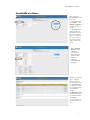
After you log into
SmartSHARE, the main
page opens.
1 - The default search
type is People. Click
Vehicles or Property to
search those types of
records.
2 - The default search
setting includes all
participating agencies.
You can select which
agencies to include in
your search. You can
also select to include
CAD records in your
search.
Select Advanced
Search to reveal
additional
search options.
Advanced search
options include
addresses,
vehicle tag
information, and
intel flags.
Results are grouped by
agency, with your
agency shown first.
For other agencies, the
record Count number
is a link you can click
to reveal that agency's
list of matching
records.
The Hit Count number
link will reveal only the
records that matched
on intel flags.
Use the scroll bar to
move up and down a
list.
3