1
National Conference on Emerging Trends in Computer, Electrical & Electronics (ETCEE-2015)
International Journal of Advance Engineering and Research Development (IJAERD)
e-ISSN: 2348 - 4470 , print-ISSN:2348-6406,Impact Factor:3.134
485 serial port as well as any installed serial port p lug -in
modules:
A. Modbus RTU Master and Slave
Modbus is a half-duplex, master-slave commun ications
protocol. The Modbus network master reads and writes bits
and registers. Modbus protocol allows a single master to
communicate with a maximu m of 247 slave devices.
Micro800 controllers support Modbus RTU Master and
Modbus RTU Slave protocol [1].
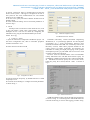
1) Configure Modbus RTU;
1. Open the Connected Components Workbench project. On
the device configuration tree, click on Controller properties
and then Click Serial Port as shown in Fig. 2.
3. Select the Baud rate by default 19200, parity is none,
Modbus role (master, slave).
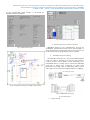
4. Click Advanced Settings to set advanced parameters as
shown in Fig. 3.
B. CIP Symbolic Client/Server
This protocol allows HMIs to easily connect to the
Micro830/Micro 850 controller [1].
1) Configure CIP Serial Driver:
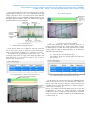
1. Open the Connected Components Workbench project. On
the device configuration tree, click on Controller properties
and then Click Serial Port as shown in Fig. 4.
Fig.4 Serial Port Configuration of CIP Serial Driver
Fig.2 Serial Port Configuration
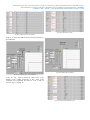
2. Select CIP Serial fro m the Driver field.
2. Select Modbus RTU on the Driver field
Fig.3 Serial Port Configuration on the Driver Field
Fig.5 CIP Serial Driver