1
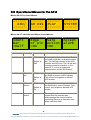
3.3 Operational Menus for the AF-2
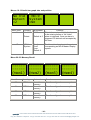
Menus 00-03 Top Level Menus
-----AFD/
------
-----AR DIS
------
-----PLAY
------
-----SYSTEM
------
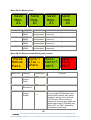
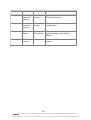
Menus 04-07, Ident Bar and Alarm Accept Menus
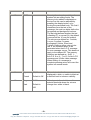
Ident
Bar
=Half
Menu Num.
4
Edge
of pic
=On
Heading
Automation
Ident Bar
Off,Half,On
Default is
Half
5
Edge of
pic
Off, On
Safe
Action
Accept
Alarm
Function
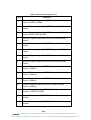
Pressing this will clear the Ident Bar,
just draw a Half bar, or draw the entire
bar. The half bar consists of the AFD
number and AFD text. The full bar also
includes a product identifier, in this
case AF-2, a user programmed
channel Ident and the AR number.
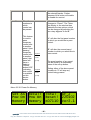
Pressing this button toggles whether
the Safe Action cursor is drawn. This
cursor only applies in defined AFD
modes.
Off,On
Default is
On
7
Accept
alarm
Pressing this button toggles whether
the Edge of picture cursor is drawn.
This cursor only applies in defined
AFD modes.
Default is
On
6
Safe
Action
=On
none
Pressing this button informs the
system that the operator has
acknowledged the current alarms,
converting them to an indication only
alarm until they clear.
- 11 eyeheight Unit 34 Park House Watford Business Park Greenhill Crescent Watford Herts GB WD18 8PH
Reg. No. 2855535 Telephone: +44 (0) 1923 256 000 Fax: +44 (0) 1923 256 100 email: [email protected]