1
SETTING TIME and DATE
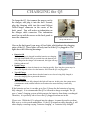
Display the current time and date by selecting “Time & Date”
from the main menu. You will notice that, at the bottom of the
screen, it says “Press ‘0’ to change”.
Press ‘0’ to change the time and date.
Displaying current time & date
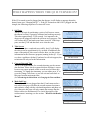
Use the arrow keys to move back and forth between the fields.
To change an entry: (1) Use the back-space key to erase the old
value; (2) Enter the new one.
If you are using 12-hour AM/PM time formatting, you will see
in the upper-right corner, “1 AM / 2 PM” below a field showing
whether it is morning or afternoon/evening. To set the clock to
AM, set this value to “1”. For PM, set it to “2”.
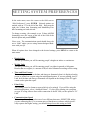
When you are satisfied with the time settings, press MENU to
return to the main menu. The settings on this form will now be
written to the Q3 clock.
- 12 -
Change Time & Date Form