1
Model: KB5000
Programmable Keyboard
66 Programmable Keys
USER MANUAL
NOTICE
The manufacturer of the POS programmable keyboard makes no
representations or warranties, either expressed or implied, by or with respect
to anything in this manual, and shall not be liable for any implied warranties
of fitness for a particular purpose or for any indirect, special or consequential
damages. Information in this document is subject to change without notice
and does not represent a commitment on the part of the manufacturer.
FCC NOTICE
This device complies with Part 15 of FCC Rules. Operations is subject to
the following two conditions: (1) this device may not cause harmful
interference. and (2) this device must accept any interference received,
including interference that may cause undesired operation.
LOGIC CONTROLS, INC.
355 Denton Ave
New Hyde Park, NY 11040
TEL: (516) 248-0400
FAX: (516) 248-0443
Email: [email protected]
http://www.logiccontrols.com
i
TABLE OF CONTENTS
FEATURES ............................................................................... 1
CARTON CONTENTS .............................................................. 2
HARDWARE CONNECTIONS ................................................. 3
FUNCTIONAL TEST ................................................................ 5
UTILITY DISK CONTENTS ...................................................... 7
INSTALLING THE KB5.EXE UTILITY PROGRAM ................... 8
STARTING THE KB5.EXE PROGRAM .................................... 8
PROGRAMMING THE KB5000 KEYBOARD ........................... 10
ADVANCED PROGRAMMING ................................................. 12
SPECIAL FEATURES OF THE KB5000 ................................... 13
INTER-STRING DELAY ............................................ 13
MULTI-LEVEL DEFINITION ...................................... 14
SELF PROGRAMMING ............................................ 16
SPECIAL CONFIGURATIONS ................................................. 17
DATA TRANSFER MENU ......................................................... 19
PINOUTS ................................................................................. 21
SPECIFICATIONS .................................................................... 22
ii
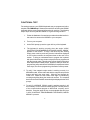
FEATURES
•
•
66 programmable keys; 2 position programmable key lock
Re-legendable / re-programmable keyboard
•
•
Requires no TSR programs and thus avoids software crashes.
Requires no expensive programming kits.
•
•
Requires no battery. Holds data over 100 years.
Multi-level key definition.
•
•
Program variable inter-string delay.
Self programmable with a single key stroke.
•
•
Records and plays back up to 119 alphanumeric characters per key.
Provides true keyboard wedge function that operates with or without the
•
normal computer keyboard connected.
Uses highly reliable, full-travel, mechanical switches.
•
Recognizes the XT, AT, PS/2-25 and PS/2 (models 50 to 95)* computers
automatically.
•
Features an optional 2 track magnetic stripe reader:
- Reads tracks 1 and 2
•
•
- Built-in decoder and wedge interface
- Optional 3 track MSR available
Provides optional output formats: Standard keyboard emulation (KB5000),
or RS232 (KB5000R).
Supports the following character sets:
- all alphanumeric characters
- 12 function keys
- all IBM keyboard’s special keys (Shift, CTRL, Alt, ESC, etc.)
- 255 ASCII codes
•
•
•
•
•
Permits simple field programmability.
Downloads an entire 66 key template into the internal non-volatile memory
in just 7 seconds.
Includes replaceable legend sheet.
Built with spill-proof construction.
Includes cable, legend sheet, and utility software.
* (XT, AT, PS/2 are registered trademarks of International Business Machines Corporation.)
1
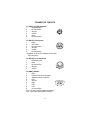
CARTON CONTENTS
KB5000
1.
2.
3.
4.
5.
6.
7.
POS keyboard, Model KB5000
Computer interface cable
Utility software disk
Legend label sheet
User’s manual
Key cap lifter
2 keys for lock
KB5000M (with optional Magnetic Stripe Reader)
1.
2.
3.
4.
5.
6.
7.
POS keyboard, Model KB5000M
Computer interface cable
Utility software disk
Legend label sheet
User’s manual
Key cap lifter
2 keys for lock
KB5000R (RS232C interface for PC computers)
1.
2.
3.
4.
5.
6.
7.
8.
9.
POS keyboard, Model KB5000R
Computer interface cable
RS232C Interface cable
Utility software disk
Legend label sheet
Power adapter (+5vdc)
User’s manual
Key cap lifter
2 keys for lock
2
HARDWARE CONNECTIONS
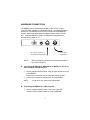
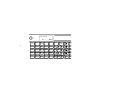
The KB5000 can be connected to an IBM101 PC, XT, AT or clone
computer, PS/2 computer, or computer terminal. The following diagram
shows how the KB5000 connects to the computer and standard keyboard or other keyboard peripheral (magnetic stripe reader, scanner,
etc.). When the KB5000 is used in a stand alone configuration no
connections are made to J5.
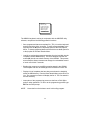
To computer keyboard or
other keyboard wedge devices
NOTE:
To computer
keyboard port
Before making any connections it is always advisable to
turn off the computer.
A. Connecting the KB5000 or KB5000M to an IBM101 PC, XT, AT, or
clone computer’s keyboard port:
1. Use the supplied interface cable. Plug the 6-pin connector into J2
of the KB5000.
Plug the 5-pin connector into the computer’s keyboard port.
2. Connect the computer’s keyboard into J5 of the KB5000.
NOTE:
J1 and J6 are not used in this configuration.
B. Connecting the KB5000 to a PS/2 computer:
1. Use the supplied interface cable. Plug in the 6-pin DIN
connector of the interface cable into J2 of the KB5000.
3
2. Connect the 5 pin DIN connector of the interface cable into the 5
pin DIN of the AT-to-PS/2 adapter.
3. Plug the PS/2 connector of the adapter into the computer’s
keyboard port.
4. Connect the PS/2 keyboard into J1 of the KB5000.
NOTE 1:
J5 and J6 are not used in this configuration.
NOTE 2:
The AT-to-PS/2 adapter is not supplied but can be
ordered from the manufacturer.
C. Connecting the KB5000R to a PC serial port:
1. Connect one end of the RS232C interface cable to J6 of the
KB5000R. Connect the other end of the cable to the DB9 serial
port of the computer.
NOTE 1:
J1, J2, and J5 are not used in this configuration.
NOTE 2:
Programming the KB5000R must be done on a PC
computer using the keyboard port. When
programming is completed, remove the cable going
to J2 and install the RS232C interface cable into J6.
NOTE 3:
Before writing or saving the legend file be sure to
open the F3 menu and set the RS232C option to
YES. Make any changes necessary to the
communications protocol setup. See Special
Configuration on page 17.
NOTE 4:
A standard KB5000 can not be used in an RS232C
environment without factory modifications.
4
FUNCTIONAL TEST
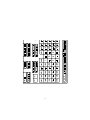
For testing purposes, your KB5000 keyboard was pre-programmed with a
template called KB5000.tpl. Shown at the end of this section is the KB5000
keyboard with the pre-programmed information for each key. The following
simple steps will verify that the KB5000 is in good working condition:
1. Follow the Hardware Connections procedure described earlier in
this manual to connect the KB5000 to your computer.
2. Turn on your computer.
3. At the DOS prompt, press the upper left key of the keyboard.
4. The keyboard is working correctly when the words “LOGIC
CONTROLS PROGRAMMABLE KEYBOARD, MODEL KB5000”
appears on the monitor. To verify if the other keys are working
simply press each key and verify that the information displayed
on the monitor matches the template shown at the end of this
section. To help you understand how to program the keyboard
with special function keys the arrow keys have been programmed
with their actual codes. Therefore they will not display information
when depressed at a DOS prompt. However, when you enter the
programming utility and select the KB5000.tpl template and select
those keys, the correct programming information will be present.
5. To verify if the magnetic stripe reader is working correctly in a
KB5000M model, hold a credit card with the magnetic stripe at the
bottom and facing the arrow mark. Slide the card through the
reader slot. Make sure the bottom card edge is continuously
touching and gliding along the reader slot surface. The recorded
data from the credit card will automatically be displayed at the DOS
prompt.
6. To verify if a KB5000R (RS232 model) is working properly, it will
be necessary to use a communications program. Set the protocol
of the communications program to 9600 baud, no parity, and 8
data bits. Press the upper left key on the keyboard and verify that
“LOGIC CONTROLS PROGRAMMABLE KEYBOARD, MODEL
KB5000” is present.
5
L1
LOGIC CONTROLS
L2
KB5000
LOGIC
CONTROLS
PRICE
MFR
COUPON
CHECK
CASH
KB5000
KEYBOARD
PRICE
VERIFY
STORE
COUPON
STORE
CREDIT
AMER.
EXPRESS
7
8
9
ST
ESC
TOP
ITEM
CORRECT
TRAVEL
CHECK
VISA
4
5
6
DEPA
MEN
MENU
INQUIRY
DATA
MERCHAND
CREDIT
GIFT
CERT.
MASTER
CARD
1
2
3
ITE
CORR
SHIFT
SEND
END OF
MERCHAND
PAYMENT
DISCOVER
0 00
.
NO T
ENT
SIGN
ON/OFF
QUANTITY
6
BACK
SPACE
RETU
UTILITY DISK CONTENTS
All KB5000 keyboards come with a utility software disk. This disk
contains several important files:
KB5.EXE -
Use this utility with or without the keyboard being
attached. It is used to program the keyboard.
For a complete description of how this program
works see the section “Programming the KB5000
keyboard”.
KB5000.TPL -
This template was pre-programmed into the
keyboard and matches the legend shown on the
previous page. If you have any questions on how to
program a particular key you can refer back to this
template to see how it was originally programmed.
DL5.COM -
This utility program allows you to download a stored
template without entering the KB5.EXE utility
program. Simply add the KB5 directory to the path
statement of the autoexec.bat file. When you want
to change the stored program simply type the
download command plus the file you want to write
into the keyboard. For example, to download a file
called lunch, you would type DL5 LUNCH.TPL and
press ENTER. The download program will take
approximately 7 seconds to over-write the existing
legend file and install the lunch file.
README.DOC - This document contains the latest information
which may not be included in the manual.
7
INSTALLING THE KB5.EXE UTILITY PROGRAM
The first step in using the KB5.EXE utility program is to copy the program
to your hard drive.
1. Insert the KB5000 utility software into drive A or B of the
computer.
2. Type MD KB5 at the “C>“ prompt to make a directory named
KB5.
3. Type CD KB5 to make the KB5 directory active.
4. Type COPY A:*.* If the disk was inserted into drive A then all
files will be copied into the hard drive’s directory (KB5). If drive
B is used then you must type COPY B:*.*
STARTING THE KB5.EXE PROGRAM
This program can be used with or without the keyboard being attached to the
computer. To start the program type KB5 at the KB5 DOS prompt and press
ENTER. When the 101 keyboard is used by itself, the program will acknowledge that no keyboard is attached by displaying a “No POS keyboard found”
message. To continue using the program you must select one of the choices
shown below. If the keyboard is attached, the program will automatically
select the correct programming graphics screen for you.
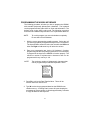
Programming with the KB5000 keyboard disconnected.
With the “No POS keyboard found” message showing on the monitor
select option number 5. The program will automatically select the
programming graphic shown below.
No POS Keyboard found !
Please enter keyboard Type?
1) KB2000 membrane keypad
2) KB2100 keyboard with .key
3) KB3000 membrane keypad
4) KB2100 keyboard with .tpl
5) KB5000 keyboard
6) KB6000 QWERTY keyboard
Q) Quit program
8
9
PROGRAMMING THE KB5000 KEYBOARD
The following procedure will show you how to program the KB5000
with standard (keyboard) alphanumeric characters. The keyboard
can be programmed with either ASCII or Scan code information. The
default mode is the ASCII code mode. The following procedure
assumes both a KB5000 keyboard and a 101 keyboard are attached.
NOTE:
To run this program you must exit windows completely.
Do not shell out from Windows.
1. With the correct programming graphics present. Select the cell
you want to program by using the arrow keys on the 101 keyboard.
The Up and Down arrows will select the row while the Shift and
either the Right or Left arrow key will select the column.
2. Enter your programming text via the 101 keyboard. Continue
programming until all the keys are programmed. It is not necessary
to program all the keys for the KB5000 to function properly. The
maximum number of alphanumeric characters that can be
programmed for any one key is 119.
NOTE:
The maximum number of alphanumeric characters that
can be programmed per standard keyboard is 2000.
DATA TRANSFER MENU
Dos shell
File list (*.tpl)
Load file from disk
Read from keypad
Save file to disk
Write to keypad
Press ESC to Quit
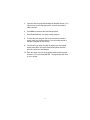
3. Press F2 to call up the Data Transfer Menu. There will be
several choices to choose from.
4.
Type W to write the programmed data into the KB5000’s non
volatile memory. A “Writing Data” screen will open showing the
percentage of memory written. It will take approximately 7 seconds
to copy the data into the keyboard.
10
5. Type S to save the programmed data into the KB5 directory. You
can select up to an 8 character name. It will be saved with a
.TPL extension.
6. Press ESC to terminate the Data Transfer Menu.
7. Press F10 followed by Y to exit the utility program.
8. To verify that your program has been successfully installed,
simply press any programmed key. The information stored in
that key will appear on the monitor.
9. The next time you want to install the legend you just created
simple press F2 to call up the Data Transfer Menu and then
press L to open the Load window.
10. Enter the name of the file in the legend window with its proper
extension (.TPL) and press ENTER. The legend will now show
on your monitor.
11
ADVANCED PROGRAMMING
The KB5000 POS keyboard can be programmed with all special control and
function keys such as the Shift, Ctrl, Alt, F1 through F12, and the up/down/
left/right arrow keys. The procedure to program these special keys is shown
below:
1. Start the KB5 utility program.
2. Select the cell to be programmed. Press F8 to enter the scancode mode. The “code type” information changes from ASCII to
SCAN.
NOTE: The scan-code mode will only be active for this cell. You must
select F8 for each cell you want to program with scan-code
information.
3.
4.
Under the scan-code mode, each alphanumeric character is
enclosed in parenthesis. For special function or control keys, press
ESC (three vertical bars will be present) followed by the special
function or control key you want to program.
For example, to program the INS (insert) key, press ESC and
then the INS key on the 101 keyboard. To program the ESC key,
simply press the ESC key twice. Special function and control
keys will not appear inside parenthesis. The three vertical bars
will disappear once the special function key is depressed.
You may return to the start-up graphic screen (short menu) by
pressing Ctrl-Alt-F4 again.
NOTES:
1) Special function keys require ESC as the leading code. In the scan-code mode, you
can view the symbol of the special key or the hex code equivalent of the special key. To
view, simply press F7 to toggle between symbol and hex modes.
2)
Once a special function key (shift, ctrl, alt, etc.) is programmed it may be necessary to
un-select the function. To do so, press in sequence ESC, f (lower case F), 0 (zero),
ESC, followed by the special function key (shift, ctrl alt, etc.)
3)
Any given programmable location may be toggled between scan-code mode and ASCIIcode mode. Pressing the F8 key on the keyboard will change the cell’s programming
mode to scan-code mode. Pressing F9 on the keyboard will change the cell’s programming
mode to ASCII-code mode. Changing modes in a cell that has been previously
programmed will erase all the information in that cell.
4)
To enter hex scan-codes directly, press ESC followed by the 2-digit hex number. For
example, to program the CTRL key press ESC followed by 1D. The KB5 program will
add the leading zero.
12
SPECIAL FEATURES OF THE KB5000
Besides being able to program all the keys of an IBM101 keyboard, the
KB5000 has also incorporated three state-of-the-art features which will
add flexibility and functionality to the keyboard.
INTER-STRING DELAY
This feature allows for a time delay(s) to be installed after a character(s)
has been inserted into a cell. To use this feature follow the steps below:
1. Enter the character(s) which will precede the delay. For
example, ABC.
2. Depress and hold the ALT key while pressing the letter D. A time
delay screen will open asking for the amount of delay you require
(up to 240 seconds). Select the appropriate delay and press
ENTER. A square pixel will appear on the programming line
immediately following the last character typed.
3. Type the next character(s), DEF. You can use more than one
delay per cell and each delay time can be different.
4. Save the template and then write the template to the keyboard.
5. Exit the KB5 program by pressing F10 followed by the letter Y.
6. Press the location key where the time delay character has been
stored. The monitor will display ABC immediately. After the delay
time you entered for this key has expired, DEF will be displayed on
the monitor and the cursor will be present at the prompt.
13
MULTI-LEVEL DEFINITION
This feature can increase the apparent number of programmablekeys by
allowing you to program different levels into any cell. For every
different level you program you must select another key to be a “SHIFT
LEVEL” key. Programming is accomplished in the normal manner. After
programming the base level a separator bar must be entered to separate
the base level from the second level. You can program more than
two levels per cell. For example, if you needed to program small coffee,
medium coffee, and large coffee into one cell follow the procedure
outlined below:
1.
Select a blank cell (L11) and enter the most common coffee first
(medium coffee). Mark the legend sheet for this cell COFFEE.
2.
Enter the separator bar by depressing and holding the ALT key
and pressing the letter S. A solid line will appear on the
programming line immediately following the last character typed.
3.
Enter the second level (small coffee) followed by another
separator.
4.
Enter the third level of information (large coffee). The entire
programming line should look like the following:
L11 MEDIUM COFFEE
SMALL COFFEE
LARGE COFFEE
5.
Select a blank location (L14) to become the first level shift
position. Mark the legend sheet for this location SMALL.
6.
Change the programming mode of this cell to scan-code mode
(F8). Depress and hold the ALT key while pressing the letter A.
A triangle inside brackets (< >) will appear on the programming
line. This key when depressed and held will activate all keys that
have a second level.
7.
Select another blank location (L15). This will become the second
level shift position (will activate the third level of information). Mark
the legend sheet for this position LARGE.
14
8.
Change the programming mode of this cell to the scan-code mode
(F8). Depress and hold the ALT key while depressing the letter A
twice. Two triangles inside brackets will appear on the programming
line.
9. To use this feature in your application is extremely simple. When
medium coffee is desired just press the L11 key (the first level of
information stored in cell L11 will be sent to the computer). When
a small coffee is desired press and hold the L14 key while pressing
the L11 key (the second level of information stored in cell L11 will
be sent to the computer). When a large coffee is desired press
and hold the L15 key while pressing the L11 key (the third level of
information stored in cell L11 will be sent to the computer)
NOTE: There is no preset limit to the number of levels that can be
programmed into a keyboard.
15
SELF PROGRAMMING
To use this feature the KB5 directory must be added to the path statement
of the AUTOEXEC.BAT file. This feature is extremely helpful for
applications where the keyboard files are changing on a regular basis.
A programming location must be reserved on each keyboard in order
to perform the self programming function.
1. Select the key location to contain the self programming
information (R51).
2. The information to be entered into this location will be the down
load command plus the name of the file to be loaded into the key
board. For example, if you want to change from a breakfast menu
to a lunch menu the R51 location in the breakfast file can be
programmed as follows:
R51
DL5 LUNCH.TPL
3. To change to the lunch menu simply press R51. The download
program will load the lunch menu into the keyboard.
16
SPECIAL CONFIGURATIONS
The KB5000 can be set up with many different programming options. To
activate the configuration menu screen the KB5 program must first be placed
into the extended menu (Ctrl, Alt, F4). Press F3 to open the configuration
screen. By depressing the highlighted letter in each option the program
will enable or disable that option. The default settings are shown in the
graphic below.
Send Break-codes for scan-codes
Yes
Enable beep while a key pressed
Yes
No beep if a key is undefined
Yes
Translate to code-set #2 for AT
Yes
Emulating XT keyboard always
No
Use ALT+num to generate ASCII
No
Enable Typematic for scan codes
No
Enable Typematic for ASCII codes
No
Emulating Link Terminal
No
InterCharacter Delay (+/-):
2 mS
Enable RS232 Output
No
Baud Rate:
9600
Parity:
NONE
Length of Data:
8 -bits
Press a High-light Letter to select
Esc ==> Quit from this menu
17
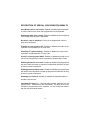
DESCRIPTION OF SPECIAL CONFIGURATION MENU F3
Send Break-code for scan-codes - Enables or disables the transmission
of break codes for each scan code programmed into the keyboard.
Enable beep while a key pressed - Enables or disables the entire keyboard
from beeping when any key is depressed.
No beep if a key is undefined - If a key is not programmed it will not
beep when depressed.
Translate to code set #2 for AT - Enables or disables the output of the
keyboard to be translated into AT scan code.
Emulating XT keyboard always - Enables or disables the output of the
keyboard to be translated into XT scan code.
Use ALT +num to generate ASCII - Enables or disables the ability to use
the ALT key along with the numeric keyboard to generate ASCII codes.
Enable typematic for scan codes - Enables or disables keys programmed
with scan code information to repeat the programmed characters as long
as the key remains depressed.
Enable typematic for ASCII codes - Enables or disables keys programmed
with ASCII code information to repeat the programmed characters as long
as the key remains depressed.
Emulating Link Terminal - Enables or disables the keyboards ability to
emulate a link terminal.
Intercharacter Delay (+/-) - The time delay between characters can be
adjusted from 1 millisecond to 266 milliseconds. This delay is set for all
characters programmed into the keyboard. Do not confuse this feature
with the inter-string delay feature.
18
DESCRIPTION OF SPECIAL CONFIGURATION MENU F3
(CONTINUED)
Enable RS232 Output - Enables or disables the output of the keyboard to
the RS232 port (DB9 connector). If this option is set to YES then the protocol
settings must be set to mirror the application software.
Baud Rate - This option selects 2400, 4800, 9600 and 19,200 baud
rates.
Parity - This option selects ODD, EVEN or NO parity.
Length of data - This option selects either 7 or 8 data bits.
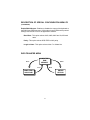
DATA TRANSFER MENU
Save
COMPUTER'S
RAM
MEMORY
Load
Write
Read
COMPUTER'S
HARD DISK
KB5000
KEYPAD
19
Dos shell
File list (*.tpl)
Load file from disk
Read from keypad
Save file to disk
Write to keypad
Press ESC to Quit
The KB5000 keyboard, working in conjunction with the KB5.EXE utility
software, can perform the following powerful functions:
*
Save programmed data as a template file (.TPL) in both the keyboard
and the hard drive of the computer. To save programmed data to the
keyboard use the W (Write to keyboard) option of the Data Transfer
Menu. To save programmed data to the hard drive use the S (Save file
to disk) option of the Data Transfer Menu.
*
Load (L) a previously programmed template from the hard disk into the
computer’s volatile RAM memory. The same template can then be
written (W) into the non-volatile memory of the KB5000. This process,
as an example, allows a restaurant to change from a breakfast menu to
a lunch menu within 7 seconds.
*
Enables the computer to read (R) a template stored in the KB5000.
That template can then be saved (S) to the hard disk for future use.
*
Display a list of templates that have been stored onto the hard disk
within the KB5 directory. From the Data Transfer Menu select F for File
List. The computer’s monitor will display the list of .TPL files stored in
the KB5 directory.
*
Interruption of the programming process to shell out to DOS (D) to
perform other operations. To return to the programming process type
EXIT at the DOS prompt.
NOTE:
Never shell out of windows to work in this utility program.
20
CONNECTOR PINOUTS
J1 (PS/2F) to PS/2 Keyboard
1
Keyboard Data
2
No Connection
3
Ground
4
+5VDC
5
Clock
6
No Connection
J2 (DIN 6F) to Computer *
1
Clock
2
CPU Data
3
No Connection
4
Ground
5
+5VDC
6
No Connection
* Requires an AT to PS/2 adapter to work with
PS/2 computer.
1
6
2
J5 (DIN 5F) to 101 Keyboard
1
Keyboard Clock
2
Data
3
No Connection
4
Ground
5
+5VDC
J6 (DB9F) RS232C
1
DCD
2
Receive Data from computer
3
Transmit Data to computer
4
DTR
5
Ground
6
DSR
7
RTS
8
CTS
9
No Connection
Pins 1,4, and 6 are tied together internally
Pins 7 and 8 are tied together internally
21
5
4
3
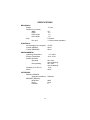
SPECIFICATIONS
MECHANICAL
Weight
Dimension (in inches)
Width
Depth
Front Height
Rear Height
Keys
Life cycle
15.7
6.2
1.2
1.8
Full travel
>1 million tactile operations
ELECTRICAL
Input Voltage (from computer)
Current (KB5000)
Current (KB5000M)
+5VDC
25ma.
50ma.
2.3 lbs
ENVIRONMENTAL
Operating Temperature
Storage Temperature
Relative Humidity
Operating
0 to +50ºC
-20 to +70ºC
85% max.,
non-condensing
90% max.,
non-condensing
4G's
40G's
Non-operating
Vibration (10 to 55 Hz.)
Shock
INTERFACES
KB5000, KB5000M
(Keyboard emulation)
KB5000R (RS232C)
Baud Rate
Parity
Data Bits
22
Standard
9600
None
8