1
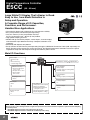
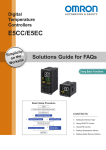
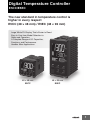
Digital Temperature Controller
E5CC/E5EC
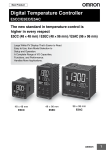
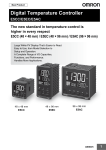
The new standard in temperature control is
higher in every respect
E5CC (48 × 48 mm) / E5EC (48 × 96 mm)
Large White PV Display That's Easier to Read.
Easy to Use, from Model Selection to
Setup and Operation.
A Complete Range of I/O Capacities,
Functions, and Performance.
Handles More Applications.
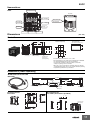
48 × 48 mm
E5CC
48 × 96 mm
E5EC
1
Digital Temperature Controller
E5CC
(48 × 48 mm)
Large White PV Display That’s Easier to Read.
Easy to Use, from Model Selection to
Setup and Operation.
A Complete Range of I/O Capacities,
Functions, and Performance.
Handles More Applications.
• The white PV display with a height of 15.2 mm improves visibility.
• Easy setup with the CX-Thermo (sold separately).
48 × 48 mm
E5CC
• Only 48 × 48 mm (C size) and provides five keys.
As easy to operate as 48 × 96 mm (E size) models.
Refer to Safety Precautions on page 30.
• High-speed sampling at 50 ms.
• Models with up to 3 auxiliary outputs, 4 event inputs, a transfer output,
and remote SP input added to the lineup. Complete selection of I/O
capacities.
• Short body with depth of only 60 mm.
• Easily connect the CX-Thermo (sold separately) through a USB-Serial Conversion Cable (sold separately) to a
Setup Tool port on the top panel or on the front panel. The Digital Temperature Controller receives the power
required for setup from the computer through the USB bus power source.
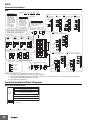
Main I/O Functions
Sensor Input
• Thermocouple
• Pt
• Universal analog
current/voltage input
E5CC
Dual displays: PV/SV
4-digit displays
Control Output 1
• Relay output
• Voltage output (for driving SSR)
• Current output
Indication Accuracy
• Thermocouple input:
±0.3% of PV
• Pt input: ±0.2% of PV
• Analog input:
±0.2% of FS
Control Output 2
• None
• Voltage output (for driving SSR)
Sampling Period
• 50 ms
Auxiliary Outputs
Event Inputs
• None
•2
•4
Remote SP Input
• None
•1
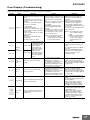
• PF (shift) Key
• Temperature status display
• Simple programming
• Independent heating and
cooling PID control
• Changed parameter display
• Display brightness setting
•3
Transfer Output
• None
•1
This datasheet is provided as a guideline for selecting products.
Be sure to refer to the following manuals for application precautions and other information required for operation before attempting
to use the product.
E5CC/E5EC Digital Controllers User’s Manual (Cat. No. H174)
E5CC/E5EC Digital Controllers Communications Manual (Cat. No. H175)
2
E5CC
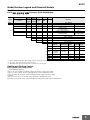
Model Number Legend and Standard Models
Model Number Legend
E5CC-@@ @ @ @ @ -@@@ (Example: E5CC-RX3A5M-000)
−− − − − − −−−
A
B C D E
F
A
Model
Control outputs
1 and 2
B
C
D
No. of Power
Terminal
auxiliary supply
type
outputs voltage
E
F
Input
type
Options
E5CC
RX
QX
*1 *3 CX
QQ
3
A
D
5
M
*1
000
001
*1
003
*3
004
005
006
007
Meaning
48 × 48 mm
Control output 1
Control output 2
Relay output
None
Voltage output
None
(for driving SSR)
Linear current output *2
None
Voltage output
Voltage output
(for driving SSR)
(for driving SSR)
3 (one common)
100 to 240 VAC
24 VAC/DC
Screw terminals (with cover)
Universal input
Event
Remote Transfer
HB alarm and
Communications
HS alarm
inputs
SP Input output
----------1
--2
----2
(for 3-phase
RS-485
------heaters)
--RS-485
2
--------4
--------2
Provided.
----2
Provided.
---
*1. Options with HB and HS alarms (001 and 003) cannot be selected if a current output is selected for the control output.
*2. The control output cannot be used as a transfer output.
*3. Option 004 can be selected only when "CX" is selected for the control outputs.
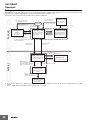
Heating and Cooling Control
● Using Heating and Cooling Control
A Control Output Assignment
If there is no control output 2, an auxiliary output is used as the cooling control output.
If there is a control output 2, the two control outputs are used for heating and cooling.
(It does not matter which output is used for heating and which output is used for cooling.)
B Control
If PID control is used, you can set PID control separately for heating and cooling.
This allows you to handle control systems with different heating and cooling response characteristics.
3
E5CC
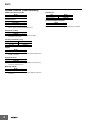
Optional Products (Order Separately)
USB-Serial Conversion Cable
Model
E58-CIFQ2
Front Covers
Type
Hard Front Cover
Soft Front Cover
Model
Y92A-48H
Y92A-48D
Terminal Covers
CX-Thermo Support Software
Model
E53-COV17
E53-COV23
Model
EST2-2C-MV4
Note: The E53-COV10 cannot be used.
Refer to page 11 for the mounted dimensions.
Waterproof Packing
Model
Y92S-P8
Note: This Waterproof Packing is provided with the Digital
Temperature Controller.
Current Transformers (CTs)
Hole diameter
5.8 mm
12.0 mm
Model
E54-CT1
E54-CT3
Adapter
Model
Y92F-45
Note: Use this Adapter when the panel has already been prepared for
an E5B@ Controller.
Waterproof Cover
Model
Y92A-48N
Note: This Cover complies with IP66 and NEMA 4X waterproofing.
Front panel: IP66 protection.
Mounting Adapter
Model
Y92F-49
Note: This Mounting Adapter is provided with the Digital Temperature
Controller.
4
Note: CX-Thermo version 4.4 or higher is required for the E5CC.
E5CC
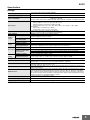
Specifications
Ratings
Power supply voltage
Operating voltage range
Power consumption
Sensor input
Input impedance
Control method
Relay output
Control
output
Auxiliary
output
Voltage output
(for driving SSR)
Current output
Number of outputs
Output specifications
Number of inputs
Event input External contact input
specifications
Transfer
output
Number of outputs
Output specifications
Setting method
Remote SP input
Indication method
Multi SP
Other functions
Ambient operating temperature
Ambient operating humidity
Storage temperature
A in model number: 100 to 240 VAC, 50/60 Hz
D in model number: 24 VAC, 50/60 Hz; 24 VDC
85% to 110% of rated supply voltage
Models with option selection of 000: 5.2 VA max. at 100 to 240 VAC, and 3.1 VA max. at 24 VDC or
1.6 W max. at 24 VDC
All other models: 6.5 VA max. at 100 to 240 VAC, and 4.1 VA max. at 24 VDC or 2.3 W max. at 24 VDC
Models with temperature inputs
Thermocouple: K, J, T, E, L, U, N, R, S, B, W, or PL II
Platinum resistance thermometer: Pt100 or JPt100
Infrared temperature sensor: 10 to 70°C, 60 to 120°C, 115 to 165°C, or 140 to 260°C
Analog input
Current input: 4 to 20 mA or 0 to 20 mA
Voltage input: 1 to 5 V, 0 to 5 V, or 0 to 10 V
Current input: 150 Ω max., Voltage input: 1 MΩ min.
(Use a 1:1 connection when connecting the ES2-HB/THB.)
ON/OFF control or 2-PID control (with auto-tuning)
SPST-NO, 250 VAC, 3 A (resistive load), electrical life: 100,000 operations,
minimum applicable load: 5 V, 10 mA *
Output voltage: 12 VDC ±20% (PNP), max. load current: 21 mA, with short-circuit protection circuit
4 to 20 mA DC/0 to 20 mA DC, load: 500 Ω max., resolution: approx. 10,000
3
N.O. relay outputs, 250 VAC, Models with 3 outputs: 2 A (resistive load),
Electrical life: 100,000 operations, Minimum applicable load: 10 mA at 5 V
2 or 4 (depends on model)
Contact input: ON: 1 kΩ max., OFF: 100 kΩ min.
Non-contact input: ON: Residual voltage: 1.5 V max., OFF: Leakage current: 0.1 mA max.
Current flow: Approx. 7 mA per contact
1 (only on models with a transfer output)
Contact output: 4 to 20 mA DC, load: 500 Ω max., resolution: approx. 10,000
Linear voltage output: 1 to 5 VDC, load: 1 kΩ max, resolution: Approx. 10,000
Digital setting using front panel keys
Current input: 4 to 20 mA DC or 0 to 20 mA DC (input impedance: 150 Ω max.)
Voltage input: 1 to 5 V, 0 to 5 V, or 0 to 10 V (input impedance: 1 MΩ min.)
11-segment digital display and individual indicators
Character height: PV: 15.2 mm, SV: 7.1 mm
Up to eight set points (SP0 to SP7) can be saved and selected using event inputs, key operations, or
serial communications.
Manual output, heating/cooling control, loop burnout alarm, SP ramp, other alarm functions, heater
burnout (HB) alarm (including SSR failure (HS) alarm), 40% AT, 100% AT, MV limiter, input digital
filter, self tuning, robust tuning, PV input shift, run/stop, protection functions, extraction of square root,
MV change rate limit, simple calculations, temperature status display, simple programming, moving
average of input value, and display brightness setting
-10 to 55°C (with no condensation or icing),
for 3-year warranty: -10 to 50°C (with no condensation or icing)
25% to 85%
-25 to 65°C (with no condensation or icing)
* You cannot select a relay output or current output for control output 2.
5
E5CC
Input Ranges
●Thermocouple/Platinum Resistance Thermometer (Universal inputs)
Platinum resistance
thermometer
Input type
Name
Pt100
Infrared temperature
sensor
Thermocouple
JPt100
K
J
T
E
L
U
N
R
S
B
W
PLII
10 to
70°C
60 to
120°C
115 to
165°C
120
165
140 to
260°C
2300
2300
1800
1800
1700
1700
1700
1600
1500
Temperature range (°C)
1400
1300
1300
1300
1300
1200
1100
1000
900
850
850
850
800
700
600
600
500.0
500
500.0
500.0
400.0
400
400
400.0
400
400.0
260
300
200
100.0
100
90
100
0
0.0
-100
-200
100.0
-200
-199.9
0
1
Setting
number
0.0
199.9
2
3
-20.0
-100
-20.0
6
7
8
-200
4
5
0
0
16
17
0
0
0
0
0
0
19
20
21
22
23
24
-100
-200
-199.9
-200
9
10
11
12
-200
-199.9
-200
13
14
15
18
Shaded settings are the default settings.
The applicable standards for the input types are as follows:
K, J, T, E, N, R, S, B: JIS C 1602-1995, IEC 60584-1
L: Fe-CuNi, DIN 43710-1985
U: Cu-CuNi, DIN 43710-1985
W: W5Re/W26Re, ASTM E988-1990
JPt100: JIS C 1604-1989, JIS C 1606-1989
Pt100: JIS C 1604-1997, IEC 60751
PL II: According to Platinel II electromotive force charts from BASF (previously Engelhard)
●Analog input
Input type
Input
specification
Current
4 to 20 mA 0 to 20 mA
Voltage
1 to 5 V
0 to 5 V
Usable in the following ranges by scaling:
-1999 to 9999, -199.9 to 999.9,
-19.99 to 99.99 or -1.999 to 9.999
Setting number
25
26
27
28
0 to 10 V
Setting range
6
29
E5CC
Alarm Outputs
Each alarm can be independently set to one of the following 19 alarm types. The default is 2: Upper limit. (see note.)
Auxiliary outputs are allocated for alarms. ON delays and OFF delays (0 to 999 s) can also be specified.
Note: In the default settings for models with HB or HS alarms, alarm 1 is set to a heater alarm (HA) and the Alarm Type 1 parameter is not displayed.
To use alarm 1, set the output assignment to alarm 1.
Set
value
0
Alarm function OFF
1
Upper- and lower-limit *1
2
6
7
8
9
11
ON
OFF
ON
OFF
Absolute-value upper-limit
with standby sequence
ON
OFF
Absolute-value lower-limit
with standby sequence
ON
OFF
LBA (alarm 1 type only)
PV change rate alarm
14
SP absolute value
upper limit
ON
OFF
SP absolute value
lower limit
ON
OFF
MV absolute value
upper limit *9
ON
OFF
MV absolute value
lower limit *9
ON
OFF
RSP absolute value
upper limit *10
ON
OFF
RSP absolute value
lower limit *10
ON
OFF
16
17
18
19
*2
Absolute-value upper-limit
12
13
15
SP
L
ON
OFF
PV
ON
OFF
L
PV
*3
Case 2
PV
*4
X
SP
PV
ON
OFF
PV
ON
OFF
PV
ON
OFF
PV
ON
OFF
PV
ON
OFF
PV
ON
OFF
X
SP
X
0
X
0
X
0
X
0
H SP
H<0, L>0
|H| < |L|
X
0
SP
ON
OFF
SP
ON
OFF
MV
ON
OFF
MV
ON
OFF
RSP
ON
OFF
RSP
ON
OFF
X
0
X
0
X
0
X
0
X
0
H
SP L H
SP
L
H<0, L>0
|H| ≥ |L|
L SP
H
SP H
*3
L
H>0, L<0
|H| ≤ |L|
Set value: 4, Upper- and lower-limit range
Case 1
Case 3 (Always OFF)
Case 2
H<0, L<0
L
H SP
H<0, L>0
|H| < |L|
SP L
H
H
H>0, L<0
|H| > |L|
PV
SP
H
SP
L
L SP
SP H L
Description of function
No alarm
Set the deviation in the set point by setting the alarm upper
limit (H) and alarm lower limit (L). The alarm is ON when the
PV is outside this deviation range.
Set the upward deviation in the set point by setting the alarm
value (X). The alarm is ON when the PV is higher than the SP
by the deviation or more.
Set the downward deviation in the set point by setting the
alarm value (X). The alarm is ON when the PV is lower than
the SP by the deviation or more.
Set the deviation in the set point by setting the alarm upper
limit (H) and alarm lower limit (L). The alarm is ON when the
PV is inside this deviation range.
A standby sequence is added to the upper- and lower-limit
alarm (1). *6
X
SP
PV
A standby sequence is added to the upper-limit alarm (2). *6
PV
A standby sequence is added to the lower-limit alarm (3). *6
X
SP
X
PV
0
X
PV
0
X
PV
0
X
PV
0
The alarm will turn ON if the process value is larger than the
alarm value (X) regardless of the set point.
The alarm will turn ON if the process value is smaller than the
alarm value (X) regardless of the set point.
A standby sequence is added to the absolute-value upper-limit alarm (8). *6
A standby sequence is added to the absolute-value lower-limit
alarm (9). *6
*7
*8
Case 3 (Always ON)
H>0, L<0
|H| > |L|
X
-
H<0, L<0
L
PV
SP
H
SP
With set values 1, 4 and 5, the upper and lower limit values can be set
ndependently for each alarm type, and are expressed as “L” and “H.”
Set value: 1, Upper- and lower-limit alarm
Case 1
X
H
SP
ON
OFF
ON
OFF
PV
X
ON
OFF
Lower-limit with standby
sequence
Absolute-value lower-limit
10
X
ON
OFF
Upper- and lower-limit with
standby sequence *1
*5
Upper-limit with standby
sequence
5
*2
PV
SP
ON
OFF
Upper- and lower-limit
range *1
H
SP
ON
OFF
Lower-limit
4
L
ON
OFF
Upper-limit
3
*1
Alarm output operation
When alarm value When alarm value
X is positive
X is negative
Output OFF
Alarm type
H<0, L>0
|H| ≥ |L|
H>0, L<0
|H| ≤ |L|
X
SP
0
X
SP
0
X
MV
0
X
MV
0
X
RSP
0
X
RSP
0
This alarm type turns ON the alarm when the set point (SP) is
higher than the alarm value (X).
This alarm type turns ON the alarm when the set point (SP) is
smaller than the alarm value (X).
This alarm type turns ON the alarm when the manipulated
variable (MV) is higher than the alarm value (X).
This alarm type turns ON the alarm when the manipulated
variable (MV) is smaller than the alarm value (X).
The alarm will turn ON when the remote SP (RSP) is larger
than the alarm value (X).
The alarm will turn ON when the remote SP (RSP) is smaller
than the alarm value (X).
*4
Set value: 5, Upper- and lower-limit with standby sequence
For Upper- and Lower-Limit Alarm Described Above *2
• Case 1 and 2
Always OFF when the upper-limit and lower-limit hysteresis overlaps.
• Case 3: Always OFF
*5. Set value: 5, Upper- and lower-limit with standby sequence
Always OFF when the upper-limit and lower-limit hysteresis overlaps.
*6 Refer to the E5CC/E5EC Digital Controllers User's Manual (Cat. No. H174)
for information on the operation of the standby sequence.
*7 Refer to the E5CC/E5EC Digital Controllers User's Manual (Cat. No.H174)
for information on the loop burnout alarm (LBA).
*8 Refer to the E5CC/E5EC Digital Controllers User's Manual (Cat. No. H174)
for information on the PV change rate alarm.
*9 When heating/cooling control is performed, the MV absolute upper limit
alarm functions only for the heating operation and the MV absolute lower
limit alarm functions only for the cooling operation.
*10 This value is displayed only when a remote SP input is used. It functions in
both Local SP Mode and Remote SP Mode.
7
E5CC
Characteristics
Indication accuracy
(at the ambient temperature of 23°C)
Transfer output accuracy
Remote SP Input Type
Influence of temperature *2
Influence of voltage *2
Input sampling period
Hysteresis
Proportional band (P)
Integral time (I)
Derivative time (D)
Proportional band (P) for cooling
Integral time (I) for cooling
Derivative time (D) for cooling
Control period
Manual reset value
Alarm setting range
Affect of signal source resistance
Insulation resistance
Dielectric strength
resistance
Vibration
Malfunction
Shock resistance
Destruction
Malfunction
Weight
Degree of protection
Memory protection
Setup Tool
Setup Tool port
Standards
EMC
Approved standards
Conformed standards
Thermocouple:
(±0.3% of indicated value or ±1°C, whichever is greater) ±1 digit max. *1
Platinum resistance thermometer: (±0.2% of indicated value or ±0.8°C, whichever is greater) ±1 digit
Analog input:
±0.2% FS ±1 digit max.
CT input:
±5% FS ±1 digit max.
±0.3% FS max.
±0.2% FS ±1 digit max.
Thermocouple input (R, S, B, W, PL II): (±1% of PV or ±10°C, whichever is greater) ±1 digit max.
Other thermocouple input: (±1% of PV or ±4°C, whichever is greater) ±1 digit max. *3
Platinum resistance thermometer: (±1% of PV or ±2°C, whichever is greater) ±1 digit max.
Analog input: (±1%FS) ±1 digit max.
CT input: (±5% FS) ±1 digit max.
Remote SP input: (±1% FS) ±1 digit max.
50 ms
Temperature input: 0.1 to 999.9°C or °F (in units of 0.1°C or °F) *4
Analog input: 0.01% to 99.99% FS (in units of 0.01% FS)
Temperature input: 0.1 to 999.9°C or °F (in units of 0.1°C or °F) *4
Analog input: 0.1% to 999.9% FS (in units of 0.1% FS)
0 to 9999 s (in units of 1 s), 0.0 to 999.9 s (in units of 0.1 s) *5
0 to 9999 s (in units of 1 s), 0.0 to 999.9 s (in units of 0.1 s) *5
Temperature input: 0.1 to 999.9°C or °F (in units of 0.1°C or °F) *4
Analog input: 0.1% to 999.9% FS (in units of 0.1% FS)
0 to 9999 s (in units of 1 s), 0.0 to 999.9 s (in units of 0.1 s) *5
0 to 9999 s (in units of 1 s), 0.0 to 999.9 s (in units of 0.1 s) *5
0.1, 0.2, 0.5, 1 to 99 s (in units of 1 s)
0.0 to 100.0% (in units of 0.1%)
-1999 to 9999 (decimal point position depends on input type)
Thermocouple: 0.1°C/Ω max. (100 Ωmax.)
Platinum resistance thermometer: 0.1°C/Ω max. (10 Ω max.)
20 MΩ min. (at 500 VDC)
2,300 VAC, 50 or 60 Hz for 1 min (between terminals with different charge)
10 to 55 Hz, 20 m/s2 for 10 min each in X, Y, and Z directions
10 to 55 Hz, 20 m/s2 for 2 hrs each in X, Y, and Z directions
100 m/s2, 3 times each in X, Y, and Z directions
300 m/s2, 3 times each in X, Y, and Z directions
Controller: Approx. 120 g, Mounting Bracket: Approx. 10 g
Front panel: IP66, Rear case: IP20, Terminals: IP00
Non-volatile memory (number of writes: 1,000,000 times)
CX-Thermo version 4.4 or higher
E5CC top panel: An E58-CIFQ2 USB-Serial Conversion Cable is used to connect a USB port on the
computer with the port on the top panel of the E5CC. *6
UL 61010-1, CSA C22.2 No. 611010-1 (evaluated by UL)
EN 61010-1 (IEC 61010-1): Pollution level 2, overcurrent category II
EMI:
EN61326
Radiated Interference Electromagnetic Field Strength: EN 55011 Group 1, class A
Noise Terminal Voltage:
EN 55011 Group 1, class A
EMS:
EN 61326
ESD Immunity:
EN 61000-4-2
Electromagnetic Field Immunity:
EN 61000-4-3
Burst Noise Immunity:
EN 61000-4-4
Conducted Disturbance Immunity:
EN 61000-4-6
Surge Immunity:
EN 61000-4-5
Voltage Dip/Interrupting Immunity:
EN 61000-4-11
*1 The indication accuracy of K thermocouples in the -200 to 1300°C range, T and N thermocouples at a temperature of -100°C max., and U and
L thermocouples at any temperatures is ±2°C ±1 digit max. The indication accuracy of the B thermocouple at a temperature of 400°Cmax. is
not specified. The indication accuracy of B thermocouples in the 400 to 800°Crange is ±3°C max. The indication accuracy of the R and S
thermocouples at a temperature of 200°C max. is ±3°C ±1 digit max. The indication accuracy of W thermocouples is ±0.3 of PV or ±3°C,
whichever is greater, ±1 digit max. The indication accuracy of PL II thermocouples is ±0.3 of PV or ±2°C, whichever is greater, ±1 digit max.
*2 Ambient temperature: -10°C to 23°C to 55°C, Voltage range: -15% to 10% of rated voltage
*3 K thermocouple at -100°C max.: ±10°C max.
*4 “EU” stands for Engineering Unit and is used as the unit after scaling. For a temperature sensor, the EU is °C or °F.
*5 The unit is determined by the setting of the Integral/Derivative Time Unit parameter.
*6 External communications (RS-485) and USB-serial conversion cable communications can be used at the same time.
8
E5CC
USB-Serial Conversion Cable
Connector
specifications
Power supply
Power supply
voltage
Current
consumption
Output voltage
Output current
Ambient operating
temperature
Ambient operating
humidity
Storage temperature
Storage humidity
Altitude
Weight
Windows 2000, XP, Vista, or 7
CX-Thermo version 4.4 or higher
E5CC/E5EC and E5CB
Weight
38400 bps
Computer: USB (type A plug)
Digital Temperature Controller:
Setup Tool port
Bus power (Supplied from USB host controller.)*
Accessories
(E54-CT3 only)
5 VDC
4.7±0.2 VDC
(Supplied from USB-Serial Conversion
Cable to the Digital Temperature Controller.)
250 mA max.
(Supplied from USB-Serial Conversion
Cable to the Digital Temperature Controller.)
0 to 55°C (with no condensation or icing)
10% to 80%
-20 to 60°C (with no condensation or icing)
10% to 80%
2,000 m max.
Approx. 120 g
Flow control
Interface
Retry function
Communications
buffer
Communications
response wait time
RS-485: Multipoint
RS-485 (two-wire, half duplex)
Start-stop synchronization
CompoWay/F, or Modbus
19200, 38400, or 57600 bps
ASCII
7 or 8 bits
1 or 2 bits
Vertical parity (none, even, odd)
Block check character (BCC) with
CompoWay/F or CRC-16 Modbus
None
RS-485
None
1,000 VAC for 1 min
50 Hz, 98 m/s2
E54-CT1: Approx. 11.5 g,
E54-CT3: Approx. 50 g
Armatures (2)
Plugs (2)
Heater Burnout Alarms and SSR Failure
Alarms
CT input (for heater
current detection)
450 mA max.
Communications Specifications
Error detection
Dielectric strength
Vibration resistance
Conforms to USB Specification 1.1.
* Use a high-power port for the USB port.
Note: A driver must be installed in the personal computer. Refer to
installation information in the operation manual for the
Conversion Cable.
Transmission line
connection method
Communications
Synchronization
method
Protocol
Baud rate
Transmission code
Data bit length*
Stop bit length*
Current Transformer (Order Separately)
Ratings
Maximum heater
current
Input current
indication accuracy
Heater burnout
alarm setting range
*1
SSR failure alarm
setting range *2
Models with detection for singlephase
heaters: One input
Models with detection for singlephase or
three-phase heaters: Two inputs
50 A AC
±5% FS ±1 digit max.
0.1 to 49.9 A (in units of 0.1 A)
Minimum detection ON time: 100 ms *3
0.1 to 49.9 A (in units of 0.1 A)
Minimum detection OFF time: 100 ms *4
*1 For heater burnout alarms, the heater current will be measured
when the control output is ON, and the output will turn ON if the
heater current is lower than the set value (i.e., heater burnout
detection current value).
*2 For SSR failure alarms, the heater current will be measured when
the control output is OFF, and the output will turn ON if the heater
current is higher than the set value (i.e., SSR failure detection
current value).
*3 The value is 30 ms for a control period of 0.1 s or 0.2 s.
*4 The value is 35 ms for a control period of 0.1 s or 0.2 s.
Electrical Life Expectancy Curve for
Relays (Reference Values)
Life (× 104 operations)
Applicable OS
Applicable software
Applicable models
USB interface
standard
DTE speed
500
300
100
50
30
10
5
E5CC
250 VAC, 30 VDC
(resistive load)
cosφ = 1
3
1
0
1
2
3
4
5
6
Switching current (A)
217 bytes
0 to 99 ms
Default: 20 ms
* The baud rate, data bit length, stop bit length, and vertical parity can
be individually set using the Communications Setting Level.
9
E5CC
External Connections
E5CC
E5CC-@@ 3 @ 5 M - @ @ @
Control output 1
Relay output
250 VAC, 3A
(resistive load)
Voltage output
(for driving SSR)
12 VDC, 21 mA
Current output
0 to 20 mA DC
4 to 20 mA DC
Load: 500 Ω max.
(1)
Relay outputs
Models with 3 auxiliary
outputs: 250 VAC, 2 A
(resistive load)
CX
OUT1
+
- Q
1
2
3
(2) Auxiliary Outputs
Pt
A
4
B
5
B
6
OUT1 1
+
- C
2
3
7
8
9
10
OUT1
+Q
- Q
+ OUT2
V
4
- 5
V
6
+
I
+ 4
mA
5
6
Auxiliary outputs 1, 2, 3
Models with 2
Voltage Outputs
(for Driving SSR)
(5) Sensor (Temperature/Analog) Input
TC
4
- 5
+ 6
The E5CC is set for a K-type thermocouple (input type = 5) by
default. An input error (s.err) will occur if the input type setting does
not agree with the temperature sensor. Check the input type.
QQ
Models with
1 Current
Output
Models with 1
Voltage Output
(for Driving SSR)
OUT1 1
R
2
3
1
2
3
(6)
Auxiliary outputs 1 to 3
Control output 2
Voltage output
(for driving SSR)
12 VDC, 21 mA
(1) Control outputs 1, 2
RX
QX
Models with
1 Relay
Output
(2) (3) (4) (5)
↑
Terminal type
1
13
7
2
14
3
15
4
5
16
8
9
10
17
18
12
6
Auxiliary output 3
Auxiliary output 2
Auxiliary output 1
●
●
(3) Input Power Supply
100 to 240 VAC
24 VAC/VDC
11
11
11
12
12
(no polarity)
(6) Options
001
Event Inputs 1
and 2, and CT1
13
EV1
EV2
CT1
14
003
Communications
(RS-485), CT1,
and CT2
B(+)
RS-485
A(-)
13
14
004
Communications
(RS-485), and
Event Inputs 3 and 4
B(+)
RS-485
A(-)
13
14
15
15
15
16
17
16
16
18
CT1
17
COM
CT2
18
EV3
EV4
005
Event Inputs
1 to 4
17
18
EV1
EV2
EV3
EV4
13
14
15
13
14
EV1
15
EV2
16
16
17
17
18
18
Note: 1. The application of the terminals depends on the model.
2. Do not wire the terminals that are shown with a gray background.
3. When complying with EMC standards, the cable that connects the sensor must be 30 m or less.
If the cable length exceeds 30 m, compliance with EMC standards will not be possible.
4. Connect M3 crimped terminals.
Isolation/Insulation Block Diagrams
Models with 3 Auxiliary Outputs
Sensor input, CT inputs, and remote SP input
Communications and event inputs
Power
supply
Voltage output (for driving SSR),
current output, and transfer output
Relay output
Auxiliary outputs 1, 2, 3
: Reinforced insulation
: Functional isolation
Note: Auxiliary outputs 1 to 3 are not isolated.
10
007
Event Inputs
1 and 2, and
Remote SP Input
006
Event Inputs
1 and 2, and
Transfer Output
EV1
+
+V
I
-
13
14
EV2
15
+
16
V +
mA 17
18
E5CC
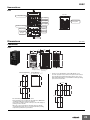
Nomenclature
E5CC
Temperature unit
Top View
No.1 display
Setup Tool port
on top panel
Operation
indicators
No. 2 display
Level key
Up key
Mode key
Shift (PF) key
Down key
Dimensions
(Unit: mm)
Controllers
E5CC
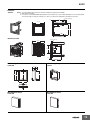
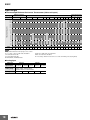
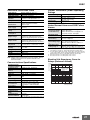
Panel Cutout
Mounted Separately
Group Mounted
73.1
4
(48 × number of units - 2.5)+1.0
0
60
1
48 × 48
45+0.6
0
44.8 × 44.8 48.8 58
Group mounting does
not allow waterproofing.
60 min.
45+0.6
0
Waterproof Packing
(Accessory)
Mounting Adapter
(Accessory)
Terminal Cover
(E53-COV17)
(Sold separately)
45+0.6
0
• Recommended panel thickness is 1 to 5 mm.
• Group mounting is not possible in the vertical direction. (Maintain
the specified mounting space between Controllers.)
• To mount the Controller so that it is waterproof, insert the
waterproof packing onto the Controller.
• When two or more Controllers are mounted, make sure that the
surrounding temperature does not exceed the allowable operating
temperature specified in the specifications.
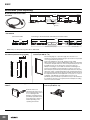
Accessories (Order Separately)
● USB-Serial Conversion Cable
E58-CIFQ2
(2,109.1)
250
(13)
(5) (15)
(87)
1,740
(250)
LED (RD)
USB connector (type A plug)
Serial connector
LED (PWR)
LED (SD)
● Terminal Covers
E53-COV17
48
● Terminal Covers
E53-COV23 (Three Covers provided.)
2
3.8
48.8
10
Terminal Cover
(E53-COV23)
22
44.8
9.1
11
E5CC
● Waterproof Packing
Y92S-P8 (for DIN 48 × 48)
Order the Waterproof Packing separately if it becomes lost or damaged.
The Waterproof Packing can be used to achieve an IP66 degree of protection.
(Deterioration, shrinking, or hardening of the waterproof packing may occur depending on the
operating environment. Therefore, periodic replacement is recommended to ensure the level of
waterproofing specified in IP66. The time for periodic replacement depends on the operating
environment. Be sure to confirm this point at your site.
Consider three years a rough standard. OMRON shall not be liable for the level of water resistance
if the customer does not perform periodic replacement.)
The Waterproof Packing does not need to be attached if a waterproof structure is not required.
● Current Transformers
E54-CT1
21
15
Thru-current (Io) vs. Output Voltage (Eo)
(Reference Values)
E54-CT1
2.8
5.8 dia.
7.5
25
Maximum continuous heater current: 50 A (50/60 Hz)
Number of windings:
400±2
Winding resistance:
18±2 Ω
3
Output voltage (Eo) V (r.m.s.)
10.5
40
Two, 3.5 dia.
10
30
100V
Frequency: 50 Hz
∞
1kΩ
10
Distortion
factor
10%
1
3%
1%
100mV
100Ω
10
E54-CT3
2.36 dia.
30
RL=10Ω
1
12 dia.
9
100μV
10
1
40 × 40
10
100mA
1
10
100 1,000A
Thru-current (Io) A (r.m.s.)
Thru-current (Io) vs. Output Voltage (Eo)
(Reference Values)
E54-CT3
Two, M3 (depth: 4)
15
E54-CT3 Accessory
• Armature
Connection Example
Armature
Approx. 3 dia.
Plug
Lead
18
• Plug
Output voltage (Eo) V (r.m.s.)
Maximum continuous heater current: 120 A (50/60 Hz)
(Maximum continuous heater current for an OMRON
Digital Temperature Controller is 50 A.)
Number of windings:
400±2
Winding resistance:
8±0.8 Ω
30
100V
Frequency: 50 Hz
Distortion
factor
10%
3%
1%
∞
1kΩ
500Ω
10
1
100mV
100Ω
50Ω
10
RL=10Ω
1
Approx. 6 dia.
100μV
(22)
10
1
10
100mA
1
10
100 1,000A
Thru-current (Io) A (r.m.s.)
12
E5CC
● Adapter
Y92F-45
Note: 1. Use this Adapter when the Front Panel has already been prepared for the E5B@.
2. Only black is available.
3. You cannot use the E58-CIFQ2 USB-Serial Conversion Cable if you use the Y92F-45 Adapter. To use the USB-Serial
Conversion Cable to make the settings, do so before you mount the Temperature Controller in the panel.
Fixture (Accessory)
76
4.7
69.6 to 77.6
72 × 72
67 × 67 87
Mounted to E5CC
Panel (1 to 8 mm)
72 × 72
48 × 48
2.2
4.7
62.8
To back of the E5CC
● Watertight Cover
● Mounting Adapter
Y92A-48N
Y92F-49
21.9
14
(2)
87.7
69
79.2
12
67.6
● Protective Cover
● Protective Cover
Y92A-48D
Y92A-48H
13
Digital Temperature Controller
E5EC
(48 × 96 mm)
Large White PV Display That’s Easier to Read.
Easy to Use, from Model Selection to
Setup and Operation.
A Complete Range of I/O Capacities,
Functions, and Performance.
Handles More Applications.
• A white LCD PV display with a height of approx. 18 mm
improves visibility.
• Easily connect the CX-Thermo (sold separately) through a
USB-Serial Conversion Cable (sold separately) to a Setup Tool port
on the top panel or on the front panel. The Digital Temperature
Controller receives the power required for setup from the computer
through the USB bus power source.
Settings can be made from CX-Thermo or the front panel of the Digital
Temperature Controller without wiring the power supply.
• High-speed sampling at 50 ms.
• Models with up to 4 auxiliary outputs, 6 event inputs, a transfer output,
and remote SP input added to the lineup. Complete selection of I/O
capacities.
• Short body with depth of only 60 mm.
48 × 96 mm
E5EC
Refer to Safety Precautions on page 30.
Main I/O Functions
Sensor Input
• Thermocouple
• Pt
• Universal analog
current/voltage input
E5EC
Three-level Display
PV, SV, and MV displayed
at the same time.
4-digit displays
Control Output 1
• Relay output
• Voltage output (for driving SSR)
• Current output
Indication Accuracy
• Thermocouple input:
±0.3% of PV
• Pt input: ±0.2% of PV
• Analog input: ±0.2% of FS
Control Output 2
• Voltage output (for driving SSR)
• Relay output
• Current output
Sampling Period
• 50 ms
Event Inputs
• None
•2
•4
•6
Remote SP Input
• None
•1
• PF (shift) Key
• Setup Tool port on front panel
• Temperature status display
• Simple programming
• Independent heating and
cooling PID control
• Changed parameter display
• Display brightness setting
Auxiliary Outputs
•4
Transfer Output
• None
•1
This datasheet is provided as a guideline for selecting products.
Be sure to refer to the following manuals for application precautions and other information required for operation before attempting
to use the product.
E5CC/E5EC Digital Controllers User’s Manual (Cat. No. H174)
E5CC/E5EC Digital Controllers Communications Manual (Cat. No. H175)
14
E5EC
Model Number Legend and Standard Models
Model Number Legend
E5EC-@@ @ @ @ @ -@@@ (Example: E5EC-RX4A5M-000)
−− − − − − −−−
A
B C D E
F
A
Model
B
C
D
No. of Power
Terminal
auxiliary supply
type
outputs voltage
Control outputs
1 and 2
E
F
Input
type
Options
Meaning
48 × 96 mm
Control output 1
Relay output
Voltage output
(for driving SSR)
Linear current output
Voltage output
(for driving SSR)
Voltage output
(for driving SSR)
Relay output
E5EC
*1 RX
*1 QX
*1, *2 CX
*1 QQ
*1 QR
*1 RR
*1, *2 CC
*3 4
A
D
Control outputs 1 and 2
For RX,
For CX or
QX, QQ,
CC
QR, or RR
5
M
Selectable Selectable
Selectable
Selectable
Option
selection
conditions
Selectable
*1
000
004
005
009
Selectable
Selectable
Selectable
Selectable
010
011
013
014
Control output 2
None
None
None
Voltage output
(for driving SSR)
Relay output
Relay output
Linear current outLinear current output
put
4 (auxiliary outputs 1 and 2 with same common and auxiliary
outputs 3 and 4 with same common)
100 to 240 VAC
24 VAC/DC
Screw terminals (with cover)
Universal input
HB alarm and
Event Remote Transfer
Communications
HS alarm
inputs SP Input output
------------RS-485
2
--------4
----2
(for 3-phase
RS-485
2
----heaters)
1
--4
----1
--6
Provided. Provided.
----6
Provided. Provided.
--RS-485
4
Provided. Provided.
*1. The options that can be selected depend on the type of control output.
*2. The control output cannot be used as a transfer output.
*3. A model with four auxiliary outputs must be selected.
Heating and Cooling Control
l Using Heating and Cooling Control
A Control Output Assignment
If there is no control output 2, an auxiliary output is used as the cooling control output.
If there is a control output 2, the two control outputs are used for heating and cooling.
(It does not matter which output is used for heating and which output is used for cooling.)
B Control
If PID control is used, you can set PID control separately for heating and cooling.
This allows you to handle control systems with different heating and cooling response characteristics.
15
E5EC
Optional Products (Order Separately)
USB-Serial Conversion Cable
Model
E58-CIFQ2
Communications Conversion Cable
Model
E58-CIFQ2-E
Note: Always use this product together with the E58-CIFQ2.
Terminal Covers
Model
E53-COV24
Waterproof Packing
Model
Y92S-P9
Note: This Waterproof Packing is provided with the Digital
Temperature Controller.
Waterproof Cover
Model
Y92A-49N
Note: This Cover complies with IP66 and NEMA 4X waterproofing.
Front panel: IP66 protection.
Front Port Cover
Model
Y92S-P7
Note: This Front Port Cover is provided with the Digital Temperature
Controller.
Mounting Adapter
Model
Y92F-51
(Two Adapters are included.)
Note: This Mounting Adapter is provided with the Digital Temperature
Controller.
16
Current Transformers (CTs)
Hole diameter
5.8 mm
12.0 mm
Model
E54-CT1
E54-CT3
CX-Thermo Support Software
Model
EST2-2C-MV4
Note: CX-Thermo version 4.4 or higher is required for the E5EC.
E5EC
Specifications
Ratings
Power supply voltage
Operating voltage range
Power consumption
Sensor input
Input impedance
Control method
Relay output
Control
output
Auxiliary
output
Voltage output
(for driving SSR)
Current output
Number of outputs
Output specifications
Number of inputs
Event input External contact input
specifications
Transfer
output
Number of outputs
Output specifications
Remote SP input
Setting method
Indication method
Multi SP
Bank switching
Other functions
Ambient operating temperature
Ambient operating humidity
Storage temperature
A in model number: 100 to 240 VAC, 50/60 Hz
D in model number: 24 VAC, 50/60 Hz; 24 VDC
85% to 110% of rated supply voltage
Models with option selection of 000:6.6 VA max. at 100 to 240 VAC, and 4.1 VA max. at 24 VDC or
2.3 W max. at 24 VDC
All other models: 8.3 VA max. at 100 to 240 VAC, and 5.5 VA max. at 24 VDC or 3.2 W max. at 24 VDC
Models with temperature inputs
Thermocouple: K, J, T, E, L, U, N, R, S, B, W, or PL II
Platinum resistance thermometer: Pt100 or JPt100
Infrared temperature sensor: 10 to 70°C, 60 to 120°C, 115 to 165°C, or 140 to 260°C
Analog input
Current input: 4 to 20 mA or 0 to 20 mA
Voltage input: 1 to 5 V, 0 to 5 V, or 0 to 10 V
Current input: 150 Ω max., Voltage input: 1 MΩ min.
(Use a 1:1 connection when connecting the ES2-HB/THB.)
ON/OFF or, for any model with two control outputs, 2-PID (with autotuning) control
SPST-NO, 250 VAC, 5 A (resistive load), electrical life: 100,000 operations,
minimum applicable load: 5 V, 10 mA
Output voltage: 12 VDC ±20% (PNP), max. load current: 40 mA, with short-circuit protection circuit
(The maximum load current is 21 mA for models with two control outputs.)
4 to 20 mA DC/0 to 20 mA DC, load: 500 Ω max., resolution: approx. 10,000
4
N.O. relay outputs, 250 VAC, Models with 4 outputs: 2 A (resistive load),
Electrical life: 100,000 operations, Minimum applicable load: 10 mA at 5 V
2, 4 or 6 (depends on model)
Contact input: ON: 1 kΩ max., OFF: 100 kΩ min.
Non-contact input: ON: Residual voltage: 1.5 V max., OFF: Leakage current: 0.1 mA max.
Current flow: Approx. 7 mA per contact
1 (only on models with a transfer output)
Current output: 4 to 20 mA DC, Load: 500 Ω max., Resolution: Approx. 10,000
Linear voltage output: 1 to 5 VDC, load: 1 Ω max, Resolution: Approx. 10,000
Current input: 4 to 20 mA DC or 0 to 20 mA DC (input impedance: 150 Ω max.)
Voltage input: 1 to 5 V, 0 to 5 V, or 0 to 10 V (input impedance: 1 MΩ min.)
Digital setting using front panel keys
11-segment digital display and individual indicators
Character height: PV: 18.0 mm, SV: 11.0 mm, MV: 7.8 mm
Three displays Contents: PV/SV/MV, PV/SV/Multi-SP, or PV/SV/Remaining soak time
Numbers of digits: 4 digits each for PM, SV, and MV displays
Up to eight set points (SP0 to SP7) can be saved and selected using event inputs, key operations, or
serial communications.
None
Manual output, heating/cooling control, loop burnout alarm, SP ramp, other alarm functions, heater
burnout (HB) alarm (including SSR failure (HS) alarm), 40% AT, 100% AT, MV limiter, input digital
filter, self tuning, robust tuning, PV input shift, run/stop, protection functions, extraction of square root,
MV change rate limit, simple calculations, temperature status display, simple programming, moving
average of input value, and display brightness setting
-10 to 55°C (with no condensation or icing),
for 3-year warranty: -10 to 50°C (with no condensation or icing)
25% to 85%
-25 to 65°C (with no condensation or icing)
17
E5EC
Input Ranges
●Thermocouple/Platinum Resistance Thermometer (Universal inputs)
Platinum resistance
thermometer
Input type
Name
Pt100
Infrared temperature
sensor
Thermocouple
JPt100
K
J
T
E
L
U
N
R
S
B
W
PLII
10 to
70°C
60 to
120°C
115 to
165°C
120
165
140 to
260°C
2300
2300
1800
1800
1700
1700
1700
1600
1500
Temperature range (°C)
1400
1300
1300
1300
1300
1200
1100
1000
900
850
850
850
800
700
600
600
500.0
500
500.0
500.0
400.0
400
400
400.0
400
400.0
260
300
200
100.0
100
90
100
0.0
-100
-200
100.0
-200
-199.9
0
1
Setting
range
0.0
-199.9
2
3
-20.0
-100
-20.0
6
7
8
-200
4
5
0
0
16
17
0
0
0
0
0
0
19
20
21
22
23
24
-100
-200
-199.9
-200
9
10
11
12
-200
-199.9
-200
13
14
15
18
Shaded settings are the default settings.
The applicable standards for the input types are as follows:
K, J, T, E, N, R, S, B: JIS C 1602-1995, IEC 60584-1
L: Fe-CuNi, DIN 43710-1985
U: Cu-CuNi, DIN 43710-1985
W: W5Re/W26Re, ASTM E988-1990
JPt100: JIS C 1604-1989, JIS C 1606-1989
Pt100: JIS C 1604-1997, IEC 60751
PL II: According to Platinel II electromotive force charts from BASF (previously Engelhard)
●Analog input
Input type
Input
specification
Current
4 to 20 mA 0 to 20 mA
Voltage
1 to 5 V
0 to 5 V
Usable in the following ranges by scaling:
-1999 to 9999, -199.9 to 999.9,
-19.99 to 99.99 or -1.999 to 9.999
Setting number
25
26
27
28
0 to 10 V
Setting range
18
29
E5EC
Alarm type
Each alarm can be independently set to one of the following 19 alarm types. The default is 2: Upper limit. (see note.)
Auxiliary outputs are allocated for alarms. ON delays and OFF delays (0 to 999 s) can also be specified.
Note: In the default settings for models with HB or HS alarms, alarm 1 is set to a heater alarm (HA) and the Alarm Type 1 parameter is not displayed.
To use alarm 1, set the output assignment to alarm 1.
Set
value
Alarm output operation
When alarm value When alarm value
X is positive
X is negative
Output OFF
Alarm type
0
Alarm function OFF
1
Upper- and lower-limit *1
2
Upper- and lower-limit
range *1
4
6
7
8
9
11
Absolute-value upper-limit
ON
OFF
Absolute-value upper-limit
with standby sequence
ON
OFF
Absolute-value lower-limit
with standby sequence
ON
OFF
LBA (alarm 1 type only)
PV change rate alarm
14
SP absolute value
upper limit
ON
OFF
SP absolute value
lower limit
ON
OFF
MV absolute value
upper limit *9
ON
OFF
MV absolute value
lower limit *9
ON
OFF
RSP absolute value
upper limit *10
ON
OFF
RSP absolute value
lower limit *10
ON
OFF
16
17
18
19
L
ON
OFF
PV
ON
OFF
L
PV
*3
PV
*4
X
SP
PV
ON
OFF
PV
ON
OFF
PV
ON
OFF
PV
ON
OFF
PV
ON
OFF
PV
ON
OFF
X
SP
X
0
X
0
X
0
X
0
H SP
H<0, L>0
|H| < |L|
X
0
SP
ON
OFF
SP
ON
OFF
MV
ON
OFF
MV
ON
OFF
RSP
ON
OFF
RSP
ON
OFF
X
0
X
0
X
0
X
0
X
0
Case 3 (Always ON)
H
SP L H
H>0, L<0
|H| > |L|
H
SP
L
H<0, L>0
|H| ≥ |L|
L SP
SP H
L
H>0, L<0
|H| ≤ |L|
*3. Set value: 4, Upper- and lower-limit range
Case 1
Case 3 (Always OFF)
Case 2
H<0, L<0
L
H SP
H<0, L>0
|H| < |L|
SP L
H
H
H>0, L<0
|H| > |L|
PV
SP
H
SP
L
L SP
SP H L
No alarm
Set the deviation in the set point by setting the alarm upper
limit (H) and alarm lower limit (L). The alarm is ON when the
PV is outside this deviation range.
Set the upward deviation in the set point by setting the alarm
value (X). The alarm is ON when the PV is higher than the SP
by the deviation or more.
Set the downward deviation in the set point by setting the
alarm value (X). The alarm is ON when the PV is lower than
the SP by the deviation or more.
Set the deviation in the set point by setting the alarm upper
limit (H) and alarm lower limit (L).
The alarm is ON when the PV is inside this deviation range.
A standby sequence is added to the upper- and lower-limit
alarm (1).*6
X
SP
PV
A standby sequence is added to the upper-limit alarm (2). *6
PV
A standby sequence is added to the lower-limit alarm (3).*6
X
SP
X
0
PV
X
0
PV
X
0
PV
X
0
PV
The alarm will turn ON if the process value is larger than the
alarm value (X) regardless of the set point.
The alarm will turn ON if the process value is smaller than the
alarm value (X) regardless of the set point.
A standby sequence is added to the absolute-value upperlimit alarm (8). *6
A standby sequence is added to the absolute-value lower-limit
alarm (9). *6
*7
*8
H<0, L<0
L
X
-
With set values 1, 4 and 5, the upper and lower limit values can be set
ndependently for each alarm type, and are expressed as “L” and “H.”
*2. Set value: 1, Upper- and lower-limit alarm
Case 2
PV
SP
H
SP
*1
Case 1
X
H
SP
ON
OFF
12
13
15
SP
ON
OFF
ON
OFF
PV
X
ON
OFF
Lower-limit with standby
sequence
Absolute-value lower-limit
10
X
ON
OFF
Upper- and lower-limit with
standby sequence *1
*5
Upper-limit with standby
sequence
5
*2
PV
SP
ON
OFF
Lower-limit
H
SP
ON
OFF
Upper-limit
3
L
ON
OFF
Description of function
H<0, L>0
|H| ≥ |L|
H>0, L<0
|H| ≤ |L|
X
0
SP
X
0
SP
X
0
MV
X
0
MV
X
0
RSP
X
0
RSP
This alarm type turns ON the alarm when the set point (SP) is
higher than the alarm value (X).
This alarm type turns ON the alarm when the set point (SP) is
smaller than the alarm value (X).
This alarm type turns ON the alarm when the manipulated
variable (MV) is higher than the alarm value (X).
This alarm type turns ON the alarm when the manipulated
variable (MV) is smaller than the alarm value (X).
The alarm will turn ON when the remote SP (RSP) is larger
than the alarm value (X).
The alarm will turn ON when the remote SP (RSP) is smaller
than the alarm value (X).
*4. Set value: 5, Upper- and lower-limit with standby sequence
For Upper- and Lower-Limit Alarm Described Above *2
• Case 1 and 2
Always OFF when the upper-limit and lower-limit hysteresis overlaps.
• Case 3: Always OFF
*5. Set value: 5, Upper- and lower-limit with standby sequence
Always OFF when the upper-limit and lower-limit hysteresis overlaps.
*6. Refer to the E5CC/E5EC Digital Controllers User's Manual (Cat. No. H174)
for information on the operation of the standby sequence.
*7. Refer to the E5CC/E5EC Digital Controllers User's Manual (Cat. No. H174)
for information on the PV change rate alarm.
*8. Refer to the E5CC/E5EC Digital Controllers User's Manual (Cat. No. H174)
for information on the PV change rate alarm.
*9. When heating/cooling control is performed, the MV absolute upper limit
alarm functions only for the heating operation and the MV absolute lower
limit alarm functions only for the cooling operation.
*10. This value is displayed only when a remote SP input is used. It functions in
both Local SP Mode and Remote SP Mode.
19
E5EC
Characteristics
Indication accuracy
(at the ambient temperature of 23°C)
Transfer output accuracy
Remote SP Input Type
Influence of temperature *2
Influence of voltage *2
Input sampling period
Hysteresis
Proportional band (P)
Integral time (I)
Derivative time (D)
Proportional band (P) for cooling
Integral time (I) for cooling
Derivative time (D) for cooling
Control period
Manual reset value
Alarm setting range
Affect of signal source resistance
Insulation resistance
Dielectric strength
resistance
Vibration
Malfunction
resistance
Destruction
Malfunction
Weight
Degree of protection
Memory protection
Setup Tool
Setup Tool port
Standards
EMC
Approved standards
Conformed standards
Thermocouple: (±0.3% of indicated value or ±1°C, whichever is greater) ±1 digit max. *1
Platinum resistance thermometer: (±0.2% of indicated value or ±0.8°C, whichever is greater) ±1 digit
Analog input: ±0.2% FS ±1 digit max.
CT input: ±5% FS ±1 digit max.
±0.3% FS max.
±0.2% FS ±1 digit max.
Thermocouple input (R, S, B, W, PL II): (±1% of PV or ±10°C, whichever is greater) ±1 digit max.
Other thermocouple input: (±1% of PV or ±4°C, whichever is greater) ±1 digit max. *3
Platinum resistance thermometer: (±1% of PV or ±2°C, whichever is greater) ±1 digit max.
Analog input: (±1%FS) ±1 digit max.
CT input: (±5% FS) ±1 digit max.
Remote SP input: (±1% FS) ±1 digit max.
50ms
Temperature input: 0.1 to 999.9°C or °F (in units of 0.1°C or°F) *4
Analog input: 0.01% to 99.99% FS (in units of 0.01% FS)
Temperature input: 0.1 to 999.9°C or °F (in units of 0.1°C or °F) *4
Analog input: 0.1 to 999.9% FS (in units of 0.1% FS)
0 to 9999 s (in units of 1 s), 0.0 to 999.9 s (in units of 0.1 s) *5
0 to 9999 s (in units of 1 s), 0.0 to 999.9 s (in units of 0.1 s) *5
Temperature input: 0.1 to 999.9°C or °F (in units of 0.1°C or °F) *4
Analog input: 0.1 to 999.9% FS (in units of 0.1% FS)
0 to 9999 s (in units of 1 s), 0.0 to 999.9 s (in units of 0.1 s) *5
0 to 9999 s (in units of 1 s), 0.0 to 999.9 s (in units of 0.1 s) *5
0.1, 0.2, 0.5, 1 to 99 s (in units of 1 s)
0.0 to 100.0% (in units of 0.1%)
-1999 to 9999 (decimal point position depends on input type)
Thermocouple: 0.1°C/Ω max. (100 Ω max.)
Platinum resistance thermometer: 0.1°C/Ω max. (10 Ω max.)
20 MΩ min. (at 500 VDC)
2,300 VAC, 50 or 60 Hz for 1 min (between terminals with different charge)
10 to 55 Hz, 20 m/s2 for 10 min each in X, Y, and Z directions
10 to 55 Hz, 20 m/s2 for 2 hrs each in X, Y, and Z directions
100 m/s2, 3 times each in X, Y, and Z directions
300 m/s2, 3 times each in X, Y, and Z directions
Controller: Approx. 210 g, Mounting Bracket: Approx. 4 g × 2
Front panel: IP66, Rear case: IP20, Terminals: IP00
Non-volatile memory (number of writes: 1,000,000 times)
CX-Thermo version 4.4 or higher
E5EC top panel: An E58-CIFQ2 USB-Serial Conversion Cable is used to connect a USB port on the
computer with the port on the top panel of the E5EC.*6
E5EC front panel: An E58-CIFQ2 USB-Serial Conversion Cable and E58-CIFQ2-E Conversion Cable
are used together to connect a USB port on the computer with the port on the front
panel of the E5EC.*6
UL 61010-1, CSA C22.2 No. 611010-1 (evaluated by UL)
EN 61010-1 (IEC 61010-1): Pollution level 2, overcurrent category II
EMI
EN61326
Radiated Interference Electromagnetic Field Strength: EN 55011 Group 1, class A
Noise Terminal Voltage:
EN 55011 Group 1, class A
EMS:
EN 61326
ESD Immunity:
EN 61000-4-2
Electromagnetic Field Immunity:
EN 61000-4-3
Burst Noise Immunity:
EN 61000-4-4
Conducted Disturbance Immunity:
EN 61000-4-6
Surge Immunity:
EN 61000-4-5
Voltage Dip/Interrupting Immunity:
EN 61000-4-11
*1. The indication accuracy of K thermocouples in the -200 to 1300°C range, T and N thermocouples at a temperature of -100°C max., and U and L thermocouples at
any temperatures is ±2°C ±1 digit max. The indication accuracy of the B thermocouple at a temperature of 400°C max.
is not specified. The indication accuracy of B thermocouples in the 400 to 800°C range is ±3°C max. The indication accuracy of the R and S thermocouples at a
temperature of 200°C max. is ±3°C ±1 digit max. The indication accuracy of W thermocouples is ±0.3 of PV or ±3°C, whichever is greater, ±1 digit max. The
indication accuracy of PL II thermocouples is ±0.3 of PV or ±2°C, whichever is greater, ±1 digit max.
*2. Ambient temperature: -10°C to 23°C to 55°C, Voltage range: -15% to 10% of rated voltage
*3. K thermocouple at -100°C max.: ±10°C max.
*4. “EU” stands for Engineering Unit and is used as the unit after scaling. For a temperature sensor, the EU is °C or °F.
*5. The unit is determined by the setting of the Integral/Derivative Time Unit parameter.
*6. External communications (RS-485) and USB-serial conversion cable communications can be used at the same time.
20
E5EC
USB-Serial Conversion Cable
Connector
specifications
Power supply
Power supply
voltage
Current
consumption
Output voltage
Output current
Ambient operating
temperature
Ambient operating
humidity
Storage temperature
Storage humidity
Altitude
Weight
*
Windows 2000, XP, Vista, or 7
CX-Thermo version 4.4 or higher
E5CC/E5EC and E5CB
Weight
38,400 bps
Computer: USB (type A plug)
Digital Temperature Controller:
Setup Tool port
Bus power (Supplied from USB host
controller.)*
Accessories
(E54-CT3 only)
5 VDC
4.7±0.2 VDC
(Supplied from USB-Serial Conversion
Cable to the Digital Temperature Controller.)
250 mA max.
(Supplied from USB-Serial Conversion
Cable to the Digital Temperature Controller.)
0 to 55°C (with no condensation or icing)
10% to 80%
-20 to 60°C (with no condensation or icing)
10% to 80%
2,000 m max.
Approx. 120 g
Communications Specifications
Flow control
Interface
Retry function
Communications
buffer
Communications
response wait time
*
RS-485: Multipoint
RS-485 (two-wire, half duplex)
Start-stop synchronization
CompoWay/F, or Modbus
19200, 38400, or 57600 bps
ASCII
1,000 VAC for 1 min
50 Hz, 98 m/s2
E54-CT1: Approx. 11.5 g,
E54-CT3: Approx. 50 g
Armatures (2)
Plugs (2)
Heater Burnout Alarms and SSR Failure
Alarms
CT input (for heater
current detection)
450 mA max.
Use a high-power port for the USB port.
Error detection
Dielectric strength
Vibration resistance
Conforms to USB Specification 1.1.
Note: A driver must be installed in the personal computer. Refer to
installation information in the operation manual for the
Conversion Cable.
Transmission line
connection method
Communications
Synchronization
method
Protocol
Baud rate
Transmission
code
Data bit length*
Stop bit length*
Current Transformer (Order Separately)
Ratings
Maximum heater
current
Input current indication accuracy
Heater burnout
alarm setting range
*1
SSR failure alarm
setting range *2
Models with detection for singlephase
heaters: One input
Models with detection for singlephase or
three-phase heaters: Two inputs
50 A AC
±5% FS ±1 digit max.
0.1 to 49.9 A (in units of 0.1 A)
Minimum detection ON time: 100 ms *3
0.1 to 49.9 A (in units of 0.1 A)
Minimum detection OFF time: 100 ms *4
*1. For heater burnout alarms, the heater current will be measured when the
control output is ON, and the output will turn ON if the heater current is
lower than the set value (i.e., heater burnout detection current value).
*2. For SSR failure alarms, the heater current will be measured when the
control output is OFF, and the output will turn ON if the heater current is
higher than the set value (i.e., SSR failure detection current value).
*3. The value is 30 ms for a control period of 0.1 s or 0.2 s.
*4. The value is 35 ms for a control period of 0.1 s or 0.2 s.
Electrical Life Expectancy Curve for
Relays (Reference Values)
Life (× 104 operations)
Applicable OS
Applicable software
Applicable models
USB interface
standard
DTE speed
500
300
E5EC
250 VAC, 30 VDC
(resistive load)
cosφ = 1
100
50
30
10
5
7 or 8 bits
1 or 2 bits
Vertical parity (none, even, odd)
Block check character (BCC) with
CompoWay/F or CRC-16 Modbus
None
RS-485
None
3
1
0
1
2
3
4
5
6
Switching current (A)
217 bytes
0 to 99 ms
Default: 20 ms
The baud rate, data bit length, stop bit length, and vertical parity can be individually set using the Communications Setting Level.
21
E5EC
External Connections
E5EC
E5EC-@@ 4 @ 5 M - @ @ @
(1)
Control output 1
Relay output
250 VAC, 5 A
(resistive load)
Voltage output
(for driving SSR)
12 VDC, 40 mA
When There Is a
Control Output 2:
21 mA
Current output
0 to 20 mA DC
4 to 20 mA DC
Load: 500 Ω max.
(2) (3) (4) (5)
↑
Terminal type
Control output 2
Relay output
250 VAC, 5 A
(resistive load)
Voltage output
(for driving SSR)
12 VDC, 21 mA
Current output
0 to 20 mA DC
4 to 20 mA DC
Load: 500 Ω max.
(6)
(6) Options
004
Communications
and 2 event inputs
B(+)
13
RS-485
14
A(-)
15
Auxiliary outputs 1 to 4
Relay output
Models with 4 auxiliary
outputs: 250 VAC, 2 A
(resistive load)
(3) Input Power Supply
100 to 240 VAC
The E5EC is set for a K-type thermocouple (input
type = 5) by default. An input error (s.err) will occur
if the input type setting does not agree with the
temperature sensor. Check the input type.
24 VAC/VDC
1
1
2
2
3
4
5
6
R
OUT1
+Q
OUT1
3
4
5
6
+ C
OUT1
RR
QR
+Q
R
17
EV1
18
EV2
19
20
21
20
21
Models with 2
Voltage Outputs
(for Driving SSR)
1
2
3
4
5
6
7
8
9
10
11
12
OUT1
3
4
5
6
+Q
+Q
OUT2
CC
3
4
5
6
R
R
3
4
5
6
+ C
-
13
14
15
16
17
18
19
20
21
22
23
24
25
26
27
28
29
30
31
32
33
34
35
36
28
29
30
31
32
33
34
+
Remote V + 35
mA
SP
36
-
EV5
EV6
+
Transfer V +
I
output
-
CT1
COM
CT2
20
21
13
14
EV3
15
EV4
16
17
EV1
18
EV2
19
CT1
20
21
(5) Sensor (Temperature/Analog) Input
TC
Auxiliary output 4
22
- 23
+ 24
Auxiliary output 3
Auxiliary output 2
17
EV1
18
EV2
19
CT1
20
21
13
+ C
28
Auxiliary outputs 1, 2, 3, 4
14
EV3
15
EV4
16
013
6 event Inputs, transfer
output, and remote SP input
(2) Auxiliary Outputs
7
8
9
10
11
12
16
17
EV1
18
EV2
19
010
4 event inputs
and 1 CT input
13
Models with 2 Models with 2
Models with Voltage
Output (for Driving SSR) Relay Outputs Current Outputs
and Relay Output
3
4
5
6
16
17
EV1
18
EV2
19
QQ
CX
Models with 1
Models with 1
Current Output
Voltage Output
(for Driving SSR)
3
4
5
6
13
14
EV3
15
EV4
16
009
Communications, 2 event
inputs, and 2 CT inputs
B(+)
13
RS-485
14
A(-)
15
011
6 event Inputs, 1 CT input,
transfer output, and remote SP input
(no polarity)
(1) Control output
QX
RX
Models with
1 Relay
Output
005
4 event inputs
Pt
A
22
B
23
B
24
I
+ 22
mA
23
24
Auxiliary output 1
V
V
+
22
23
24
EV5
EV6
+
Transfer V +
output
I
-
29
30
31
32
33
34
+
+
Remote V
35
mA
SP
36
14
EV3
15
EV4
16
17
EV1
18
EV2
19
20
21
014
Communications, 4 event Inputs,
transfer output, and remote SP input
B(+)
13
RS-485
14
A(-)
15
28
29
EV5
30
EV6
+
31
+
Transfer V
32
I
output
33
+
34
+
Remote V
35
mA
SP
36
16
17
EV1
18
EV2
19
Note: 1. The application of the terminals depends on the model.
2. Do not wire the terminals that are shown with a gray background.
3. When complying with EMC standards, the cable that connects the sensor must be 30 m or less. If the cable length exceeds 30 m,
compliance with EMC standards will not be possible.
4. Connect M3 crimped terminals.
Isolation/Insulation Block Diagrams
Models with 4 Auxiliary Outputs
Sensor input, CT inputs, and remote SP input
Communications and event inputs
Power
Supply
Voltage output (for driving SSR),
current output, and transfer output
Relay output
Auxiliary outputs 1, 2
Auxiliary outputs 3, 4
: Reinforced insulation
: Functional isolation
22
20
21
E5EC
Nomenclature
E5EC
Top View
Temperature unit
No.1 display
Setup Tool port
on top panel
No. 2 display
No. 3 display
Operation indicators
Down key
Shift (PF) key
Up key
Front Setup
Tool port
Mode key
Level key
Dimensions
(Unit: mm)
Controllers
E5EC
48
(64)
60
4
1
96
44
91
110
Waterproof
Packing (Accessory)
Mounted Separately
Mounting Adapter
(Accessory)
Group Mounted *
(48 × number of units − 2.5)+1.0
0
45+0.6
0
*
Selections for Control Outputs 1 and 2: QQ, QR, RR, or CC
If you also specify 011, 013, or 014 for the option selection and use
group mounting, the ambient temperature must be 45°C or less.
If the ambient temperature is 55°C, maintain the following mounting
spaces between Controllers.
92+0.8
0
60 min.
45-0.6
0
Group mounting does not
allow waterproofing.
120 min.
92+0.8
0
92-0.8
0
120 min.
• Recommended panel thickness is 1 to 8 mm.
• Group mounting is not possible in the vertical direction. (Maintain the
specified mounting space between Controllers.)
• To mount the Controller so that it is waterproof, insert the waterproof
packing onto the Controller.
• When two or more Controllers are mounted, make sure that the
surrounding temperature does not exceed the allowable operating
temperature specified in the specifications.
23
E5EC
Accessories (Order Separately)
● USB-Serial Conversion Cable
E58-CIFQ2
(2,110)
250
(13)
(5) (15)
(87)
1,740
(250)
LED(RD)
USB connector (type A plug)
Serial connector
LED(PWR)
LED(SD)
● Conversion Cable
E58-CIFQ2-E
Conversion Cable
Connecting to the E58-CIFQ2 USB-Serial Conversion Cable
(2110)
(1510)
250
263
E58-CIFQ2 (Order Separately)
1510
Conversion Cable
Note: Always use this product together with the E58-CIFQ2.
● Terminal Covers
E53-COV24 (Three Covers provided.)
2
● Waterproof Packing
Y92S-P9 (for DIN 48 × 96)
3.8
The following degrees of protection apply. The structure is not
waterproof for any part for which the degree of protection is not specified
or for any part with IP@0 protection.
Front panel: IP66, Rear case: IP20, Terminal section: IP00
When waterproofing is required, fit Watertight Packing on the backside
of front panel. Keep the Port Cover on the front-panel Setup Tool port of
the E5EC securely closed. The degree of protection when the
Waterproof Packing is used is IP66. To maintain an IP66 degree of
protection, the Waterproof Packed and the Port Cover for the frontpanel Setup Tool port must be periodically replaced because they may
deteriorate, shrink, or harden depending on the operating environment.
The replacement period will vary with the operating environment. Check
the required period in the actual application. Use 3 years or sooner as
a guideline. If the Waterproof Packing and Port Cover are not
periodically replaced, waterproof performance may not be maintained.
If a waterproof structure is not required, then the Waterproof Packing
does not need to be installed.
10
91
● Setup Tool Port Cover for top panel
Y92S-P7
Order this Port Cover
separately if the Port Cover on
the front-panel Setup Tool port
is lost or damaged. The
Waterproof Packing must be
periodically replaced because
it may deteriorate, shrink, or
harden depending on the
operating environment.
24
● Mounting Adapter
Y92F-51 (for DIN 48 × 96)
E5EC
● Current Transformers
E54-CT1
21
15
Thru-current (Io) vs. Output Voltage (Eo)
(Reference Values)
E54-CT1
2.8
5.8 dia.
7.5
25
Maximum continuous heater current: 50 A (50/60 Hz)
Number of windings:
400±2
Winding resistance:
18±2 Ω
3
Output voltage (Eo) V (r.m.s.)
10.5
40
Two, 3.5 dia.
10
30
100V
Frequency: 50 Hz
∞
1kΩ
10
Distortion
factor
10%
1
3%
1%
100mV
10
100Ω
1
RL=10Ω
E54-CT3
2.36 dia.
30
12 dia.
9
100μV
10
1
10
100mA
1
40 × 40
30
Connection Example
Armature
Plug
Lead
18
Output voltage (Eo) V (r.m.s.)
Maximum continuous heater current: 120 A (50/60 Hz)
(Maximum continuous heater current for an OMRON Digital
Temperature Controller is 50 A.)
Number of windings:
400±2
Winding resistance:
8±0.8 Ω
15
Approx. 3 dia.
100 1,000A
Thru-current (Io) vs. Output Voltage (Eo)
(Reference Values)
E54-CT3
Two, M3 (depth: 4)
E54-CT3 Accessory
• Armature
10
Thru-current (Io) A (r.m.s.)
100V
Frequency: 50 Hz
Distortion
factor
10%
3%
1%
∞
1kΩ
500Ω
10
1
100mV
100Ω
50Ω
10
RL=10Ω
• Plug
1
Approx. 6 dia.
100μV
(22)
10
1
10
100mA
1
10
100 1,000A
Thru-current (Io) A (r.m.s.)
25
E5CC/E5EC
Operation
Setting Levels Diagram
This diagram shows all of the setting levels. To move to the advanced function setting level and calibration level, you must enter passwords. Some
parameters are not displayed depending on the protect level setting and the conditions of use.
Control stops when you move from the operation level to the initial setting level.
Operating
Manual Control
Level
Used to set protection
for operations.
Power ON
Press the O Key or the
S Key for at least 1 s.
Press the O and M Keys
for at least 3 s.*2
Level changes
automatically.
Operation Level
Used for SP, alarm values,
and other basic settings
and monitoring.
Used to set the
MV manually.
Protect Level
Press the O and M
Keys for at least 1 s.
Only when Manual Mode was
used just before power OFF
O Key once.
O Key once.
Adjustment Level
Used to change adjustment
parameters (PID constants,
adjustment sensitivity, etc.).
O Key pressed for at least 3 s *2
or S Key pressed for at least 1 s *1
while A-M is displayed
Press the O Key
for at least 3 s.*2
Press the O Key
for at least 1 s.
Press O Key once
(models with communications only).
Initial Setting Level
Communications
Setting Level
Used to set the input type
and other basic settings.
O Key once.
Stopped.
Release protection and then
enter the password (−169)
for the amoV (Move to Advanced
Setting Level) parameter.
Used to set communications.
Press the O Key for at least 1 s.
Advanced Function
Setting Level
Used to set application
functions.
Enter the password
(1201) for the Move to
Calibration Level parameter.
Calibration Level
Used to calibrate
the E5CC/E5EC.
*1. To use a key procedure to move to Manual Control Level, set the Auto/Manual Select Addition parameter to ON and set the PF Setting parameter to a-m (Auto/
Manual).
*2. The No. 1 display will flash in the middle when the keys are pressed for 1 s or longer.
26
E5CC/E5EC
Error Displays (Troubleshooting)
When an error occurs, the No. 1 display or No. 2 display shows the error code.
Take necessary measure according to the error code, referring the following table.
Display
Name
Meaning
The input value exceeded the control
range.*
The input type is not set correctly.
The sensor is disconnected or shortcircuited.
The sensor is not wired correctly.
The sensor is not wired.
s.err
Input error
[[[[
Display
range
exceeded
]]]]
e333
A/D
converter
error
e111
Memory
error
ffff
Overcurrent
ct1
ct2
lcr1
lcr2
HB or HS
alarm
Action
Operation
After the error occurs and it is
displayed, the alarm output will
operate as if the upper limit was
exceeded.
It will also operate as if transfer
output exceeded the upper limit.
If an input error is assigned to a
control output or auxiliary output,
theoutput will turn ON when the input
error occurs.
The error message will appear in the
display for the PV.
Check the wiring for input to be sure
it is wired correctly, not broken, and
not shorted. Also check the input
type.
If there are no problems in the wiring
or input type settings, cycle the
power supply.
If the display remains the same,
* Control Range
replace the Digital Temperature
Temperature resistance
Controller.
thermometer or thermocouple input: If the display is restored to normal,
SP Lower Limit - 20°C to SP Upper then the probable cause is external
Note: 1. The heating and cooling
Limit + 20°C
noise affecting the control system.
control outputs will turn
(SP Lower Limit - 40°F to SP Upper Check for external noise.
OFF.
Limit + 40°F)
2. When the manual MV, MV
ESIB input:
Note: For a temperature resistance
at stop, or MV at error is
Same as specified input range.
thermometer, the input is
set, the control output is
Analog input:
considered disconnected if the
determined by the set
Scaling range -5% to 105%
A, B, or B’line is broken.
value.
This is not an error. It
is displayed when the
Control continues and operation is
Below -1,999 control range is wider
than the display
normal.
range and the PV
The value will appear in the display
exceeds the display
for the PV.
range. The PV is
Refer to the E5CC/E5EC Digital
displayed for the
Controllers User’s Manual (Cat. No.
range that is given on
H174) for information on the
Above 9,999
the left (the number
controllable range.
without the decimal
point).
First, cycle the power supply.
If the display remains the same, the The control outputs, auxiliary
controller must be repaired.
outputs, and transfer outputs turn
There is an error in the internal
If the display is restored to normal,
OFF. (A current output will be approx.
circuits.
then a probable cause can be
0 mA and a linear voltage output will
external noise affecting the control
be approx. 0V.)
system. Check for external noise.
First, cycle the power supply.
If the display remains the same, the The control outputs, auxiliary
controller must be repaired.
outputs, and transfer outputs turn
There is an error in the internal
If the display is restored to normal,
OFF. (A current output will be approx.
memory operation.
then a probable cause can be
0 mA and a linear voltage output will
external noise affecting the control
be approx. 0V.)
system. Check for external noise.
Control continues and operation is
normal.
The error message will appear for the
This error is displayed when the peak
following displays.
current exceeds 55.0 A.
Heater Current Value 1 Monitor
Heater Current Value 2 Monitor
Leakage Current Value 1 Monitor
Leakage Current Value 2 Monitor
The No. 1 display for the following
parameter flashes in Operation Level
or Adjustment Level.
If there is a HB or HS alarm, the No.
Heater Current Value 1 Monitor
1 display will flash in the relevant
Heater Current Value 2 Monitor
setting level.
Leakage Current Value 1 Monitor
Leakage Current Value 2 Monitor
However, control continues and
operation is normal.
27
E5CC/E5EC
Operation
Parameters
The related setting items in each level are described below. If you press the Mode Key at the last setting item, the display will return to the first
setting item in the same level.
Press the S Key *2
Power ON
Press the S Key *2
Starting in manual mode.
Manual Control Level
Press the O
Press the S Key
for at least 1 s. *1
C
Starting in
automatic
mode.
Press the O Key for at least 3 s.
Other than the Auto/Manual Switch display
Initial Setting Level
Key or the S
Key for at least
1 s. *1
PID
Control
0
only
25
PV/MV
Press the O Key less than 1 s.
Press the
O Key
for at least
1 s.
Press the O Key less than 1 s.
in-t
Operation Level
Adjustment Level
Press the O Key less than 1 s.
Adjustment Level Display
Displayed only once when
entering adjustment level.
25
ins
Process Value
0.0 Input Shift
M
M
at
AT Execute/Cancel
off
inrt
M
M
rss
Communications
off Writing
rsrt
1.000
Heater Current 1
0.0 Value Monitor
p
i
233
M
M
Heater Burnout
0.0 Detection 1
ct2
Heater Current 2
0.0 Value Monitor
d
M
M
c-p
Heater Burnout
0.0 Detection 2
M
c-i
M
M
hs1
c-d
HS Alarm 1
50.0
Leakage Current
0 2 Monitor
M
M
M
SP 1
0
Hysteresis (Heating)
chys
M
SP 2
0
soak
Soak Time
1
M
M
SP 3
0
wt-b
Wait Band
mv-s
MV at Stop
off
M
sp-4
SP 4
0
0.0
M
sp-5
M
SP 5
M
sp-6
SP 6
0
sprt
SP Ramp Set Value
M
SP 7
sprl
same
M
w1of
Work Bit 1 OFF
Delay
M
w2on
w2of
Work Bit 2 ON
Delay
w4on
Work Bit 3 ON
Delay
Work Bit 3 OFF
Delay
SP Ramp Fall Value
0
M
rsp
M
Value
al2h Alarm
Upper Limit 2
Remote SP Monitor
0.0
0
M
M
sp-m
al2l
M
M
Set Point During SP
0 Ramp
ct-1
Alarm Value
0 Lower Limit 2
al-3 Alarm
Heater Current 1 Value
0 Value 3
M
ct-2
M
al3h Alarm Value
Heater Current 2 Value
0 Upper Limit 3
M
lcr1
M
al3l Alarm Value
Leakage Current 1
0 Lower Limit 3
lcr2
al-4 Alarm
Value 4
Leakage Current 2
0
M
prst
Work Bit 4 ON
Delay
M
Value
al4h Alarm
Upper Limit 4
Program Start
0
M
sktr
M
al4l
Alarm Value
0 Lower Limit 4
Soak Time Remain
0
Work Bit 4 OFF
Delay
Work Bit 5 ON
Delay
M
r-s
0.0 (Heating)
M
M
M
w6of
Work Bit 6 OFF
Delay
Work Bit 7 ON
Delay
M
M
M
Operation/Adjustment Protect:
Restricts displaying and modifying menus in
operation, adjustment, and manual control levels.
M
Initial Setting/Communications Protect:
This protect level restricts movement to the initial
1 setting, communicationssetting, and advanced
function setting levels.
M
wtpt
Setting Change Protect:
off Protects changes to setups by
Work Bit 8 OFF
Delay
M
pfpt
operating the front panel keys.
PF Key Protect
chgp
M
st
on
M
ptrn
M
Control Period (Heating)
20
Parameter Mask Enable:
Displayed only when a
on parameter mask is set.
Control Period (Cooling)
Direct/Reverse Operation
or-r
M
alt1
Alarm 1 Type
2
Press the
O Key
M
alh1
Alarm 1
0.2 Hysteresis
less than
1 s.
M
Communications Setting Level
Note: Displayed only for models with communications. Changes
are effective after cycling power or after a software reset.
psel
M
u-no
Protocol Setting:
Switches between
CompoWay/F and
Modbus.
Communications
1 Unit No.
M
bps
Communications
9.6 Baud Rate
M
len
CompoWay/F only
Communications
7 Data Length
M
Communications
M
M
sdwt
Password to Move to Protect Level:
Communications Parity
even
M
Password setting
Set the ON/OFF
output cycle.
20
M
orev
prty
M
M
ST
For input type of
temperature, standard
control, or PID
cp
M
c-cp
pmsk
0 Password
Standard or
Program Pattern
When assigning PID
or control output to
ON/OFF output
off
2 Stop Bits
Display Changed Parameters
off
prlp
PID ON/OFF
stnd Heating/Cooling
sbit
off
M
28
M
s-hc
cwf
0
Limit the set point
SP Lower Limit
onof
Move to Protect Level:
Displayed only when a password is set.
icpt
Work Bit 8 ON
Delay
M
w8of
Protect Level
Note: The time ta ken to move to the protect level can be
adjusted by changing the "Move to protect level time" setting.
oapt
Work Bit 7 OFF
Delay
SP Upper Limit
Press the O and M Keys
for at least 1 s.
0 Restricts moving to protect level.
M
w8on
M
cntl
M
Press the O and M Keys
for at least 3 s.
Temperature Unit
Temperature for
°C or °F input type.
-200
c-o MV Monitor
pmov
M
w7on
M
sl-l
0.0 (Cooling)
Work Bit 6 ON
Delay
Decimal Point
For input type of analog
1300
o MV Monitor
run
Work Bit 5 OFF
Delay
M
w6on
M
sl-h
M
RUN/STOP
M
w5of
c
M
M
rset
M
w5on
al-2 Alarm
Value 2
Multi-SP Set Point
0 Setting
0.0 Monitor
M
w4of
m-sp
0.0 Monitor
M
w3of
0 Lower Limit 1
M
0.0 Monitor
Work Bit 2 OFF
Delay
M
w3on
al1l Alarm Value
0.0 Monitor
M
w7of
off
M
M
MV at PV Error
M
0
sp-7
mv-e
0.0
0
M
Hysteresis settings
Hysteresis (Cooling)
1.0
M
sp-3
Manual Reset Value
Clear the offset during
50.0 stabilization of P or PD
control.
of-r
hys
M
w1on Work Bit 1 ON
M
Dead Band
0.0
1.0
M
sp-2
c-db
M
SP 0
0
sp-1
Derivative Time
40 (Cooling)
M
HS Alarm 2
50.0
sp-0
Integral Time
233 (Cooling)
M
M
for at
least 3 s.
O Key
Auto/Manual Switch
PID 1 control only.
Added for Auto/Manual
M Switch Display Addition.
0
M
d-u
Set either of these parameters.
M
M
of Square
sqrp Extraction
Root Low-cut Point
PID settings
Derivative Time
Proportional Band
8.0 (Cooling)
lcr1
Leakage Current
0 1 Monitor
Integral Time
40
hb2
Press the
M
Scaling Lower Limit
0
M
dp
Set either of these parameters.
hb1
a-m
MV Change
0 Rate Limit
orl
0
M
0.0
Delay
M
M
hs2
Proportional Band
8.0
Value
al1h Alarm
Upper Limit 1
Process Value/Set
0 Point (2)
0
M
M
lcr2
Remote SP input Slope
Coefficient
M
M
in-l
Set either of these parameters.
SP Mode
lsp
ct1
0.0
M
M
spmd
25
MV Lower Limit
M
Remote SP Input Shift
0 Value 1
M
100.0
ol-l
al-1 Alarm
Process Value/Set
Point (1)
0
MV Upper Limit
M
PV Input Slope
1.000 Coefficient
cmwt
ol-h
Scaling Upper Limit
100
Set either of these parameters.
l.adj
Input Type
5
M
in-h
20
M
Send Data Wait Time
*1. When the PF
Setting parameter
is set to A-M.
*2. When the PF
Setting parameter
is set to PFDP.
E5CC/E5EC
Monitor/Setting Item Level
25
Monitor/Setting
S
Monitor/Setting
Item Display 2
0 Item Display 1
S
Monitor/Setting
Item Display 3
S
Monitor/Setting
Item Display 4
S
Monitor/Setting
Item Display 5
Note: The monitor/setting items to be displayed is set in the Monitor/Setting Item 1 to 5 parameters (advanced function setting level).
Press the
alt2
O Key for at least 1 s.
Alarm 2 Type
2
M
alh2
Advanced Function Setting Level
init
off
Alarm 2 Hysteresis
0.2
M
mspu
off
M
alt3 Alarm 3 Type
M
spru
M
alh3
M
rest
2
Alarm 3 Hysteresis
0.2
Parameter Initialization
Number of Multi-SP
Points
SP Ramp Time Unit
m
ret
off
M
brgt
M
a1lt
M
a2lt
M
a3lt
M
alh4
M
sb2n
M
a4lt
M
o1st Control Output 1
M
sb3n
M
prlt
M
o2st
M
sb4n
Alarm 4 Hysteresis
0.2
4-20
4-20
M
trst
4-20
M
tr-t
Signal Type
Control Output 2
Signal Type
Transfer Output
Signal Type
Transfer Output Type
off
M
tr-h
100.0
M
tr-l
0.0
msp0
M
hbl
Transfer Output
Upper Limit
Transfer Output
Lower Limit
Event Input
Assignment 1
M
hbh
M
st-b
Assignment 2
Assignment 3
M
Event Input
Assignment 4
M
inf
none
Assignment 6
(E5EC only)
M
sqr Extraction of Square
off
Root Enable
M
amov
Move to Advanced
Function Setting Level:
0 Displayed when initial setting/
communications protect is set to 0.
M
ST Stable Range
α
Integral/Derivative
AT Calculated Gain
AT Hysteresis
off
Move to Protect Level
Time
a2on
M
a3on
Cold Junction
Compensation Method
Alarm 1 ON Delay
M
a2of
Alarm 2 ON Delay
M
a4of
Alarm 3 ON Delay
mvse
Alarm 4 ON Delay
Alarm 1 OFF Delay
MV Display
M
sub3
M
sub4
alm4
Alarm 2 OFF Delay
M
alma
Alarm 3 OFF Delay
M
t-u
Control Output 1
Control Output 2
Assignment
rs-t
Auxiliary Output 4
Assignment
(E5EC only)
Integrated Alarm
Soak Time Unit
0
M
pfd3 Monitor/Setting Item 3
0
0
0
4
Alarm SP Selection
Screen Selection
M
spd2 "PV/SP (2)" Display
0
Screen Selection
M
odsl MV Display Selection
o
M
pvdp PV Decimal Point
on
Display
M
Status Display
pvst PV
Function
off
Remote SP Input Type
4-20
M
svst SV Status Display
off
Remote SP Enable
M
rsph
Remote SP Upper limit
M
mani Manual MV Initial Value
M
0.0
M
rspl
hold
M
pfd2 Monitor/Setting Item 2
Auxiliary Output 2
Assignment
M
mant Manual Output Method
Auto/Manual Select
M
pfd1 Monitor/Setting Item 1
M
spd1 "PV/SP (1)" Display
M
rspu
amad
M
pf PF Setting
Auxiliary Output 2
Assignment
M
MV at Stop and Error
Minimum Output
ON/OFF Band
M
pfd5 Monitor/Setting Item 5
sp-m
off Addition
Heating/Cooling
Tuning Method
Auxiliary Output 1
Assignment
m
alsp
PV Rate of Change
Calculation Period
M
pfd4 Monitor/Setting Item 4
M
Alarm 4 OFF Delay
Manual MV Limit
Enable
1
49 Assignment
off Addition
Moving Average Count
M
sub2
SP Tracking
shft
o Assignment
alm3
M
Input Digital Filter
LBA Band
sub1
M
ompw
1.0
3.0
alm2
M
Limit Cycle MV
LBA Detection Time
M
lbab
M
out2
M
hctm
off
LBA Level
alm1
0
M
a3of
HS Alarm Hysteresis
M
lbal
out1
M
pvrp
20
M
0
M
a1of
M
lba
none
0
M
a4on
HS Alarm Latch
M
0
0.0
M
o-dp
off
M
M
a1on
M
hsh
M
manl
off
8.0
0
20.0 Amplitude
M
mav
Alarm 4 Latch
0
0.8
M
ev-6 Event Input
Assignment 5
(E5EC only)
Heater Burnout
0.8
M
lcma
on
HS Alarm Use
0
0
1 Time Unit
M
ev-5 Event Input
none
Heater Burnout Latch
0.65
M
at-h
Alarm 3 Latch
off
M
cjc
M
hsl
sptr
off
0.1
M
15.0
M
alfa
Alarm 2 Latch
off
3
RT
off
M
hsu
off
0
0.1 Hysteresis
M
at-g
none
HB ON/OFF
on
M
ev-3 Event Input
ev-4
Auxiliary Output 4
n-o Open in Alarm
M
tidu
none
Auxiliary Output 3
n-o Open in Alarm
M
ev-2 Event Input
stop
Open in Alarm
off
Linear output
M
ev-1
Auxiliary Output 1
Auxiliary Output 2
n-o Open in Alarm
M
hbu
Alarm 1 Latch
off
M
sb1n
rt
on
off
Standby Sequence
a Reset
n-o
Display Brightness
3
M
alt4 Alarm 4 Type
2
Automatic Display
Return Time
Function
M
d.ref Display Refresh Period
0.25
off
M
cmov Move to Calibration
0
1300
Level
M
Remote SP Lower limit
-200
M
Move by setting password (−169).
29
E5CC/E5EC
Safety Precautions
Refer to Safety Precautions for All Digital Temperature Controllers.
CAUTION
Do not touch the terminals while power is being
supplied.
Doing so may occasionally result in minor injury due
to electric shock.
Electric shock may occur. Do not touch any cables or
connectors with wet hands.
Electric shock, fire, or malfunction may occasionally
occur. Do not allow metal objects, conductors,
cuttings from installation work, or moisture to enter
the Digital Temperature Controller or the Setup Tool
port or ports. Attach the cover to the front-panel Setup Tool port
whenever you are not using it to prevent foreign objects from
entering the port.
Do not use the Digital Temperature Controller where
subject to flammable or explosive gas. Otherwise,
minor injury from explosion may occasionally occur.
Not doing so may occasionally result in fire. Do not
allow dirt or other foreign objects to enter the Setup
Tool port or ports, or between the pins on the
connectors on the Setup Tool cable.
Minor electric shock or fire may occasionally occur.
Do not use any cables that are damaged.
Never disassemble, modify, or repair the product or
touch any of the internal parts. Minor electric shock,
fire, or malfunction may occasionally occur.
CAUTION - Risk of Fire and Electric Shock
a. This product is UL recognised as Open Type
Process Control Equipment. It must be mounted in
an enclosure that does not allow fire to escape
externally.
b. More than one disconnect switch may be required to deenergize the equipment before servicing the product.
c. Signal inputs are SELV, limited energy. *1
d. Caution: To reduce the risk of fire or electric shock, do not
interconnect the outputs of different Class 2 circuits. *2
If the output relays are used past their life expectancy,
contact fusing or burning may occasionally occur.
Always consider the application conditions and use
the output relays within their rated load and electrical
life expectancy. The life expectancy of output relays varies
considerably with the output load and switching conditions.
30
Tighten the terminal screws to the rated torque of
between 0.43 and 0.58 N•m.
Loose screws may occasionally result in fire.
Set the parameters of the product so that they are
suitable for the system being controlled. If they are
not suitable, unexpected operation may occasionally
result in property damage or accidents.
A malfunction in the product may occasionally make
control operations impossible or prevent alarm
outputs, resulting in property damage.
To maintain safety in the event of malfunction of the
product, take appropriate safety measures, such as installing a
monitoring device on a separate line.
*1. An SELV circuit is one separated from the power supply withdouble
insulation or reinforced insulation, that does not exceed 30 V r.m.s. and
42.4 V peak or 60 VDC.
*2. A class 2 power supply is one tested and certified by UL as having the
current and voltage of the secondary output restricted to specific levels.
E5CC/E5EC
Precautions for Safe Use
Be sure to observe the following precautions to prevent malfunction
or adverse affects on the performance or functionality of the product.
Not doing so may occasionally result in faulty operation.
1. This product is specifically designed for indoor use only.
Do not use this product in the following places:
• Places directly subject to heat radiated from heating equipment.
• Places subject to splashing liquid or oil atmosphere.
• Places subject to direct sunlight.
• Places subject to dust or corrosive gas (in particular, sulfide gas
and ammonia gas).
• Places subject to intense temperature change.
• Places subject to icing and condensation.
• Places subject to vibration and large shocks.
2. Use and store the product within the rated ambient
temperatureand humidity.
Gang-mounting two or more Digital Temperature Controllers, or
mounting Digital Temperature Controllers above each other may
cause heat to build up inside the Digital Temperature Controllers,
which will shorten their service life. In such a case, use forced
cooling by fans or other means of air ventilation to cool down the
Digital Temperature Controllers.
3. To allow heat to escape, do not block the area around the Digital
Temperature Controller.
Do not block the ventilation holes on the Digital Temperature
Controller.
4. Be sure to wire properly with correct polarity of terminals.
5. Use the specified size of crimp terminals for wiring (M3, width of
5.8 mm or less). For open-wired connections, use stranded or
solid copper wires with a gauge of AWG24 to AWG18 (equal to a
crosssectional area of 0.205 to 0.823 mm2). (The stripping length
is 6 to 8 mm.) Up to two wires of the same size and type or two
crimp terminals can be connected to one terminal. Do not connect
more than two wires or more than two crimp terminals to the same
terminal.
6. Do not wire the terminals that are not used.
7. Use a commercial power supply for the power supply voltage input
to a Digital Temperature Controller with AC input specifications.
Do not use the output from an inverter as the power supply.
Depending on the output characteristics of the inverter,
temperature increases in the Digital Temperature Controller may
cause smoke or fire damage even if the inverter has a specified
output frequency of 50/60 Hz.
8. To avoid inductive noise, keep the wiring for the product’s terminal
block away from power cables carry high voltages or large
currents. Also, do not wire power lines together with or parallel to
product wiring. Using shielded cables and using separate conduits
or ducts is recommended.
Attach a surge suppressor or noise filter to peripheral devices that
generate noise (in particular, motors, transformers, solenoids,
magnetic coils, or other equipment that have an inductance
component).
When a noise filter is used at the power supply, first check the
voltage or current, and attach the noise filter as close as possible
to the product.
Allow as much space as possible between the product and
devices that generate powerful high frequencies (high-frequency
welders, high-frequency sewing machines, etc.) or surge.
9. Use this product within the rated load and power supply.
10.Make sure that the rated voltage is attained within two seconds of
turning ON the power using a switch or relay contact. If the voltage
is applied gradually, the power may not be reset or output
malfunctions may occur.
11.Make sure that the Digital Temperature Controller has 30 minutes
or more to warm up after turning ON the power before starting
actual control operations to ensure the correct temperature
display.
12.When executing self-tuning, turn ON power to the load (e.g.,
heater) at the same time as or before supplying power to the
product. If power is turned ON to the product before turning ON
power to the load, self-tuning will not be performed properly and
optimum control will not be achieved.
13.A switch or circuit breaker must be provided close to the product.
The switch or circuit breaker must be within easy reach of the
operator, and must be marked as a disconnecting means for this
unit.
14.Do not use paint thinner or similar chemical to clean with. Use
standard grade alcohol.
15.Design the system (e.g., control panel) considering the 2 seconds
of delay that the product's output to be set after power ON.
16.The output may turn OFF when you move to the initial setting level.
Take this into consideration when performing control operations.
17.The number of non-volatile memory write operations is limited.
Therefore, use RAM write mode when frequently overwriting data
during communications or other operations.
18.Use suitable tools when taking the Digital Temperature
Temperature Controller apart for disposal. Sharp parts inside the
Digital Temperature Controller may cause injury.
19.Do not connect cables to both the front-panel Setup Tool port and
the top-panel Setup Tool port at the same time. The Digital
Controller may be damaged or may malfunction.
20.Do not place heavy object on the Conversion Cable, bend the
cable past its natural bending radius, or pull on the cable with
undue force.
21.Do not disconnect the Communications Conversion Cable or the
USB-Serial Conversion Cable while communications are in
progress. Damage or malfunction may occur.
22.Do not touch the external power supply terminals or other metal
parts on the Digital Temperature Controller.
23.Do not exceed the communications distance that is given in the
specifications. Use the specified communications cable.
Refer to the E5CC/E5EC Digital Controllers User’s Manual (Cat.
No. H174) for information on the communications distances and
cables.
24.Do not bend the communications cables past their natural bending
radius. Do not pull on the communications cables.
25.Do not turn the power supply to the Digital Temperature Controller
ON or OFF while the USB-Serial Conversion Cable is connected.
The Digital Temperature Controller may malfunction.
26.Make sure that the indicators on the USB-Serial Conversion Cable
are operating properly. Depending on the application conditions,
deterioration in the connectors and cable may be accelerated, and
normal communications may become impossible. Perform
periodic inspection and replacement.
27.Connectors may be damaged if they are inserted with excessive
force. When connecting a connector, always may sure that it is
oriented correctly. Do not force the connector if it does not connect
smoothly.
28.Noise may enter on the USB-Serial Conversion Cable, possibly
causing equipment malfunctions. Do not leave the USB-Serial
Conversion Cable connected constantly to the equipment.
31
E5CC/E5EC
Precautions for Correct Use
●Service Life
●Others
1. Use the product within the following temperature and humidity
ranges:
Temperature: -10 to 55°C (with no icing or condensation)
Humidity:
25% to 85%
If the product is installed inside a control board, the ambient
temperature must be kept to under 55°C, including the temperature
around the product.
2. The service life of electronic devices like Digital Temperature
Controllers is determined not only by the number of times the relay
is switched but also by the service life of internal electronic
components.
Component service life is affected by the ambient temperature: the
higher the temperature, the shorter the service life and, the lower
the temperature, the longer the service life. Therefore, the service
life can be extended by lowering the temperature of the Digital
Temperature Controller.
3. When two or more Digital Temperature Controllers are mounted
horizontally close to each other or vertically next to one another,
the internal temperature will increase due to heat radiated by the
Digital Temperature Controllers and the service life will decrease.
In such a case, use forced cooling by fans or other means of air
ventilation to cool down the Digital Temperature Controllers. When
providing forced cooling, however, be careful not to cool down the
terminals sections alone to avoid measurement errors.
1. Do not connect or disconnect the Conversion Cable connector
repeatedly over a short period of time.
The computer may malfunction.
2. After connecting the Conversion Cable to the computer, check the
COM port number before starting communications. The computer
requires time to recognize the cable connection. This delay does
not indicate failure.
3. Do not connect the Conversion Cable through a USB hub. Doing
so may damage the Conversion Cable.
4. Do not use an extension cable to extend the Conversion Cable
length when connecting to the computer. Doing so may damage
the Conversion Cable.
●Mounting
Mounting to a Panel
E5CC
There are two models of Terminal Covers that you can use with the E5CC.
Terminal Cover
(E53-COV17)
(Sold separately)
Adapter
Terminal Cover
(E53-COV23)
●Measurement Accuracy
1. When extending or connecting the thermocouple lead wire, be
sure to use compensating wires that match the thermocouple
types.
2. When extending or connecting the lead wire of the platinum
resistance thermometer, be sure to use wires that have low
resistance and keep the resistance of the three lead wires the
same.
3. Mount the product so that it is horizontally level.
4. If the measurement accuracy is low, check to see if input shift has
been set correctly.
●Waterproofing
The degree of protection is as shown below. Sections without any
specification on their degree of protection or those with IP@0 are not
waterproof.
Front panel: IP66, Rear case: IP20, Terminal section: IP00
●Operating Precautions
1. It takes approximately two seconds for the outputs to turn ON from
after the power supply is turned ON. Due consideration must be
given to this time when incorporating Digital Temperature
Controllers in a sequence circuit.
2. Make sure that the Digital Temperature Controller has 30 minutes
or more to warm up after turning ON the power before starting
actual control operations to ensure the correct temperature
display.
3. When using self-tuning, turn ON power for the load (e.g., heater)
at the same time as or before supplying power to the Temperature
Controller. If power is turned ON for the Temperature Controller
before turning ON power for the load, self-tuning will not be
performed properly and optimum control will not be achieved.
4. When starting operation after the Digital Temperature Controller
has warmed up, turn OFF the power and then turn it ON again at
the same time as turning ON power for the load. (Instead of turning
the Digital Temperature Controller OFF and ON again, switching
from STOP mode to RUN mode can also be used.)
5. Avoid using the Controller in places near a radio, television set, or
wireless installing. These devices can cause radio disturbances
which adversely affect the performance of the Controller.
32
Water Proof Packing
Panel
1. For waterproof mounting, waterproof packing must be installed on
the Controller. Waterproofing is not possible when group mounting
several Controllers. Waterproof packing is not necessary when
there is no need for the waterproofing function.
2. Insert the E5CC into the mounting hole in the panel.
3. Push the adapter from the terminals up to the panel, and
temporarily fasten the E5CC.
4. Tighten the two fastening screws on the adapter.
Alternately tighten the two screws little by little to maintain a
balance. Tighten the screws to a torque of 0.29 to 0.39 N•m.
E5CC/E5EC
E5EC
E5EC
Adapter
Adapter
Panel
Slightly bend the E53-COV24 Terminal Cover to attach it to the
terminal block as shown in the following diagram. The Terminal Cover
cannot be attached in the opposite direction.
Terminal Cover
(E53-COV24)
Terminal Cover
(E53-COV24)
Slightly bend the
E53-COV24 Terminal
Cover in the direction
shown by the arrows to
attach it to the terminal block.
Water Proof Packing
1. For waterproof mounting, waterproof packing must be installed on
the Controller. Waterproofing is not possible when group mounting
several Controllers. Waterproof packing is not necessary when
there is no need for the waterproofing function.
2. Insert the E5EC into the mounting hole in the panel.
3. Push the adapter from the terminals up to the panel, and
temporarily fasten the E5EC.
4. Tighten the two fastening screws on the adapter.
Alternately tighten the two screws little by little to maintain a
balance. Tighten the screws to a torque of 0.29 to 0.39 N•m.
Mounting the Terminal Cover
E5CC
Slightly bend the E53-COV23 Terminal Cover to attach it to the
terminal block as shown in the following diagram. The Terminal Cover
cannot be attached in the opposite direction. E53-COV17 Terminal
Cover can be also attached.
Make sure that the "UP" mark is facing up, and then attach the E53COV17 Terminal Cover to the holes on the top and bottom of the
Digital Temperature Controller.
E53-COV17
E53-COV23
Enlarged illustration of
●Precautions when Wiring
• Separate input leads and power lines in order to prevent external
noise.
• Use a shielded, AWG24 to AWG18 (cross-sectional area of 0.205
to 0.8231 mm2) twisted-pair cable.
• Use crimp terminals when wiring the terminals.
• Use the suitable wiring material and crimp tools for crimp terminals.
• Tighten the terminal screws to a torque of 0.43 to 0.58 N•m.
• Use the following types of crimp terminals for M3 screws.
5.8 mm max.
5.8 mm max.
Adapter
Terminal Cover
(E53-COV17)
(Sold separately)
Enlarged illustration of
Terminal Section
33
E5CC/E5EC
Three-year Guarantee
●Period of Guarantee
The guarantee period of the Unit is three years starting from the date
the Unit is shipped from the factory.
Scope of Guarantee
The Unit is guaranteed under the following operating conditions.
1. Average Operating Temperature (see note): −10°C to 50°C
2. Mounting Method: Standard mounting
Top
Bottom
Note: Average Operating Temperature
Refer to the process temperature of the Unit mounted to a
control panel and connected to peripheral devices on condition
that the Unit is in stable operation, sensor input type K is
selected for the Unit, the positive and negative thermocouple
input terminals of the Unit are short-circuited, and the ambient
temperature is stable.
Should the Unit malfunction during the guarantee period, OMRON
shall repair the Unit or replace any parts of the Unit at the expense of
OMRON.
34
Read and Understand this Catalog
Please read and understand this catalog before purchasing the product. Please consult your OMRON representative if you have
any questions or comments.
Warranty and Limitations of Liability
WARRANTY
OMRON's exclusive warranty is that the products are free from defects in materials and workmanship for a period of one year
(or other period if specified) from date of sale by OMRON.
OMRON MAKES NO WARRANTY OR REPRESENTATION, EXPRESS OR IMPLIED, REGARDING NON-INFRINGEMENT,
MERCHANTABILITY, OR FITNESS FOR PARTICULAR PURPOSE OF THE PRODUCTS. ANY BUYER OR USER
ACKNOWLEDGES THAT THE BUYER OR USER ALONE HAS DETERMINED THAT THE PRODUCTS WILL SUITABLY MEET
THE REQUIREMENTS OF THEIR INTENDED USE. OMRON DISCLAIMS ALL OTHER WARRANTIES, EXPRESS OR
IMPLIED.
LIMITATIONS OF LIABILITY
OMRON SHALL NOT BE RESPONSIBLE FOR SPECIAL, INDIRECT, OR CONSEQUENTIAL DAMAGES, LOSS OF PROFITS
OR COMMERCIAL LOSS IN ANY WAY CONNECTED WITH THE PRODUCTS, WHETHER SUCH CLAIM IS BASED ON
CONTRACT, WARRANTY, NEGLIGENCE, OR STRICT LIABILITY.
In no event shall the responsibility of OMRON for any act exceed the individual price of the product on which liability is asserted.
IN NO EVENT SHALL OMRON BE RESPONSIBLE FOR WARRANTY, REPAIR, OR OTHER CLAIMS REGARDING THE
PRODUCTS UNLESS OMRON'S ANALYSIS CONFIRMS THAT THE PRODUCTS WERE PROPERLY HANDLED, STORED,
INSTALLED, AND MAINTAINED AND NOT SUBJECT TO CONTAMINATION, ABUSE, MISUSE, OR INAPPROPRIATE
MODIFICATION OR REPAIR.
Application Considerations
SUITABILITY FOR USE
OMRON shall not be responsible for conformity with any standards, codes, or regulations that apply to the combination of the
product in the customer's application or use of the product.
Take all necessary steps to determine the suitability of the product for the systems, machines, and equipment with which it will
be used.
Know and observe all prohibitions of use applicable to this product.
NEVER USE THE PRODUCT FOR AN APPLICATION INVOLVING SERIOUS RISK TO LIFE OR PROPERTY WITHOUT
ENSURING THAT THE SYSTEM AS A WHOLE HAS BEEN DESIGNED TO ADDRESS THE RISKS, AND THAT THE OMRON
PRODUCT IS PROPERLY RATED AND INSTALLED FOR THE INTENDED USE WITHIN THE OVERALL EQUIPMENT OR
SYSTEM.
PROGRAMMABLE PRODUCTS
OMRON shall not be responsible for the user's programming of a programmable product, or any consequence thereof.
Disclaimers
CHANGE IN SPECIFICATIONS
Product specifications and accessories may be changed at any time based on improvements and other reasons. Consult with
your OMRON representative at any time to confirm actual specifications of purchased product.
DIMENSIONS AND WEIGHTS
Dimensions and weights are nominal and are not to be used for manufacturing purposes, even when tolerances are shown.
PERFORMANCE DATA
Performance data given in this catalog is provided as a guide for the user in determining suitability and does not constitute a
warranty. It may represent the result of OMRON's test conditions, and the users must correlate it to actual application
requirements. Actual performance is subject to the OMRON Warranty and Limitations of Liability.
Note: Do not use this document to operate the Unit.
OMRON Corporation
Industrial Automation Company
Authorized Distributor:
Tokyo, JAPAN
Contact: www.ia.omron.com
Regional Headquarters
OMRON EUROPE B.V.
Wegalaan 67-69-2132 JD Hoofddorp
The Netherlands
Tel: (31)2356-81-300/Fax: (31)2356-81-388
OMRON ELECTRONICS LLC
One Commerce Drive Schaumburg,
IL 60173-5302 U.S.A.
Tel: (1) 847-843-7900/Fax: (1) 847-843-7787
OMRON ASIA PACIFIC PTE. LTD.
No. 438A Alexandra Road # 05-05/08 (Lobby 2),
Alexandra Technopark,
Singapore 119967
Tel: (65) 6835-3011/Fax: (65) 6835-2711
OMRON (CHINA) CO., LTD.
Room 2211, Bank of China Tower,
200 Yin Cheng Zhong Road,
PuDong New Area, Shanghai, 200120, China
Tel: (86) 21-5037-2222/Fax: (86) 21-5037-2200
© OMRON Corporation 2011 All Rights Reserved.
In the interest of product improvement,
specifications are subject to change without notice.
CSM_1_2_0212
Cat. No. H177-E1-01
1111