1
If you use other equipments to control the camera, because of the protocol limitation, some special function maybe
cannot use. When you use other equipments to control the camera, you need to set the protocol (auto identify), baud
rate, address codes to be right. Different factories have different address codes, so sometimes you need to add 1 or cut
1 when you setting address codes. For example, you set the address code of camera to be 2, then you need to set
DVR controlling address code to be 3 or 1, then you can control it.
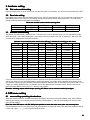
Remarks: alarming output switch always opening, K1~K8 are use to connect outside input signal
4. OSD menu setting
4.1 menu setting operating introductions
When the camera power on, its basic informations will display, like protocol, baud rate, address code. After finish the
checking and accept your controlling, these informations will disappear. ( user can see all setting info at here ) OSD
menu setting method:
Enter the main OSD menu: call #59 / #95 preset position to enter the main menu, then can set every item.
Use the keyboard: call 59 / 95 number keys (call preset position) to enter main menu, then shake the joystick to shift up
/ down / left / right ( ←↑→↓ ), every keys functions as below:
No.
menu setting functional keys
Original functions of the keyboard
Functions after enter the OSD menu
1
2
3
4
5
6
joystick: up
joystick: down
joystick: left
joystick: right
Iris close/ Iris (Iris - )
Iris open/ Iris (Iris + )
Menu cursor: up
Menu cursor: down
Menu cursor: left
Menu cursor: right
Menu: back
Menu: enter
4.2 Basic introduction
4.2.1 Select item
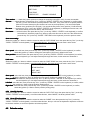
Use the keyboard: call 59# / 95 # preset position to enter main menu, then see a sheet as below:
Use the joystick up / down to select item, then press the key "Iris+" (or the key "OPEN" / "ENTER" on the keyboard ) to
confirm select this item, or enter the next sub menu:
Change the language to be English: move the joystick down to the bottom, press the key "Iris+" (or the key "OPEN"
on the keyboard ) to confirm select the item of "LANGUAGE", shake the joystick to change language to be "ENGLISH".
SYSTEM
SETUP
CAMERA
SETUP
PAN
SETUP
CALENDAR
LANGUAGE
ENGLISH
4.2.2 Parameters setting operation
Shake the joystick up / down to change number of every item, press the key "Iris+" (or the key "OPEN" / "ENTER" on
the keyboard ) to confirm select this item and save this setting.
Press the key "Iris-" (or key "CLOSE" / "RETURN" on the keyboard ) to exit this menu, or back to the previous menu.
4.3 System setting of the dome camera
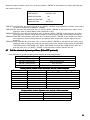
Shake the joystick up / down to make the cursor be under the "SYSTEM SETUP" item, then press the key "Iris+" (or the
key "OPEN" / "ENTER" on the keyboard ) to confirm select this item, or enter the next sub menu: as the sheet:
INFO DISPLAY
SYSTEM ACT
SET DOME TITLE
7