1
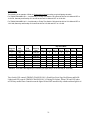
An Example:
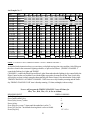
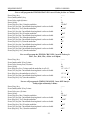
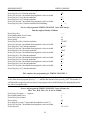
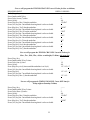
The following is an example of filled out Programming Chart according to typical lighting schedule.
For TIMING CHANNEL NO. 1, from Monday to Friday Time Switch CH1 should be ON at 6:00 AM and OFF at
11:00 PM, Saturday and Sunday CH1 should be ON at 6:00 AM and OFF at 12:00 AM*.
For TIMING CHANNEL NO. 2, from Monday to Friday Time Switch CH2 should be ON at 5:00 AM and OFF at
12:00 AM, Saturday and Sunday CH2 should be ON at 5:00 AM and OFF at 1:00 AM.
Day of the Week
Program
Number
1
2
3
4
5
6
7
8
CH1
(ON/OFF)
ON
OFF
ON
OFF
CH2
(ON/OFF)
ON
OFF
ON
OFF
Switching
Time
6:00 AM
11:00 PM
6:00 AM
12:00 AM
5:00 AM
12:00 AM
5:00 AM
1:00 AM
MO (1)
1
1
1
1
TU (2)
2
2
2
2
WE (3)
3
3
3
3
TH (4)
4
4
4
4
FR (5)
5
5
5
5
SA (6)
SU (7)
6
7
7
6
6
1
7
7
* Attention: 12:00 AM is the beginning of a new day (the lights will go off the next day at 12:00 AM).
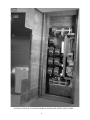
Time Switch CH1 controls TIMING CHANNEL NO. 1 (Road Sign, Facia Sign, Roof Beams and Soffit
Lights) and CH2 controls TIMING CHANNEL NO. 2 (Parking Lot Lights). When CH1 and CH2 when
are ON they enable Photo Control to turn the lights ON and OFF automatically with the ambient light level.
21