1
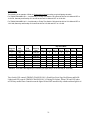
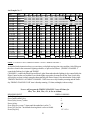
Now we will program the TIMING CHANNEL 2 turn ON time for Sun. at 6:00am;
REQUIRED INPUT
Press (Prog.) key.
Press (hand symbol 2) key.
Press (h) key seven (7) times.
Press (m) key.
Press (Day) key. Mo (1) has the underline.
Press (Sel.) key, the 1 now blinks showing that it is to be excluded.
Press (Day) key. Tu (2) has the underline.
Press (Sel.) key, the 2 now blinks showing that it is to be excluded.
Press (Day) key. We (3) has the underline.
Press (Sel.) key, the 3 now blinks showing that it is to be excluded.
Press (Day) key. Th (4) has the underline.
Press (Sel.) key, the 4 now blinks showing that it is to be excluded.
Press (Day) key. Fr (5) has the underline.
Press (Sel.) key, the 5 now blinks showing that it is to be excluded.
Press (Day) key. Sa (6) has the underline.
Press (Sel.) key, the 6 now blinks showing that it is to be excluded.
Press (Day) key. Su (7) has the underline.
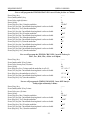
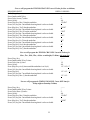
DISPLAY SHOWS:
—:—
•
6:
:00
1234567
234567
34567
4567
567
67
7
Now we will program the TIMING CHANNEL 2 turn OFF times for
Mon., Tue., Wed., Thu., & Sun. at midnight, 12:00am; (the next day)
Press (Prog.) key.
Press (hand symbol 2) key 2 times.
Press (h) key one (1) time.
Press (m) key.
Press (Day) key six (6) times until the underline is at Sa (6).
Press (Sel.) key, the 6 now blinks showing that it is to be excluded.
Press (Day) key.
Press (Sel.) key, the 7 now blinks showing that it is to be excluded.
Press (Day) key. Mo (1) has the underline
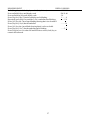
—:—
°
12:
:00
1234567
1 2 3 4 5 .. 7
1 2 3 4 5 ..
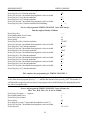
Now we will program the TIMING CHANNEL 2 turn OFF time for
Friday night at Saturday 2:00am;
Press (Prog.) key.
Press (hand symbol 2) key 2 times.
Press (h) key three (3) times.
Press (m) key.
Press (Day) key. Mo (1) has the underline.
Press (Sel.) key, the 1 now blinks showing that it is to be excluded.
Press (Day) key. Tu (2) has the underline.
Press (Sel.) key, the 2 now blinks showing that it is to be excluded.
25
—:—
°
2:
:00
1234567
234567