1
II SetupMenu Options
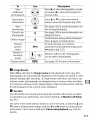
The GPS item
in the setup
menu
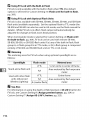
• Auto
off: Choose
whether
meter
turn off automatically
when
contains
a GPS unit
Option
the options
if no operations
are performed for the period specified in Custom Setting c2
(Auto meter-off delay). This reduces the drain on the
battery but may prevent GPS data from being recorded
the shutter-release
button is pressed all the way down
without
pausing.
Disable
Exposure meters will not turn offwhile a GPS unit is
connected;
GPS data will always be recorded.
when
will
Description
(default)
• Position:
This item
it displays
is only
available
the current
Coordinated
Universal
the GPS device.
[]
below.
meters
is attached.
Exposure meters will turn off automatically
Enable
listed
or not the exposure
Time
latitude,
if a GPS device
longitude,
(UTC), and heading
if
is connected,
altitude,
as reported
by
Heading
equipped with a digital
Keep the GPS
device pointing in the same direction as the lens
and at least 20cm (8in.) from the camera.
[]
Coordinated
Universal
UTC data is provided
clock.
Time (UTC)
by the GPS device and is independent
of the camera
215