1
Meijer.com
Camera layout
Zoom button
• In Shooting mode: Zoom in or out
• In Playback mode: Zoom in on part of
a photo or view files as thumbnails, or
adjust volume
Status lamp
• Blinking: When the camera is saving
a photo or video, being read by a
computer or printer, or out of focus
• Steady: When the camera is
connecting to a computer or in focus
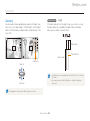
Attaching the strap
x
y
Main display
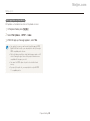
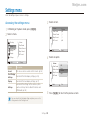
Refer to the table at the bottom
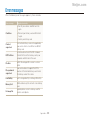
Button
Description
Button
Description
Access options or menus.
D
c
F
t
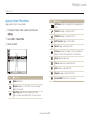
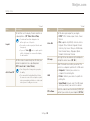
Select a shooting mode.
M
Description
Basic functions
Other functions
Change the display option.
Move up
Change the macro option.
Move down
Change the flash option.
Move left
Change the timer option.
Move right
S
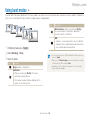
Smart Auto: Capture a photo with a scene mode
setting selected automatically by the camera.
p
Program: Capture a photo with settings you have set
manually.
Confirm the highlighted option or menu.
s
Scene: Capture a photo with options preset for a
specific scene.
Enter Playback mode.
v
Movie: Record a video.
• Access options in Shooting mode.
• Delete files in Playback mode.
Basic functions 15




















































![[ENG] – User Manual – Infinity 3G](http://vs1.manualzilla.com/store/data/005684047_1-eeeaf4fee2be19f7818c1d37bfef1f10-150x150.png)