1
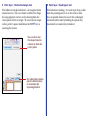
◆ Paint layer - Hollow Rectangle tool
◆ Paint layer - Eyedropper tool
The hollow rectangle tool draws a rectangular frame
around an area. You can choose to define the shape
by using opposite corners, or by drawing from the
center point of the rectangle. To constrain the shape
to be a perfect square, hold down the SHIFT key as
you drag the mouse.
This tool draws nothing. It is used to pick up a color
from the painting and set it as the current color.
You can quickly obtain the use of the eyedropper
tool inside other tools by holding the option key
(macintosh) or control key (windows).
You can draw out
the shape from the
corners or from the
center point
Use solid color strokes,
pattern filled strokes,
or automatically
repeating borders