1
Operating of the software
Operating of the software
Administration of the pager list
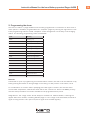
Each pager in a paging system is identified by a unique number called
Radio Identity Code = RIC . The RIC is a number in the range from 8 to
2.097.151. The RIC is either imprinted on the back of the pagers casing
or will be shown shortly on the pagers display after inserting the battery.
Some pagers display the RIC on demand after pressing certain buttons.
The pagerlist contains an entry for every pager consisting of a designation to identify the pager and its RIC. The designation may be a number or
name which is also printed on the pager or the name of the person that
carries that pager. The pagerlist is displayed in the left upper half of the
program window. The list may contain up to 200 entries (number can be
extended on demand). The list is sorted alphabetically and can be scrolled
with the scroll bar at its right side.
The pagerlist is stored in
the file „PAGERS.DAT“. The
location of this file can be
changed in „Administration“
(see page 18).
Creating new entries
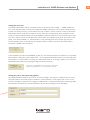
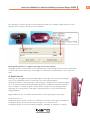
A new pager is introduced in the system by creating an entry in the pagerlist. To create an entry open the program window in administrator mode.
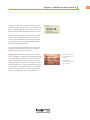
In the lower left corner there is the section “Edit pager list”.
For each pager the following data have to be entered: The pagers designation and its RIC. After entering both click on the button „new entry“ and
the pager will be inserted in the list in alphabetical order. It is not possible to write directly into
the list.
S
O
L
U
T
I
O
N
S
21