1
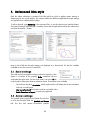
2. Quick Start This section guides the user through adding a bar in the CAD model space in a few easy steps. It also illustrates the use of a template file and producing a rebar schedule with the scheduler. Bricscad Menu AutoCad Menu 2.1 Rebar Template The easiest way to start a rebar drawings is to open a template file with pre-defined styles, layers and settings. AddoBar provides a basic rebar template setup in the following location: "C:\Addosoft\AddoBar\Block\ADDO_REBAR_TEMPLATE.dwt" The file may be opened by double clicking on it or opening it in CAD. The file is customized to provide the following pre-set abstract objects: Layers: Relevant layers have been set up such as Concrete, Rebar, Dimension, Grid & Text. TextStyle: The default text style, on which all other styles are based, is Arial. DimStyle: Four custom dimstyles are provided, of which DIM ANNO & DIM REBAR should be used. Multileader Style: One custom style has been setup, DIM ANNO, matching the equivalent DimStyle. TableStyle: One custom style for schedules named Schedule table style. Barstyle: Four visual barstyles have been created, with standard as the current. The relevant styles above has been set as the default values in the template. 10