1
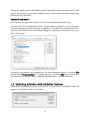
Only one CAD platform can be selected at a time. If the user wants to install AddoBar on more
than one CAD platform, the installer needs to be executed for each CAD platform installation.
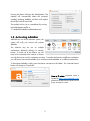
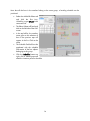
On completion, the installer will prompt to run the
installed CAD system and view the changelog. Each
tick-box will be ticked by default.
The selected CAD system must be run once in
elevated user account control (UAC) rights for the
relevant COM interaction CUID code to be installed
in the system’s registry.
1.3 Re-Installing AddoBar
The installer file may also be used to update AddoBar or to install AddoBar on another supported
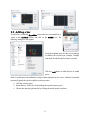
CAD platform on the system. Should AddoBar be already installed, the installer will prompt the
user with the following message boxes.
When CAD is running, the AddoBar application files are in use by the CAD system and would
therefore be not-replaceable. It is therefore important to make sure all CAD systems are closed.
Since windows keeps track of an installer’s status, the existing installer must be uninstalled before
it can run again and make further changes to the system. AddoBar will not uninstall itself in this
case, only the installer program is being uninstalled. All registry entries, files, directories and
customizations will remain intact. Therefore, the user must select NO at the next dialog prompt:
6