1
MySQL++ User Manual
3. Tutorial
This tutorial is meant to give you a jump start in using MySQL++. While it is a very complicated and powerful library, it's possible to make quite functional programs without tapping but a fraction of its power. This section will introduce you to the most useful fraction.
This tutorial assumes you know C++ fairly well, in particuler the Standard Template Library (STL) and exceptions.
3.1. Running the Examples
All of the examples are complete running programs. They may or may not be built for you already, depending on
how you installed the library.
If you installed MySQL++ from the source tarball on a Unixy system, the examples should have been built along
with the library. If not, simply go into the examples directory and type make.
If you installed the library via RPM, the examples are in the mysql++-devel RPM. After installing that, the examples
are in /usr/src/mysql++/examples. To build them, go into that directory and type make -f Makefile.simple. See the file /usr/share/doc/mysql++-devel*/README.examples for more details.
If you are on a Windows system, the build process for the library should have built the examples as well. Where the
programs are depends on which compiler you're using. There should be a README.* file in the distribution specific to your compiler with further instructions.
Once you have the examples building, you need to initialize the sample database by running the resetdb example.
The usage of resetdb is as follows:
resetdb [host [user [password [port]]]]
If you leave off host, localhost is assumed. If you leave off user, your current username is assumed. If you leave of
the password, it is assumed that you don't need one. And if you leave off the port, it will use the standard MySQL
port number.
The user you give resetdb needs to be an account with permission to create databases. Once the database is created
you can use any account that has full permission to the sample database mysql_cpp_data.
You may also have to re-run resetdb after running some of the other examples, as they change the database.
3.2. The Basics
A simple example
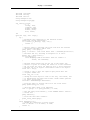
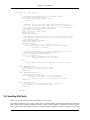
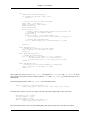
The following example demonstrates how to open a connection, execute a simple query, and display the results. This
is examples/simple1.cpp:
#include "util.h"
#include <mysql++.h>
#include <iostream>
#include <iomanip>
using namespace std;
int
main(int argc, char *argv[])
{
// Wrap all MySQL++ interactions in one big try block, so any
// errors are handled gracefully.
try {
5