1
-
•
•
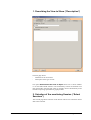
With the option "Copy the file to ftp site" it is posible to upload
the created file on a ftp site. If this option is active the following
parameters can be chosen:
The address of the ftp site can be specified on the
field "ftp site"
The folder where to upload the created file can be
specified in the field "folder"
The login and the password to use for the registration
to the ftp site can be specified in the fields "Login"
and "Password"
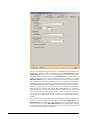
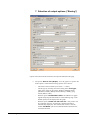
With the option "Save to File (Table)" the Measurement table will be
saved on a file in the form of: text, MS Excel or xml file. If this option
is selected the following options can be chosen:
-
The name of the saved file by use of the "..." button,
-
The type of separator used in the text file by selecting from the
scrolling menu "File Type".
Four different types of file can be selected: tab separated text
file, comma separated text file, MS Excel and XML.
-
With the option "Create new file each run" a new text file
will be created for each new View display (whether manually
or automatically displayed). ). The software then creates a new
file named "File Name" plus an incremental number attached
to the end of the file name.
-
The option "Copy the file to ftp site" allows the possibility to
upload the created file on an ftp site. If this option is active the
following parameters can be chosen:
The address of the ftp site can be specified on the
field "ftp site"
The folder where to upload the created file can be
specified in the field "folder"
The login and the password to use for the registration
to the ftp site can be specified in the fields "Login"
and "Password"
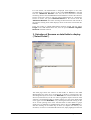
With the option "Generate HTML File" an html file will be generated
accordingly to a predefined html template (uploaded by the user). The
SDB View software parses the source file and then creates the
destination file replacing the keywords with the relative information
(map, graph and table). If this option is selected the following options
can be chosen:
-
The name of the html source file to use as template by use of the
button,
SOFO SDB User's Manual
-
The name of the destination file, that contains the file html updated
in the "Destination" box
-
The option "Copy the file to ftp site" allows the possibility to
upload the created file on a ftp site. If this option is active the
following parameters can be chosen:
The address of the ftp site can be specified on the
field "ftp site"
The folder where to upload the created file can be
specified in the field "folder"
Defining a View • 25