1
MV-D640 User’s Manual
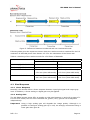
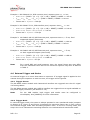
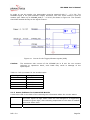
Figure 8: CameraLink serial interface for camera communication
To interface different cameras to different frame grabbers, the CameraLink standard
defines a software API. It defines how the functions to initialise, read from, write to and
close the serial interface should look. The code behind these functions is frame grabber
specific and is written by the frame grabber manufacturer. The functions are then compiled
into a DLL called clserXXX.dll, where XXX is a unique identifier for the frame grabber
manufacturer.
The PFRemote camera configuration tool as well as the PFLib API use the serial interface to
communicate with the camera and to control its functions. The serial interface is accessed
via the clserXXX.dll. Therefore, the appropriate clserXXX.dll for the frame grabber
manufacturer needs to be in the same directory as the PFRemote executable (e.g.
C:\Program Files\Photonfocus\PFRemote). This DLL is usually located in the windows\system32
directory after installing the frame grabber driver.
The serial configuration parameters are defined in the CameraLink standard and are as
follows: 9600 baud, 1 start bit, 1 stop bit, no parity, no handshaking.
4.8.2 USB 2.0 Interface
The abbreviation USB stands for “Universal Serial Bus” and is a bus system developed in
1995 by a consortium of leading companies in the computer industry, in cooperation with
Intel. The USB 1.1 specification defined a port speed to be 12 MBit/s, the USB 2.0
specification a remarkable 480 MBit/s. However, not every PC with an USB 2.0 interface
can be used in the fast mode to reach a maximum speed of data transfer (24 MByte/s or
48 MByte/s). Depending on the available USB chipset on the PC, it is possible that only a
data rate of 24 MByte/s can be achieved.
Note:
The maximum speed of the USB interface (24 MByte/s or 48 MByte/s) is
determined by the USB driver automatically and cannot be configured.
Software requirements
To reach the full performance of 48 MByte/s, Windows XP with Service Pack 2 is required.
For Windows 2000 and Windows XP with Service Pack 1, the camera will run with 24
Mbyte/s only.
Note:
REV: 2.0
The camera can only be operated with the software MicroDisplay USB to grab
images, together with PFRemote to control the camera. Alternatively, the
frame grabber module USB SDK and the PFLib SDK can be used. Other
software is not supported.
Page 21