1
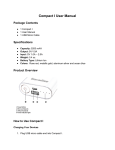
Curve Cube User Manual Package Contents 1 CurveCube 1 Micro USB Charging Cable 1 3.5mm Audio Cable 1 User Manual Specifications Bluetooth Version: 4.0 Speaker: 2Ω5W 45 mm Driver S/N: 80 dB Distortion: 0.3% Frequency Response: 90Hz – 18KHz Play Time: 8 hours Charging Time: 3 hours Battery: 500m AH DC Output: 5V Weight: 9.2 oz Product Overview How to Use the CurveCube Pairing the CurveCube 1. Turn on the CurveCube and turn on Bluetooth on your phone or device. 2. Search for CurveCube on your device or phone, then click on it. If necessary, enter security password 0000 if asked for it. 3. When the blue light is on, the CurveCube is connected to Bluetooth and ready for playback. Using the Curve Cube The CurveCube is completely controlled, for the most part, by your device. Use whatever controls for playback are available to control the CurveCube. How to Recharge the CurveCube When the red light flashes, the CurveCube needs to be recharged. 1. Plug the USB micro cable that came with the CurveCube and plug it into an AC adapter (not included) or computer. 2. Unplug the USB micro cable from the CurveCube when fully charged. Usage Tips The CurveCube works best when speaker is unobstructed and within distance of your phone or device. If static occurs, you’re too far away from the CurveCube. The louder the music you listen to, the quicker you’ll burn out the CurveCube speaker. Always listen at a volume responsibly. FAQ 1: Can I charge the CurveCube by using a car chargers? Yes, you can charge the device by AC, DC, or computer. 2: Can CurveCube pair with my computer? Yes, as long as your computer utilizes Bluetooth functionality. 3: Can I charging the CurveCube while playing when the battery is fully dead? Yes. Charge the CurveCube for at least five minutes before playing for better listening experiences and to prolong your battery life. 4: Can the CurveCube power off automatically? Yes, it will turn off automatically after five minutes of not being paired with a device. 5: Can two CurveCubes play music at the same time like a surround stereo system? No, but one CurveCube can pair with two phones; you can switch music between your two phones, but only play music from one phone at a time. Warranty We strive to make every customer’s experience with Garadise a positive one. However, if you need to return or exchange an item, here’s what you need to know the make the process as smooth as possible. For all purchases made from Garadise, we offer our customers the following: 30-Day Money Back Guarantee 12 Month Limited Warranty Our 30-day money back guarantee gives you peace of mind that we’re here to take care of you in the event that you change your mind or a defective product comes your way. We have you covered. Just return your undamaged Garadise accessory back to us for a full refund. Keep in mind if you’re just returning a product, and it’s not defective, you’ll incur all shipping costs on the return; if it’s defective, we’ll take care of that for you. Our 12 month limited warranty covers all manufacturer defects from the date of purchase. Simply return the accessory to us, and we’ll send you a replacement or full refund, including your shipping costs. Contact Us If you need help with a Garadise accessory, we’re here for you! Contact us in any of the following ways. We guarantee a 24-hour response time during the week. Call Us 800 – 865 – 6799 (US) Monday – Friday 9 AM – 5 PM MST Email Us [email protected]